·1. Test Code
·2. Cross Compilation
oCommand Structure
oFunction of Each Part
·3. Execute Test
·4. Environment Variable `$PATH`
o4.1 System-level Configuration Files (Global Settings)
o4.2 User-level Configuration Files (Personal Settings)
o4.3 Shell Built-in Defaults
·5. How to Find the Source of the Current `PATH`?
·Common Modification Scenarios
1. Test Code
// test_sqlite.c
#include <stdio.h>
#include <stdlib.h>
#include <string.h>
#include "./sqlite3.h"

// Query callback function
static int callback(void *data, int argc, char **argv, char **azColName) {
    for (int i = 0; i < argc; i++) {
        printf("%s = %s\n", azColName[i], argv[i] ? argv[i] : "NULL");
    }
    printf("-----------------------------------\n");
    return 0;
}

static int callback2(void *data, int argc, char **argv, char **azColName) {
    for (int i = 0; i < argc; i++) {
        printf("%s = %s\n", azColName[i], argv[i] ? argv[i] : "NULL");
    }
    printf("-----------------------------------\n");
    return 0;
}

// Callback function: process query results
static int feature_callback(void *feature_ptr, int argc, char **argv, char **azColName) {
    if (argc > 0 && argv[0]) {
        // Copy the queried feature to the passed pointer
        sprintf((char*)feature_ptr, "%s", argv[0]);
        return 0;  // Return 0 indicates to continue processing subsequent rows (though there will only be one row here)
    }
    return 1;  // Return non-zero value indicates to stop processing
}

int main(int argc, char **argv) {
    sqlite3 *db;
    char *err_msg = 0;
    int rc;
    const char *sql;
    const char *data = "Result Callback";

    // 1. Open database
    rc = sqlite3_open("test.db", &db);
    if (rc) {
        fprintf(stderr, "Cannot open database: %s\n", sqlite3_errmsg(db));
        return(0);
    } else {
        fprintf(stdout, "Database opened successfully\n");
    }

    // 2. Create table
    sql = "CREATE TABLE IF NOT EXISTS TEST ("
          "ID INT PRIMARY KEY     NOT NULL,"
          "NAME           TEXT    NOT NULL,"
          "AGE            INT     NOT NULL,"
          "ADDRESS        CHAR(50),"
          "SALARY         REAL);";
    rc = sqlite3_exec(db, sql, callback, 0, &err_msg);
    if (rc != SQLITE_OK) {
        fprintf(stderr, "SQL error: %s\n", err_msg);
        sqlite3_free(err_msg);
    } else {
        fprintf(stdout, "Table created successfully\n");
    }

    // 3. Insert data
    sql = "INSERT INTO TEST (ID,NAME,AGE,ADDRESS,SALARY) "
          "VALUES (1, 'Zhang San', 32, 'Beijing', 20000.00 ); "
          "INSERT INTO TEST (ID,NAME,AGE,ADDRESS,SALARY) "
          "VALUES (2, 'Li Si', 25, 'Shanghai', 15000.00 ); "
          "INSERT INTO TEST (ID,NAME,AGE,ADDRESS,SALARY) "
          "VALUES (3, 'Wang Wu', 23, 'Guangzhou', 2000.00 ); "
          "INSERT INTO TEST (ID,NAME,AGE,ADDRESS,SALARY) "
          "VALUES (4, 'Zhao Liu', 25, 'Shenzhen', 65000.00 );";
    rc = sqlite3_exec(db, sql, callback, 0, &err_msg);
    if (rc != SQLITE_OK) {
        fprintf(stderr, "SQL error: %s\n", err_msg);
        sqlite3_free(err_msg);
    } else {
        fprintf(stdout, "Data inserted successfully\n");
    }

    // 4. Query data
    sql = "SELECT * FROM TEST";
    rc = sqlite3_exec(db, sql, callback, (void*)data, &err_msg);
    if (rc != SQLITE_OK) {
        fprintf(stderr, "SQL error: %s\n", err_msg);
        sqlite3_free(err_msg);
    } else {
        fprintf(stdout, "Data queried successfully\n");
    }
    printf("\n****************************************\n");
    // 4.1 Query specific data
    char sql2[256];
    char feature[1024] = {0};  // Buffer to store query results
    memset(sql2,0,sizeof(sql2));
    memset(feature,0,sizeof(feature));
    // Construct SQL query statement
    //snprintf(sql2, sizeof(sql2), "SELECT FEATURE FROM FEATURE WHERE USER_ID = %d", user_id);
    //snprintf(sql2, sizeof(sql2), "SELECT AGE FROM TEST WHERE NAME = '%s'", "Zhang San"); // Strings need to be enclosed in single quotes
    // Execute query
    rc = sqlite3_exec(db, sql2, feature_callback, (void*)feature, &err_msg);
    if (rc != SQLITE_OK) {
        fprintf(stderr, "SQL error: %s\n", err_msg);
        sqlite3_free(err_msg);
        return -1;  // Query failed
    } else {
        fprintf(stdout, "Data queried successfully\n");
        if (feature[0] != '\0') {
            //printf("Feature for user ID %d is: %s\n", user_id, feature);
            printf("Feature for user %s is: %s\n", "Zhang San", feature);
        } else {
            //printf("No record found for user ID %d\n", user_id);
            printf("No record found for user ID %s\n", "Zhang San");
        }
    }
    printf("\n****************************************\n");
    // 5. Update data
    sql = "UPDATE TEST set SALARY = 25000.00 where ID=1; "
          "SELECT * FROM TEST";
    rc = sqlite3_exec(db, sql, callback, 0, &err_msg);
    if (rc != SQLITE_OK) {
        fprintf(stderr, "SQL error: %s\n", err_msg);
        sqlite3_free(err_msg);
    } else {
        fprintf(stdout, "Data updated successfully\n");
    }
    // 6. Delete data
    sql = "DELETE FROM TEST where ID=2; "
          "SELECT * FROM TEST";
    rc = sqlite3_exec(db, sql, callback, 0, &err_msg);
    if (rc != SQLITE_OK) {
        fprintf(stderr, "SQL error: %s\n", err_msg);
        sqlite3_free(err_msg);
    } else {
        fprintf(stdout, "Data deleted successfully\n");
    }
    // 7. Close database
    sqlite3_close(db);
    return 0;
}
Note: Strings in SQL statements need to be enclosed in single quotes
<span>snprintf(sql2, sizeof(sql2), "SELECT AGE FROM TEST WHERE NAME = '%s'", "Zhang San"); // Strings need to be enclosed in single quotes</span>
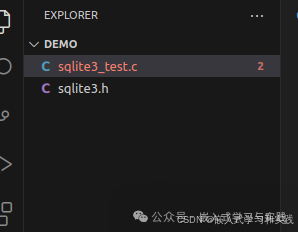
Project Directory
2. Cross Compilation
Set up the cross-compilation toolchain
export PATH=$PATH:/home/user/Desktop/nuc980-sdk/buildroot-2022.02.3/output/host/bin

Direct compilation will report an error
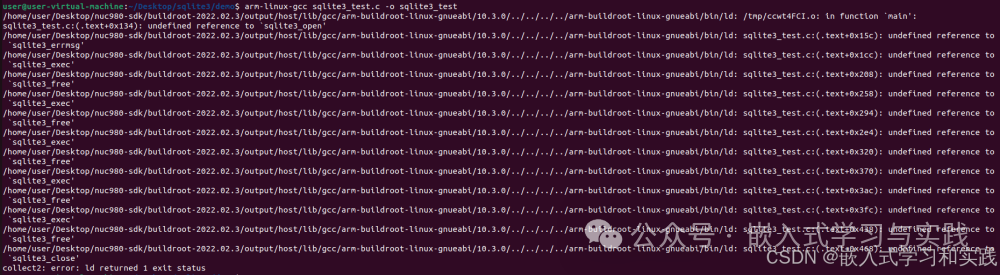
Compile specifying the dynamic library search location and name
arm-linux-gcc sqlite3_test.c -o sqlite3_test -L/home/user/Desktop/sqlite3/install/lib -lsqlite3
This command compiles a C language program under an ARM architecture Linux system. Let’s analyze its components in detail:
Command Structure
arm-linux-gcc sqlite3_test.c -o sqlite3_test -L/home/user/Desktop/sqlite3/install/lib -lsqlite3
Function of Each Part
1.arm-linux-gcc It belongs to the cross-compilation toolchain, capable of compiling executable programs for one architecture (e.g., x86 PC) on a system of another architecture (like ARM).
2.sqlite3_test.c This is the name of the source file, which is your written C language source code file.
3.-o sqlite3_test“-o” is the output file parameter, “sqlite3_test” is the name of the executable file generated after compilation.
4.-L/home/user/Desktop/sqlite3/install/lib“-L” is used to specify the search path for library files. Here it tells the compiler to look in the directory /home/user/Desktop/sqlite3/install/lib for the required library files.
5.-lsqlite3“-l” is the link library parameter, “sqlite3” is the name of the library. This parameter links the SQLite3 database dynamic library (usually libsqlite3.so ) during compilation.
During the compilation process, it will look for the SQLite3 library in the specified path /home/user/Desktop/sqlite3/install/lib and link it to the program, ultimately generating an executable file named sqlite3_test that can run on ARM architecture Linux systems.
3. Execute Test
Reference Article[Step-by-Step Guide — Porting Sqlite3 Database on Arm Linux Development Boards] .Article Link
Step-by-Step Guide — Porting Sqlite3 Database on Arm Linux Development Boards
Using Deployment Method One Run

Copy the cross-compiled file to the development board for testing

Temporary test command, dynamic library runtime search command
export LD_LIBRARY_PATH=$LD_LIBRARY_PATH:/lib
Run again
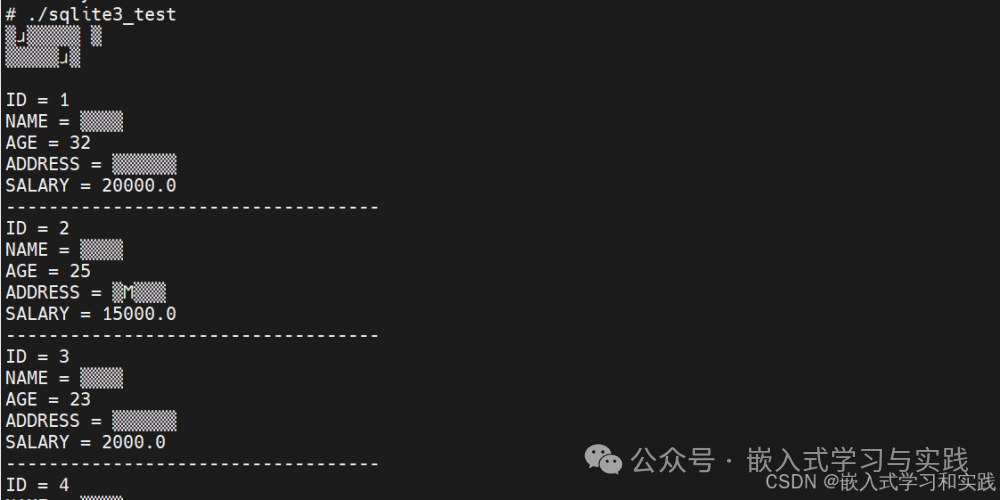
Using Deployment Method Two Run Check the value of the environment variable $LD_LIBRARY_PATH
echo $LD_LIBRARY_PATH
Temporary setting
export LD_LIBRARY_PATH=$LD_LIBRARY_PATH:/my/custom/lib
Permanent, set user configuration ~/.bashrc, found it did not take effect. Use command to check system configuration
grep -r ‘PATH=’ /etc/*

Modify /etc/profile file, add the corresponding path Restart to take effect.
# cd /etc # vi profile export PATH=”/bin:/sbin:/usr/bin:/usr/sbin” export PATH=$PATH:/root/sqlite3/install/bin export LD_LIBRARY_PATH=$LD_LIBRARY_PATH:/root/sqlite3/install/lib if [ “$PS1” ]; then if [ “`id -u`” -eq 0 ]; then export PS1=’# ‘ else export PS1=’$ ‘ fi fi export EDITOR=’/bin/vi’ # Source configuration files from /etc/profile.d for i in /etc/profile.d/*.sh ; do if [ -r “$i” ]; then . $i fi done unset i
4. Environment Variable $PATH
The assignment location of the environment variable $PATH depends on system configuration and Shell type.
4.1 System-level Configuration Files (Global Settings)
These files are maintained by the system administrator and affect all users:
·/etc/environment
o Loaded by PAM (Pluggable Authentication Modules) at system startup, independent of Shell.
oExample:
PATH=”/usr/local/sbin:/usr/local/bin:/usr/sbin:/usr/bin:/sbin:/bin”
·/etc/profile
o Loaded when all login Shells start (applies to bash,sh etc.).
o Usually contains calls to scripts in the /etc/profile.d/ directory.
·/etc/profile.d/*.sh
o Scripts automatically added by the system or packages (e.g., Java, Python, etc.).
4.2 User-level Configuration Files (Personal Settings)
These files are located in the user’s home directory and only affect the current user:
·~/.bashrc (for bash Shell)
o Loaded for non-login interactive Shells (like directly opening a terminal).
o Usually indirectly called through ~/.bash_profile (see below).
·~/.bash_profile or ~/.profile
o Loaded for login Shells (like ssh login,su – username).
oExample:
if [ -f ~/.bashrc ]; then . ~/.bashrc fi PATH=”$HOME/bin:$PATH” # Add personal bin directory
·~/.bash_login (less commonly used)
o Loaded only if ~/.bash_profile does not exist.
4.3 Shell Built-in Defaults
If none of the above files set PATH, the Shell may use built-in defaults (though this is rare). For example:
·bash default PATH usually includes /usr/bin:/bin.
Temporary setting (session-level)
· Directly execute in the terminal (only valid for the current session):
export PATH=”/my/custom/bin:$PATH”
5. How to Find the Source of the Current PATH?
1. Check system configuration:
grep -r ‘PATH=’ /etc/*
2. Check user configuration:
grep ‘PATH=’ ~/.bashrc ~/.bash_profile ~/.profile
3. Debug loading process:
bash –login -x 2>&1 | grep ‘PATH=’
Common Modification Scenarios
· Add personal tool directory: Add to ~/.bashrc or ~/.bash_profile PATH=”$HOME/bin:$PATH”.
· Update path after installing software: For example, create a script in /etc/profile.d/ (like java.sh).