“
This article is compiled based on the C programming course taught by Professor Weng Kai from Zhejiang University on the China University MOOC platform.
Preparation
Correctly Displaying Chinese on Windows
To compile C programs on Windows, you can install Dev-C++ (recommended) or MinGW (Minimalist GNU for Windows).
General compilation command:
gcc -o foo foo.c
Compile using the following command to correctly display Chinese:
gcc -o foo foo.c -fexec-charset=GBK
Where<span>-o</span> specifies the name of the executable program generated by the compilation.
Variable Assignment and Initialization
When assignment occurs at the time of variable definition, it is called variable initialization. Although C does not require all variables to be initialized at the point of definition, all variables should be assigned a value before their first use.
Variable Initialization
<code><span><variable type> <variable name> = <initial value></span><code><span>int price = 0;</span><code><span>int amount = 100;</span>- When defining multiple variables, you can also assign initial values to individual variables within the same definition, such as:
<code><span>int price = 0, amount = 100;</span>
What happens if a variable is not initialized:
#include <stdio.h>

int main() {
    int i;
    int j;

    j = i + 10;
    printf("%d\n", j);

    return 0;
}
Variable Types
C is a strongly typed language, and all variables must be defined or declared before use, with each variable having a specific data type. The data type indicates what kind of data can be stored in the variable, and the type of a variable cannot change during program execution.
- In C99 standard, variables can be defined anywhere in the code
#include <stdio.h>

int main() {
    int price = 0;

    printf("请输入金额(元):");
    scanf("%d", &price);

    int change = 100 - price;

    printf("找您%d元。\n", change);

    return 0;
}
- In ANSI C, variables can only be defined at the beginning of the code
#include <stdio.h>

int main() {
    int price = 0;
    int change = 0;

    printf("请输入金额(元):");
    scanf("%d", &price);

    change = 100 - price;

    printf("找您%d元。\n", change);

    return 0;
}
- Constants
<span>int change = 100 - price;</span>
A fixed value is a constant, such as the<span>100</span> in the code above. When written directly in the program, we call it a literal, but a better way is to define a constant:
<span>const int AMOUNT = 100;</span>
Here,<span>const</span> is a modifier placed before<span>int</span> to give this variable a const (immutable) property. The const property indicates that once the variable is initialized, its value cannot be modified.
If you attempt to modify a constant by placing it on the left side of an assignment operator, the compiler will detect it and report an error.
- Exercise: Height 5 feet 7 inches
Americans use imperial measurement units, and they are accustomed to reporting their height in feet and inches. If an American tells you they are 5 feet 7 inches, how many meters is that?
#include <stdio.h>

int main() {
    int foot;
    int inch;

    printf("请分别输入身高的英尺和英寸,"
          "如输入\"5 7\"表示5英尺7英寸:");
    scanf("%d %d", &foot, &inch);

    //printf("inch / 12 = %d\n", inch / 12);
    printf("身高是%f米。\n",
          (foot + inch / 12) * 0.3048);

    return 0;
}
- Operations with two integers yield only integers
- 10 / 3 * 3 = ?
<span>10</span>and<span>10.0</span>are completely different numbers in C;<span>10.0</span>is a floating-point number
#include <stdio.h>

int main() {
    printf("%d\n", 10.0/3*3);
    printf("%f\n", 10.0/3*3);

    return 0;
}
- Floating Point Numbers (float)
Numbers with decimal points. The term floating point refers to the fact that the decimal point is movable, and it is a way for computers to represent non-integer values (including fractions and irrational numbers). Another way is called fixed-point, but fixed-point numbers are not encountered in C. People use the term floating point to express all numbers with decimal points.
- Improvement of the above exercise code:
<span>(foot + inch / 12.0) * 0.3048</span> - When floating-point numbers and integers are used together in operations, C will convert the integer to a floating-point number and then perform floating-point operations.
– double
<span>double</span> means “double,” which is the first word of “double precision floating point,” used to represent floating-point types. In addition to <span>double</span>, there is also <span>float</span>, which represents “single precision floating point.”
#include <stdio.h>

int main() {
    double foot;
    double inch;

    printf("请分别输入身高的英尺英寸,"
          "如输入\"5 7\"表示5英尺7英寸:");
    scanf("%lf %lf", &foot, &inch);

    printf("身高是%f米。\n",
          (foot + inch / 12) * 0.3048);

    return 0;
}
- Input and Output of Different Data Types
- Input and output of integers
<code><span>int</span><code><span>printf("%d", ...)</span><code><span>scanf("%d", ...)</span>- Input and output of numbers with decimal points
<code><span>double</span><code><span>printf("%f", ...)</span><code><span>scanf("%lf", ...)</span>
- Integers
Integer types cannot express numbers with decimal parts; the result of operations between integers is still an integer. Computers have pure integers because integer operations are faster and take up less space. In fact, most calculations in daily life are still pure integer calculations, so integers are very useful.
Quiz: Which of the following are valid variable names?
<span>main</span><span>4ever</span><span>monkey-king</span><span>__int</span>
Correct answers: 1, 4
Expressions
An expression is a combination of a series of operators and operands used to compute a value.
amount = x * (1 + 0.033) * (1 + 0.033) * (1 + 0.033);
total = 57;
count = count + 1;
value = (min / 2) * lastValue;
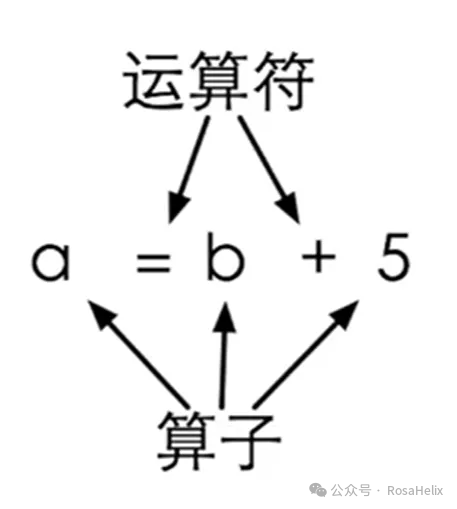
- Operators refer to the actions performed, such as the addition operator
<span>+</span>, and the subtraction operator<span>-</span> - Operands refer to the values involved in the operation, which can be constants, variables, or the return value of a method
Exercise: Calculate Time Difference
#include <stdio.h>

int main() {
    int hour1, minute1;
    int hour2, minute2;

    scanf("%d %d", &hour1, &minute1);
    scanf("%d %d", &hour2, &minute2);

    int t1 = hour1 * 60 + minute1;
    int t2 = hour2 * 60 + minute2;

    int t = t2 - t1;

    printf("时间差是%d小时%d分。\n", t/60, t%60);

    return 0;
}
Operator Precedence
| Precedence | Operator | Operation | Associativity | Example |
|---|---|---|---|---|
| 1 | + | Unary positive | Right to Left | <span>a*+b</span> |
| 1 | – | Unary negation | Right to Left | <span>a*-b</span> |
| 2 | * | Multiplication | Left to Right | <span>a*b</span> |
| 2 | / | Division | Left to Right | <span>a/b</span> |
| 2 | % | Modulus | Left to Right | <span>a%b</span> |
| 3 | + | Addition | Left to Right | <span>a+b</span> |
| 3 | – | Subtraction | Left to Right | <span>a-b</span> |
| 4 | = | Assignment | Right to Left | <span>a=b</span> |
Embedded assignments can be hard to read and prone to errors:
int a = 6;
int b;
int c = 1 + (b = a);
Exercise: Calculate Compound Interest
When depositing in a bank, you can choose to automatically renew the deposit after maturity, and the interest earned will be added to the principal for renewal. If the annual interest rate for a one-year deposit is 3.3%, how much principal and interest will the initial deposit of x yuan yield after being automatically renewed for 3 years?
PrincipalInterestCalculation
#include <stdio.h>

int main() {
    int total_start;

    scanf("%d", &total_start);
    double total_final = x * (1 + 0.033) * (1 + 0.033) * (1 + 0.033);
    printf("final total amount: %f", amount);

    return 0;
}
Compound Assignment
Five arithmetic operators, <span>+</span>, <span>-</span>, <span>*</span>, <span>/</span>, and <span>%</span>, can be combined with the assignment operator <span>=</span> to form compound assignment operators
<code><span>+=</span>,<span>-=</span>,<span>*=</span>,<span>/=</span>,<span>%=</span><code><span>total += 5</span>is equivalent to<span>total = total + 5</span>- Note that there should be no spaces between the two operators
<code><span>total *= sum + 12</span>is equivalent to<span>total = total * (sum + 12)</span>
Increment and Decrement Operators
<span>++</span> and <span>--</span> are two special operators; they are unary operators and their operands must be variables. These two operators are called increment and decrement operators, and their function is to add <span>+1</span> or subtract <span>-1</span> from the variable.
- Prefix and Postfix
<span>++</span> and <span>--</span> can be placed before the variable, called prefix form (increment/decrement before use); they can also be placed after the variable, called postfix form (increment/decrement after use).
<span>a++</span> yields the value of <span>a</span> before it is incremented, while <span>++a</span> yields the value after it has been incremented; in either case, <span>a</span> itself is incremented by <span>1</span>.
#include <stdio.h>

int main() {
    int a;
    a = 10;

    printf("a++ = %d\n", a++);
    printf("a = %d\n", a);

    printf("++a = %d\n", ++a);
    printf("a = %d\n", a);
    return 0;
}
| Expression | Operation | Value of Expression |
|---|---|---|
<span>count++</span> |
Add <span>1</span> to <span>count</span> |
<span>Original value of count</span> |
<span>++count</span> |
Add <span>1</span> to <span>count</span> |
<span>Value of count + 1</span> |
<span>count--</span> |
Subtract <span>1</span> from <span>count</span> |
<span>Original value of count</span> |
<span>--count</span> |
Subtract <span>1</span> from <span>count</span> |
<span>Value of count - 1</span> |
These two operators have their historical origins (to allow C to be easily compiled into increment and decrement instructions in PDP-11, speeding up operations), but modern compilers are more advanced, and even if not written this way, they can speed up operations; some CPUs no longer support increment and decrement instructions.
- They can be used alone, but should not be combined into expressions
<code><span>++i++</span>-> ?<code><span>i++++</span>-> ?<code><span>a = b += c++-d+--e/-f</span>
- Quiz: What are the values of
<span><span>t1</span></span> and <span><span>t2</span></span> after executing the following code?
<span><span>t1</span></span> and <span><span>t2</span></span> after executing the following code?int a = 14;
int t1 = a++;
int t2 = ++a;
Conditions and Branching
Conditional Statement – if Statement
#include <stdio.h>

int main() {
    int hour1, minute1;
    int hour2, minute2;

    scanf("%d %d", &hour1, &minute1);
    scanf("%d %d", &hour2, &minute2);

    int ih = hour2 - hour1;
    int im = minute2 - minute1;
    if (im < 0) {
        im += 60;
        ih--;
    }

    printf("时间差是%d小时%d分。\n", ih, im);

    return 0;
}
Relational Operations
Relational operations calculate the relationship between two values, hence the name relational operations.When the relationship between two values meets the expectations of the relational operator, the result of the relational operation is the integer 1; otherwise, it is the integer 0..
| Operator | Meaning |
|---|---|
<span>==</span> |
Equal |
<span>!=</span> |
Not equal |
<span>></span> |
Greater than |
<span>>=</span> |
Greater than or equal to |
<span><</span> |
Less than |
<span><=</span> |
Less than or equal to |
Precedence
- All relational operators have lower precedence than arithmetic operators but higher precedence than assignment operators
- The equality check operators
<span>==</span>and<code><span>!=</span>have lower precedence than others, and consecutive relational operations are performed from left to right
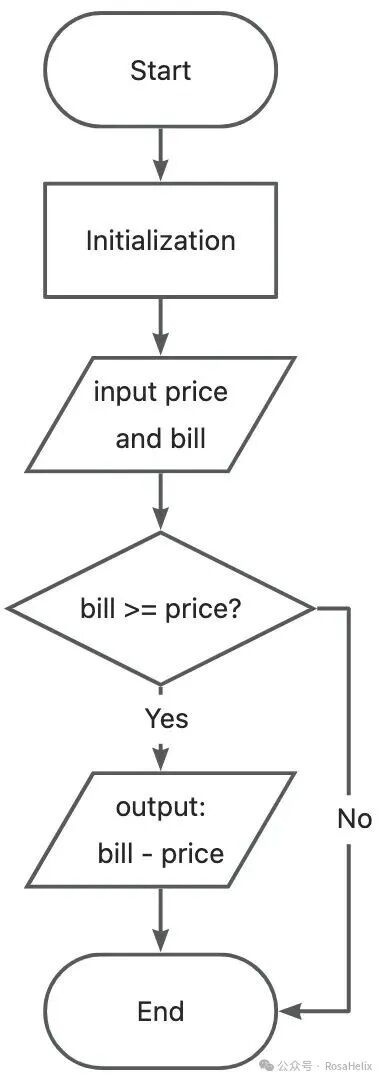
Exercise: Change Calculator – Judgement, Comments, Flowchart
- The change calculator requires the user to perform two actions: input the purchase amount and input the payment bill
- The change calculator then performs the corresponding actions based on the user’s input: calculates and prints the change or informs the user that the balance is insufficient to make the purchase
- From the perspective of a computer program, this means the program needs to read the user’s two inputs, perform some calculations and judgments, and finally output the result
#include <stdio.h>

int main() {
    // Initialize variable
    int price;
    int bill;

    // Read in price and bill
    printf("请输入金额(元):");
    scanf("%d", &price);
    printf("请输入票面:");
    scanf("%d", &bill);

    // Calculate the change
    if ( bill >= price ) {
        printf("应该找您:%d\n", bill - price);
    }

    return 0;
}
Comments
Statements that start with two slashes<span>//</span> (this is a C99 comment, ANSI C does not support this).
Flowchart
Branching – if-else Statement
#include <stdio.h>

int main() {
    // Initialize variable
    int price;
    int bill;

    // Read in price and bill
    printf("请输入金额(元):");
    scanf("%d", &price);
    printf("请输入票面:");
    scanf("%d", &bill);

    // Calculate the change
    if ( bill >= price ) {
        printf("应该找您:%d\n", bill - price);
    } else {
        printf("您的钱不够\n");
    }

    return 0;
}
- if and else can also have no {}
A basic if statement starts with the keyword<span>if</span>, followed by a logical expression in parentheses that represents the condition, and then a pair of braces (<span>{}</span>) containing several statements. If the result of the logical expression is non-zero, the statements within the braces are executed; otherwise, they are skipped, and execution continues with subsequent statements.
if ( total > amount )
    total += amount + 10;
There is no semicolon at the end of the if statement line (<span>;</span>), while the assignment statement following the if is on the next line and indented, and it ends with a semicolon (<span>;</span>). This indicates that this assignment statement is part of the if statement, which controls whether it is executed.
- Calculating Salary
#include <stdio.h>

int main() {
    const double RATE = 8.25;
    const int STANDARD = 40;
    double pay = 0.0;
    int hours;

    printf("请输入工作的小时数:");
    scanf("%d", &hours);
    printf("\n");

    if (hours > STANDARD)
        pay = STANDARD * RATE + (hours-STANDARD) * (RATE * 1.5);
    else
        pay = hours * RATE;
    printf("应付工资:%f\n", pay);

    return 0;
}
- Nested if-else Statements
When the statements to be executed when an if condition is met or not met can also be an if or if-else statement, this is called a nested if statement.
#include <stdio.h>

int main() {
    int a, b, c;
    scanf("%d %d %d", &a, &b, &c);

    int max = 0;

    if (a > b) {
        if (a > c) {
            max = a;
        } else {
            max = c;
        }
    } else {
        if (b > c) {
            max = b;
        } else {
            max = c;
        }
    }

    printf("The max is %d\n", max);

    return 0;
}
<span>else</span> always matches the nearest <span>if</span>, and indentation does not imply <span>else</span>‘s match
#include <stdio.h>

int main() {
    const int READY = 24;
    int code = 0;
    int count = 0;

    scanf("%d %d", &code, &count);
    if (code == READY)
        if (count < 20)
            printf("一切正常\n");
        else
            printf("继续等待\n");

    return 0;
}
- Tips
Always use <span>{}</span> after <span>if</span> or <span>else</span>, even if there is only one statement.
Branching – if-else if Statement
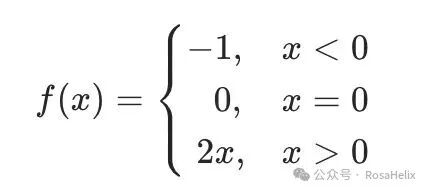
if (x < 0) {
    f = -1;
} else if (x == 0) {
    f = 0;
} else {
    f = 2 * x;
}
Common Errors in if Statements
- Forgetting braces
<code><span>Adding a semicolon after if</span>- Incorrectly using
<code><span>==</span>and<span>=</span> <code><span>if</span>only requires the value in<code><span>()</span>to be zero or non-zero
// b's value will be assigned to a
// and as long as b is not 0, the condition after if will be true
if (a = b) {
    printf("a = b");
}
- Confusing
<span>else</span>
Code Style
- Always use
<span>{}</span>after<span>if</span>or<span>else</span>to form a statement block - Indent statements within braces by one tab space
- Style is a matter of perspective…
- In the early days, screens were small, and lines were saved
if (x < 0) {
    f = -1;
} else if (x == 0) {
    f = 0;
} else {
    f = 2 * x;
}
- Modern screens are large, and screens can be oriented vertically
if (x < 0)
{
    f = -1;
} else if (x == 0)
{
    f = 0;
} else
{
    f = 2 * x;
}
- Facilitates multi-line comments in modern editors
if (x < 0)
{
    f = -1;
}
else if (x == 0)
{
    f = 0;
}
else
{
    f = 2 * x;
}
Multi-way Branching – switch-case Statement
Comparing the code that implements the same functionality using if-else statements and switch-case statements:
if (type == 1)
    printf("你好");
else if (type == 2)
    printf("早上好");
else if (type == 3)
    printf("晚上好");
else if (type == 4)
    printf("再见");
else
    printf("啊,什么啊?");
switch ( type ) {
case 1:
    printf("你好");
    break;
case 2:
    printf("早上好");
    break;
case 3:
    printf("晚上好");
    break;
case 4:
    printf("再见");
    break;
default:
    printf("啊,什么啊?");
    break;
}
Syntax of switch-case Statement
switch ( control expression ) {
    case constant:
        statement;
        ...
    case constant:
        statement;
        ...
    default:
        statement;
        ...
}
- The control expression can only yield an integer result
- Constants can be constants or expressions calculated from constants (C99 only)
The switch statement can be seen as a jump based on calculations; after calculating the value of the control expression, the program jumps to the matching <span>case</span> (branch label). The branch label is just a marker indicating the position within the switch; after executing the last statement in the branch, if there is no <span>break</span>, it will sequentially execute the statements in the following <span>case</span> until it encounters a <span>break</span> or the end of the switch.
By analogy with game saves: think of <span>case</span> as game saves sorted by gameplay progress; when you read a specific save based on the control expression in the <span>switch</span> and execute certain tasks, unless you actively exit the game (<span>break</span> statement), the switch-case statement will inevitably execute the tasks in the subsequent <span>case</span> (game saves) until all tasks in the game are completed.