Buffer and Cache Definitions:
-
Buffer: A temporary storage for raw disk blocks, which writes cached data to disk. It is usually not very large (around 20MB). This allows the kernel to consolidate scattered writes, optimizing disk writes uniformly. For example, multiple small writes can be combined into a single large write.
-
Cache: A page cache used for reading files from disk, caching data read from files. This way, when accessing these file data next time, it can be quickly retrieved from memory without needing to access the slow disk again.
But let me ask you, since Buffer is just a cache for data written to disk. Conversely, does it also cache data read from the disk? Or is Cache a cache for data read from files, does it also cache data written to files?
If you can answer the above two questions, you can skip this article; I think you already have a good understanding of Buffer and Cache. But if you cannot, please stay and see my further explanation.
free Command
To check the system memory usage, the first command that might come to mind is <span>free</span>, for example:
<span>$ free -h</span><span> total used free shared buff/cache available</span><span>Mem: 1.9G 1.0G 394M 2.6M 491M 728M</span><span>Swap: 0B 0B 0B</span>
Clearly, the output includes the specific usage of physical memory <span>Mem</span> and <span>Swap</span> (such as total memory, used memory, cache, available memory, etc.). The cache is the sum of Buffer and Cache.
Let’s look at the definitions of <span>Buffer</span> and <span>Cache</span> in the manual page of <span>free</span>:
<span>buffers</span><span> Memory used by kernel buffers (Buffers </span><span><span>in</span></span><span> /proc/meminfo)</span><span>cache Memory used by the page cache and slabs (Cached and SReclaimable </span><span><span>in</span></span><span> /proc/meminfo)</span><span>buff/cache</span><span> Sum of buffers and cache</span>
We can see that the source data for the <span>free</span> command is actually stored in the <span>proc/meminfo</span> file. As I mentioned earlier, <span>/proc</span> is a special filesystem provided by the Linux kernel, acting as an interface for users to interact with the kernel.
<span>/proc</span> filesystem is also the ultimate data source for many performance tools. In <span>man proc</span>, the definitions of <span>Buffers</span> and <span>Cached</span> are as follows:
<span>Buffers %lu</span><span> Relatively temporary storage </span><span><span>for</span></span><span> raw disk blocks that shouldn</span><span><span>'t get tremendously large (20MB or so).</span><span>Cached %lu</span><span> In-memory cache for files read from the disk (the page cache). Doesn'</span></span><span>t include SwapCached.</span><span>...</span><span>SReclaimable %lu (since Linux 2.6.19)</span><span> Part of Slab, that might be reclaimed, such as caches.</span><span> </span><span>SUnreclaim %lu (since Linux 2.6.19)</span><span> Part of Slab, that cannot be reclaimed on memory pressure.</span>
At this point, you might think you have found the answer to my question, “Buffer” is just a cache for writing data to disk, and “Cache” is just a cache for reading data from files. But in fact, “Buffer” can also be used for reading, and “Cache” can also be used for writing.
Experiments
We will conduct two experiments here, write cache and read cache.
Writing to Cache
Let’s log into our Linux host and prepare two terminals. In Terminal 1, let’s first clear the cache:
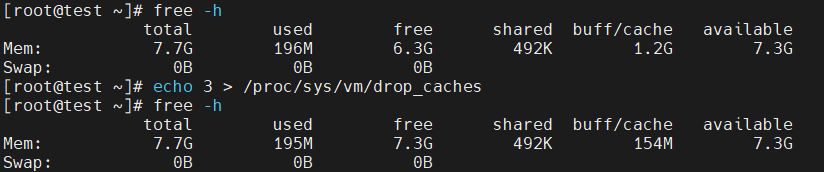
Here, <span>/proc/sys/vm/drop_caches</span> is an example of modifying kernel behavior through the <span>proc</span> filesystem. Writing <span>3</span> means clearing various caches, such as file pages, directory entries, and inodes.
Still in Terminal 1, let’s start the <span>vmstat 2</span> command:

<span>buff</span>and<span>cache</span>are what we saw earlier as Buffer and Cache, measured in KB.<span>bi</span>and<span>bo</span>represent the size of blocks read and written to the block device, measured in blocks/s. Since the block size in Linux is 1KB, this unit is equivalent to KB/s.
Next, switch to Terminal 2 and run the following command:

Now switch back to Terminal 1 and observe the changes in <span>buff</span> and <span>cache</span>:
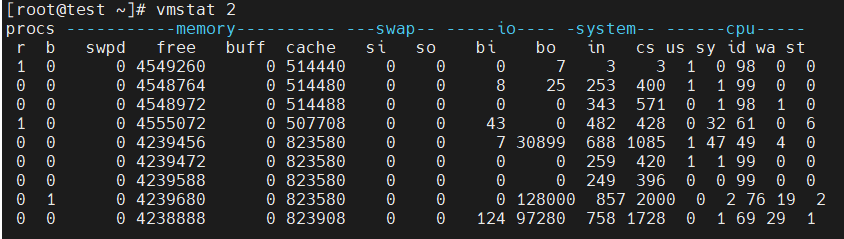
By observing the output of <span>vmstat</span>, we find that while running the <span>dd</span> command, the Cache kept increasing, while the Buffer remained basically unchanged.
Reading from Buffer
Now, let’s conduct the second experiment. Again, clear the cache in Terminal 1:
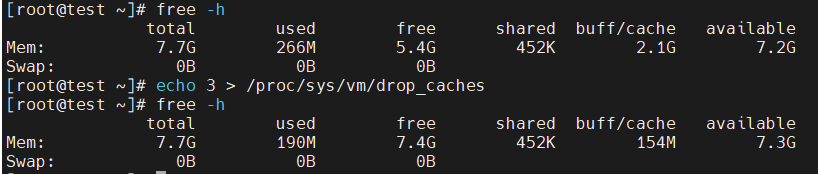
Also in Terminal 1, start the <span>vmstat 2</span> command again:

You can see that at this point, <span>buff</span> is <span>0</span>. Now in Terminal 2, run the following command:

Then, return to Terminal 1 and observe:
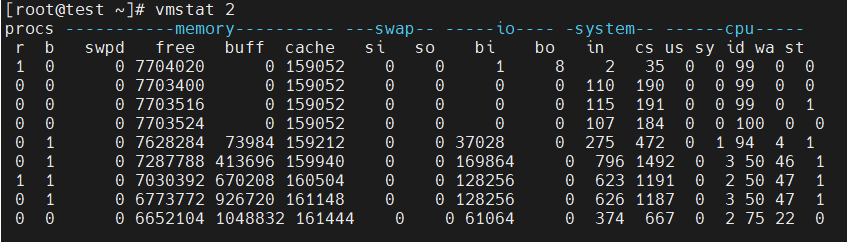
Observe the output of <span>vmstat</span>, you will find that when reading from the disk (i.e., when <span>bi</span> > <span>0</span>), both Buffer and Cache are increasing, but clearly, the increase in Buffer is much faster. This means that when reading from the disk, the data is cached in the Buffer.
Now we can almost conclude:
Data is cached in Cache when reading files, and cached in Buffer when reading from the disk.
Conclusion
Here you should find that although this article describes Buffer and Cache, it still cannot cover all details. We have learned the following two points:
- Buffer: Can be used as both a “cache for data to be written to disk” and a “cache for data read from the disk.”
- Cache: Can be used as both a “page cache for reading files” and a “page cache for writing files.”
Disclaimer:The articles published by this public account are either original or edited and organized from excellent articles found online. The copyright of the articles belongs to the original authors and is for readers’ learning and reference only. For shared non-original articles, some may not have a true source. If the source is misattributed or if there are any infringements regarding images, links, etc., please contact the backend directly, specifying the article in question, and the backend will delete it as soon as possible. We apologize for any inconvenience caused.