In recent years, I have primarily engaged in Linux and Android development, using Ubuntu as my main development environment. Due to project requirements involving Cortex-M core development, I had to switch back to an IDE on the Windows platform that I used years ago. Having become accustomed to the open-source ecosystem of Ubuntu, I found the Windows environment quite uncomfortable. Another very important reason is the necessity to unify the development environment within the Linux world to enhance development efficiency, technical consistency, and access to open resources, among other benefits.
Therefore, I plan to completely migrate the STM32 development environment to the Ubuntu platform, and I will document the development practices of STM32F407 on Ubuntu. All operational processes and solutions will be compiled into technical documentation and continuously published.
Various IDEs on Windows have implemented a unified, user-friendly integration management system. However, on Ubuntu, it appears to be a bit more complicated. If one has a bit of ambition, they wouldn’t find this too troublesome, right? To save everyone time, I have drawn the following “Ubuntu Development Environment Composition Diagram” for reference:
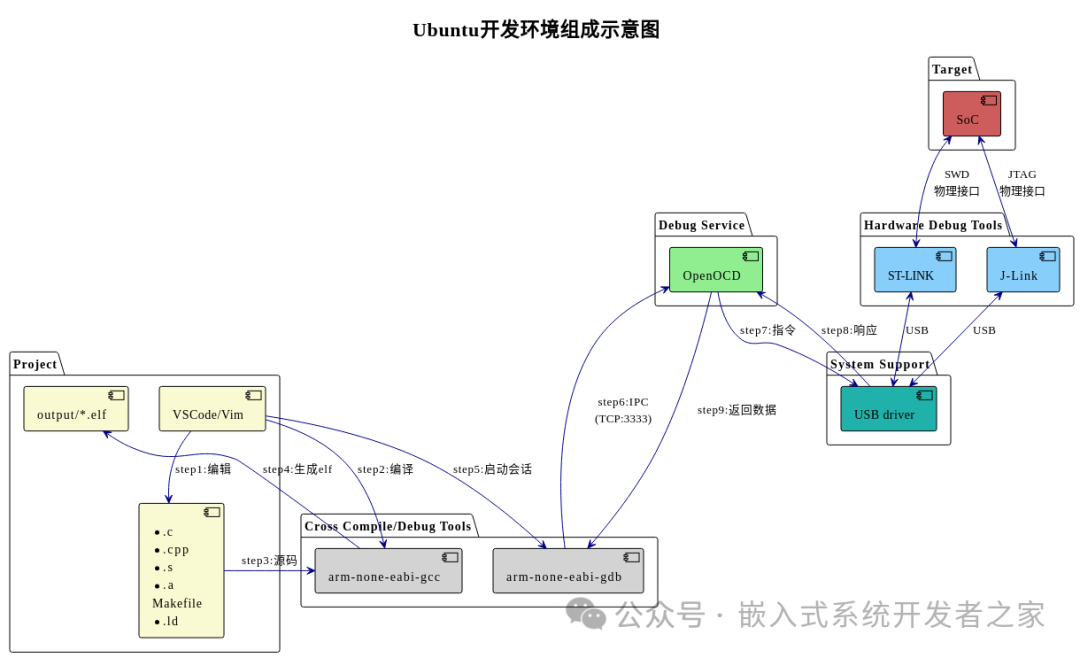
1. A brief description of the components of the development environment and their respective roles is as follows:
1. Development Toolchain (Project)
-
Source Files (
<span>*.c</span>/<span>*.cpp</span>/<span>*.s</span>/<span>Makefile</span>/link scripts, etc.) Role: Project source code, compilation configuration, and linking rules. -
Code Editor (VSCode/Vim) Role: Writing and modifying code, triggering the compilation process.
-
Executable File (
<span>output/*.elf</span>) Role: The ARM target platform executable file generated by compilation.
2. Cross Compile/Debug Tools
-
<span>arm-none-eabi-gcc</span>Role: ARM architecture cross-compiler that compiles source code into hardware-executable binary files. -
<span>arm-none-eabi-gdb</span>Role: ARM debugger that connects to the OpenOCD service to control program execution (breakpoints, single-step, etc.).
3. Debug Service Layer
-
<span>OpenOCD</span>Role: Bridges the debugger (GDB) and hardware debugging tools, interprets debugging commands, and communicates with hardware via USB drivers.
4. System Support Layer
-
USB Driver Role: Provides operating system-level USB communication support for hardware debugging tools (ST-LINK/J-Link).
5. Hardware Debug Tools
-
ST-LINK Role: Official ST debugger that connects to the target SoC via SWD interface.
-
J-Link Role: General-purpose debugger that supports JTAG/SWD interfaces to connect to SoC.
6. Target Hardware
-
SoC Role: The embedded device chip (e.g., STM32 series MCU) that runs the final program.
2. Key Workflow
-
Edit Compile source code using VSCode/Vim.
-
Compile Call
<span>arm-none-eabi-gcc</span>to compile the source code and generate the<span>.elf</span>file. -
Debug Connection
-
GDB connects to OpenOCD via TCP port (3333).
-
OpenOCD controls ST-LINK/J-Link via USB drivers.
-
The debugging tool interacts with the SoC through the SWD/JTAG physical interface.
Debug Execution Debug commands flow from GDB → OpenOCD → USB driver → hardware tool → SoC, with results returned in reverse order.
3. Physical Connection Relationships
-
Debugger and SoC ST-LINK/J-Link connects to the target board via SWD or JTAG interface.
-
Debugger and Host Connected to the Ubuntu system via USB cable, relying on USB driver communication.
In the future, I will detail the process of building the development environment for STM32F407 on Ubuntu.