Source: Fresh Date Classroom
Original Author: Little Date Jun
We use operating systems every day. Windows, Linux, Android, and iOS are all classic operating systems. With them, we can better utilize hardware terminal devices like computers and smartphones. So, what is the essence of an operating system? What functions and features does it have? What do we mean by processes, threads, kernels, interrupts, GUI, CLI, etc.? Let’s find the answers together.
What is an Operating System
Essentially, an operating system is a set of software. It is also written in code, like the widely used Windows 10, which is primarily written in C/C++.
Operating systems belong to software, but they are very special types of software.
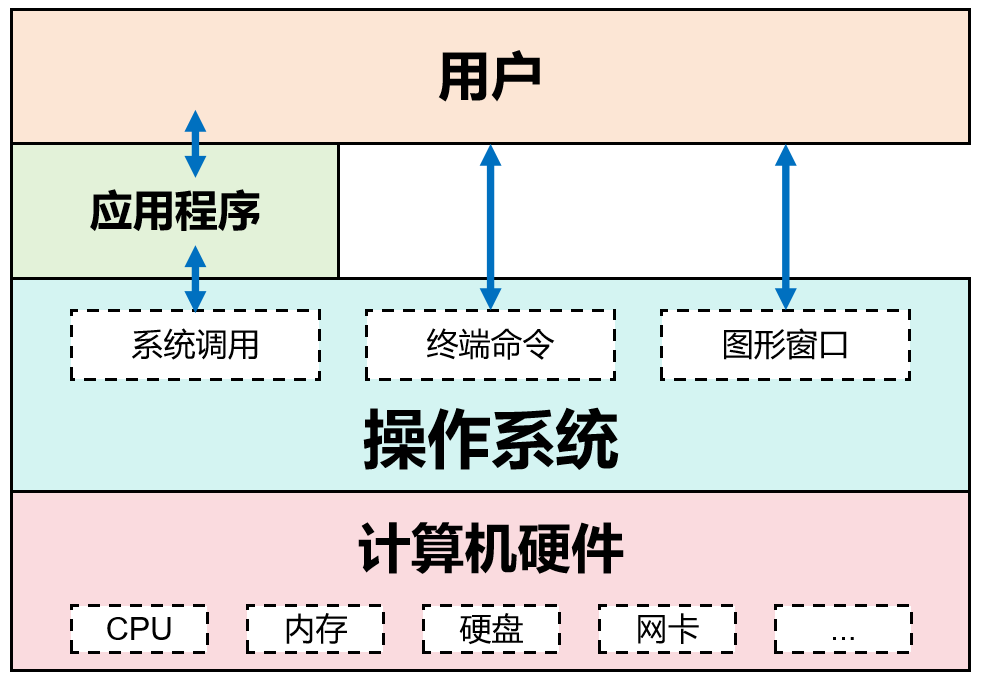
In the entire computer architecture, it is closest to the hardware and is the most important and fundamental software. It is responsible for controlling and managing the resources of the entire computer system, organizing, scheduling, and allocating them reasonably.
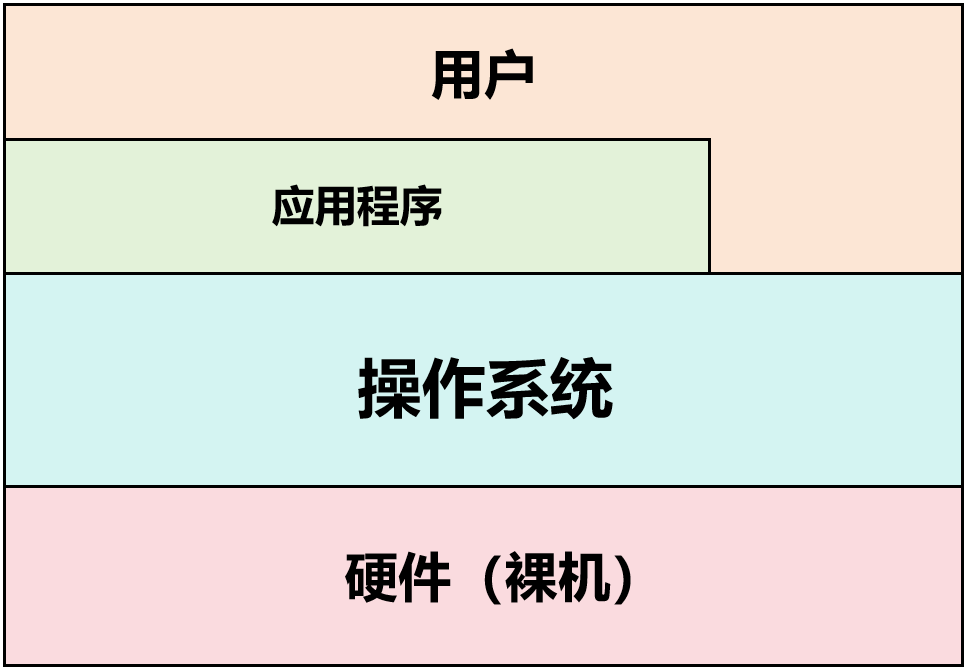
Computer Hierarchical Architecture
For users and upper-level application software, the operating system encapsulates and hides many low-level details, providing standard interfaces for calls, greatly simplifying the development of upper-level application software.
At the same time, it provides many auxiliary tools and functions, allowing users to better control the operating status of the computer.
In other words, the operating system is like a super housekeeper. It manages everything, serves users, and is accountable to them.
Core Functions of the Operating System
We can categorize the core functions of an operating system into the following aspects:
2.1 Process Management
Processes and threads are two very important concepts in operating systems.
A process is the basic unit of resource allocation. The creation, termination, scheduling, synchronization, and inter-process communication of processes are all managed by the operating system. The execution of application programs, including the core functions of the operating system itself, exists in the form of processes.
Each process includes the program’s code, data, state, and the resources allocated by the operating system for that program (such as memory space, file handles, network ports, etc.). The operating system ensures that various processes can efficiently and safely share CPU time through process management.
When we use the “Ctrl+Alt+Del” shortcut to bring up the Windows Task Manager, we can see many processes:
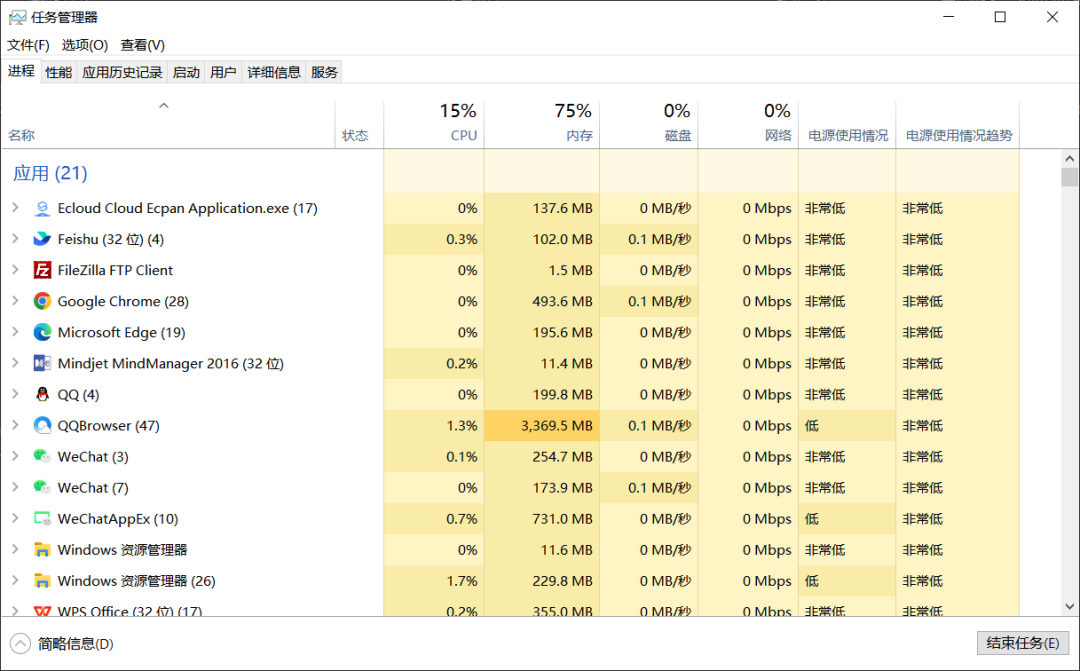
Task Manager
A thread is the smallest unit of scheduling in the operating system.
Threads are a lower level than processes and are an executable unit that can be independently scheduled and assigned within a process.
A process can have multiple threads that share the same memory space and resources, making communication and data sharing easier.
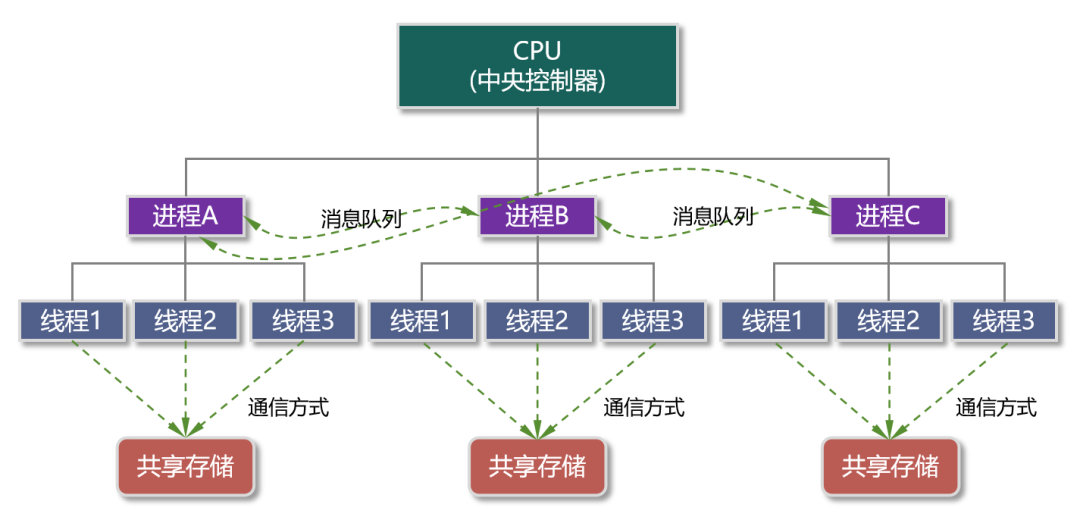
Processes and Threads
For example, when you start a browser program, the operating system will open a corresponding process. Within this process, there will be multiple threads, such as HTTP request threads, event response threads, rendering threads, etc.
If you close this browser program, you can see from the Task Manager that this process and its corresponding threads are gone. Of course, you can also right-click on a process in the Task Manager to forcefully close it. In Linux, the command to kill a process is “kill”.
Threads were introduced later in the development of operating systems. They further provide concurrency in program execution, improving system efficiency.
Both processes and threads can include states such as running, ready, and blocked. Managing processes and threads is essentially about allocating and scheduling CPU resources.
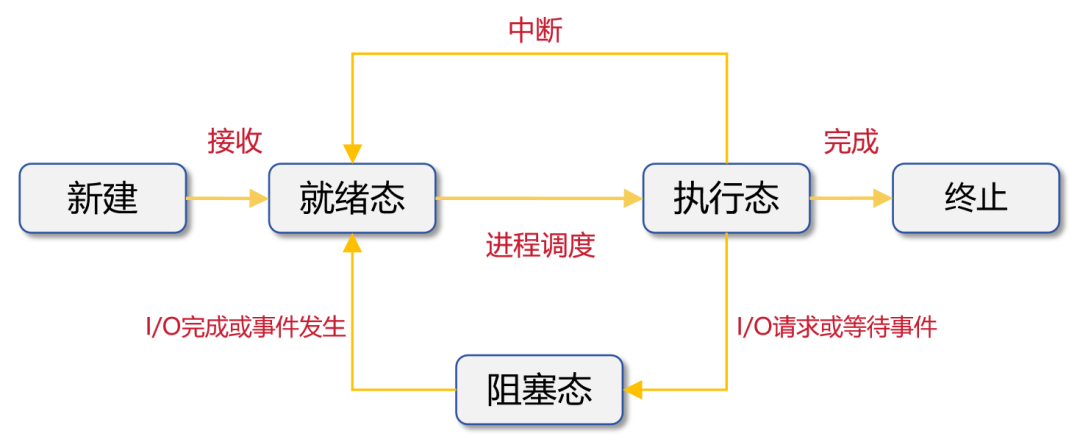
Process State Changes
It is important to note that a program can correspond to one or more processes. A process can also correspond to one or more programs (though this is rare).
2.2 Memory Management
We have mentioned the von Neumann architecture several times. Programs must be loaded from the hard disk into memory to be processed by the CPU. Each program must have sufficient memory space to ensure normal operation.
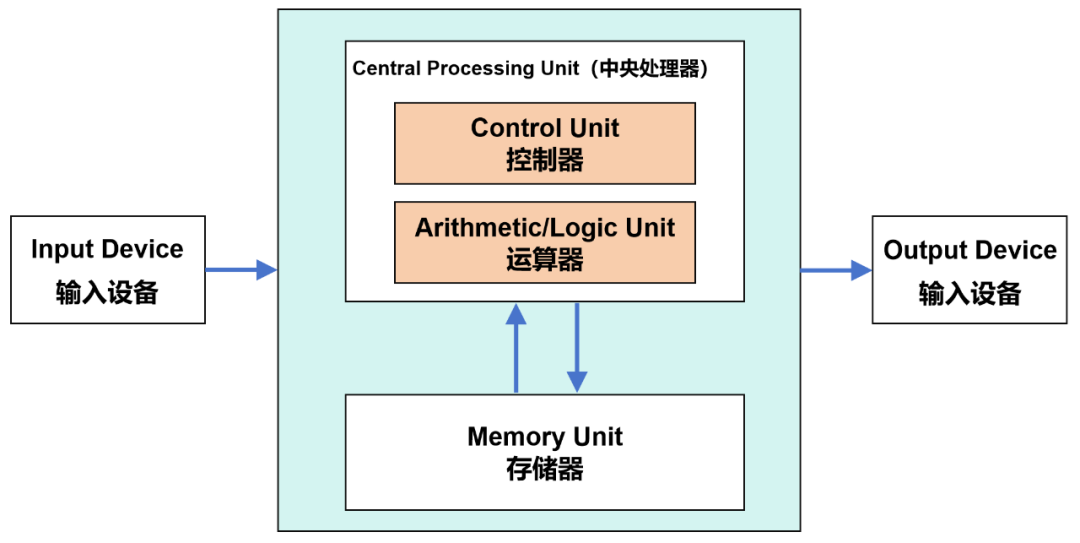
Von Neumann Architecture
After execution, memory also needs to be released in a timely manner to allow other programs to continue using it.
The allocation and recovery of memory are also the responsibilities of the operating system.
In addition to memory allocation, the operating system is also responsible for memory protection (ensuring that each program runs only in its own memory area, preventing interference between processes), address mapping (when a program is loaded into memory, the logical address must be converted into the physical address defined by the memory unit), and memory expansion (using virtual storage technology to logically expand memory capacity).
2.3 Device Management
This is one of the important tasks of the operating system. It manages and controls the use of external devices (such as printers, hard drives, keyboards, mice, etc.).
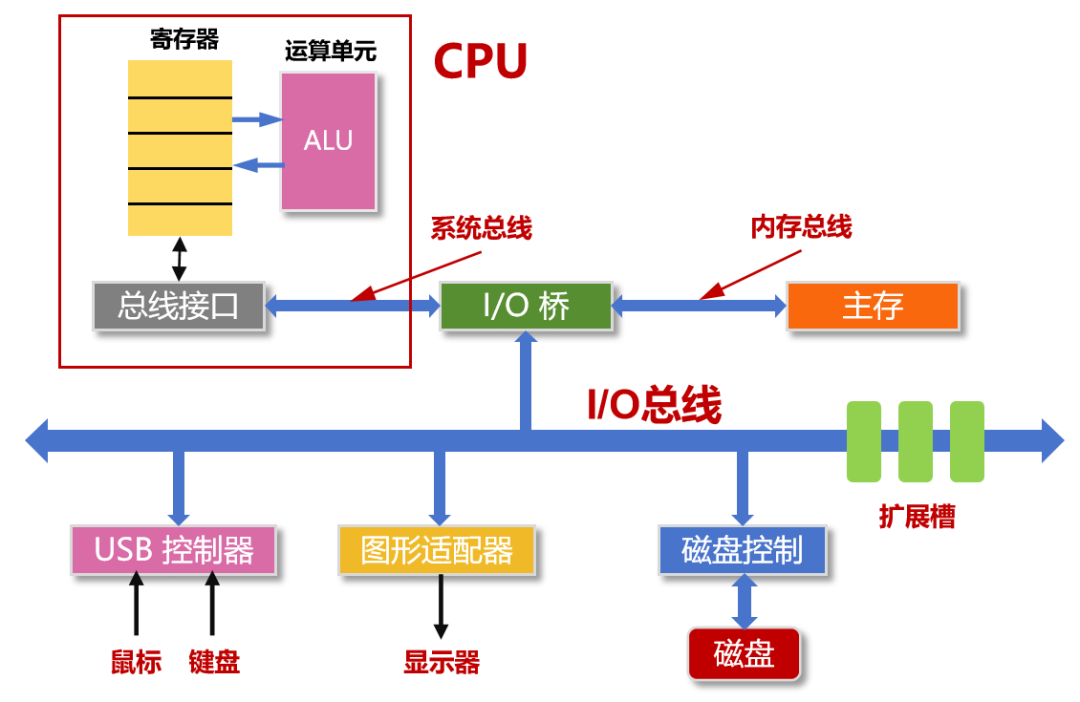
Specifically, it can fulfill I/O (input/output) requests made by user processes, allocate the required I/O devices to user processes, improve the utilization of CPU and I/O devices, and increase I/O speed, etc. Efficient I/O scheduling can prevent I/O devices from dragging down system performance.
2.4 File System Management
The file system is a set of rules used by the operating system to organize, store, and retrieve data.
The operating system provides a mechanism to organize, store, retrieve, and protect files, including file creation, deletion, read/write operations, and directory structure maintenance. We can also understand it as the operating system’s management and invocation of storage devices and resources.
2.5 Security and Permission Management
With hardware and software resources, we also need to specify who can use them.
The operating system provides a comprehensive security mechanism to ensure the security and integrity of user data, including user authentication, access control, and encryption.
2.6 Interactive Interface
The operating system is a tool for users to use the computer. To make the computer work, we need a good interactive interface to issue commands, query results, and check status.
The operating system provides a graphical user interface (GUI) or command line interface (CLI) to allow users to easily interact with the computer. This is a prerequisite for the widespread adoption of computers in society.
Many people have used the command line interface brought up by “cmd”, which is called an online command interface, also known as an interactive command interface.
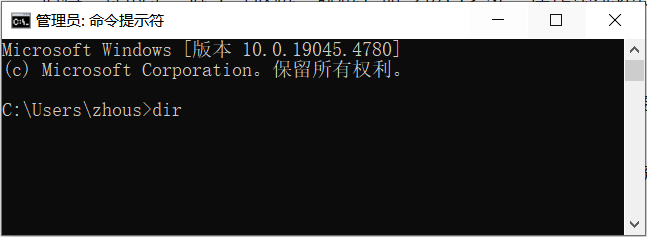
Previously, we also learned to write batch files (.bat files), providing several commands for the computer to execute one by one. This is called an offline command interface.
It is worth mentioning that in addition to (online, offline) command interfaces, the operating system also provides a program interface.
The program interface consists of a set of system calls that allow applications to indirectly call resources.
Many applications now indirectly make system calls through library functions provided by high-level languages. We can view these library functions as further encapsulations of system calls.
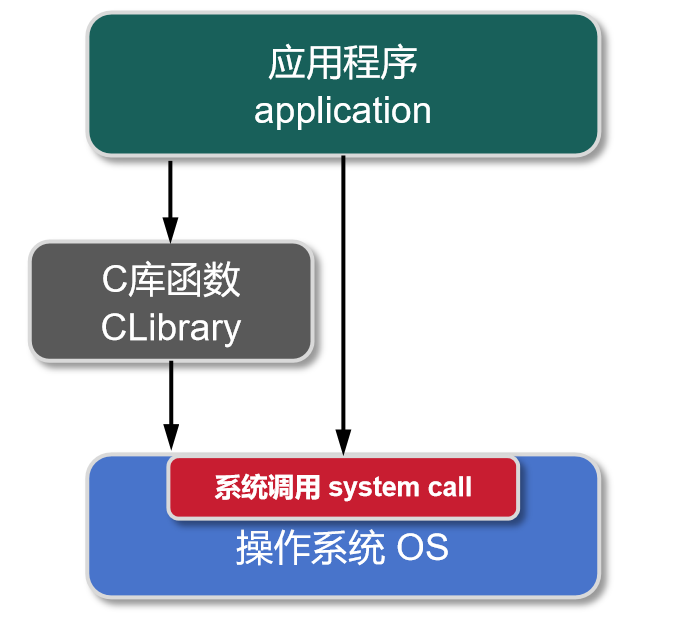
It is important to note that any operations related to shared resources (such as memory allocation, I/O operations, file management, etc.) must be requested from the operating system kernel through system calls, which ensures the stability and security of the system.
Main Features of the Operating System
In addition to the six functions mentioned above, the operating system has four features: concurrency, sharing, asynchrony, and virtualization.
3.1 Concurrency
Concurrency refers to two or more events occurring within the same time interval. The concurrent feature of an operating system means it has the ability to handle and schedule multiple programs to execute simultaneously.
Concurrency is different from parallelism. Parallelism refers to two or more events occurring at the same moment. For example, eating an apple while watching TV is parallelism. Eating an apple, banana, and orange within one minute is concurrency.
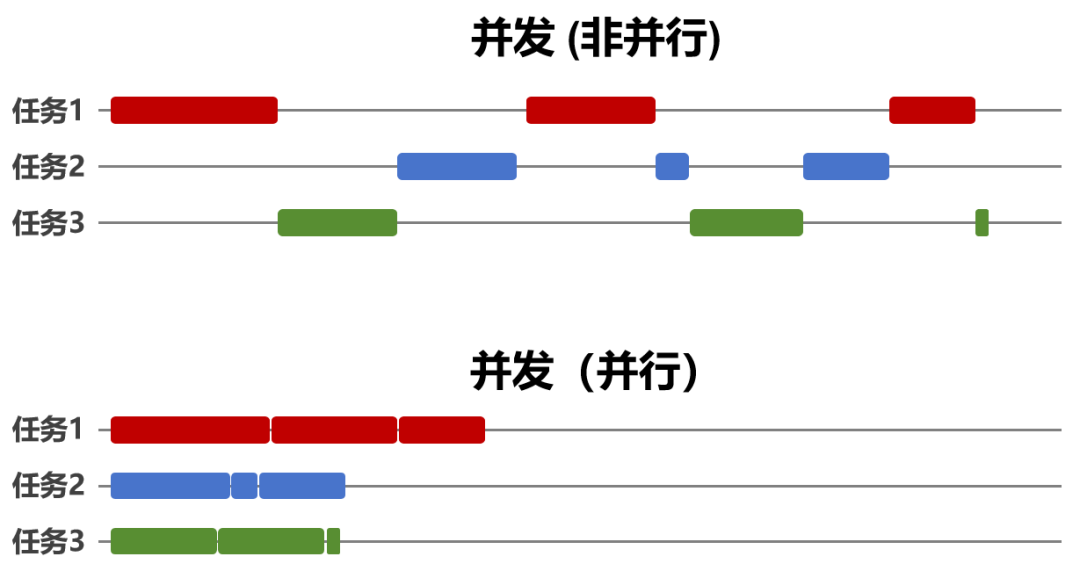
Clearly, concurrency appears simultaneous from a macro perspective, but from a micro perspective, it occurs in a time-sharing manner (similar to time-division multiplexing in communication). Concurrency tests the ability of resource scheduling, while parallelism requires hardware support, such as using multi-core processors.
3.2 Sharing
Sharing means that resources in the system can be jointly used by multiple concurrent processes. It can be divided into two types: mutual exclusion sharing and simultaneous sharing.
Mutual exclusion sharing, as the name implies, cannot be used simultaneously. Only when one process has finished accessing and released the resource can another process access it. Such resources are called critical or exclusive resources. Most physical devices in computer systems belong to critical resources.
Simultaneous sharing means that multiple processes can use it at the same time. The most typical device is the hard disk.
It is also evident that the underlying logic of sharing is similar to “multiplexing” in communication, either sharing by dividing time (time-division multiplexing) or sharing by dividing physical resource space (space-division multiplexing), depending on the properties of the resource itself.
3.3 Asynchrony
Asynchrony is the opposite of synchrony. Synchrony means everyone keeps the same rhythm. Asynchrony means each goes their own way.
The premise of asynchrony is concurrency; without concurrency, all tasks can only be executed one by one serially, resulting in low overall system efficiency.
3.4 Virtualization
Finally, virtualization. This is often mentioned in cloud computing. Turning a physical entity into several logical entities is virtualization.
The essence of virtualization is still resource reuse. However, it is achieved through software, and what users perceive are multiple logical entities.
Composition Architecture of the Operating System
Now let’s take a look at the composition architecture of the operating system.
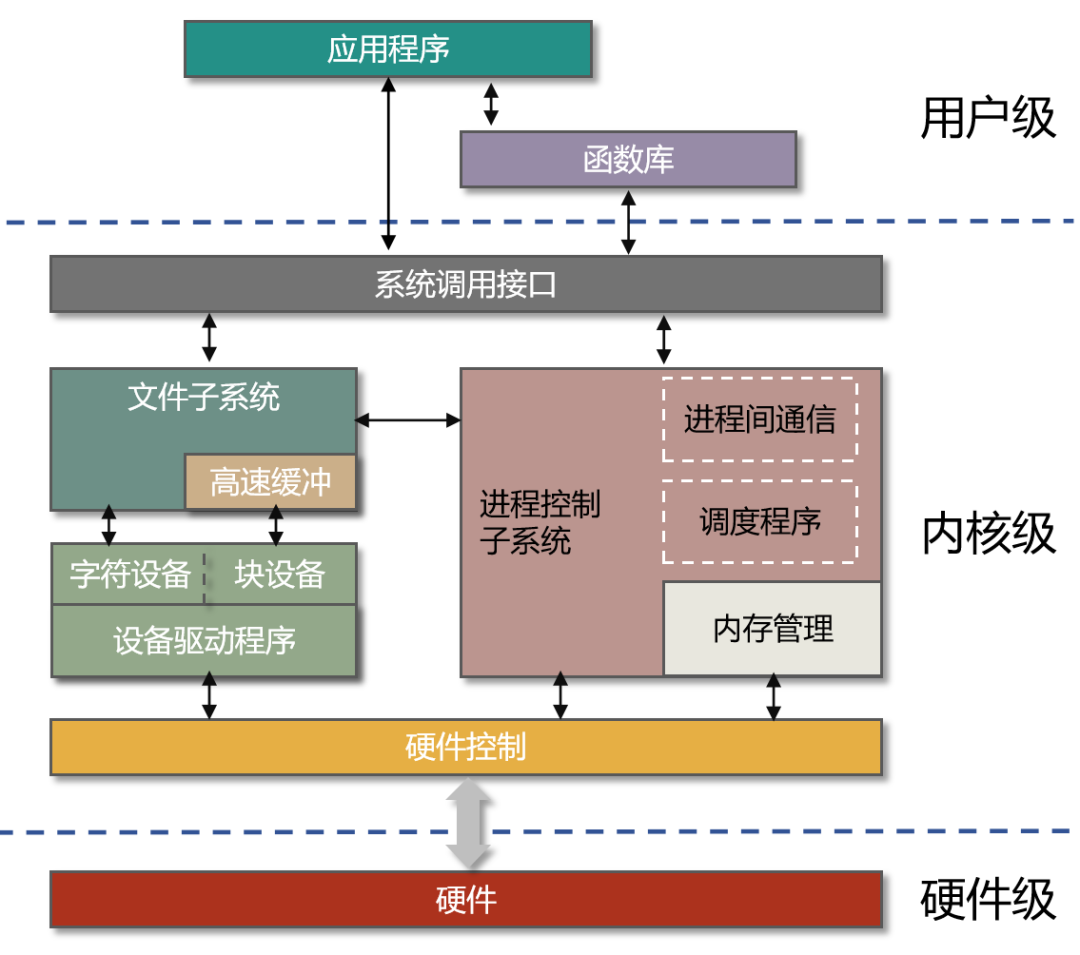
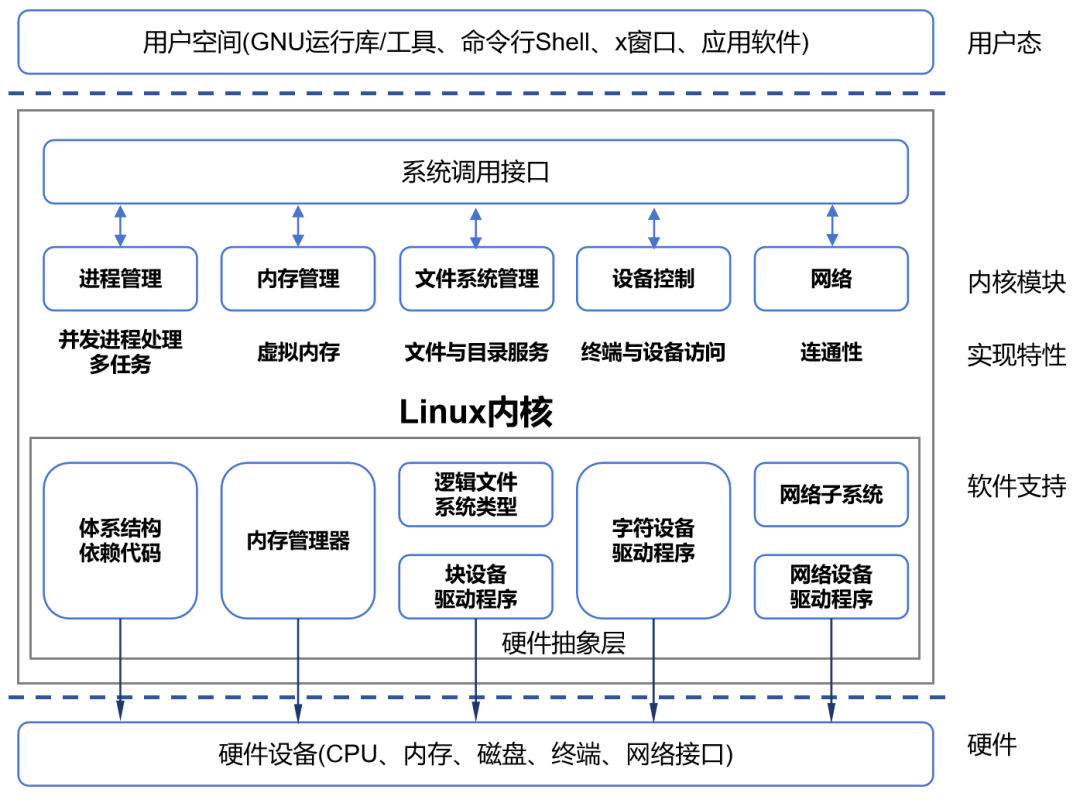
The core of the operating system is the kernel, which is often heard about.

The kernel interacts directly with the hardware and provides services to other system software and applications. Most of the core functions of the operating system mentioned earlier, except for the interactive interface, are closely related to the kernel.
The CPU in the computer can operate in two states: kernel mode (also called privileged mode) and user mode (also called unprivileged mode). When running kernel programs, it is in kernel mode. When running application programs, it is in user mode.
The operating system has two types of instructions: “non-privileged instructions” and “privileged instructions”.
Application programs can only use “non-privileged instructions”, such as addition and subtraction instructions. The operating system kernel, as the “manager”, sometimes allows the CPU to execute some high-level “privileged instructions”, such as memory clearing instructions. These instructions have significant effects and are only allowed to be used by the operating system kernel.
When the operating system is in kernel mode, it can execute privileged instructions. If it is in user mode, it can only execute non-privileged instructions.
Generally, after booting, when a user starts an application program, the operating system kernel program will proactively yield the CPU at the appropriate time, switching to user mode. At this time, if an interrupt occurs, the operating system kernel will forcibly regain control of the CPU, switching the CPU from user mode to kernel mode.
This brings us to interrupts.
An interrupt occurs when the processor receives a signal indicating that an event has occurred that requires attention.
Interrupts can be divided into internal interrupts and external interrupts.
Internal interrupts, also known as exceptions, refer to events originating from within the CPU that are related to the currently executing instruction, such as illegal operation codes, address out-of-bounds, arithmetic overflow, etc. Exceptions cannot be masked and must be handled immediately once they occur.
Three typical types of internal interrupts include: traps (triggered by trap instructions), faults (triggered by error conditions that can be fixed by kernel programs), and aborts (triggered by fatal errors that cannot be fixed by kernel programs).
External interrupts are the narrow definition of interrupts, where signals come from external events unrelated to the currently executing instruction. Typical examples include clock interrupts and I/O interrupts, or human intervention.
Continuing with the kernel.The kernel can also be divided into various types, such as monolithic kernels and microkernels.
All operating system services run in kernel space, which is a monolithic kernel, also known as a macro kernel or single kernel.
Only the most basic system services run in kernel space, while other services are moved out of the kernel and run in user space, which is a microkernel.
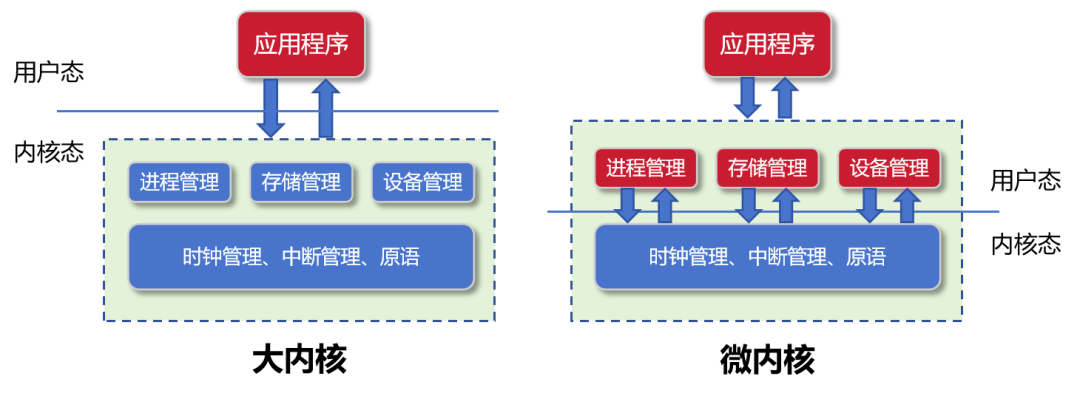
Compared to monolithic kernels, microkernels are more flexible, have clearer architectures, and are easier to maintain due to smaller code sizes.
The part of the operating system responsible for the interactive interface is called the shell. As mentioned earlier, this includes command interpreters and graphical user interfaces.
In addition to the kernel and shell, the operating system also includes many other tools and services, such as backup tools, recovery tools, firewalls, network services, etc.
The following is a schematic diagram of the overall architecture of an operating system:
This is a schematic diagram of the Linux system architecture for reference:
Common Classifications of Operating Systems
With the development of technology, modern operating systems have undergone decades of evolution.
Computer hardware is constantly upgrading, user demands are increasing, and system functions are iterating, ultimately leading to increasingly complex operating system architectures and larger code sizes.
Earlier operating systems were only a few MB, fitting on a floppy disk. Now, operating systems can easily be several GB, or even tens of GB, which cannot fit on a DVD.
In response to different types of device terminals and various application scenarios, operating systems have also shown a trend of refinement and evolution into many categories.
Generally speaking, operating systems can be roughly divided into desktop operating systems, server operating systems, mobile terminal operating systems, embedded operating systems, and IoT operating systems.
As shown in the table below:

END
The reproduced content only represents the author’s views
It does not represent the position of the Semiconductor Institute of the Chinese Academy of Sciences
Editor: March
Responsible Editor: Mu Xin
Submission Email: [email protected]
Previous Recommendations
1. The Semiconductor Institute has made progress in the research of bionic covering-type neuron models and learning methods.
2. The Semiconductor Institute has made significant progress in inverted structure perovskite solar cells.
3. Why is copper used as the interconnect metal in chips?
4. What exactly is 7nm in chips?
5. Silicon-based integrated optical quantum chip technology.
6. How abnormal is the quantum anomalous Hall effect? It may lead to the next revolution in information technology!