01
Memory Management
We need to understand that variables are essentially just abstract names for memory addresses. In statically compiled programs, all variable names are converted to memory addresses at compile time. The machine does not recognize the names we use; it only knows the addresses.
Memory usage is one of the important factors to consider in program design, not only because system memory is limited (especially in embedded systems), but also because memory allocation directly affects program efficiency. Therefore, we need to have a systematic understanding of memory management in C.
In C, four memory regions are defined: code segment; global and static variable segment; local variable segment (stack); and dynamic storage segment (heap); as detailed below:
1> Stack Segment (stack)— Automatically allocated and released by the compiler, storing function parameter values, local variable values, etc. Its operation is similar to a stack in data structures.
2> Heap Segment (heap)— Generally allocated and released by the programmer. If the programmer does not release it, the OS may reclaim it when the program ends. Note that it is different from the heap in data structures, but the allocation method is similar to a linked list.
3> Global Segment (Static Segment) (static)— Global and static variable storage is grouped together; initialized global and static variables are in one area, while uninitialized global and static variables are in an adjacent area. Released by the system after the program ends.
4> Constant Segment — Constant strings are stored here. Released by the system after the program ends.
5> Program Code Segment— Stores the binary code of the function body. Let’s look at a diagram:
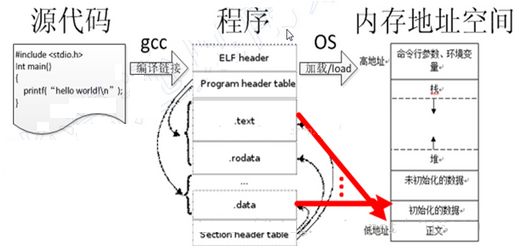
Figure 1
First, we need to know that source code is compiled into a program, which is stored on the hard disk, not in memory! It is only called into memory during execution! Let’s look at the program structure; ELF is the main executable file format for Linux. An ELF file consists of four parts: ELF header, program header table, sections, and section header table. Details are as follows:
1> Program HeaderDescribes the position, size, and location in memory of a segment in the file. This is the information to be loaded;
2> SectionsContains information about the object file, including instructions, data, symbol tables, relocation information, etc. In the diagram, we can see that the sections include:
-
text segment — stores instructions;
-
rodata segment — read-only data;
-
data segment — readable and writable;
3> Section Header TableContains information describing the sections of the file. Each section has an entry in this table; each entry provides the name, size, and other information of that section. It acts as an index!
How is the program loaded into memory, and how is it distributed? Let’s look at the diagram above:
The text and initialized and uninitialized data are what we refer to as the data segment, with the text being the code segment;
2>The text segment is above the constant segment, and above that is the global and static variable segment, which occupies the initialized and uninitialized data portion;
3>Above that is the heap, the dynamic storage area, which grows upwards;
4>Above the heap is the stack, which stores local variables. After the code block where the local variables are located is executed, this memory will be released. The stack grows downwards;
5>Command line parameters are like 001, environment variables, etc. This has been discussed in previous articles, which you can check out if interested.
We know that memory is divided intodynamic memory and static memory, let’s first discuss static memory.
Static Memory
The storage model determines how a variable is allocated memory and its access characteristics. In C, there are mainly three dimensions that determine this: storage duration, scope, and linkage.
1. Storage DurationStorage duration: the time a variable is retained in memory (lifetime). There are two cases for storage duration, primarily depending on whether the variable will be automatically reclaimed by the system during program execution.
1) Static Storage DurationOnce allocated during program execution, it will not be automatically reclaimed. Generally, any variable not defined within a function-level code block. Regardless of whether it is within a code block, any variable modified with the static keyword.
2) Automatic Storage DurationAll variables other than those with static storage duration are of automatic storage duration, or in other words, any non-static variable defined within a code block, where the system automatically allocates and releases memory.
2. ScopeScope: the visibility (access or reference) of a variable within the file where it is defined. In C, there are three types of scope:
1) Block ScopeVariables defined within a code block have the scope of that code. From the point of definition of this variable until the end of the code block, the variable is visible;
2) Function Prototype ScopeVariables appearing in a function prototype have function prototype scope, which extends from the point of definition to the end of the prototype declaration.
3) File ScopeA variable defined outside of all functions has file scope, meaning it is visible from its definition to the end of the file containing that definition;
3. LinkageLinkage: the visibility (access or reference) of a variable across all files that make up the program. In C, there are three types of linkage:
1) External LinkageIf a variable can be accessed from any location in any of the files that make up a program, it is said to have external linkage;
2) Internal LinkageIf a variable can only be accessed from any location within the file where it is defined, it is said to have internal linkage.
3) No LinkageIf a variable is private to the current code block where it is defined and cannot be accessed from other parts of the program, it is said to have no linkage.
Let’s look at a code example:
#include <stdio.h> int a = 0; // Global initialization area char *p1; // Global uninitialized area int main() { int b; // b in stack char s[] = "abc"; // Stack char *p2; // p2 in stack char *p3 = "123456"; // 123456\0 in constant area, p3 in stack. static int c = 0; // Global (static) initialization area p1 = (char *)malloc(10); p2 = (char *)malloc(20); // Allocated 10 and 20 bytes in heap. strcpy(p1, "123456"); // 123456\0 in constant area, the compiler may optimize it to the same location as p3 points to "123456".}1.2 Dynamic Memory
When the program reaches a point where a dynamically allocated variable is needed, it must request a block of memory of the required size from the system to store that variable. When the variable is no longer in use, that is, when its lifetime ends, it must be explicitly released so that the system can reallocate that space, allowing for the reuse of limited resources. Below are the functions for dynamic memory allocation and release.
1.2.1 malloc Function
The prototype of the malloc function:
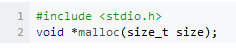
size is the number of bytes of memory to be dynamically allocated. If the allocation is successful, the function returns the starting address of the allocated memory; if it fails, it returns NULL. Let’s look at the following example:
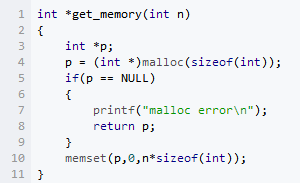
When using this function, there are a few points to note:1) Only care about the size of the memory being allocated;2) The allocation is for a contiguous block of memory. Remember to always write error checks;3) Explicit initialization. Since we do not know what is in this block of memory, we should zero it out;
1.2.2 free Function
Memory allocated on the heap needs to be explicitly released using the free function, whose prototype is as follows:
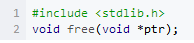
When using free(), there are also a few points to note:1) Must provide the starting address of the memoryWhen calling this function, you must provide the starting address of the memory; providing a partial address is not allowed, and releasing part of the memory is not permitted.
2) malloc and free must be used in pairsThe compiler does not handle the release of dynamic memory; it is the programmer’s responsibility to release it explicitly. Therefore, malloc and free must be used in pairs to avoid memory leaks.
p = NULL is necessary because although this block of memory has been released, p still points to this memory, preventing erroneous operations on p later;
3) Releasing memory multiple times is not allowedBecause this block of memory may have been reallocated after being released, if it is released again, it may cause data loss;
1.2.3 Other Related Functions
calloc function allocates memory considering the type of storage location. realloc function can adjust the size of a dynamically allocated memory block.
1.3 Comparison of Heap and Stack
1) Allocation Method
stack: Automatically allocated by the system. For example, declaring a local variable int b; the system automatically allocates space for b in the stack.heap: Requires the programmer to allocate it themselves and specify the size, using malloc in C, e.g., p1 = (char *)malloc(10);
2) System Response After Allocationstack: As long as the remaining space in the stack is greater than the requested space, the system will provide memory; otherwise, it will report an exception indicating stack overflow.
heap: First, it should be known that the operating system maintains a linked list of free memory addresses. When the system receives a request from the program, it traverses this list to find the first heap node with space greater than the requested size, removes that node from the free list, and allocates that space to the program. Additionally, for most systems, the size of the allocated memory is recorded at the starting address of that memory space, allowing the delete statement in the code to correctly release that memory space. Furthermore, since the size of the found heap node may not exactly match the requested size, the system will automatically place any excess back into the free list.
3) Size Limitations for Allocationstack: The stack is a data structure that expands towards lower addresses and is a contiguous memory area. This means that the address of the stack top and the maximum capacity of the stack are predetermined by the system. The stack size is typically 2M (some say 1M, but it is a constant determined at compile time). If the requested space exceeds the remaining space in the stack, it will indicate overflow. Therefore, the space obtained from the stack is relatively small.heap: The heap is a data structure that expands towards higher addresses and is a non-contiguous memory area. This is because the system uses a linked list to store free memory addresses, which are naturally non-contiguous, and the traversal direction of the linked list is from low addresses to high addresses. The size of the heap is limited by the effective virtual memory in the computer system. Thus, the space obtained from the heap is more flexible and larger.
4) Comparison of Allocation Efficiency The stack is automatically allocated by the system, making it faster. However, the programmer cannot control it.The heap is memory allocated by new, generally slower, and prone to memory fragmentation, but it is the most convenient to use.
5) Contents Stored in Heap and Stackstack: When a function is called, the first thing pushed onto the stack is the address of the next instruction in the main function (the next executable statement after the function call), followed by the function’s parameters, which in most C compilers are pushed onto the stack from right to left, and then the function’s local variables. Note that static variables are not pushed onto the stack. When the current function call ends, local variables are popped off the stack first, followed by parameters, and finally, the stack pointer points back to the address where it started, which is the next instruction in the main function, and the program continues running from that point.
heap: Generally, a byte is stored at the head of the heap to indicate the size of the heap. The specific contents of the heap are arranged by the programmer.
6) Comparison of Access Efficiency
char s1[] = “aaaaaaaaaaaaaaa”;
char *s2 = “bbbbbbbbbbbbbbbbb”;
aaaaaaaaaaa is assigned at runtime; while bbbbbbbbbbb is determined at compile time; However, in subsequent accesses, arrays on the stack are faster than strings pointed to by pointers (e.g., heap). For example:
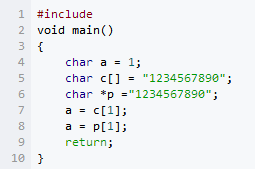
Corresponding assembly code
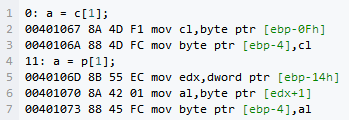
The first one directly reads the elements from the string into register cl, while the second must first read the pointer value into edx, and then read the character based on edx, which is evidently slower.
7) Final SummaryThe differences between heap and stack can be illustrated as follows:
The stack is like going to a restaurant to eat; you just order (make a request), pay, and eat (use it). Once you are full, you leave without worrying about the preparation work like chopping vegetables, washing vegetables, etc., or the cleanup work like washing dishes and pots. Its advantage is speed, but it has less freedom.
The heap is like cooking your favorite dishes yourself; it is more troublesome but more suited to your taste and offers greater freedom.
02
Memory Alignment
2.1 #pragma pack(n) Alignment Usage Explained
1. What is alignment, and why is it necessary?In modern computers, memory space is divided by bytes. Theoretically, it seems that access to any type of variable can start from any address, but in practice, when accessing specific variables, it is often necessary to access them at specific memory addresses. This requires data of various types to be arranged in memory according to certain rules, rather than being laid out sequentially one after another, which is what alignment is.
The purpose and reason for alignment: Different hardware platforms handle storage space very differently. Some platforms can only access certain types of data from specific addresses. Other platforms may not have this restriction, but the most common issue is that if data is not aligned according to the requirements of the platform, it can lead to a loss of access efficiency. For example, some platforms read from even addresses; if an int type (assuming a 32-bit system) is stored at an even address, it can be read in one read cycle, while if it is stored at an odd address, it may require two read cycles and the high and low bytes of the two reads must be combined to obtain that int data. Clearly, this significantly decreases reading efficiency. This is a trade-off between space and time.
2. Implementation of AlignmentTypically, when we write programs, we do not need to consider alignment issues. The compiler will choose the alignment strategy for the target platform for us. Of course, we can inform the compiler to pass pre-compile directives to change the alignment method for specific data. However, because we generally do not need to worry about this issue, the alignment done by the editor can often confuse us regarding certain problems. The most common is the unexpected result of sizeof for struct data structures. Therefore, we need to understand the alignment algorithm.
Purpose: Specify the packing alignment of struct, union, and class members; Syntax:
#pragma pack( [show] | [push | pop] [, identifier], n )
Description:1> pack provides control at the data declaration level and does not affect definitions; 2> When calling pack without specifying parameters, n will be set to the default value; 3> Once the alignment of a data type is changed, the direct effect is a reduction in memory usage, but performance may decrease;
3. Detailed Analysis of Syntax1> show:Optional parameter; displays the current packing alignment in bytes as a warning message;
2> push:Optional parameter; pushes the current specified packing alignment value onto the stack, where the stack is the internal compiler stack, and sets the current packing alignment to n; if n is not specified, the current packing alignment value will be pushed onto the stack;
3> pop:Optional parameter; removes the top record from the internal compiler stack; if n is not specified, the current top record on the stack becomes the new packing alignment value; if n is specified, it will become the new packing alignment value; if an identifier is specified, all records in the internal compiler stack will be popped until the identifier is found, and then the identifier will be popped out, setting the packing alignment value to the current top record on the stack; if the specified identifier does not exist in the internal compiler stack, the pop operation is ignored;
4> identifier:Optional parameter; when used with push, assigns a name to the current record being pushed onto the stack; when used with pop, pops all records from the internal compiler stack until the identifier is popped out; if the identifier is not found, the pop operation is ignored;5> n: optional parameter; specifies the packing value in bytes; the default value is 8, and valid values are 1, 2, 4, 8, 16.
4. Important Rules
1> Members of complex types are stored in memory in the order they are declared, and the address of the first member is the same as the address of the entire type;
2> Each member is aligned separately, meaning each member is aligned according to its own way and minimizes length; the rule is that each member is aligned according to its type’s alignment parameter (usually the size of that type) and the smaller of the specified alignment parameter;
3> For data members of structures, unions, or classes, the first is placed at an offset of 0; subsequent data members are aligned according to the smaller of the specified value in #pragma pack and the length of that data member; in other words, when the value specified by #pragma pack is equal to or exceeds the length of all data members, the specified value will have no effect;
4> The overall alignment of complex types (such as structures) is based on the smaller of the largest data member’s length and the value specified by #pragma pack; this minimizes length when members are complex types;
5> The overall length of a structure must be a multiple of all alignment parameters used, with padding bytes added if necessary; this means that the total length occupied by the members must be a multiple of the largest alignment parameter used, as alignment parameters are powers of 2; this ensures that each item in an array is boundary-aligned.
5. Alignment AlgorithmDue to differences among platforms and compilers, I will use the gcc version 3.2.2 compiler (32-bit x86 platform) as an example to discuss how the compiler aligns the members of struct data structures.
Under the same alignment method, the order of data definitions within a structure can lead to different overall memory space occupied by the structure, as shown below:
Assuming the structure is defined as follows:
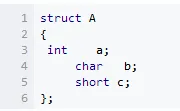
Structure A contains a 4-byte int, a 1-byte char, and a 2-byte short. Therefore, the space used by A should be 7 bytes. However, because the compiler must align the data members in memory, the sizeof(struct A) value is 8.Now let’s adjust the order of the structure members.
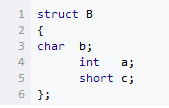
Now, with a total of 7 bytes of variables, the sizeof(struct B) value is 12.Next, we will use the pre-compile directive #pragma pack(value) to instruct the compiler to use our specified alignment value instead of the default.
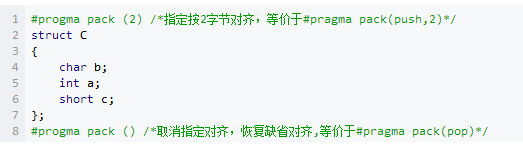
sizeof(struct C) value is 8.Change the alignment value to 1:
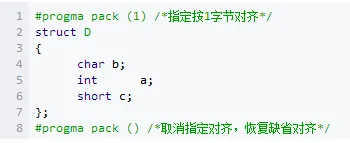
sizeof(struct D) value is 7.
For char data, its own alignment value is 1, for short it is 2, and for int, float, and double types, their own alignment value is 4, in bytes.
6. Four Concept Values1> The alignment value of the data type itself: as explained above, the basic data types have their own alignment values.
2> Specified alignment value: the specified alignment value when using #pragma pack(value).
3> The alignment value of the structure or class itself: the largest alignment value among its data members.
4> Effective alignment value of data members, structures, and classes: the smaller of the self-alignment value and the specified alignment value. With these values, we can easily discuss the alignment methods of specific data structure members. The effective alignment value N is the value ultimately used to determine the storage address of the data, which is the most important. Effective alignment N indicates “aligned at N,” meaning the starting address of the data “storage % N = 0.” The data variables in the data structure are arranged in the order they are defined. The starting address of the first data variable is the starting address of the data structure. The members of the structure must be aligned, and the structure itself must also be rounded according to its effective alignment value (the total length occupied by the members must be a multiple of the effective alignment value of the structure, which can be understood in conjunction with the examples below).
Example Analysis: Analyze Example B;
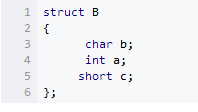
Assuming B starts at address space 0x0000. In this example, no specified alignment value is defined, and in my environment, this value defaults to 4.
The first member variable b has an alignment value of 1, which is smaller than the specified or default alignment value of 4, so its effective alignment value is 1, meaning its storage address 0x0000 satisfies 0x0000 % 1 = 0.
The second member variable a has an alignment value of 4, so its effective alignment value is also 4, meaning it can only be stored at starting addresses from 0x0004 to 0x0007, satisfying 0x0004 % 4 = 0, and is adjacent to the first variable.
The third variable c has an alignment value of 2, so its effective alignment value is also 2, meaning it can be stored from 0x0008 to 0x0009, satisfying 0x0008 % 2 = 0. Therefore, from 0x0000 to 0x0009, all of B’s contents are stored. Now, looking at the overall alignment value of structure B, it is the maximum alignment value among its variables (here it is b), so the overall alignment value is 4. According to the structure rounding requirement, the total length from 0x0000 to 0x0009 is 10 bytes, and (10 + 2) % 4 = 0. Therefore, 0x000A to 0x000B is also occupied by structure B. Thus, B occupies a total of 12 bytes from 0x0000 to 0x000B, and sizeof(struct B) = 12;
Similarly, analyze the above example C:
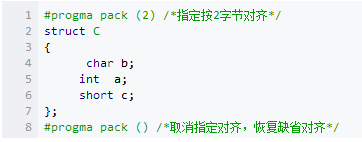
The first variable b has an alignment value of 1, and the specified alignment value is 2, so its effective alignment value is 1. Assuming C starts at 0x0000, then b is stored at 0x0000, satisfying 0x0000 % 1 = 0;
The second variable, with an alignment value of 4 and a specified alignment value of 2, has an effective alignment value of 2, so it is stored sequentially in 0x0002, 0x0003, 0x0004, and 0x0005, satisfying 0x0002 % 2 = 0.
The third variable c has an alignment value of 2, so its effective alignment value is also 2, and it is stored sequentially in 0x0006 and 0x0007, satisfying 0x0006 % 2 = 0. Therefore, from 0x0000 to 0x00007, all of C’s variables are stored. The overall alignment value of C is 4, so the effective alignment value is also 2. Since 8 % 2 = 0, C only occupies 0x0000 to 0x0007, which is 8 bytes. Therefore, sizeof(struct C) = 8.
Byte alignment affects the program.
Let’s look at a few examples (32bit, x86 environment, gcc compiler):Assuming the structure is defined as follows:
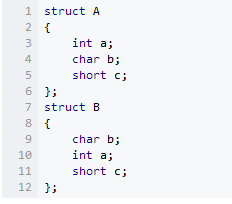
Now, the lengths of various data types on a 32-bit machine are known:char: 1 (signed and unsigned are the same) short: 2 (signed and unsigned are the same) int: 4 (signed and unsigned are the same) long: 4 (signed and unsigned are the same) float: 4 double: 8 So how about the sizes of the above two structures?The result is: sizeof(struct A) = 8 sizeof(struct B) = 12
Structure A contains a 4-byte int, a 1-byte char, and a 2-byte short, and B is the same; logically, A and B should both be 7 bytes. The reason for the above result is that the compiler must align the data members in memory. The above is the result of alignment according to the compiler’s default settings; can we change this default alignment setting of the compiler? Of course, we can. For example:
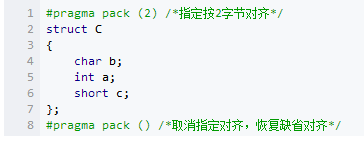
sizeof(struct C) value is 8.Change the alignment value to 1:
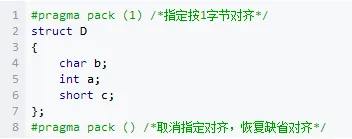
sizeof(struct D) value is 7.Next, we will explain the role of #pragma pack().
2.2 Modifying the Compiler’s Default Alignment Value
1> In VC IDE, you can modify it as follows: [Project]|[Settings], in the c/c++ tab, modify the Struct Member Alignment option in the Code Generation category, which defaults to 8 bytes.
2> During coding, you can dynamically modify it: #pragma pack. Note: it is pragma, not progma.
If you want to consider saving space while programming, you just need to assume the starting address of the structure is 0, and then arrange the variables according to the principles above. The basic principle is to declare the variables in the structure in order of type size from smallest to largest, minimizing the padding space in between. Another method to trade space for time efficiency is to explicitly insert reserved members for padding:
The reserved member does not have any significance for our program; it merely serves to fill space to achieve byte alignment. Of course, even without this member, the compiler will usually automatically fill in for alignment; adding it just serves as an explicit reminder.
2.3 Potential Hazards of Byte Alignment
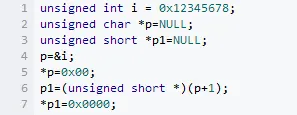
Code-related alignment hazards are often implicit. For example, during forced type conversions:
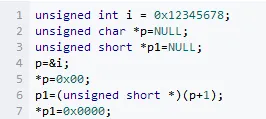
The last two lines of code access an unsigned short variable from an odd boundary, which clearly violates alignment rules.
On x86, similar operations will only affect efficiency, but on MIPS or SPARC, it may result in an error, as they require strict byte alignment.
If alignment or assignment issues arise, first check:1). Compiler’s big/little-endian settings;2). Whether the architecture itself supports unaligned access;3). If supported, check whether alignment is set; if not, see if special modifiers are needed for certain access operations.
Alignment handling under ARMfrom DUI0067D_ADS1_2_CompLib type qualifiersSome excerpts from the ARM compiler documentation on alignment usage:
1.__align(num)This is used to modify the byte boundary of the highest-level object. When using LDRD or STRD in assembly, this command __align(8) is used to ensure that data objects are aligned accordingly. This modifier has a maximum limit of 8 bytes, allowing 2-byte objects to be aligned to 4 bytes, but not allowing 4-byte objects to be aligned to 2 bytes. __align is a storage class modifier; it only modifies the highest-level type objects and cannot be used for structures or function objects.
2.__packed__packed enforces one-byte alignment.l Cannot align packed objects;l All read and write accesses to objects are performed with unaligned access;l Floats and structures or unions containing floats, as well as objects not using __packed, will not be byte-aligned;l __packed has no effect on local integer variables.
l Forcing conversion from unpacked objects to packed objects is undefined; integer pointers can be legally defined as packed.
__packed int* p; // __packed int is meaningless
2.4 Issues with Aligned or Unaligned Read/Write Access
__packed struct STRUCT_TEST { char a; int b; char c; }; // Define the structure as shown; at this time, the starting address of b is definitely unaligned, and accessing b on the stack may have issues, as stack data is certainly aligned. [from CL] // Define the following variables as global static, not on the stack static char* p; static struct STRUCT_TEST a; void main() { __packed int* q; // At this time, define __packed to modify the current q to point to an unaligned data address; the following access can be p = (char*)&a; q = (int*)(p + 1); *q = 0x87654321; /* The assembly instructions for the assignment are clear: ldr r5, 0x20001590 ; = #0x12345678 [0xe1a00005] mov r0, r5 [0xeb0000b0] bl __rt_uwrite4 // Call a function to write 4 bytes here [0xe5c10000] strb r0, [r1, #0] // The function performs 4 strb operations and then returns, ensuring correct data access [0xe1a02420] mov r2, r0, lsr #8 [0xe5c12001] strb r2, [r1, #1] [0xe1a02820] mov r2, r0, lsr #16 [0xe5c12002] strb r2, [r1, #2] [0xe1a02c20] mov r2, r0, lsr #24 [0xe5c12003] strb r2, [r1, #3] mov pc, r14 */// This clearly shows how unaligned access can lead to errors and how to eliminate issues caused by unaligned access. // It also illustrates the differences in instructions between unaligned and aligned access, leading to efficiency issues.

Some screenshots from electronic books

【Complete Set of Hardware Learning Materials】