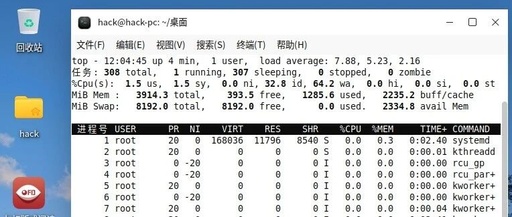
In-Depth Analysis of the top Command: A Powerful Tool for Linux System Monitoring and Performance Analysis

In-Depth Analysis of <span>top</span> Command: A Powerful Tool for Linux System Monitoring and Performance Analysis In the daily operation and maintenance of Linux and Unix-like operating systems, understanding the system’s operational status and mastering resource usage is key to ensuring stable and efficient services. For system administrators, operations engineers, and even developers, there is one … Read more
Linux Top Command Usage Tutorial and Tips

Linux Top Command Usage Tutorial and Tips 1. Basic Usage Starting top # Start directly top # Set refresh interval (seconds) top -d 2 # Show only processes of a specific user top -u username # Hide idle processes on startup top -i 2. Overview of the Top Interface top – 10:30:00 up 10 days, … Read more

Detailed Explanation of the Linux Top Command

(Pretending to pull up the terminal by tapping the spacebar twice) As a Linux operator or developer, you have certainly encountered the existential question, “The system is lagging, who is consuming resources?” — at this moment, there is no need to panic; just type top, and the characters that pop up on the screen are … Read more

Filtering and Sorting with the Linux Top Command

Filtering and Sorting with the Linux Top Command

top is a command in Linux used to view current processes, CPU, memory, and other information. 1. Filter by User <span>top</span> and then press <span>u</span> to enter the username you want to view. 2. Filter by Command <span>top</span> and then press <span>o</span> to enter <span>COMMAND=xxx</span>, which will only display the xxx program. <span>top</span> and then … Read more

Filtering and Sorting with the Linux Top Command (Concise Version)

Filtering and Sorting with the Linux Top Command (Concise Version)

The top command in Linux is used to view current processes, CPU, memory, and other information. 1. Filter by user <span>top</span> and then press <span>u</span>, and enter the username you want to view. 2. Filter by command <span>top</span> and then press <span>o</span>, enter <span>COMMAND=xxx</span> to display only the xxx program. <span>top</span> and then press <span>o</span>, … Read more

A Deep Dive Guide to the Linux Performance Monitoring Tool: top Command

A Deep Dive Guide to the Linux Performance Monitoring Tool: top Command

<span>top</span> is one of the most frequently used commands by operations engineers. It acts like an electrocardiogram for the system, allowing you to grasp the overall health of the machine within seconds. Today, we will thoroughly dissect this “classic tool that has stood the test of time”. 1. Applicable Scenarios: When to Use top? • … Read more

In-Depth Analysis of PR and NI in Linux Top Command

This article is an original work by Teacher Liu from Yunbei Education. Please respect intellectual property rights. When forwarding, please indicate the source. No plagiarism, adaptation, or unauthorized reproduction is allowed. In the Linux system, the top command is an important tool for monitoring system resources and process status. In the interactive interface of top, … Read more

Daily Linux Command: Top

Daily Linux Command: Top

<span>top</span> is a commonly used command-line tool in Linux systems for dynamically monitoring system resource usage in real-time. It displays the resource usage of various processes in the system (such as CPU and memory usage) and provides some interactive operation features. 📌 Basic Syntax top After running, you will see an interface similar to the … Read more

Basic Knowledge of Linux System: Detailed Explanation of the top Command

Basic Knowledge of Linux System: Detailed Explanation of the top Command

Tip: This article shares the basic commands of the Linux system, providing a detailed explanation of the top command, including its functions, format, common options, interactive commands, and examples of the top command. 1. Overview of the top Command 1. Function ❝ The top command: displays active processes in real-time, showing the resource usage of … Read more

Linux Shell (1) – Managing Processes

Linux Shell (1) - Managing Processes

1. Exploring Processes in Linuxps Command The key to using the ps command is not to memorize all available options, but to remember the ones that are most useful to you. Most Linux system administrators will keep a set of commonly used options in mind to extract useful process information, while referring to documentation when … Read more