Have you noticed that although there is only one router at home, there are two Wi-Fi networks, one of which has the word “5G” after it?
Why does a Wi-Fi network seem to “appear” out of nowhere? What is the difference between this “5G” Wi-Fi and the other one? Which Wi-Fi should you connect to for faster speeds?
What Is the 5G After Wi-Fi?
The “5G” after Wi-Fi is not what we usually refer to as 5G.
The “5G” following Wi-Fi indicates that the Wi-Fi network operates on the 5GHz frequency band, which is a specific range of radio frequencies. Different wireless communication technologies use different frequency bands to avoid interference, while the 5G we usually talk about refers to the fifth generation of mobile communication technology on phones.
Although the two are fundamentally different, the “5G” after Wi-Fi aligns with people’s existing impression of the term 5G, which means “fast”; the high-frequency 5GHz can achieve very fast download and transmission speeds, much like a “highway”.
Currently, home Wi-Fi mainly operates on two frequency bands: one is 2.4GHz and the other is 5GHz. Even though only one router is installed, there appears to be an additional Wi-Fi network with “5G” because it uses a dual-band router that can operate simultaneously on both the 2.4GHz and 5GHz bands.
Generally, when connecting to Wi-Fi, if you see two Wi-Fi networks with the same name, the one without the “5G” label is the 2.4GHz signal, while the one with the “5G” label is the 5GHz signal.
Which Is Better: Wi-Fi Without 5G or With 5G?
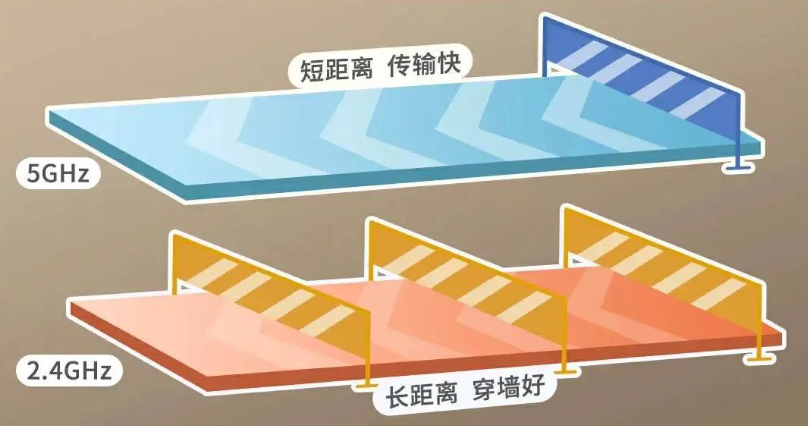
The 2.4GHz band is better at penetrating obstacles and propagating over longer distances, but its transmission speed is relatively slower than that of the 5GHz band. Moreover, since the 2.4GHz band technology is very mature and widely used, it is prone to interference from other devices.
The 5GHz band has a shorter wavelength, weakens quickly, has poor obstacle penetration, and covers a smaller distance compared to the 2.4GHz signal, but it offers faster transmission speeds.
Therefore, if there are obstacles between your phone and the router, and the distance is considerable, you should choose the 2.4GHz Wi-Fi; if there are no obstacles between your phone and the router and the distance is short, connecting to the 5GHz Wi-Fi is a better choice.
Image Source: Official WeChat Account of China Telecom
How to Properly Use 2.4GHz Wi-Fi and 5GHz Wi-Fi?
Devices at home that need to be placed in corners but do not require high-speed internet, such as air conditioners, water heaters, surveillance cameras, and robotic vacuum cleaners, can connect to the 2.4GHz Wi-Fi;
Computers, smartphones, and other devices that require high-speed internet and are used on the move can switch between different frequency bands depending on the situation. For high-demand scenarios like gaming, live streaming, ticket grabbing, or red packet grabbing, using the 5GHz band Wi-Fi will enhance the experience.
The drawbacks of the 5GHz signal can be addressed by adjusting the 5GHz frequency parameters:
Log into the management interface and set the channel for the 5GHz Wi-Fi to a lower number, such as 36-64, to improve the signal coverage.
Most new routers have built-in 5G functionality. If the 5G frequency Wi-Fi signal does not appear in the network list, you can connect your mobile device to the router’s Wi-Fi network, open a browser, and enter the router’s IP address (usually found on the label on the back of the router, such as 192.168.1.1 or 192.168.0.1), then input the username and password (also found on the label) to log into the router management interface. In the “Wireless Network Settings”, select and enable the 5G frequency, set the network name and password, and restart the router to activate it.
However, if you are using older devices, such as those prior to the sixth generation router (i.e., “Wi-Fi 6”), you may need to upgrade or replace them.
Source: “People’s Daily” Client, The Paper
Click the card below to follow Jinan Promotion
Welcome to Submit Articles