Using Dialog in Qt. Dialogs are an essential part of GUI applications, used for brief interactions with users, such as confirming actions, inputting information, and displaying progress.
1. Basic Concept of Dialogs
In Qt, a Dialog is essentially a special window that inherits from <span><span>QDialog</span></span>. <span><span>QDialog</span></span> itself is a subclass of <span><span>QWidget</span></span>, so it possesses all the characteristics of a Widget and adds some functionalities specifically designed for dialogs.
-
Modal and Non-Modal: This is the most important distinction of dialogs.
-
Modal Dialogs: Block input to their parent window and other related windows. Users must complete their interaction with the dialog and close it before returning to the main window. For example, the “Open File” dialog.
-
Non-Modal Dialogs: Allow users to switch between the dialog and other windows of the application simultaneously. For example, the “Find and Replace” dialog.
-
Return Value: Dialogs are typically executed using the
<span><span>exec()</span></span>function, which returns an integer value (such as<span><span>QDialog::Accepted</span></span>or<span><span>QDialog::Rejected</span></span>) to indicate how the user closed it (for example, by clicking “OK” or “Cancel”).
2. Types of Dialogs
Qt provides a series of commonly used standard dialogs, such as <span><span>QMessageBox</span></span> (message box), <span><span>QFileDialog</span></span> (file dialog), <span><span>QColorDialog</span></span> (color selection dialog), <span><span>QFontDialog</span></span> (font selection dialog), and custom dialogs. This article uses the traditional default dialog and also customizes a dialog; let’s first look at the effect: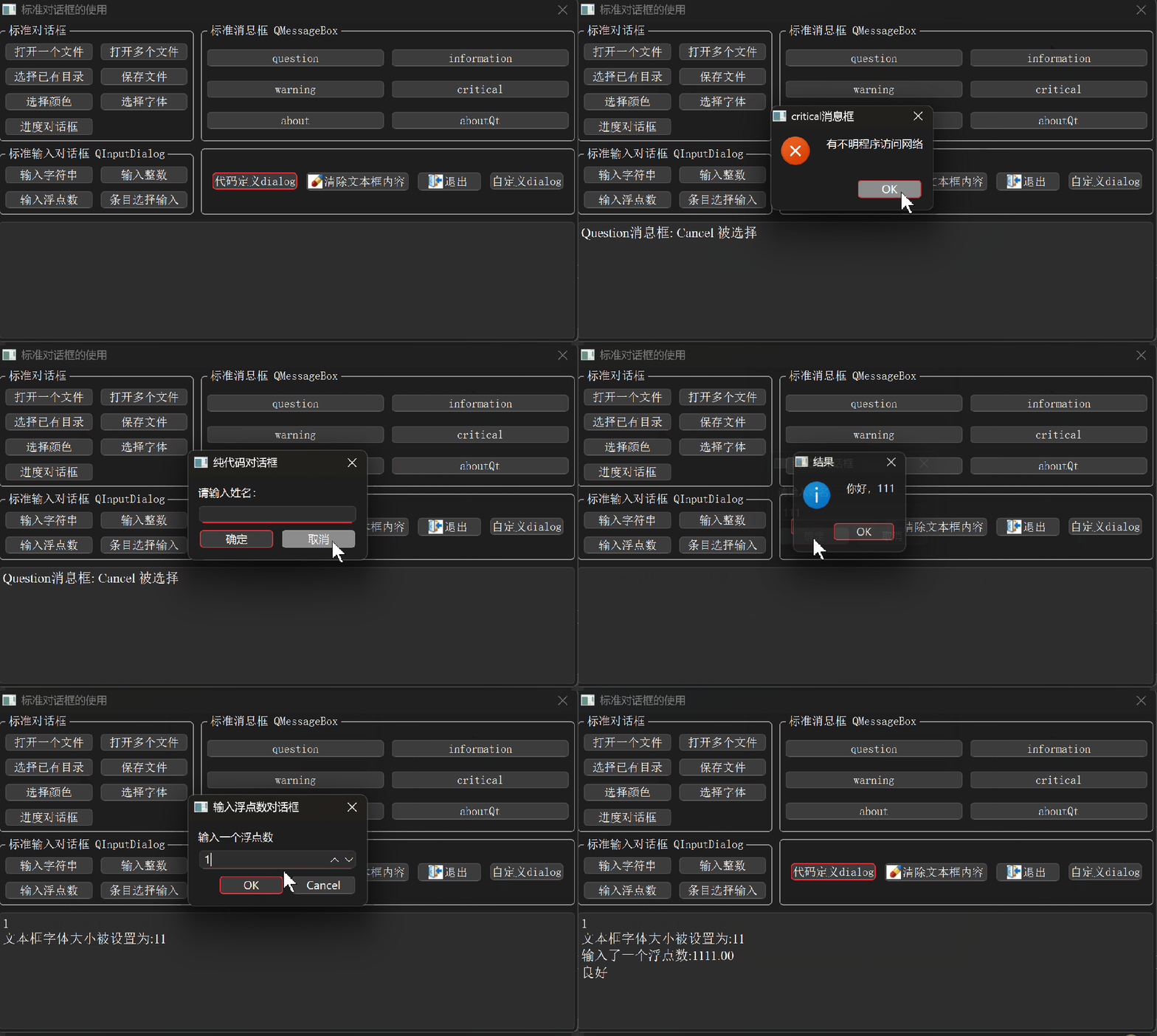 The code for the custom dialog is as follows: mydialog.h
#ifndef MYDIALOG2_H#define MYDIALOG2_H
#include <QDialog>
namespace Ui {class MyDialog2;}
class MyDialog2 : public QDialog{    Q_OBJECT
public:    explicit MyDialog2(QWidget *parent = nullptr);    ~MyDialog2();    QString getInputText() const;
private slots:    void on_buttonBox_accepted();    void on_buttonBox_rejected();private:    Ui::MyDialog2 *ui;};
#endif // MYDIALOG2_H
mydialog.cpp
#include "mydialog2.h"
#include "ui_mydialog2.h"
MyDialog2::MyDialog2(QWidget *parent)    : QDialog(parent)    , ui(new Ui::MyDialog2){    ui->setupUi(this); // Set up UI}
MyDialog2::~MyDialog2(){    delete ui;}
QString MyDialog2::getInputText() const{    return "=====I am mydialog";//ui->lineEdit->text(); // Return the input text}
void MyDialog2::on_buttonBox_accepted(){    accept(); // Clicked the OK button of the dialog}
void MyDialog2::on_buttonBox_rejected(){    reject(); // Clicked the Cancel button of the dialog}
<span>mydialog.ui</span>
<?xml version="1.0" encoding="UTF-8"?><ui version="4.0"> <class>MyDialog2</class> <widget class="QDialog" name="MyDialog2"> <property name="geometry"> <rect> <x>0</x> <y>0</y> <width>240</width> <height>320</height> </rect> </property> <property name="windowTitle"> <string>Dialog</string> </property> <widget class="QDialogButtonBox" name="buttonBox"> <property name="geometry"> <rect> <x>150</x> <y>10</y> <width>81</width> <height>301</height> </rect> </property> <property name="orientation"> <enum>Qt::Orientation::Vertical</enum> </property> <property name="standardButtons"> <set>QDialogButtonBox::StandardButton::Cancel|QDialogButtonBox::StandardButton::Ok</set> </property> </widget> </widget> <resources/> <connections> <connection> <sender>buttonBox</sender> <signal>accepted()</signal> <receiver>MyDialog2</receiver> <slot>accept()</slot> <hints> <hint type="sourcelabel"> <x>248</x> <y>254</y> </hint> <hint type="destinationlabel"> <x>157</x> <y>274</y> </hint> </hints> </connection> <connection> <sender>buttonBox</sender> <signal>rejected()</signal> <receiver>MyDialog2</receiver> <slot>reject()</slot> <hints> <hint type="sourcelabel"> <x>316</x> <y>260</y> </hint> <hint type="destinationlabel"> <x>286</x> <y>274</y> </hint> </hints> </connection> </connections></ui>
The effect: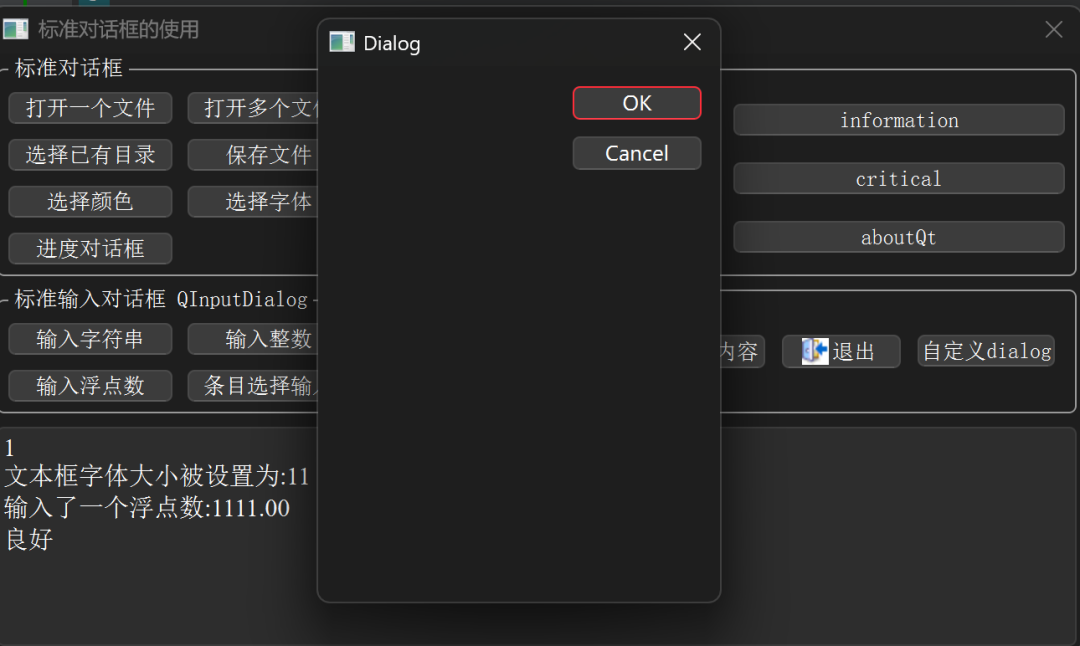 The function code for the dialog implemented purely in code:
void Dialog::on_customDialog_clicked(){ QDialog dialog(this); dialog.setWindowTitle("Pure Code Dialog"); QVBoxLayout *mainLayout = new QVBoxLayout(&dialog); QLabel *label = new QLabel("Please enter your name:", &dialog); QLineEdit *lineEdit = new QLineEdit(&dialog); QHBoxLayout *buttonLayout = new QHBoxLayout(); QPushButton *okButton = new QPushButton("OK", &dialog); QPushButton *cancelButton = new QPushButton("Cancel", &dialog); buttonLayout->addWidget(okButton); buttonLayout->addWidget(cancelButton); mainLayout->addWidget(label); mainLayout->addWidget(lineEdit); mainLayout->addLayout(buttonLayout); // Connect signals and slots QObject::connect(okButton, &QPushButton::clicked, &dialog, &QDialog::accept); QObject::connect(cancelButton, &QPushButton::clicked, &dialog, &QDialog::reject); // Show as a modal dialog if (dialog.exec() == QDialog::Accepted) { QString name = lineEdit->text(); QMessageBox::information(this, "Result", "Hello, " + name); }}
The effect is as follows: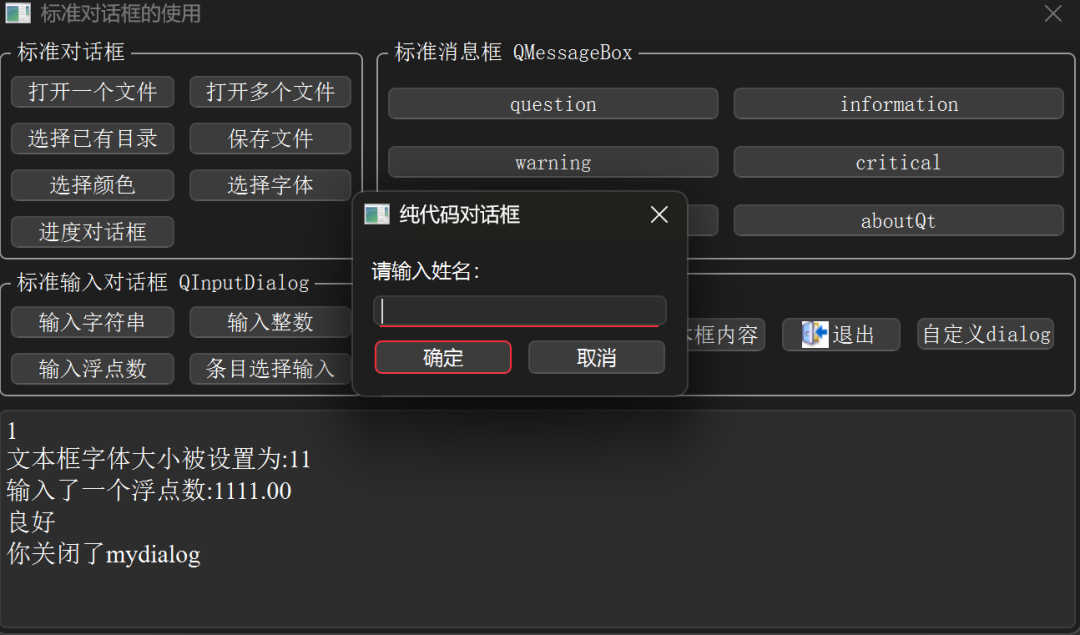 The dialog for floating point input:
void Dialog::on_btnInputFloat_clicked(){ // Input floating point number QString dlgTitle="Input Floating Point Number Dialog"; QString txtLabel="Enter a floating point number"; float defaultValue=3.13; float minValue=0, maxValue=10000; // Range int decimals=2; // Decimal places bool ok=false; float inputValue = QInputDialog::getDouble(this, dlgTitle,txtLabel, defaultValue, minValue,maxValue,decimals,&ok); if (ok) // Confirm selection { QString str=QString::asprintf("Input a floating point number:%.2f",inputValue); ui->plainTextEdit->appendPlainText(str); }}
The effect is as follows: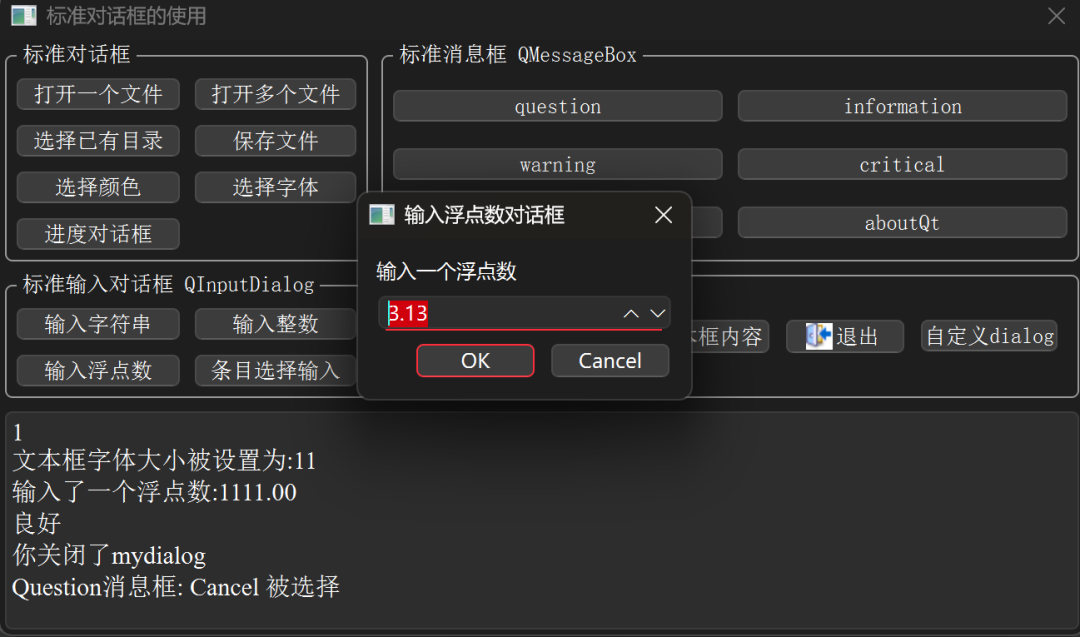 The code for the question dialog:
void Dialog::on_btnMsgQuestion_clicked(){ QString dlgTitle="Question Message Box"; QString strInfo="The file has been modified, do you want to save the changes?"; QMessageBox::StandardButton defaultBtn=QMessageBox::NoButton; // Default button QMessageBox::StandardButton result;// Return selected button result=QMessageBox::question(this, dlgTitle, strInfo, QMessageBox::Yes|QMessageBox::No |QMessageBox::Cancel, defaultBtn); if (result==QMessageBox::Yes) ui->plainTextEdit->appendPlainText("Question Message Box: Yes selected"); else if(result==QMessageBox::No) ui->plainTextEdit->appendPlainText("Question Message Box: No selected"); else if(result==QMessageBox::Cancel) ui->plainTextEdit->appendPlainText("Question Message Box: Cancel selected"); else ui->plainTextEdit->appendPlainText("Question Message Box: No selection");}
<span> The effect is as follows:</span>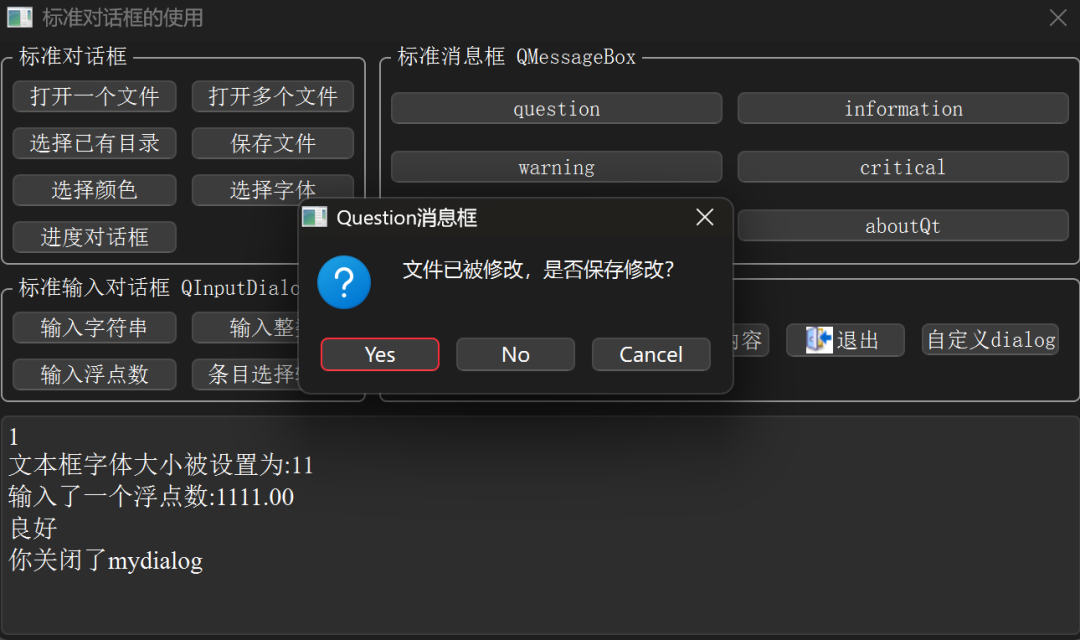 There are too many codes; here are just some code snippets. Other codes are in the repository:https://gitee.com/codeceo_net/qttest/tree/dialog/
Conclusion:
-
Simple Interactions: Prefer using
<span><span>QMessageBox</span></span>and other standard dialogs. -
Complex Interactions: Use Qt Designer to create custom dialogs, which is the most mainstream and efficient way.
-
Dynamic/Simple Interfaces: Consider creating them with pure code.
-
Modal Dialogs use
<span><span>exec()</span></span>, suitable for scenarios requiring immediate user response. -
Non-Modal Dialogs use
<span><span>show()</span></span>, and pay attention to their lifecycle management (usually created with<span><span>new</span></span>and specifying a parent object).
I hope this detailed explanation helps you master the use of Qt Dialogs!
▼Follow me for more basic programming knowledge ▼

👆🏻👆🏻👆🏻Scan to follow👆🏻👆🏻👆🏻
▼Click “ ” to like, it motivates me to keep updating ▼
Blog address: codeceo.net