Introduction
PLC programming and debugging is a critical and complex task. It acts as the “brain” of the entire automation system; any issues can directly affect the normal operation of the production line.
As the core control device, the programming and debugging process of PLCs is often filled with challenges. Below, we will delve into the common issues encountered during PLC programming and debugging, along with corresponding solutions.

1. Logical Errors: The “Maze” of Program Execution
Logical errors are one of the most common issues in PLC programming and debugging. They are like a hidden maze within the program, potentially leading to output results that are vastly different from expectations or failing to trigger the required operations altogether.
The causes of this issue are varied; it may stem from incomplete considerations during the design of the logic circuit, akin to a flawed blueprint when building a house; it could also be due to incorrect conditional judgments, similar to choosing the wrong direction at a fork in the road; or it may arise from unreasonable program flow arrangements, leading to chaotic program execution.
For example, in an automated packaging production line, the packaging machine should be triggered to start when the product quantity reaches a certain value, but due to a logical error, products may pile up while the packaging machine remains inactive.
To avoid logical errors, programmers need to conduct in-depth analysis and design of the control logic before writing the program, creating detailed flowcharts, and maintaining a clear thought process throughout the writing process, rigorously deducing logic at each step. After completing the program, multiple simulation tests should be conducted to verify that the output meets expectations under various input conditions.

2. Communication Issues: The “Stumbling Block” of Data Transmission
Communication between PLCs and external devices is a crucial aspect of industrial automation control, but communication issues often become the “stumbling block” of data transmission. Incorrect communication protocol settings are like two people trying to communicate in different languages, unable to understand each other; communication line faults are akin to a roadblock, preventing data from passing normally; and incorrect device configurations are like mismatched keys and locks, unable to open the door to communication.
For instance, in a remote monitoring system, the PLC needs to transmit production data to the monitoring center, but due to inconsistent communication protocol settings, the monitoring center cannot receive accurate data, preventing management from timely grasping production conditions.
To resolve communication issues, first ensure the correct settings of the communication protocol by carefully reading the relevant device manuals and configuring them as required. Secondly, regularly check the connections of communication lines for firmness and any signs of damage or aging. For device configurations, strict audits and tests should be conducted to ensure they meet the PLC’s communication requirements.

3. Sensor Failures: The “Source of Signal Distortion” for Input
Sensors are important input devices in PLC systems, acting as the “eyes” and “ears” of the PLC, responsible for collecting external information. However, if a sensor fails or is improperly connected, it may prevent the PLC from accurately obtaining input signals, leading to deviations in control logic. Causes of sensor failures may include aging or damage from long-term use, improper installation locations, or environmental factors.
For example, in a temperature control system, if the temperature sensor fails and transmits incorrect temperature signals to the PLC, the PLC may control based on this erroneous signal, potentially resulting in excessively high or low production environment temperatures, affecting product quality.
To avoid the impact of sensor failures, regular calibration and maintenance of sensors are necessary to ensure measurement accuracy. When installing sensors, strict adherence to installation requirements is essential, selecting appropriate installation locations to avoid external interference. Additionally, check the sensor connection lines for firmness, ensuring there are no loose connections or short circuits.

4. Output Issues: The “Hurdle” to Executing Control
Output module failures or incorrect output line connections are common output issues in PLC programming and debugging. They act as a “hurdle” to executing control commands, potentially preventing the PLC from properly controlling actuators or causing unstable output signals. Output module failures may arise from component damage, overheating, etc., while output line connection issues may stem from loose connections or poor contact.
For example, in a motor control system, the PLC issues a command to start the motor, but due to an output module failure, the motor fails to start. To resolve output issues, regular checks and tests of the output module are necessary to promptly identify and replace damaged components.
For output lines, ensure firm connections and check the insulation performance of the lines to avoid issues like leakage. Additionally, protective devices such as fuses and relays can be installed on output lines to protect the output module and actuators.

5. Program Debugging Issues: The “Double-Edged Sword” of Optimization
During debugging, modifying and optimizing the program is essential, but this can also be a “double-edged sword,” potentially introducing new issues such as modified logical errors or deadlocks.
When modifying a program, it is possible to disrupt existing logical relationships due to incomplete considerations, leading to new logical errors. A deadlock refers to a situation where the program becomes trapped in an infinite loop during execution, unable to terminate normally.
For example, in a complex control program, to optimize the execution efficiency of a certain function, the logical structure of the program was adjusted without fully considering the logical relationships of other related parts, resulting in overall logical confusion.
To avoid program debugging issues, modifications should be made cautiously, with only small adjustments at a time, followed by thorough testing after each change. Debugging tools can be used for step-by-step debugging to observe the execution process and promptly identify and resolve issues. Additionally, backing up the program is essential to restore to a previous version in case of problems.

6. Power Supply Issues: The “Hidden Danger” of System Operation
The PLC system requires a stable and reliable power supply, just as humans need a stable food supply. If the power supply voltage is unstable or the power supply lines have poor contact, it may prevent the PLC from functioning properly or cause failures. Unstable power supply voltage can damage internal components of the PLC, while poor contact in power supply lines may lead to frequent reboots or crashes of the PLC.
For example, in a factory, due to an unstable power supply system, frequent voltage fluctuations can lead to PLC system failures, affecting production progress.
To resolve power supply issues, equip the PLC system with stable power supply devices, such as UPS (Uninterruptible Power Supply), to ensure that the PLC system can operate normally during power interruptions or voltage fluctuations. Additionally, regularly check the connections of power supply lines to ensure they are secure and free from looseness or oxidation.

7. Hardware Failures: The “Potential Threat” to System Stability
Hardware components of the PLC, such as the CPU and input/output modules, may fail, for instance, due to chip damage or interface failures. These hardware failures pose a “potential threat” to system stability, potentially leading to serious issues in the PLC system at any time. Causes of hardware failures may include natural wear from long-term use, environmental factors (such as high temperatures, humidity, dust, etc.), and electrical shocks.
For example, in a harsh industrial environment, prolonged exposure to high temperatures, humidity, and dust may damage the CPU chip and cause interface failures in input/output modules, preventing the PLC system from operating normally.
To prevent hardware failures, provide a good operating environment for the PLC system, such as installing air conditioning and dehumidifiers to control temperature and humidity, and regularly clean the dust from the surface of the PLC equipment. Additionally, choose reliable hardware components and conduct regular inspections and maintenance to promptly identify and replace potentially faulty parts.
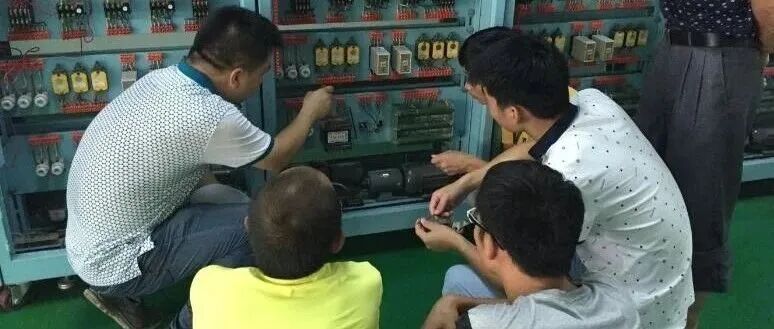
8. Programming Errors: The “Minor Flaws” in Code Writing
During programming, issues such as syntax errors, variable naming errors, and data type errors may occur. Although these errors may seem like “minor flaws,” they can prevent the program from compiling or running correctly.
Syntax errors are like typos and grammatical mistakes in writing, causing the program to be unrecognizable to the compiler; variable naming errors and data type errors may lead to logical confusion during program execution.
For example, while writing a PLC program, a programmer may inadvertently define a variable’s data type incorrectly, leading to erroneous results during calculations involving that variable.
To avoid programming errors, programmers should familiarize themselves with the syntax rules of the PLC programming language, be meticulous when writing programs, ensure reasonable naming for each variable, and maintain consistency in data types.
After completing the program, use the compilation feature of programming software to identify and correct syntax errors promptly. Additionally, conduct multiple tests to verify the correctness of the program.
Various issues may arise during PLC programming and debugging, but by thoroughly understanding the causes of these problems and implementing appropriate solutions, we can effectively avoid and resolve these issues, ensuring the stable operation of the PLC system.
PLC debugging is a technical activity that closely integrates theory and practice. Excellent automation engineers not only need solid programming skills but also systematic problem analysis abilities.
We welcome everyone to leave comments and engage in discussions!
