In the field of embedded application development, OpenCV has become the preferred tool for developers handling computer vision tasks due to its rich functionality. Buildroot provides a convenient embedded system build environment, with the default integrated version of OpenCV being 4.5.4. However, in practical applications, different projects often have specific requirements regarding functionality and performance, and developers may need to use other versions of OpenCV, necessitating a replacement of Buildroot’s default configuration. Additionally, to meet more complex scenario requirements and expand functionality, adding the contrib module of OpenCV has also become a common task. The following will detail the implementation of this process.
Scenario 1: Configuring the Default OpenCV Version in Buildroot
The default version of OpenCV in the Buildroot source code is 4.5.4.
1. Since the Linux 5.10.209 system does not compile Buildroot by default, you first need to compile Buildroot on a virtual machine. For the method, refer to the attached “ELF 2 Development Board Compilation Manual”.
2. The default configuration version of OpenCV in the Buildroot system with the Linux 5.10.209 kernel version is 4.5.4.
elf@ubuntu:~/work/ELF2-linux-source$ ./build.sh bconfigThe path is as follows:
-> Target packages -> Libraries -> Graphics -> opencv4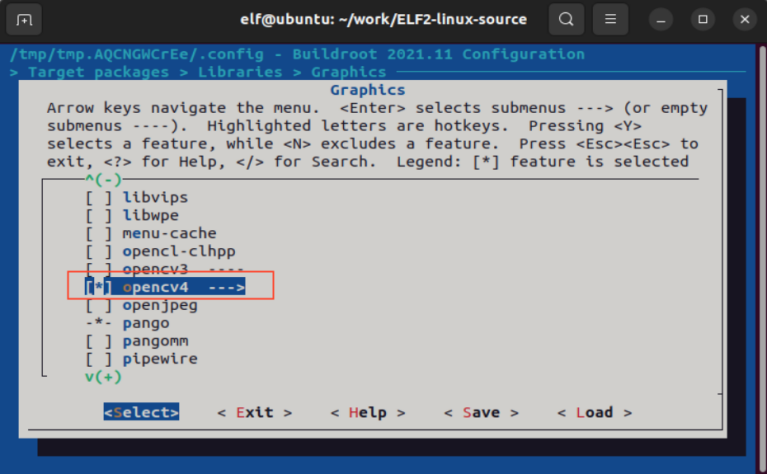
Press the “Enter” key to enter OpenCV4 for selection, as shown in the figure below (make sure to select the same as the red box):
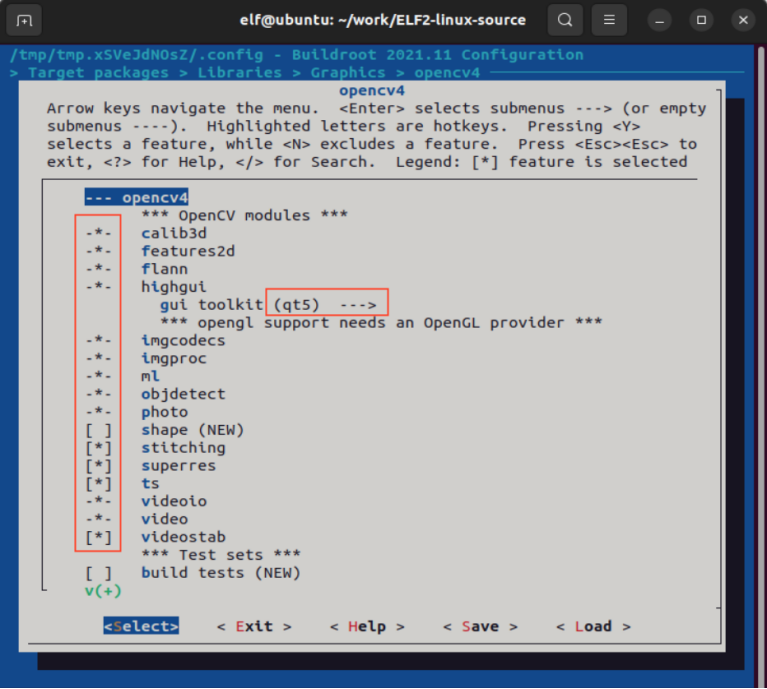
After modification, save and exit.
3. Compile Buildroot.
elf@ubuntu:~/work/ELF2-linux-source$ ./build.sh rootfsIn the following directories, there will be an include directory and a lib directory, where the compiled OpenCV library header files and library files will be placed.
ELF2-linux-source/buildroot/output/elf2_fs/host/aarch64-buildroot-linux-gnu/sysroot/usr/
In the include directory, you can find the OpenCV4 directory, and in the lib directory, you can find all OpenCV library files starting with libopencv_*, indicating that you have added OpenCV to the Buildroot system.
Scenario 2: Changing the OpenCV Version in Buildroot
Refer to Scenario 1, simply complete the OpenCV configuration addition in Buildroot without executing the file system compilation.
1. Install the sha checksum tool on the virtual machine.
sudo apt-get install hashalot2. To change the version, you need to delete the patch files in the following directory:
ELF2-linux-source/buildroot/package/opencv4/
elf@ubuntu:~/work/ELF2-linux-source$ rm buildroot/package/opencv4/0001-modules-videoio-src-cap_ffmpeg_impl.hpp-fix-build-wi.patch3. Modify the following file. Change the version to 4.10.0 and add OpenCL support.
ELF2-linux-source/buildroot/package/opencv4/opencv4.mk
# Change the version, then modify the compilation options for different versions#OPENCV4_VERSION = 4.5.4OPENCV4_VERSION = 4.10.0OPENCV4_SITE = $(call github,opencv,opencv,$(OPENCV4_VERSION))OPENCV4_INSTALL_STAGING = YESOPENCV4_LICENSE = Apache-2.0OPENCV4_LICENSE_FILES = LICENSEOPENCV4_CPE_ID_VENDOR = opencvOPENCV4_CPE_ID_PRODUCT = opencvOPENCV4_SUPPORTS_IN_SOURCE_BUILD = NO# Disabled features (mostly because they are not available in Buildroot), but# - eigen: OpenCV does not use it, not take any benefit from it.OPENCV4_CONF_OPTS += \ -DWITH_1394=OFF \ -DWITH_CLP=OFF \ -DWITH_EIGEN=OFF \ -DWITH_GDAL=OFF \ -DWITH_GPHOTO2=OFF \ -DWITH_GSTREAMER_0_10=OFF \ -DWITH_LAPACK=OFF \ -DWITH_MATLAB=OFF \ # -DWITH_OPENCL=OFF -DWITH_OPENCL=ON \ # Add OpenCL support -DWITH_OPENCL_SVM=OFF \ -DWITH_OPENEXR=OFF \ -DWITH_OPENNI2=OFF \ -DWITH_OPENNI=OFF \ -DWITH_UNICAP=OFF \ -DWITH_VA=OFF \ -DWITH_VA_INTEL=OFF \ -DWITH_VTK=OFF \ -DWITH_XINE=OFF4. Compile Buildroot.
After modification, execute the command to compile Buildroot, which will automatically download the OpenCV 4.10.0 compressed package to the following directory.
ELF2-linux-source/buildroot/output/elf2_fs/build/
elf@ubuntu:~/work/ELF2-linux-source$ ./build.sh rootfsIn the following directories, there will be an include directory and a lib directory, where the compiled OpenCV library header files and library files will be placed.
ELF2-linux-source/buildroot/output/elf2_fs/host/aarch64-buildroot-linux-gnu/sysroot/usr/
Scenario 3: Adding OpenCV Third-Party Library contrib
OpenCV’s functionality in visual algorithms is very powerful, one reason being that the algorithm library continuously updates with the latest algorithms. For patented algorithms (such as SURF) and some algorithms that are not yet stable, OpenCV places them in extension modules, which are included in the opencv_contrib codebase.
For this third-party library, choose to compile manually, without using Buildroot for construction.
1. First, confirm that the OpenCV4 folder is installed in the following path:
OpenCV4, ELF2-linux-source/buildroot/output/elf2_fs/build/
2. Unzip the attached OpenCV4-contrib-4.5.5 compressed package to the following directory:
ELF2-linux-source/buildroot/output/elf2_fs/build/
Source:
https://github.com/opencv/opencv_contrib is the git repository for contrib.
3. Configure the cmake tool.
sudo apt-get install cmake Since Buildroot does not help us configure the cross-compiler, we need to configure it ourselves.
Go to the following path and modify the aarch64-gnu.toolchain.cmake file. Replace the path of GNU_MACHINE with the path of the cross-compiler that comes with the Buildroot system + prefix.
ELF2-linux-source/buildroot/output/elf2_fs/build/opencv4-4.10.0/platforms/linux/
set(CMAKE_SYSTEM_PROCESSOR aarch64)set(GCC_COMPILER_VERSION "" CACHE STRING "GCC Compiler version")set(GNU_MACHINE "/home/elf/work/ELF2-linux-source/buildroot/output/elf2_fs/host/bin/aarch64-buildroot-linux-gnu" CACHE STRING "GNU compiler triple")include("${CMAKE_CURRENT_LIST_DIR}/arm.toolchain.cmake")4. Enter the following directory, create a folder named build and add_contrib_install, then enter build. Use the following command to compile OpenCV 4.10.0 and the contrib third-party library.
ELF2-linux-source/buildroot/output/elf2_fs/build/opencv4-4.10.0/
elf@ubuntu:~/work/ELF2-linux-source/buildroot/output/elf2_fs/build/opencv4-4.10.0$ mkdir buildelf@ubuntu:~/work/ELF2-linux-source/buildroot/output/elf2_fs/build/opencv4-4.10.0$ mkdir add_contrib_installelf@ubuntu:~/work/ELF2-linux-source/buildroot/output/elf2_fs/build/opencv4-4.10.0$ cd buildelf@ubuntu:~/work/ELF2-linux-source/buildroot/output/elf2_fs/build/opencv4-4.10.0/build$ cmake .. -D CMAKE_INSTALL_PREFIX=../add_contrib_install -DCMAKE_TOOLCHAIN_FILE=/home/elf/work/ELF2-linux-source/buildroot/output/elf2_fs/build/opencv4-4.10.0/platforms/linux/aarch64-gnu.toolchain.cmake -DOPENCV_EXTRA_MODULES_PATH=/home/elf/work/ELF2-linux-source/buildroot/output/elf2_fs/build/opencv_contrib-4.5.5/modules -DBUILD_opencv_xphoto=OFF -DBUILD_opencv_rgbd=OFF -DBUILD_opencv_ximgproc=OFF -DBUILD_opencv_xfeatures2d=OFFCMAKE_INSTALL_PREFIX: indicates the storage path for the generated bin and libs.
DCMAKE_TOOLCHAIN_FILE: indicates the path of the cmake cross-compiler.
DOPENCV_EXTRA_MODULES_PATH: indicates the path of the modules in the contrib source code.
5. Compile using make.
Execute nproc to check how many cores the virtual machine has. The return value is 4, so execute make -j4.
elf@ubuntu:~/work/ELF2-linux-source/buildroot/output/elf2_fs/build/opencv4-4.10.0/build$ nproc4elf@ubuntu:~/work/ELF2-linux-source/buildroot/output/elf2_fs/build/opencv4-4.10.0/build$ make -j46. Execute make install.
The generated bin and lib will be installed in the ../add_contrib_install directory specified by the CMAKE_INSTALL_PREFIX macro.
Copy the files from the lib and include directories in the add_contrib_install directory to the development board.
elf@ubuntu:~/work/ELF2-linux-source/buildroot/output/elf2_fs/build/opencv4-4.10.0/build$ make install