
Click the blue text to follow us
When it comes to operating systems, the first one that might come to mind is Windows—an expensive, fixed-interface system that occasionally pops up ads and gets viruses. However, today we will discuss Linux, which is practically a different “species” compared to Windows.
It is free and open-source, yet supports 70% of the servers worldwide. It is low-key and simple, yet serves as the “core engine” for companies like Google and Amazon. Even your Android phone and smart TV at home run on its “blood”.
1. The Origin of a Student’s “Small Project”
In 1991, Finnish university student Linus Torvalds posted online: “I am developing a free operating system kernel, just for personal interest, and it won’t be as large and complex as GNU…”
No one expected that this initially small project, meant only for personal computers, would evolve into a “universal system” that spans the digital world with the participation of developers globally. Its core charm lies in the open-source spirit: the source code is completely public, and anyone can use, modify, and share it for free, like an everlasting “global collaborative development party”.
2. Three Major Features of Linux
1. Free but More Reliable than Paid Options
Unlike closed-source systems that can cost thousands, Linux is completely free from the kernel to application software, yet its stability and security far exceed many paid products. Almost all top tech companies use Linux for their servers because it can run for years without shutting down or crashing, which is crucial for websites and banking systems that require 24/7 operation.
2. As Flexible as a “Transformer”
Linux does not have a fixed “look”; instead, it has hundreds of “distributions” (which can be understood as different styles of “custom versions”):
Want to be a “computer novice”? Choose Ubuntu, which has a graphical interface as simple as Windows;
Want to set up a server? Use CentOS, known for its stability and reliability;
Want to challenge technical limits? Try Arch Linux, where you build everything from the ground up.
This flexibility allows it to adapt to all devices, from smartwatches to supercomputers.
3. Built-in “Golden Shield”, Viruses Avoid It
The permission management mechanism of Linux is like a strict “access control system”; each program can only operate within its own “territory”. Even if you accidentally click on a virus link, it is difficult to compromise the entire system. This is why security-sensitive institutions like banks and governments prefer Linux.
3. Application Scenarios of Linux
Don’t think that Linux only circulates in programmers’ computers; it has already permeated all aspects of life:
Mobile Phones: The underlying system of Android is Linux, powering over 3 billion Android phones worldwide;
Internet: Google Search, Taobao shopping, WeChat chatting… over 80% of the servers behind these services use Linux;
Smart Devices: The routers, smart TVs, and even the operating system of Tesla cars at home all run on Linux;
Research: Almost all of the world’s top 500 supercomputers run on Linux, including China’s “Tianhe” and “Shenwei”.
4. Current Mainstream Linux Systems and Chinese Developed Linux Systems
Current Mainstream Linux Systems
Ubuntu: Widely used in personal desktop environments, it has a beautiful interface and is user-friendly, making it very suitable for beginners. It has a rich software ecosystem and can handle both daily office tasks and simple development work.
CentOS: Built on Red Hat Enterprise Linux (RHEL), it is known for its strong stability and is widely adopted in the server field. Many enterprises run their backend services on CentOS. However, CentOS Linux ceased maintenance at the end of 2021, and its successor versions, Rocky Linux and AlmaLinux, are gradually gaining attention.
Debian: Focused on open-source principles and system stability, it serves as the foundation for many other Linux distributions, such as Ubuntu, which is based on Debian. It has a large software repository, suitable for users with high demands for system stability and open-source purity.
Fedora: Sponsored by Red Hat, it keeps up with the latest technological trends, with rapid updates for new features. It is suitable for developers to test and experience cutting-edge technologies, but its stability is slightly inferior to that of CentOS and other distributions.
Chinese Developed Linux Systems
China Standard Kernel Operating System: Developed by China Software’s Zhongbiao Software, it integrates advanced technological achievements from both domestic and international sources, featuring high security, high reliability, and good compatibility. It is widely used in critical industries such as government, finance, and energy, providing important guarantees for national information security.
Galaxy Kylin Operating System: Developed by the National University of Defense Technology and other institutions, it is one of China’s self-controlled operating systems, excelling in security and real-time performance. It can meet daily office needs and is also applicable in military and aerospace fields that require high system standards.
Deepin Operating System: Developed by Wuhan Deepin Technology, it features a simple and beautiful interface, focusing on user experience and good compatibility with hardware devices. It has applications in personal computers and office environments and is actively expanding into international markets.
5. Linux Certification System
For learners who want to prove their Linux skills, obtaining relevant certifications is a good choice. Here are some mainstream Linux certifications:
Red Hat Certification:
RHCSA (Red Hat Certified System Administrator): An entry-level certification that mainly assesses basic operations and management capabilities of Linux systems, including system installation, network configuration, user and file permission management, etc. It is suitable for beginners who are new to Linux system management.
RHCE (Red Hat Certified Engineer): A mid-level certification that requires mastering more complex system configurations and service management based on RHCSA, such as setting up and managing web servers, database servers, and mail servers. It is suitable for those with some Linux experience who want to work as system engineers.
RHCA (Red Hat Certified Architect): The highest level of Red Hat certification, requiring passing multiple specialized exams covering cloud computing, storage, security, etc. It aims to cultivate high-level talents capable of designing and deploying complex Linux system architectures, suitable for professionals responsible for system architecture design in enterprises.
Linux Professional Institute (LPI) Certification:
LPIC-1: An entry-level certification that assesses basic knowledge and operational skills of Linux systems, including file system management, command line operations, user and group management, etc. The certification is universal and not specific to any particular distribution.
LPIC-2: A mid-level certification that requires mastering more in-depth knowledge of system service configuration, network management, security management, etc., suitable for those looking to enhance their system management skills.
LPIC-3: An advanced certification divided into different specialized directions, such as enterprise-level Linux certification, virtualization, and cloud computing, suitable for professionals with in-depth research and practical experience in specific fields.
Ubuntu Certification:
Ubuntu Certified Professional (UCP): Launched by Canonical, focusing on the management and application of Ubuntu systems, covering installation, configuration, troubleshooting, etc. It is suitable for users and administrators primarily using Ubuntu systems.
These certifications have a certain degree of recognition in the industry. Obtaining certification not only helps systematically organize and consolidate Linux knowledge but also adds weight to personal career development. However, certification is just one proof of ability; practical experience is equally important, and it is essential to combine theory with practice during the learning process.
6. Want to Learn Linux from Scratch? This Technical Roadmap Helps You Avoid Detours
If you are interested in Linux and want to learn and master it in depth, you might consider following this roadmap for gradual progression:
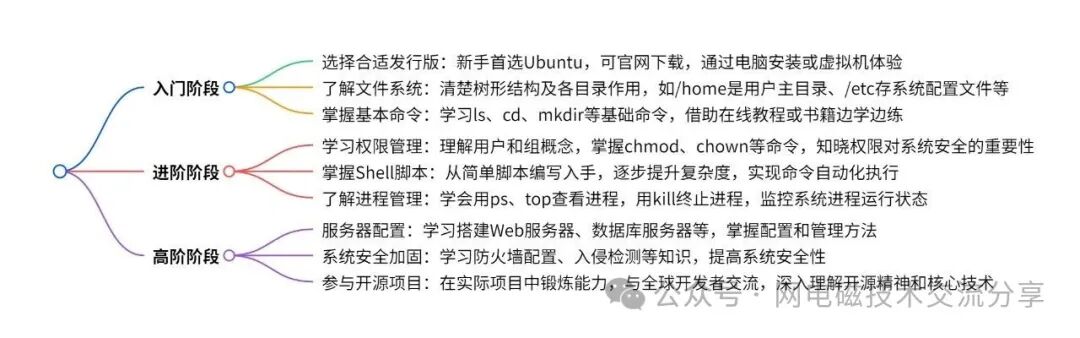
Entry Stage: Build a Solid Foundation, Familiarize Yourself with Operations
Choose the Right Distribution: For beginners, Ubuntu is the first choice due to its user-friendly interface and similarities to Windows, making it easy to get started. It can be downloaded for free from the official website and installed on your computer or experienced through a virtual machine.
Understand the File System: Get to know the tree structure of Linux file systems and the functions of different directories, such as /home for user home directories and /etc for system configuration files.
Master Basic Commands: Basic commands like ls (list files), cd (change directory), mkdir (create folder), cp (copy files), mv (move or rename files) are key to getting started. You can learn and practice through online tutorials or related books to deepen your memory.
Advanced Stage: Delve into the System, Enhance Skills
Learn Permission Management: Understand the concepts of users and groups in Linux, master commands like chmod (change file permissions), chown (change file owner), and realize the importance of permissions for system security.
Master Shell Scripting: Shell scripts can automate command execution, improving work efficiency. Start with simple script writing, such as batch file creation and automatic data backup, gradually increasing the complexity of the scripts.
Understand Process Management: Learn to view processes (using ps, top commands), terminate processes (using kill command), and know how to monitor the running status of system processes.
High-Level Stage: Specialized Breakthroughs, Practical Applications
Server Configuration: If you want to work in server-related jobs, you can learn to set up web servers (like Nginx, Apache), database servers (like MySQL), and master server configuration and management methods.
System Security Hardening: Learn firewall configuration (like iptables), intrusion detection, and other knowledge to enhance the security of Linux systems and prevent network attacks.
Participate in Open Source Projects: Try to participate in some Linux-related open-source projects to hone your skills in real projects, while also communicating and learning with developers worldwide, deeply understanding the open-source spirit and core technologies of Linux.


Forge ahead
Strive
Progress
Advance