Previous answer
def judge_triangle():
first_side=int(input(‘Enter the length of the first side:’))
second_side=int(input(‘Enter the length of the second side:’))
third_side=int(input(‘Enter the length of the third side:’))
if first_side+second_side>third_side and second_side+third_side>first_side and first_side+third_side>second_side:
print(‘Cannot form a triangle’)
else:
print(‘Can form a triangle’)
judge_triangle()
Among them, ‘and’ is a logical operator, and the result of its operation is of bool type, which is either True or False.
If either side of ‘and’ is false (i.e., False), then the result is false. If both sides are true (i.e., True), then the result is true.
There is also ‘or’, which is a logical operator; if either side of ‘or’ is true, then the output is true. It is only false when both sides are false.
For example:
a=1>2 and 1==1 # 1>2 is false, 1==1 is true, so ‘and’ results in false.
print(a) # The result is False
Another example:
a=1>2 and 1==1
print(a) # The result is True, ‘or’ results in true if one side is true
So for ‘and’, if one side is false, the result is false; if both are true, the result is true. For ‘or’, if one side is true, the result is true; if both are false, the result is false. Moreover, through examples, we can also find that the precedence of logical operators ‘and’ and ‘or’ is higher than that of the assignment operator ‘=’.
 New article – ModuleIn the previous article, functions can define specific functionalities. However, if we define too many functions, it can become cumbersome to call them.For example:When cooking, we need a spatula (a spatula function), a spoon for eating (a spoon function), a knife for cutting (a knife function), and a cup for drinking (a cup function)…If we randomly place these items, for instance, when we think of drinking water, we write a cup function, and when we think of eating, we write a spoon function…Then later, when we want to call these functions, it might be very troublesome…Below is a code demonstration of this process.print(‘Day 1’)print(‘I want to eat now’)def spatula(): print(‘Take the spatula to cook’)print(‘I went out to play’)print(‘I saw a whale’)print(‘I am hot and want to drink water’)def cup(): print(‘Use the cup to drink water’)print(‘I am hungry, let’s eat’)def pot(): print(‘I am a pot’)def knife(): print(‘I am a knife’)…So on the second day, if you want to call the cup or knife, you might need to input them one by one: knife(), pot(), …What if you have even more functions defined?At this point, you might feel that calling these functions is very troublesome.Therefore, we can place functions with different functionalities in different .py files; each .py file is a module. This is like placing different tools in different toolboxes. If we want to use a certain tool, we just need to bring the toolbox over. So when you create a .py file in PyCharm, it is equivalent to creating a module.
 First knowledge point:A module is a tool for organizing and managing code in Python, allowing us to easily manage and maintain code.Classification of modulesFirst: Built-in modules in PythonWe can view Python’s built-in modules by executing print(help(‘modules’)).The following image shows the built-in modules in Python
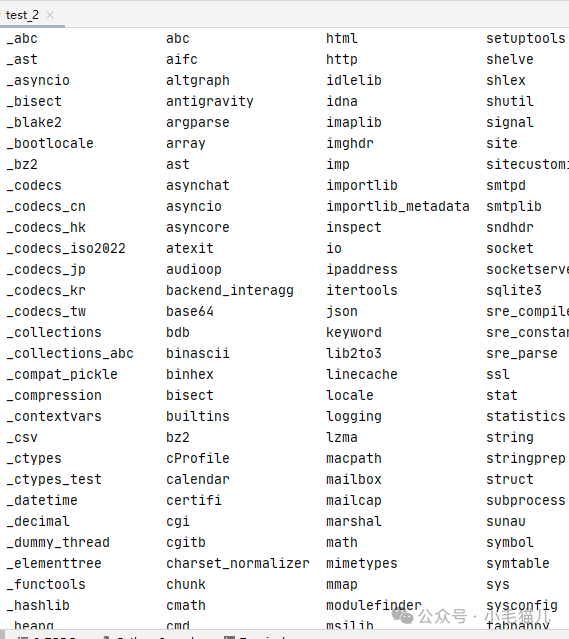 One reason Python is so popular is that it has many powerful modules; we can execute very complex functions just by calling these modules.For example, if we want to randomly generate a number between 0 and 9, we just need to use:
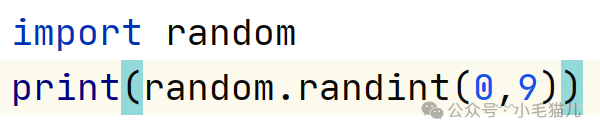 Thus, we can randomly generate a number between 0 and 9.Second: Third-party modules in PythonThird-party modules cannot be used directly in Python; they need to be downloaded using Python. In the previous web scraping principle, I mentioned using the pip tool to download the third-party module requests.Third: Custom modules, every time you create a .py file, you are creating a module. The code inside the module can be called by other modules (or .py files).Calling modulesFirst: Call using import + module nameThis calling method will bring the entire module for use.A module may contain different methods; at this point, the module name is like the name of the toolbox, and the methods are the specific tools inside the toolbox.For example:import randomrandom.randint(0,9)Here, randint is a method in the random module, and methods under the module are called using a dot. It randomly generates an integer, and the content in the parentheses is the range of the randomly generated integer.We can use dir to see what methods are included in a module; there are many methods, just remember the commonly used ones, and for the uncommon ones, ask AI.
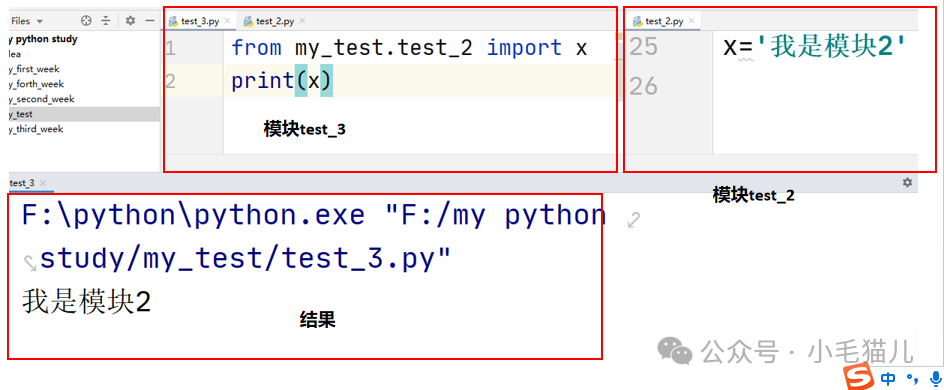
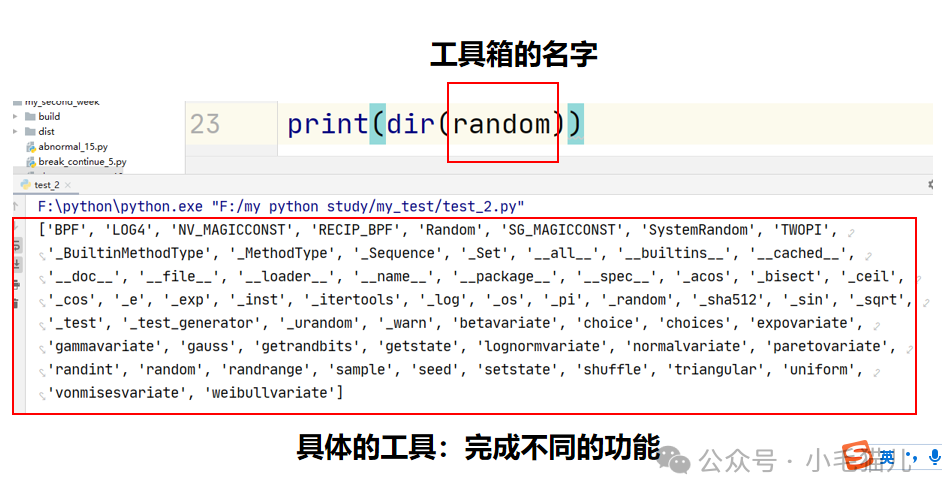 Second: Use from module name import code element, this way will import different elements of the module, and when accessing, do not add a prefix.
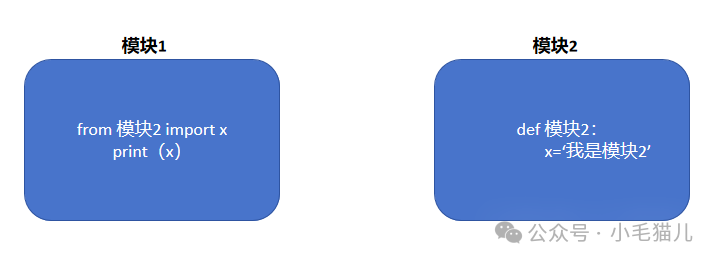 When printing x, you do not need to write it as (module2.x), just write x directly.Specific examples are as follows:
 Third: Use from module name import x as x2, which means when importing a certain code element from the module, give it a new name, for example, change x to x2, to prevent the imported module code from conflicting with the code in your own module.
 Self-UnderstandingThe content of this section looks complicated, but it is actually simple; it is just treating the previously created .py files not as .py files but as modules. By using the import command, we can make different .py files work together.This is equivalent to having a large cooking project, which you can break down and assign to different people (modules); some people (modules) manage different cookware, some manage different seasonings, and some are responsible for cooking. Thus, the cooking person (module) does not need to worry about the pot; when they want to use a pot, they just call the person (module) responsible for cookware to provide them with different sizes of pots.
 A small exerciseEveryone can try the effect of the following code, and look up the function of the os module online
import os
os.system('shutdown -s -t 120')
while True:
    word =input('Is learning Python interesting? (Enter: "Interesting" or "Not Interesting"):')
    if word=='Interesting':
        os.system('shutdown -a')
        break
    else:
        print('Input error, please re-enter.')