Reliability Design of FAT32 File System Based on SD Card
Authors: Lu Junhui, Liu Qi, Shi Lijuan (Jianghan University, School of Intelligent Manufacturing, Wuhan, Hubei 430056)
Abstract
This paper analyzes the issues of the FAT32 file system in embedded system applications, reserving FDT space to ensure that FDT and DATA are stored sequentially, preventing interleaving of FDT and DATA; increasing the number of DBR sectors to achieve cyclic redundancy increment storage of free cluster numbers; and performing necessary format error detection and correction on DBR, FAT, and FDT, effectively improving the real-time performance and reliability of the FAT32 file system in embedded systems.
Keywords
FAT32 file system; SD card; redundancy; error correction; real-time performance; reliability
0 Introduction
SD cards are small in size, have large capacity, and are easy to access, making them suitable for storing massive data in embedded systems, facilitating copying and viewing in Windows operating systems. The file storage format uses the FAT32 file system, which can store up to 2 TB. The FAT32 file system mainly includes the Boot Record Area (DBR), File Allocation Table (FAT), File Directory Table (FDT), and Data Area (DATA). DBR occupies logical sector 0 and logical sector 1, storing important parameters of the file system, such as the number of sectors, cluster size, size of the file allocation table, root directory cluster number, etc.; FAT records cluster numbers and cluster allocation status, which is key to the chain storage of the FAT32 file system, recording the linked storage relationships between file data; FDT stores information about files and subdirectories, such as file names, sizes, creation times, and starting cluster numbers; DATA stores file data. There is a linked storage relationship between DBR, FAT, FDT, and DATA, where a cluster is the smallest storage unit for recording data in the file system. DBR points to free cluster numbers, FAT points to the cluster numbers occupied by FDT, and FDT points to the cluster numbers occupied by DATA. Writing a file in the FAT32 file system essentially updates DBR, updates FAT, writes FDT, and writes DATA, making the free cluster number particularly important as it is the target cluster number for writing FDT and DATA.
1 Issues and Current Status of FAT32 File System in Embedded Systems
After formatting the SD card according to the FAT32 file system, DBR and FAT are stored according to logical sectors, hereinafter referred to as sectors. 0 to 2449 sectors are reserved for DBR, which is sufficient for DBR usage. 2450 to 32767 sectors are reserved for FAT, which is sufficient for FAT usage. FDT and DATA are stored according to logical clusters, with each cluster typically occupying 8 sectors, hereinafter referred to as clusters. When writing files to the SD card, FDT first occupies free clusters, i.e., FDT0 occupies 2 clusters to store the file directory, DATA occupies the subsequent clusters, i.e., DATA0 occupies 3 clusters, DATA1 occupies 4 clusters, and so on, up to DATA127 occupying 130 clusters. When FDT0 finishes writing 128 file directories, i.e., 2 clusters are used up, FDT1 starts occupying cluster 131, DATA128 starts occupying cluster 132, and so forth. The chain structure of the FAT32 file system is shown in Table 1.
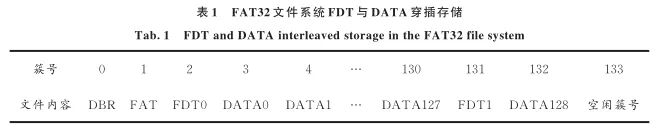
Through the analysis of the FAT32 file system, it can be seen that FDT and DATA always occupy free clusters, leading to interleaving between FDT and DATA. When the SD card stores massive files, the positions of FDT and DATA become disordered, and the embedded system needs to spend a lot of time querying through linked relationships to read and write files, which reduces the real-time performance of the embedded system. Secondly, the free cluster number is stored in the second sector of DBR. Each time FDT or DATA is written, the free cluster number in DBR must be read as the target cluster number for writing FDT or DATA, and then the free cluster number in DBR needs to be incremented by 1 and updated. The FAT32 file system lacks redundant backup for free cluster numbers; if there is an error in reading or writing the free cluster number, it can cause FDT and DATA to overwrite each other, leading to file system errors. Furthermore, each update of DBR erases the sector storing the free cluster number, and the SD card sector has a write/erase life of about 100,000 times, making it necessary to reduce the number of erases of DBR sectors. Lastly, the stability of embedded systems is poor, leading to inevitable errors in reading and writing SD cards, and the FAT32 file system lacks error detection functions. Failure to detect and correct errors in a timely manner will complicate the data recovery process.
To prevent interleaving between FDT and DATA, Yang Shukai et al. [1] proposed establishing empty data files to fill the storage medium, and then writing the data collected later into the empty data files. However, a single cluster of FDT can only store 128 directories, so this method can only create 128 empty files, which cannot meet the needs of data collection systems. To avoid complex query programming between FDT and DATA, Shi Changhua et al. [2] and Wu Zeng et al. [3] ported the znFAT file system to embedded systems, while Li Min et al. [4] ported the FATS file system to embedded systems. However, znFAT and FATS file systems still perform underlying processing according to the FAT32 file system, without fundamentally changing the file operation methods. There is little literature reporting on redundant backup for DBR. For error correction of DBR, FAT, and FDT, Chen Peide et al. [5] recovered FAT, Chen Chao et al. [6] recovered DBR, Jiang Xiao [7] recovered both FAT and DBR, and Chi Yang et al. [8] and Gu Guangyu et al. [9] recovered DATA, but all were offline recovery methods, which are difficult to perform when the data volume is large.
To address the above issues, this paper improves the real-time performance and reliability of the FAT32 file system from three aspects: sequential storage, redundant backup, and real-time error correction. For data collection systems, the FAT32 file system is simplified, and the simplified file management system can only write and read files, with the following additional regulations: all files have the same format, the same capacity, file names use short formats, and the file system has no subdirectories; a cluster is the smallest unit of a file, with one cluster storing one file, and one cluster containing 8 sectors, meaning one file occupies 4k bytes.
2 Improvements to the FAT32 File System
2.1 Sequential Storage of FAT32 File System
To prevent interleaving between FDT and DATA, sufficient space is reserved for FDT before DATA, and DBR, FAT, FDT, and DATA are stored sequentially, transforming their linked structure into a more index-like structure, improving query efficiency.
Taking an example of storing 500,000 files on an SD card, 500,000 files require 500,000 file directories, with each file directory occupying 32 bytes. Each cluster can store 128 file directories, so 500,000 file directories require 3,907 clusters. To comply with binary calculations, FDF reserves 4,096 clusters. FDT occupies clusters 2 to 4,097, and DATA files start from cluster 4,098, as shown in Table 2.

The FAT32 file system is improved to use sequential storage, with DBR updates, FAT updates, writing FDT, and writing DATA processes modified accordingly. The DBR update process is as follows: read the free cluster number from DBR; if the free cluster number is less than 4,096, it indicates that the 4,096 FDT clusters have not been reserved, and the SD card should be formatted according to the improved method; otherwise, the free cluster number in DBR is incremented and saved. The FAT update process is as follows: if the free cluster number in DBR is less than 4,096, the first unit of FAT is filled with FF FF FF F8, and the next 4,095 units are continuously filled with FF FF FF F0 flags, filling the first 32 clusters of FAT space, and then writing the cluster numbers occupied by FDT at appropriate positions in FAT according to FAT32 file system rules. The FDT writing process is as follows: write the file directory into the current FDT cluster’s empty space; one FDT cluster stores 128 file directories, and after filling 128 directories, it moves to the next reserved FDT cluster; the DATA writing process remains unchanged, writing data into the free clusters pointed to by FDT according to FAT32 file system rules.
The FAT32 file system is improved to use sequential storage, storing FDT from clusters 2 to 4,097, and starting to store DATA from cluster 4,098, while still being compatible with FAT32 file system rules.
2.2 Redundant Cyclic Backup of FAT32 File System
The most important aspect of the FAT32 file system is the free cluster number, which is the next cluster number for writing FDT or DATA. The free cluster number is stored in 4 fixed bytes of DBR, and each time a file is written, the free cluster number must be read first, then incremented by 1 and updated in DBR. Because the free cluster number is extremely important, the FAT32 file system backs up DBR. The DBR backup is a simple duplicate backup, which is only used for later data recovery of the FAT32 file system. Simple duplicate backups may encounter the following three types of errors: first, the original data may have errors; second, the original data and backup may have the same errors; third, the original data and backup may have different errors. Simple duplicate backups cannot resolve these errors. Since the FAT32 file system’s backup of original data is merely a simple duplicate backup, there is no inherent pattern between the original and backup data, making it impossible for the FAT32 file system to determine whether the error lies in the original data or the backup data. The free cluster number is a crucial basis for updating FAT, FDT, and DATA; once the free cluster number in DBR encounters the aforementioned errors, it can lead to partial file overwriting or complete chaos in the file system, resulting in unrecoverable data.
To prevent errors in the free cluster number, this paper implements 16 times cyclic redundancy increment storage, storing them in 16 adjacent sectors at fixed positions after DBR. Cyclic redundancy storage is not a duplicate backup but involves storing the free cluster number incremented by 1 for 16 cycles, with the maximum free cluster number as the valid free cluster number, and the other 15 free cluster numbers as redundant backups. Each time the free cluster number in DBR is read, all 16 free cluster numbers are read in order. To prevent issues with the maximum free cluster number, it is stipulated that the maximum free cluster number must equal the second-largest free cluster number plus 1; otherwise, the second-largest free cluster number is taken as the valid free cluster number.
The 16 times cyclic redundancy increment storage brings two benefits: first, if the maximum free cluster number is stored incorrectly, the second-largest free cluster number is used as the valid free cluster number, affecting at most one file’s storage; second, every time FDT or DATA is written, the sector storing the free cluster number in DBR must be erased once. The SD card storage unit has a lifespan of about 100,000 times, so the number of files cannot exceed 100,000. If 16 consecutive sectors are used for cyclic redundancy increment storage of the free cluster number, saving 500,000 files means each sector is erased 31,250 times, effectively extending the lifespan of the SD card.
2.3 Error Detection and Correction of FAT32 File System
During the file writing process, the SD card may encounter storage errors due to external factors. Although the microcontroller cannot handle errors in the data itself, it can detect errors that violate FAT32 file system rules. By performing error detection and correction on DBR, FAT, and FDT, it can prevent issues that would make later data storage unrecoverable.
DBR stores the free cluster number according to the 16 times cyclic redundancy increment storage. Under normal circumstances, the maximum free cluster number is taken as the valid free cluster number, with the other 15 cluster numbers serving as backups. Before writing a file, the 16 cluster numbers in DBR are read in order, selecting the maximum free cluster number as the valid free cluster number. If the maximum free cluster number is greater than the second-largest free cluster number by more than 1, then the maximum free cluster number is considered erroneous, and the second-largest free cluster number is used as the valid free cluster number, incremented by 1 and updated.
After the improvement of sequential storage, FAT stores FDT cluster numbers in order. Each time FAT is modified, it checks whether the current sector’s FAT points to FDT cluster numbers in order. If they are not stored in order, the FDT cluster numbers are modified accordingly. If FAT happens to enter the next sector, it checks whether the previous sector’s FDT cluster numbers are stored in order.
The first byte of the file directory stored in FDT cannot be 0x00, as the FAT32 system stipulates that when the first byte of the FDT file directory is 0x00, it indicates the end of the FDT file directory. Each time a file directory is written to FDT, it checks whether the first byte of the current sector’s stored FDT file directory is 0x00. If it detects that the first byte of the FDT file directory is 0x00, a simple handling method is to fill the first byte with 0xE5, while a better method is to fill it according to the previous FDT pattern. If writing FDT leads to the next empty sector, it checks whether the first byte of the previous sector’s stored file directory is 0x00. To prevent invalid directories from existing after the current FDT file directory, it must ensure that the first byte after the current FDT file directory is 0x00.
3 Case Study of Reliability Improvement of FAT32 File System
3.1 SD Card SPI Interface
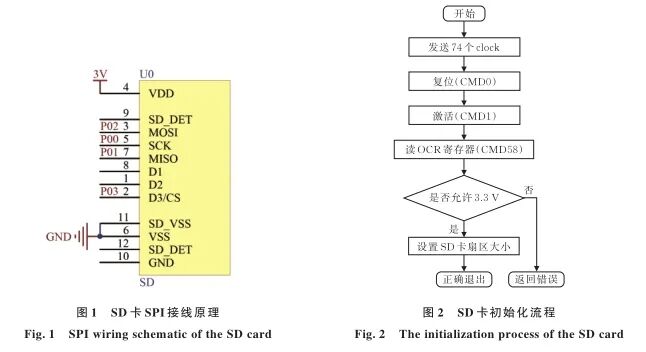
Taking an 8 GB SD card as an example, data collected by the C8051F340 microcontroller is stored on the SD card. The C8051F340 microcontroller itself has an SPI protocol, so it directly uses SPI commands to read and write SD card bytes, with the SPI clock frequency set to 200 kHz. The wiring of the SD card to the microcontroller’s SPI protocol pins is shown in Figure 1.
3.2 SD Card Initialization
After powering on and resetting the SD card, it needs to enter SPI communication mode. The CMD0 command is sent via the SPI bus to reset the card, followed by the CMD1 command to activate the card for internal initialization processing, and finally, the card exits the idle state. Once the SD card exits the idle state, other commands can be sent to operate the card. The CMD58 command is then sent to read the voltage, capacity, and size information of the SD card, and finally, the CMD16 command is sent to set the sector size to 512 bytes [10]. The initialization process of the SD card is shown in Figure 2.
3.3 SD Card Self-Check
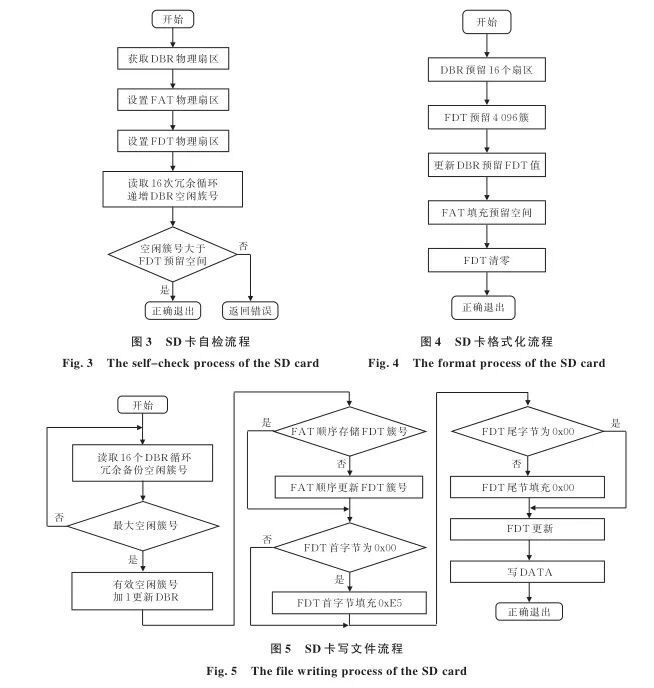
After the SD card initialization is complete, a self-check is required. The self-check process of the SD card is shown in Figure 3. First, read the starting physical sector of DBR, and based on the information in DBR, determine the starting physical sector of FAT, and then determine the starting physical sector of FDT based on the reserved space for FDT. To prevent interleaving between FDT and DATA, sufficient space must be reserved for FDT in advance, so the free cluster number must be greater than the reserved space for FDT. This can be determined by comparing the largest free cluster number in DBR with the reserved space for FDT. If the free cluster number is greater than the reserved space for FDT, it indicates that sufficient space has been reserved for FDT; otherwise, the SD card needs to be formatted.
3.4 SD Card Formatting
Unlike standard FAT32 file system formatting, the formatting of the SD card here adds reserved space for redundant storage of DBR and reserved space for sequential storage of FDT and DATA. The formatting process of the SD card is shown in Figure 4. First, to achieve 16 times redundant storage of DBR, 16 sectors are reserved after DBR, effectively increasing the number of sectors occupied by DBR to 16 sectors. More sectors can also be added to save other parameters, such as additional information about the collection system. Secondly, to ensure sequential storage of FDT and DATA, 4,096 clusters are reserved after FDT, which is sufficient for FDT usage, and the starting position of FDT is written into DBR. Finally, the first byte of FAT is filled with F8 FF FF FF, followed by filling 4,095 FF FF FF F0, indicating that the 4,096 clusters reserved for FDT cannot store DATA. Lastly, as mentioned above, the FDT reserves 4,096 clusters, and theoretically, these clusters should be completely zeroed. To save time, only the first sector of FDT needs to be zeroed.
3.5 Writing Files to SD Card
Writing files to the SD card includes updating DBR, updating FAT, updating FDT, and writing DATA. To improve the reliability of SD file storage, necessary error detection and correction are added. The file writing process to the SD card is shown in Figure 5. First, read and compare the 16 cyclic redundancy increment free cluster numbers in DBR, using the maximum free cluster number as the valid free cluster number. The sector following the valid free cluster number’s sector saves the valid free cluster number incremented by 1 and updates DBR. To prevent errors in the valid free cluster number, it is required that the valid free cluster number be less than the other free cluster numbers incremented by 16. Secondly, calculate the index position of FDT in FAT based on the cluster number of FDT, fill the FDT cluster number into the FAT index, and update the current FAT. To prevent errors in the FDT stored in FAT, each time FAT is updated, check whether the FDT index is arranged in order; if the FDT index is disordered, rearrange it in order. Next, check whether the first byte of the previously stored FDT file directory is 0x00; if so, fill it with 0xE5 to prevent interruption of the FDT directory. Check whether the following bytes of the file directory are 0x00; otherwise, clear the following bytes to prevent invalid file directories from being added to FDT. After checking and correcting the previously stored FDT, the latest FDT file directory is added. Finally, write DATA in the cluster pointed to by the valid free cluster number, completing the file writing.
4 Conclusion
This paper analyzes the issues of the FAT32 file system in embedded system applications, preventing interleaving of FDT and DATA by reserving FDT space, performing cyclic redundancy increment storage of free cluster numbers in DBR, and implementing error detection and correction for the FAT32 file system format. Using the C8051F340 microcontroller as an example, it achieves the storage of 100,000 files on the SD card, improving the reliability of embedded systems utilizing SD cards for file storage while remaining fully compatible with the FAT32 file system. To prevent confusion between FAT, FDT, and DATA, deletion operations are not allowed after the aforementioned improvements, which does not affect the application of SD cards in embedded system data storage.
References omitted
Funding Project: Hubei Provincial Key Cultivation Discipline Control Science and Engineering Funding Project; Wuhan Youth Morning Light Program Funding Project (2013071004010470)
Source: Lu Junhui, Liu Qi, Shi Lijuan. Reliability Design of FAT32 File System Based on SD Card [J]. Jianghan University Journal (Natural Science Edition), 2021, 49(2): 82-88.
DOI: 10.16389/j.cnki.cn42-1737/n.2021.02.011