A Python library is a collection of pre-written functions, classes, and modules that can be directly referenced in our programs, thus avoiding the need to reinvent the wheel and greatly improving development efficiency.
Python libraries are divided into two categories:
1. Standard Libraries
These are included with Python, such as math, datetime, random, turtle, etc.
2. Third-Party Libraries
These need to be installed using pip, such as numpy, pandas, matplotlib, etc.
◆ ◆ ◆Methods for Importing Python Libraries
To use a library, you must import its functionality using the “import” operation. Python provides various flexible import methods.
Method One:
import <library_name>
This is the most basic import method, directly importing the entire module, and subsequently using the library name as a prefix to access its functions or classes.
import math
r = 5
area = math.pi * math.pow(r, 2)
print("The area of the circle is:", area)
Note:
1. Use the library_name.member_name method to access module functionality.
2. This method is clear and standard, suitable for referencing the entire module.
Method Two:
import <library_name> as <alias>
This assigns a short alias to the module, commonly used when the module name is long or called frequently.
import turtle as t
t.circle(100)       # Draw a circle with a radius of 100
t.done()
Note:
1. Common aliases include: numpy as np, pandas as pd, turtle as t.
2. This improves code readability and ease of input.
3. Recommended for use in graphical or data analysis applications.
Method Three:
from <library_name> import <member_name>
This imports only a specific function, class, or variable from the module, allowing you to omit the module prefix.
from random import randint
print("Your lucky number is:", randint(1, 100))
Note:
1. This method is suitable when only one or two functions from the module are needed.
2. Be cautious of naming conflicts: local variables may override imported functions with the same name.
Method Four:
from <library_name> import <member_name> as <alias>
This imports a specific member from the module and assigns it an alias to avoid naming conflicts.
from datetime import datetime as dt
now = dt.now()
print("Current time:", now.strftime("%Y-%m-%d %H:%M:%S"))
Note:
1. Commonly used for renaming datetime, path, Counter, etc.
2. Helps maintain clarity in the namespace.
Method Five:
from <library_name> import *
This imports all publicly accessible members from the module at once, without needing the module prefix.
from math import *
print("sin(90°) =", sin(radians(90)))
print("π =", pi)
Note:
1. Although this method is convenient, it can lead to naming pollution.
2. Not recommended for large projects; suitable for teaching or interactive experiments.
Method Six: Dynamic Module Import
__import__(library_name)
or
importlib.import_module(library_name)
This dynamically loads a module at runtime, suitable for plugin systems, reflective calls, and other advanced scenarios.
module_name = "json"
json = __import__(module_name)
data = {"name": "Alice", "age": 20}
print(json.dumps(data, indent=2))
Note:
1. Dynamic loading allows for variable module names.
2. importlib.import_module() is the more modern approach (recommended).
import importlib
# Dynamically import the math module
math_module = importlib.import_module('math')
# Use the sqrt() function from the math module to calculate the square root
result = math_module.sqrt(25)
print("The square root of 25 is:", result)
◆ ◆ ◆Summary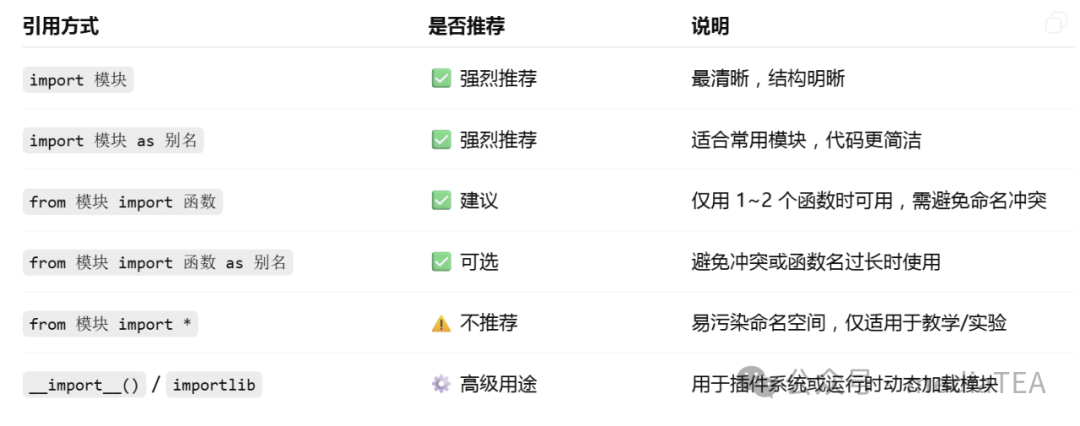
 “Likes are meaningful, appreciation is encouragement”