This is the official API documentation for speech recognition in Baidu API.https://cloud.baidu.com/doc/SPEECH/s/JlbxdezufUnlike text recognition, which provides test code directly, speech recognition does not offer such straightforward access; instead, it provides descriptions of the interfaces, parameter explanations, and so on.In the Online Debugging & Sample Code section of the document, there is code available on GitHub:https://github.com/Baidu-AIP/speech-demoOf course, accessing GitHub can be quite slow, and sometimes it may not connect at all. Here is the core code for everyone:
# coding=utf-8
import sys
import json
# Check if the current Python version is 3.x
IS_PY3 = sys.version_info.major == 3
# Import the corresponding network request module based on Python version
if IS_PY3:
    from urllib.request import urlopen
    from urllib.request import Request
    from urllib.error import URLError
    from urllib.parse import urlencode
    from urllib.parse import quote_plus
else:
    import urllib2
    from urllib import quote_plus
    from urllib2 import urlopen
    from urllib2 import Request
    from urllib2 import URLError
    from urllib import urlencode
# Baidu API key (replace with your own key)
API_KEY = '4E1BG9lTnlSeIf1NQxxxxxx'
SECRET_KEY = '544ca4657ba8002e3dea3ac2f5xxxxxx'
# The text content to be synthesized into speech
TEXT = "欢迎使用百度语音合成。"
# Speaker selection parameters
# Basic voice library: 0 for Du Xiaomei, 1 for Du Xiaoyu, 3 for Du Xiaoyao, 4 for Du Yaya
# Premium voice library: 5 for Du Xiaojiao, 103 for Du Miduo, 106 for Du Bowen, 110 for Du Xiaotong, 111 for Du Xiaomeng, default is Du Xiaomei
PER = 4
# Speech rate control, range 0-15, default is 5 (medium speed)
SPD = 5
# Pitch control, range 0-15, default is 5 (medium pitch)
PIT = 5
# Volume control, range 0-9, default is 5 (medium volume)
VOL = 5
# Output audio format selection
# 3: mp3 (default) 4: pcm-16k 5: pcm-8k 6: wav
AUE = 3
# Map the corresponding file format suffix based on AUE parameter
FORMATS = {3: "mp3", 4: "pcm", 5: "pcm", 6: "wav"}
FORMAT = FORMATS[AUE]
# Unique device identifier, can be filled in arbitrarily
CUID = "123456PYTHON"
# URL for Baidu Speech Synthesis API
TTS_URL = 'http://tsn.baidu.com/text2audio'
# Custom exception class for handling errors in the demo program
class DemoError(Exception):
    pass
"""  TOKEN acquisition section starts """
# URL for obtaining access token
TOKEN_URL = 'http://aip.baidubce.com/oauth/2.0/token'
# Permission scope, audio_tts_post indicates speech synthesis capability
SCOPE = 'audio_tts_post'
def fetch_token():
    """Get the access token for Baidu API"""
    print("Starting to obtain access token...")
    # Build parameters for obtaining the token
    params = {
        'grant_type': 'client_credentials',  # Authorization type, fixed as client_credentials
        'client_id': API_KEY,                # Application API Key
        'client_secret': SECRET_KEY          # Application Secret Key
    }
    # Encode parameters as URL query string
    post_data = urlencode(params)
    # Handle encoding based on Python version
    if IS_PY3:
        post_data = post_data.encode('utf-8')
    # Send request to obtain token
    req = Request(TOKEN_URL, post_data)
    try:
        # Set timeout to 5 seconds
        f = urlopen(req, timeout=5)
        result_str = f.read()
    except URLError as err:
        print('HTTP error code while obtaining token: ' + str(err.code))
        result_str = err.read()
    # Decode response result
    if IS_PY3:
        result_str = result_str.decode()
    print("Token response result:", result_str)
    # Parse JSON response
    result = json.loads(result_str)
    print("Parsed token information:", result)
    # Verify if the response contains a valid access token and permission
    if ('access_token' in result.keys() and 'scope' in result.keys()):
        if not SCOPE in result['scope'].split(' '):
            raise DemoError('Incorrect permission, no speech synthesis capability')
        print(f'Successfully obtained token: {result["access_token"]} ; Validity (seconds): {result["expires_in"]}')
        return result['access_token']
    else:
        raise DemoError('API_KEY or SECRET_KEY may be incorrect: access_token or scope not found in token response')
"""  TOKEN acquisition section ends """
if __name__ == '__main__':
    # Obtain access token
    token = fetch_token()
    # URL encode the text (needs to be encoded twice)
    tex = quote_plus(TEXT)
    print("Encoded text:", tex)
    # Build parameters for speech synthesis
    params = {
        'tok': token,    # Access token
        'tex': tex,      # URL encoded text
        'per': PER,      # Speaker selection
        'spd': SPD,      # Speech rate
        'pit': PIT,      # Pitch
        'vol': VOL,      # Volume
        'aue': AUE,      # Audio format
        'cuid': CUID,    # Device identifier
        'lan': 'zh',     # Language, fixed as zh
        'ctp': 1         # Client type, fixed as 1
    }
    # Encode parameters as URL query string
    data = urlencode(params)
    print('You can test in the browser: ' + TTS_URL + '?' + data)
    # Send speech synthesis request
    req = Request(TTS_URL, data.encode('utf-8'))
    has_error = False  # Error flag
    try:
        # Send request and get response
        f = urlopen(req)
        result_str = f.read()
        # Handle response headers
        headers = dict((name.lower(), value) for name, value in f.headers.items())
        # Check if the response is of audio type
        has_error = ('content-type' not in headers.keys() or headers['content-type'].find('audio/') < 0)
    except URLError as err:
        print('Speech synthesis HTTP error code: ' + str(err.code))
        result_str = err.read()
        has_error = True
    # Determine the filename to save, save as error.txt in case of error, otherwise save according to format
    save_file = "error.txt" if has_error else 'result.' + FORMAT
    # Save result to file
    with open(save_file, 'wb') as of:
        of.write(result_str)
    # If an error occurred, print the error message
    if has_error:
        if IS_PY3:
            result_str = str(result_str, 'utf-8')
        print("Speech synthesis API error message:" + result_str)
    print("Result saved as: " + save_file)
<span>Note that both API_KEY and</span><span>SECRET_KEY need to be obtained from the application list in the Baidu AI Open Platform, specifically refer to Python Black Technology - General Text Recognition (Standard Version). Note that our previous articles created applications for text recognition, so you need to first select "Speech Technology" in the console.</span>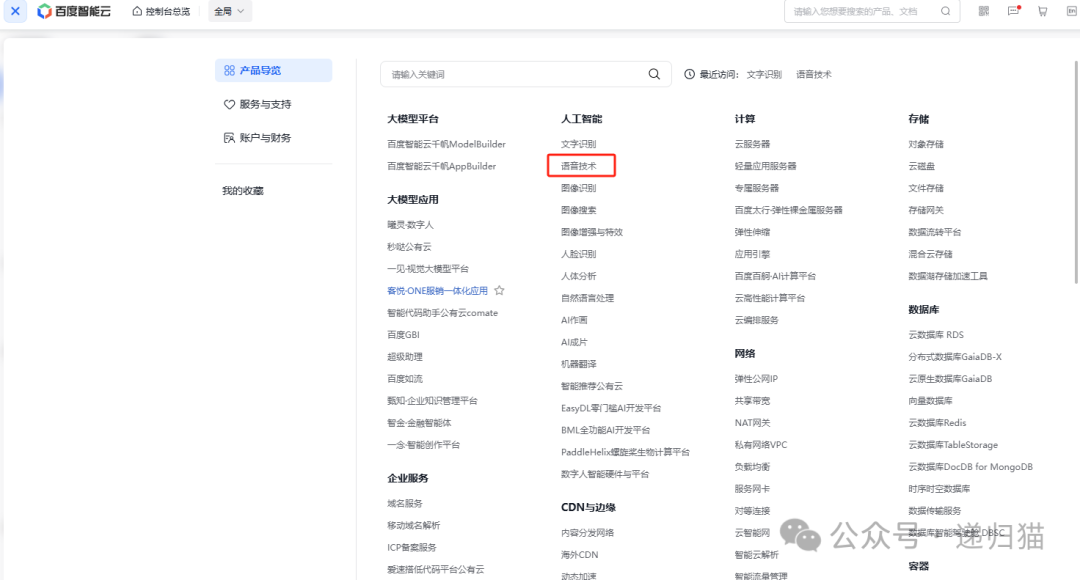 Then go to the “Application List” in Speech Recognition to create an applicationand copy the API_KEY and
<span>SECRET_KEY into the code for replacement.</span>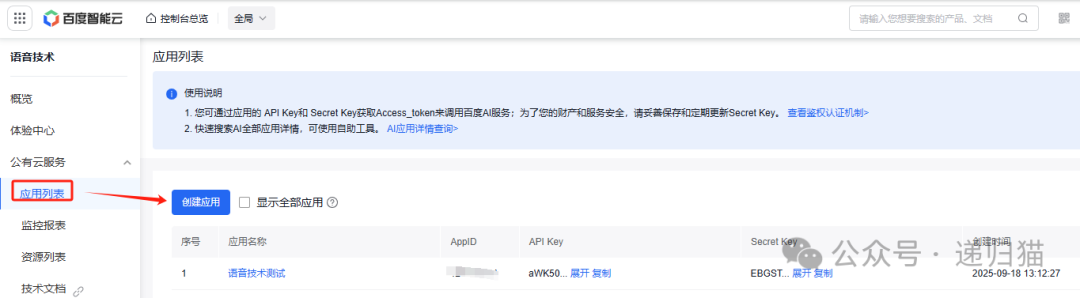
In the Baidu Speech Synthesis API calling code, there are multiple parameters that can be modified according to needs to adjust the synthesized speech effect. The following are the main modifiable parameters and their explanations:
1. Core Speech Parameters
-
<span>TEXT</span>: The text content to be converted to speech - Example:
<span>TEXT = "This is a test speech"</span> - Note: There is a limit on text length (usually no more than 1024 characters)
-
<span>PER</span>: Speaker selection - Basic voice library: 0 (Du Xiaomei), 1 (Du Xiaoyu), 3 (Du Xiaoyao), 4 (Du Yaya)
- Premium voice library: 5 (Du Xiaojiao), 103 (Du Miduo), 106 (Du Bowen), 110 (Du Xiaotong), 111 (Du Xiaomeng)
- Example:
<span>PER = 5</span>(using the voice of Du Xiaojiao) -
<span>SPD</span>: Speech rate control - Range: 0-15 (the larger the value, the faster the speech)
- Default value: 5 (medium speed)
- Example:
<span>SPD = 8</span>(faster speech) -
<span>PIT</span>: Pitch control - Range: 0-15 (the larger the value, the higher the pitch)
- Default value: 5 (medium pitch)
- Example:
<span>PIT = 3</span>(lower pitch) -
<span>VOL</span>: Volume control - Range: 0-9 (the larger the value, the louder the volume)
- Default value: 5 (medium volume)
- Example:
<span>VOL = 7</span>(louder volume) -
<span>AUE</span>: Audio format selection - 3: mp3 format (default)
- 4: pcm-16k format
- 5: pcm-8k format
- 6: wav format
- Example:
<span>AUE = 6</span>(output wav format)
2. Other Modifiable Parameters
-
<span>CUID</span>: Unique device identifier - Customizable string used to distinguish different devices
- Example:
<span>CUID = "my_python_tts"</span> -
<span>API_KEY</span>and<span>SECRET_KEY</span>: Keys from Baidu Developer Platform - Must be replaced with valid keys from your account to function properly
- Can be obtained from the Baidu AI Open Platform console
Modification Example
If you need to generate a faster, louder female voice (Du Xiaojiao) mp3 speech, you can modify it like this:
TEXT = "Welcome to use Baidu Speech Synthesis API, this is a faster female voice example"
PER = 5       # Du Xiaojiao
SPD = 10      # Faster speech
VOL = 8       # Louder volume
AUE = 3       # mp3 format
After modifying the parameters, running the program will generate a speech file that meets the new parameter settings. Adjusting these parameters according to actual needs can yield synthesized speech with different effects. The generated speech file will be located in the project root directory as “result.mp3”.