PLC programming is one of the essential skills for automation engineers. With this skill, engineers can effectively communicate with PLCs to guide their interaction with sensors and actuators in the factory workshop. Therefore, mastering the language of PLCs and the correct way to communicate is key to achieving efficient communication.
This article will explore 5 common PLC programming mistakes and provide corresponding avoidance strategies to help you feel more confident during your next programming or troubleshooting session.
If you are a PLC programming novice and don’t know where to start, please refer to this article on how to begin learning PLC programming.
Now, let’s dive into the first common mistake that PLC programmers might make.
Mistake 1: Undefined Programming Objectives
Before writing any code, it is crucial to clearly understand the project objectives and requirements. Many PLC programmers fail to clarify the functionalities that the project should achieve at the beginning of programming, which often leads to errors and wasted time. They may also overlook critical requirements, resulting in costly modifications or subsequent downtime.
How to Avoid
Before starting PLC programming, it is essential to define the specific objectives of the project. You can also refer to the Functional Design Specification (FDS), which details the expected behavior of the process. This will provide you with a clear blueprint of what the code should accomplish and help you break the project down into smaller, more manageable tasks, making the programming process smoother.
Mistake 2: Poor Naming and Lack of Comments
Another common mistake made by PLC programmers is not paying attention to the naming of variables and functions, and not adding any comments. In such cases, understanding the PLC program becomes exceptionally difficult, especially when you or other team members need to troubleshoot or update the code in the future. Without proper naming and comments, understanding the logic behind the code becomes extremely challenging.
How to Avoid
·Use appropriate naming: Define clear and meaningful names for variables and functions.
·Add comments: Provide clear and understandable comments for variables and complex parts of the code, accurately explaining their role in the program. This helps everyone understand the functionality of each part of the code.
For example, refer to the following PLC program. As you can see, we have added variables to distinguish between hardware inputs (in), hardware outputs (ou), and local variables (var).
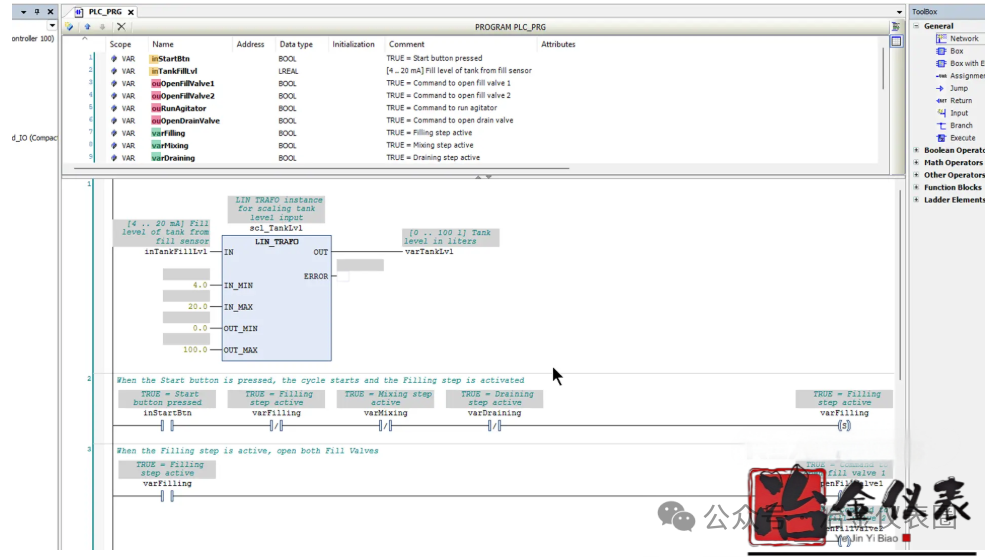
Additionally, you will find that we have added easy-to-understand comments for the variables and rungs of the PLC program.
By the way, the above PLC program is written in CODESYS. We explain how this program works in the article “Ladder Logic Best Practices.” If you want to learn more about CODESYS programming, you can check out our course “CODESYS 1: Introduction to PLC Programming.”
If you want your PLC program to be easy to understand and allow others to troubleshoot and update smoothly, then using appropriate naming and comments is essential.
Some people deliberately avoid adding proper naming and comments to ensure they are the only ones in the factory who understand how the PLC program works. However, they do not realize that this will harm their careers in the long run. For example, if they leave the factory one day and others need to troubleshoot or update the PLC program, it will be a huge challenge. Guess what? Everyone will know who wrote that messy PLC program. Don’t be that person.
Mistake 3: Overly Complex Logic
When the logic is overly complex, the PLC program can become chaotic. Some PLC programmers try to achieve perfect code by adding unnecessary conditions or functionalities, while others write the entire program in one block. In such cases, different parts of the program may contain duplicate code.
This not only slows down the system but also makes the code difficult to troubleshoot and increases the risk of PLC programming errors.
How to Avoid
·Write clear and concise logic: Break tasks down into smaller parts to help program step by step and avoid complex programs.
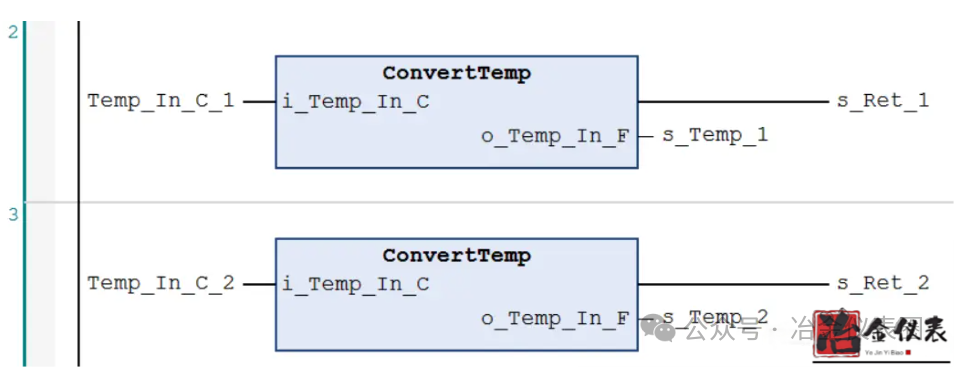
·Use modular code: To improve readability, you can use Functions and Function Blocks. This makes the code reusable and avoids duplication in programming. For example, suppose you are developing a PLC program for an industrial process, and as part of the code, you need to convert temperature values from Celsius to Fahrenheit multiple times. To do this, as you can see in the following PLC program, you can write a function that handles this conversion. Then, whenever you need to perform such conversions in different parts of the PLC program, you can easily call this function.
If you want to learn how to use Functions and Function Blocks in your PLC program, please check out our course “Learn how to Use FCs and FBs for Programming Siemens PLC.”
·Regularly review code: To avoid overly complex PLC programs, you should regularly review the code and remove any redundant code or overly complex conditions.
Mistake 4: Ignoring Proper Testing and Simulation
One of the most costly mistakes in PLC programming is skipping simulation testing and relying solely on physical testing. Testing is crucial to ensure that the code operates as expected under all conditions. After programming is complete, and even at each stage of programming, it is best to test the logic in a simulation environment using a simulator.
How to Avoid
Most PLC programming software comes with a simulation environment that you can use to test PLC programs. For example, if you are programming a Siemens S7 PLC using TIA Portal, you can use PLCSIM as a simple and effective simulator to test your code.
You can also use more general 3D simulators (like Factory I/O) to test programs in a virtual environment.
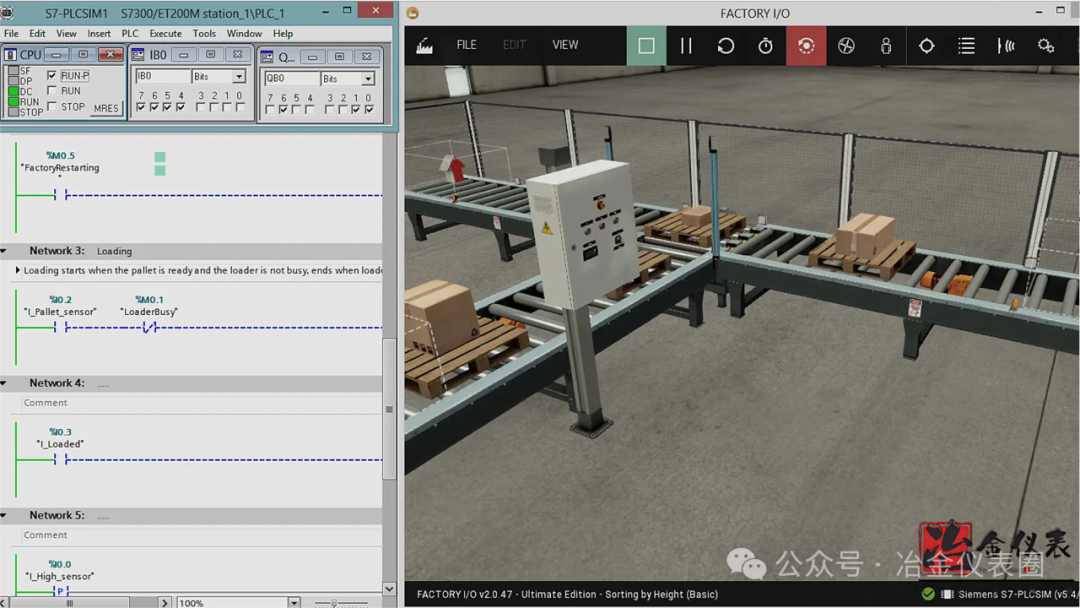
Note that using 3D simulators like Factory I/O is best suited for small PLC programs with digital inputs and outputs. If you are dealing with a PLC program that has hundreds or thousands of inputs and outputs, most of which are analog, it is better to use the built-in simulator of the PLC you are using.
The table below will help you quickly identify popular PLC brands, their software, and corresponding simulators.
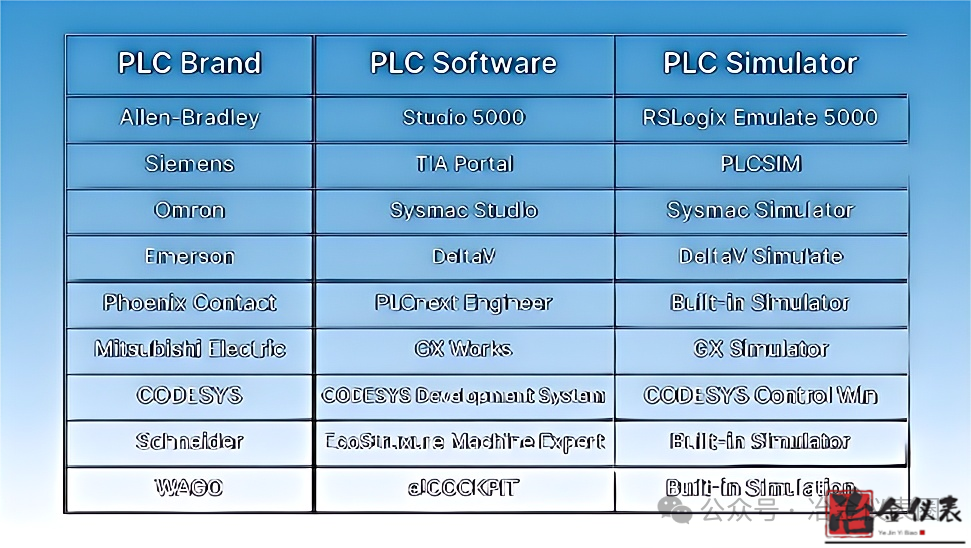
Testing PLC programs helps avoid future failures in industrial environments.
Mistake 5: Ignoring Continuous Learning
Some PLC programmers cling to outdated knowledge and do not seek self-improvement. However, the PLC programming field is continuously evolving, with PLC brands and programming software constantly releasing updates and new features. If you stop learning, you may find it difficult to adapt to modern systems. Employers also prefer programmers who keep up with industry trends. Ignoring learning may limit your opportunities to participate in exciting projects.
How to Avoid
There are numerous online courses, videos, and tutorials available to help you master the latest knowledge. In the Metallurgical Instrument Circle WeChat public account, we frequently publish new PLC programming courses, and you can stay updated by following the public account or adding the Metallurgical Instrument Circle WeChat.
To supplement your learning, you can also join WeChat study groups to stay informed about the latest PLC programming techniques. There, you can ask questions and benefit from the experiences of other PLC programmers.
Conclusion
In this blog post, you learned about some of the most common PLC programming mistakes and how to avoid them. This will help you write higher quality code and ultimately enhance your career prospects and income as an automation engineer or technician.