Scan the code to follow Chip Dynamics , and say goodbye to “chip” congestion!

 Search WeChat
 Chip Dynamics
When defining a structure while coding, you might find that it occupies more memory than the sum of its members’ sizes. For example, a struct { char a; int b; } has a char that occupies 1 byte and an int that occupies 4 bytes, yet the total size is 8 bytes? This extra “mysterious space” is due to memory alignment causing the issue! Today, we will unveil this “mystery” and thoroughly explain the principles, rules, and optimization techniques of memory alignment, helping you completely eliminate the wasteful operations of “memory waste”!
What is Memory Alignment?
1.1 “Alignment” in Daily Life
Suppose you want to send a package containing three items:
-
A coin (1cm × 1cm)
-
A mobile phone (15cm × 8cm)
-
A notebook (20cm × 15cm)
How would the courier pack it? Would they just throw everything together? Of course not! They would follow the rule of “larger items first, edge alignment,” placing the phone horizontally (15×8), the notebook vertically (15×20), and squeezing the coin into the gap between the phone and the notebook. This way, the space utilization of the package is maximized, and it won’t be damaged during transport due to items being misaligned.
The essence of memory alignment is that the compiler helps us “pack” structure data according to a set of rules of “edge alignment, no gaps”! It ensures that each member variable is “neatly arranged” in memory, avoiding access chaos caused by data being “squeezed together” and allowing the CPU to read data efficiently.
1.2 Why is Memory Alignment Necessary?
You might ask: “If the data is a bit misaligned, what’s the big deal? Why must it be ‘aligned’?”
The answer is: CPUs are very “picky”!
Modern CPUs do not read memory “one byte at a time”; instead, they read “in blocks” (for example, 4 bytes or 8 bytes at a time). If the data is not aligned according to the rules, the CPU may need to read multiple times to get the complete data, or it may even “crash” (for instance, accessing unaligned memory can trigger hardware exceptions).
For example:
Suppose you have an int variable (4 bytes), and it is placed at memory address 0x1001 (an odd address). When the CPU tries to read it, it may first read 0x1000-0x1003 (4 bytes), then discard the first byte and keep the last 4 bytes—this is clearly inefficient!
However, if the int variable is placed at 0x1000 (a multiple of 4), the CPU can directly read 0x1000-0x1003 in one go!
Structure Alignment Memory Analysis
2.1 Structure Basic Type Alignment Analysis (char, char, int)
Each member variable of a structure has its own “designated seat”: its starting address must be a multiple of its type size.
Code Example:
typedef struct{ char c1; char c2; int i;}MyStruct;Memory Distribution Analysis (Assuming the structure starts at address 0x1000, 4-byte alignment):
|
Member |
Type Size |
Starting Address Requirement |
Actual Starting Address |
Address Range Occupied |
Padding Description |
|
c1 |
1 byte |
Any (multiple of 1) |
0x1000 |
0x1000 |
No padding |
|
c2 |
1 byte |
Any (multiple of 1) |
0x1001 |
0x1001 |
2 bytes padding after c2 |
|
Padding |
2 bytes |
– |
– |
0x1002-0x1003 |
|
|
i |
4 bytes |
Must be a multiple of 4 |
0x1004 |
0x1004-0x1007 |
No padding |
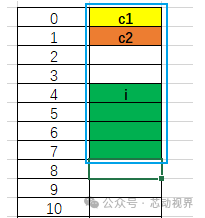
Memory Distribution Diagram:
Detailed Analysis:
Both c1 and c2 are aligned to 1 byte (alignment requirement is 1), so c2 can be stored directly next to c1 (starting address is 0x1001, satisfying the multiple of 1). However, i is of type int (occupying 4 bytes), and its alignment requirement is 4 bytes, so 2 bytes of padding are needed after c2 (address 0x1002-0x1003) to make the starting address of i 0x1004 (a multiple of 4), and then i is stored (occupying 0x1004-0x1007). The total size of the structure is 8 bytes (0x1000-0x1007), which is exactly a multiple of the maximum alignment (4 bytes) (8÷4=2).
2.2 Structure Basic Type Alignment Analysis (char, int, char)
Code Example:
typedef struct{ char c1; int i; char c2;}MyStruct;Memory Distribution Analysis (Assuming the structure starts at address 0x1000, 4-byte alignment):
|
Member |
Type Size |
Starting Address Requirement |
Actual Starting Address |
Address Range Occupied |
Padding Description |
|
c1 |
1 byte |
Any (multiple of 1) |
0x1000 |
0x1000 |
No padding (stored directly) |
|
Padding |
3 bytes |
– |
– |
0x1001-0x1003 |
|
|
i |
4 bytes |
Must be a multiple of 4 |
0x1004 |
0x1004-0x1007 |
3 bytes padding after c1 (0x1001-0x1003), making the starting address of i a multiple of 4 |
|
c2 |
1 byte |
Any (multiple of 1) |
0x1008 |
0x1008 |
No padding (stored directly after i) |
|
Padding |
3 bytes |
– |
– |
0x1009-0x100B |
The total size of the structure must be a multiple of the maximum alignment (4); currently, the total is 9 bytes (0x1000-0x1008), so 3 bytes are added to make it 12 bytes |
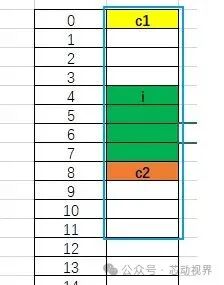
Memory Distribution Diagram:
Detailed Analysis:
c1 is of char type (1 byte alignment) and can be stored directly from the starting address (e.g., 0x1000); i is of int type (4 bytes alignment) and must have a starting address that is a multiple of 4, so 3 bytes of padding are needed after c1 (address 0x1001-0x1003), making i start at 0x1004 (occupying 0x1004-0x1007); c2 is of char type (1 byte alignment) and can be stored directly after i (address 0x1008). At this point, the total unpadded size of the structure is 9 bytes (0x1000-0x1008), but since the maximum alignment of the structure is 4 (determined by the 4-byte alignment of i), the total size must be a multiple of 4, so 3 bytes are added after c2 (address 0x1009-0x100B), resulting in a final structure size of 12 bytes.
2.3 Structure Multi-Type Continuous Alignment Analysis
Code Example:
typedef struct{ char c1; short s1; char c2; int i; char c3;}MyStruct;Memory Distribution Analysis (Assuming the structure starts at address 0x1000, 4-byte alignment):
|
Member |
Type Size |
Starting Address Requirement |
Actual Starting Address |
Address Range Occupied |
Padding Description |
|
c1 |
1 byte |
Any (multiple of 1) |
0x1000 |
0x1000 |
No padding (stored directly) |
|
Padding |
1 byte |
– |
– |
0x1001 |
|
|
s1 |
2 bytes |
Must be a multiple of 2 |
0x1002 |
0x1002-0x1003 |
1 byte padding after c1 (0x1001), making s1’s starting address a multiple of 2 |
|
c2 |
1 byte |
Any (multiple of 1) |
0x1004 |
0x1004 |
No padding (stored directly after s1) |
|
Padding |
3 bytes |
– |
– |
0x1005-0x1007 |
|
|
i |
4 bytes |
Must be a multiple of 4 |
0x1008 |
0x1008-0x100B |
3 bytes padding after c2 (0x1005-0x1007), making i’s starting address a multiple of 4 |
|
c3 |
1 byte |
Any (multiple of 1) |
0x100C |
0x100C |
No padding (stored directly after i) |
|
Padding |
3 bytes |
– |
– |
The total size of the structure must be a multiple of the maximum alignment (4); currently, the total is 13 bytes (0x1000-0x100C), so 3 bytes are added to make it 16 bytes |
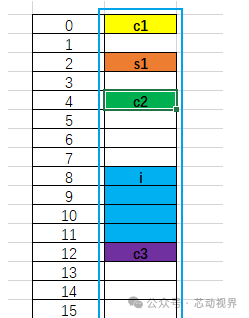
Memory Distribution Diagram:
Detailed Analysis:
c1 is of char type (1 byte alignment) and can be stored directly from the starting address (e.g., 0x1000); s1 is of short type (2 bytes alignment) and must have a starting address that is a multiple of 2, so 1 byte of padding is needed after c1 (address 0x1001), making s1 start at 0x1002 (occupying 0x1002-0x1003); c2 is of char type (1 byte alignment) and can be stored directly after s1 (address 0x1004); i is of int type (4 bytes alignment) and must have a starting address that is a multiple of 4, so 3 bytes of padding are needed after c2 (address 0x1005-0x1007), making i start at 0x1008 (occupying 0x1008-0x100B); c3 is of char type (1 byte alignment) and can be stored directly after i (address 0x100C). At this point, the total unpadded size of the structure is 13 bytes (0x1000-0x100C), but since the maximum alignment of the structure is 4 (determined by the 4-byte alignment of i), the total size must be a multiple of 4, so 3 bytes are added after c3 (address 0x100D-0x100F), resulting in a final structure size of 16 bytes.
2.4 Nested Structure Memory Alignment Analysis
Code Example:
typedef struct { double j; char c; }MyS1; typedef struct { char c1; MyS1 my_s1; short s1; int i; }MyStruct;Memory Distribution Analysis (Assuming the structure starts at address 0x1000, 4-byte alignment):
|
Member |
Type Size |
Starting Address Requirement |
Actual Starting Address |
Address Range Occupied |
Padding Description |
|
c1 |
1 byte |
Any (multiple of 1) |
0x1000 |
0x1000 |
No padding (stored directly) |
|
Padding |
3 bytes |
– |
– |
0x1001-0x1003 |
|
|
my_s1.j (double) |
4 bytes |
Must be a multiple of 4 |
0x1004 |
0x1004-0x1007 |
3 bytes padding after c1 (0x1001-0x1003), making my_s1.j’s starting address a multiple of 4 |
|
my_s1.c (char) |
1 byte |
Any (multiple of 1) |
0x1008 |
0x1008 |
No padding (stored directly after my_s1.j) |
|
my_s1 (padding) |
3 bytes |
– |
– |
0x1009-0x100B |
The total size of MyS1 must be a multiple of its maximum alignment (4); currently, it is 5 bytes (0x1004-0x1008), so 3 bytes are added to make it 8 bytes |
|
s1 (short) |
2 bytes |
Must be a multiple of 2 |
0x100C |
0x100C-0x100D |
my_s1 ends at 0x100B, the next address 0x100C is a multiple of 2, no padding |
|
Padding |
2 bytes |
– |
– |
0x100E-0x100F |
|
|
i (int) |
4 bytes |
Must be a multiple of 4 |
0x1010 |
0x1010-0x1013 |
2 bytes padding after s1 (0x100E-0x100F), making i’s starting address a multiple of 4 |
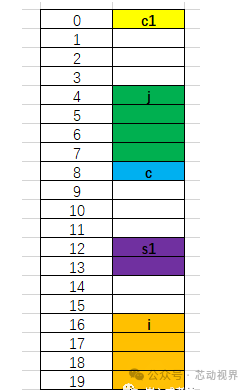
Memory Distribution Diagram:
Detailed Analysis:
Looking at the analysis of the previous examples, I believe you will understand the principle of this nested structure. The principle is the same. c1 is aligned to 1 byte, and the nested structure my_s1 has j aligned to 4 bytes, so the address must be a multiple of 4, which is why 3 bytes are left after c1. c is 1 byte, stored right after j, s1 is 2 bytes, and 2 bytes are left after c, while i is 4 bytes, and 2 bytes are left after s1 to maintain alignment. Thus, the total is 4+4+2+2+4=16, and the maximum alignment is 4, so 16 is also a multiple of 4. Therefore, the size of this structure is 16 bytes. Many students might make this mistake.
Do not overlook the alignment of the nested structure itself; the maximum alignment of the nested structure my_s1 is 4, so the size of the nested structure my_s1 must be a multiple of 4, which means the size of my_s1 is 8 bytes, making the total size of this structure 20 bytes.
2.5 Structure Alignment Analysis with Union
Code Example:
typedef struct{ char c1; union { int j; char c[8]; }MyUnion; short s1; int i; }MyStruct;Memory Distribution Analysis (Assuming the structure starts at address 0x1000, 4-byte alignment):
|
Member |
Type Size |
Starting Address Requirement |
Actual Starting Address |
Address Range Occupied |
Padding Description |
|
c1 |
1 byte |
Any (multiple of 1) |
0x1000 |
0x1000 |
No padding (stored directly) |
|
Padding |
3 bytes |
– |
– |
0x1001-0x1003 |
|
|
MyUnion (Union) |
8 bytes |
Must be a multiple of 4 |
0x1004 |
0x1004-0x100B |
3 bytes padding after c1 (0x1001-0x1003), making the union’s starting address a multiple of 4 (consistent with the int alignment requirement) |
|
s1 (short) |
2 bytes |
Must be a multiple of 2 |
0x100C |
0x100C-0x100D |
The union ends at 0x100B, the next address 0x100C is a multiple of 2, no padding |
|
Padding |
2 bytes |
– |
– |
0x100E-0x100F |
|
|
i (int) |
4 bytes |
Must be a multiple of 4 |
0x1010 |
0x1010-0x1013 |
2 bytes padding after s1 (0x100E-0x100F), making i’s starting address a multiple of 4 |
Memory Distribution Diagram:
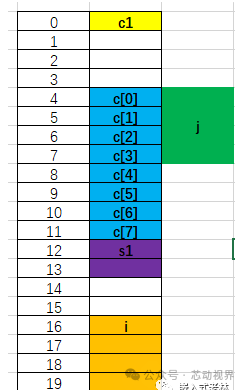
Detailed Analysis:
It is important to note that all members of a union share the same memory area, and only one member can read or write to that memory at any given time (i.e., only one member is “valid” at any time), and all members have the same starting address.
Conclusion
There is no need to memorize the rules rigidly; understanding the underlying logic is more important—after all, if you memorize the rules for a long time without using them, you will inevitably forget them. By observing examples and performing calculations to verify, the principles will become clear. Based on the previous analysis, the core of structure memory alignment can be summarized in two points:
First, the starting address of each member variable must be a multiple of its own type size (i.e., satisfying the alignment requirement of that type);
Second, the total size of the entire structure must be a multiple of the maximum alignment of all its members (to ensure consistency in member alignment when storing structure arrays).

If you find this article helpful, please click “Like”, “Share”, and “Recommend”!