Source | Embedded Miscellaneous
There are many embedded open source projects on GitHub. Today, we will share several popular embedded open source projects, including practical software modules and complete hardware projects!
Practical Software Modules
MultiButton – Multi-Key Handling Library
Project Address: https://github.com/0x1abin/MultiButton
Powerful Features:
// Supports various key events
Key event types:
├── Single Click: PRESS_DOWN, PRESS_UP
├── Long Press: LONG_PRESS_START, LONG_PRESS_HOLD
├── Repeated Press: PRESS_REPEAT (consecutive presses)
├── Combination: Detect multiple keys pressed simultaneously
└── Status: Key press duration statistics
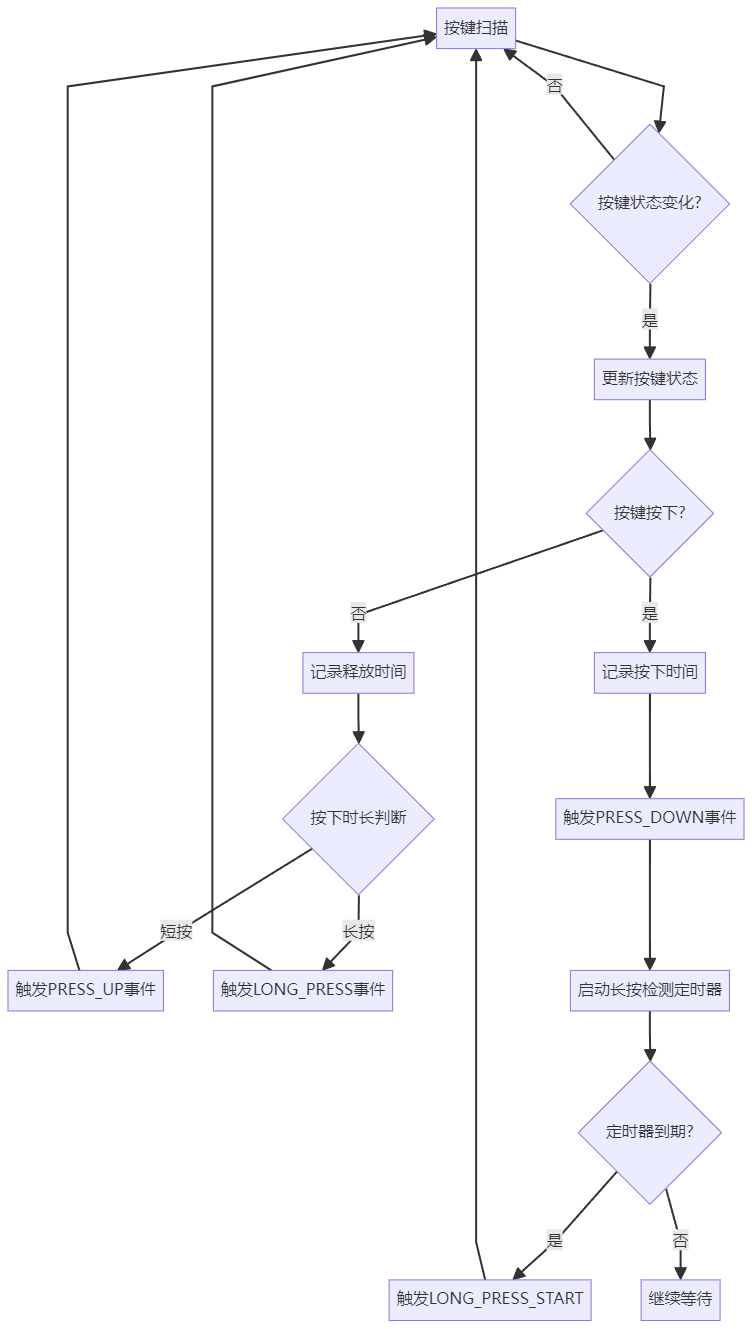
Usage Example:
#include "multi_button.h"

struct Button btn1, btn2;

// Key event callback function
void btn1_callback(void *btn) {
    struct Button *handle = (struct Button *)btn;

    switch(handle->event) {
        case PRESS_DOWN:
            printf("Button1 press down\n");
            break;
        case PRESS_UP:
            printf("Button1 press up\n");
            break;
        case LONG_PRESS_START:
            printf("Button1 long press start\n");
            break;
        case LONG_PRESS_HOLD:
            printf("Button1 long press hold\n");
            break;
    }
}

void setup() {
    // Initialize button
    button_init(&btn1, read_button1_GPIO, 0);
    button_attach(&btn1, PRESS_DOWN, btn1_callback);
    button_attach(&btn1, PRESS_UP, btn1_callback);
    button_attach(&btn1, LONG_PRESS_START, btn1_callback);

    button_start(&btn1);
}

void main_loop() {
    // Call every 5ms
    button_ticks();
}
QueueForMcu – MCU Queue Library
Project Address: https://github.com/xiaoxinpro/QueueForMcu
Project Highlights:
// Queue library designed for microcontrollers
Core features:
├── Platform Compatibility: Supports 8/16/32-bit microcontrollers
├── Memory Efficiency: Minimal resource usage
├── Simple Operations: Enqueue, dequeue, query interfaces
├── Thread Safety: Supports use in interrupt environments
└── Status Monitoring: Queue full, empty state detection
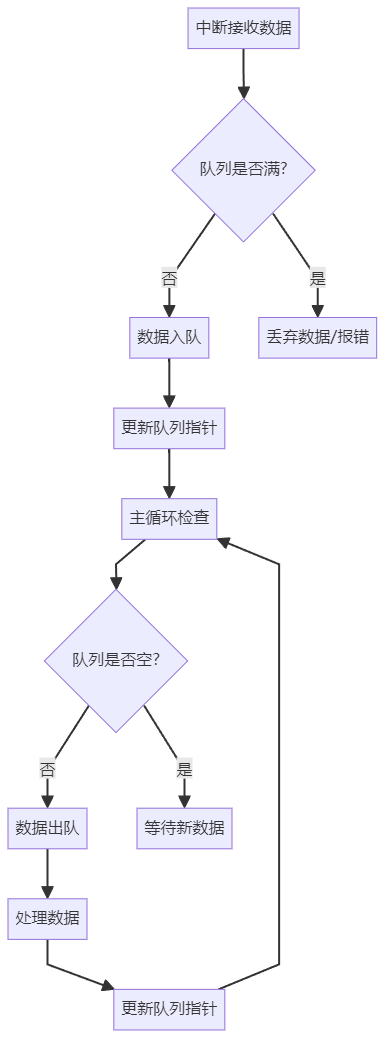
Code Example:
#include "queue.h"

// Define queue
#define QUEUE_SIZE 32
uint8_t queue_buffer[QUEUE_SIZE];
Queue_t my_queue;

void setup() {
    // Initialize queue
    Queue_Init(&my_queue, queue_buffer, QUEUE_SIZE);
}

void uart_rx_handler(uint8_t data) {
    // Safe enqueue in interrupt
    if (!Queue_IsFull(&my_queue)) {
        Queue_Put(&my_queue, data);
    }
}

void main_loop() {
    uint8_t data;
    // Process data in main loop
    while (!Queue_IsEmpty(&my_queue)) {
        if (Queue_Get(&my_queue, &data)) {
            process_received_data(data);
        }
    }
}
Application Scenarios:
- Serial Data Buffer: Receiving variable-length data packets
- Key Message Queue: Buffering key event processing
- Sensor Data: Queuing multiple sensor data for processing
- Communication Protocol: Buffering and parsing data packets
StateMachine – State Machine Framework
Project Address: https://github.com/kiishor/UML-State-Machine-in-C
Core Functions:
// UML standard state machine implementation
State machine features:
├── Standard Implementation: Complies with UML state diagram specifications
├── Hierarchical States: Supports nested state structures
├── Event-Driven: Event-based state transitions
├── Safe and Reliable: Atomicity of state transitions
└── Debug-Friendly: State transition logging
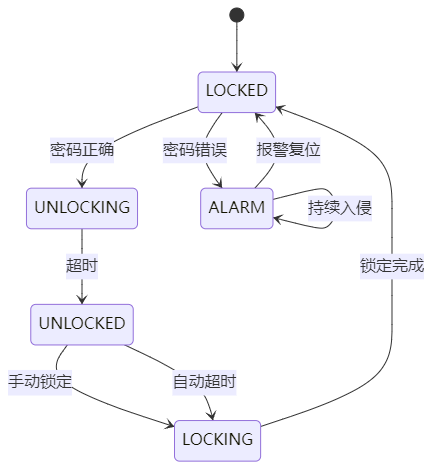
Practical Application Example:
// Smart Lock State Machine
typedef enum {
    STATE_LOCKED,
    STATE_UNLOCKING,
    STATE_UNLOCKED,
    STATE_LOCKING,
    STATE_ALARM
} door_state_t;

typedef enum {
    EVENT_PASSWORD_CORRECT,
    EVENT_PASSWORD_WRONG,
    EVENT_TIMEOUT,
    EVENT_MANUAL_LOCK,
    EVENT_INTRUSION_DETECTED
} door_event_t;

// State transition table
const state_transition_t door_transitions[] = {
    {STATE_LOCKED, EVENT_PASSWORD_CORRECT, STATE_UNLOCKING},
    {STATE_LOCKED, EVENT_PASSWORD_WRONG, STATE_ALARM},
    {STATE_UNLOCKING, EVENT_TIMEOUT, STATE_UNLOCKED},
    {STATE_UNLOCKED, EVENT_MANUAL_LOCK, STATE_LOCKING},
    {STATE_UNLOCKED, EVENT_TIMEOUT, STATE_LOCKING},
    // ... More transition rules
};
Complete Projects
TinyGameEngine – Game Development Framework Based on STM32
Project Address: https://github.com/juj/fbcp-ili9341
Project Features:
// Game development framework based on STM32
Engine features:
├── Graphics Rendering: Pixel-level graphics drawing
├── Sound System: PWM sound playback
├── Input Handling: Key and joystick input
├── Collision Detection: Simple 2D collision
├── Scene Management: Game state switching
└── Save System: EEPROM data storage
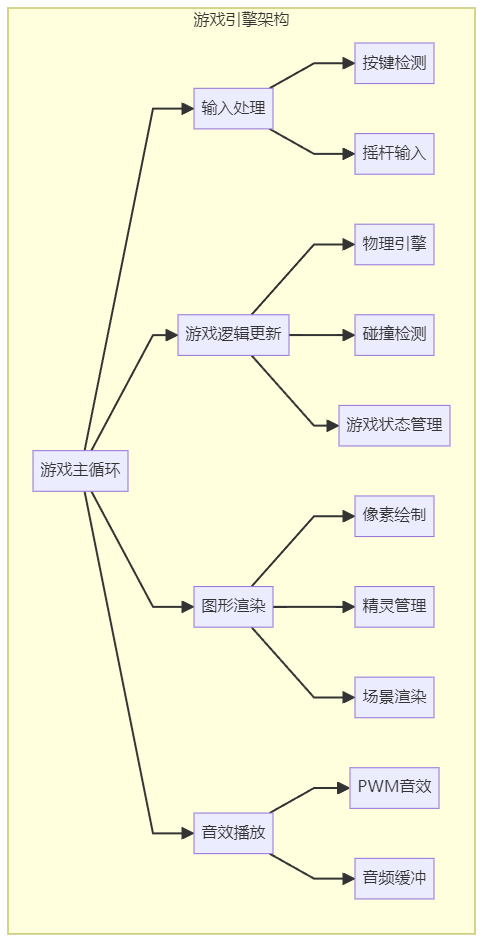
Classic Game Implementations:
- Snake: Classic puzzle game
- Tetris: Block elimination game
- Breakout: Ball bouncing game
- Space Shooter: Flight shooting game
HomeAutomation – Smart Home System
Project Address: https://github.com/home-assistant/core
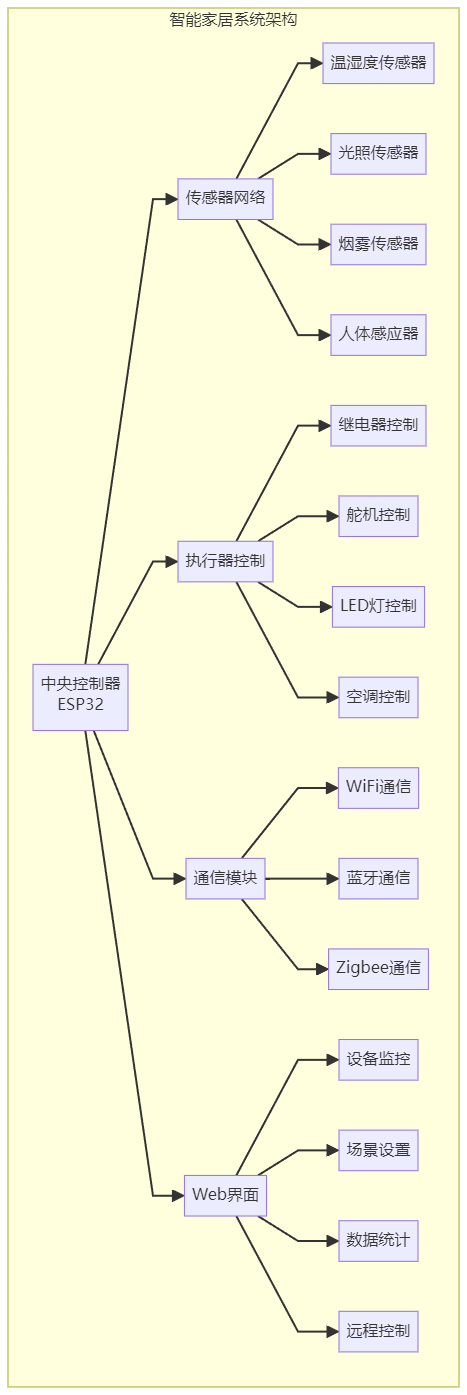
System Architecture:
// Distributed smart home architecture
System components:
├── Central Controller: ESP32 main control board
├── Sensor Network: Temperature, humidity, light, smoke sensors
├── Actuators: Relays, servos, LED control
├── Communication Protocols: WiFi, Bluetooth, Zigbee
├── Web Interface: Real-time monitoring and control
└── Data Logging: Sensor data storage
Core Functional Modules:
// Device abstraction layer
typedef struct {
    uint8_t device_id;
    device_type_t type;
    device_status_t status;

    // Device operation interfaces
    int (*init)(void *device);
    int (*read)(void *device, void *data);
    int (*write)(void *device, void *data);
    int (*control)(void *device, uint8_t cmd, void *param);
} smart_device_t;

// Scene automation
typedef struct {
    char scene_name[32];
    trigger_condition_t trigger;
    action_list_t actions;
    bool enabled;
} automation_scene_t;
CanBus-Triple – CAN Bus Analyzer
Project Address: https://github.com/CANBus-Triple/CANBus-Triple
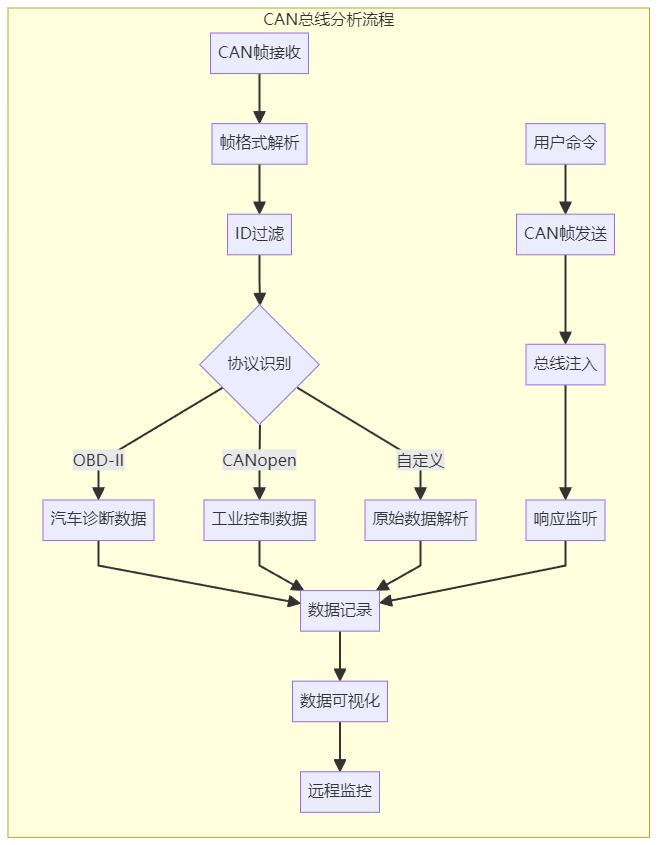
Project Functions:
// Professional CAN bus tool
Core functions:
├── Data Listening: Real-time CAN frame capture
├── Data Sending: Custom CAN frame sending
├── Protocol Analysis: Common CAN protocol parsing
├── Data Logging: CAN data storage and playback
├── Remote Control: WiFi remote operation
└── Filtering Function: ID filtering and data selection
Application Fields:
- Automotive Diagnostics: OBD-II protocol analysis
- Industrial Control: CANopen network debugging
- Device Development: CAN device functional testing
- Reverse Engineering: Unknown CAN protocol analysis
IoT Projects
ESP32-IoT-Platform – IoT Platform
Project Address: https://github.com/espressif/esp-idf
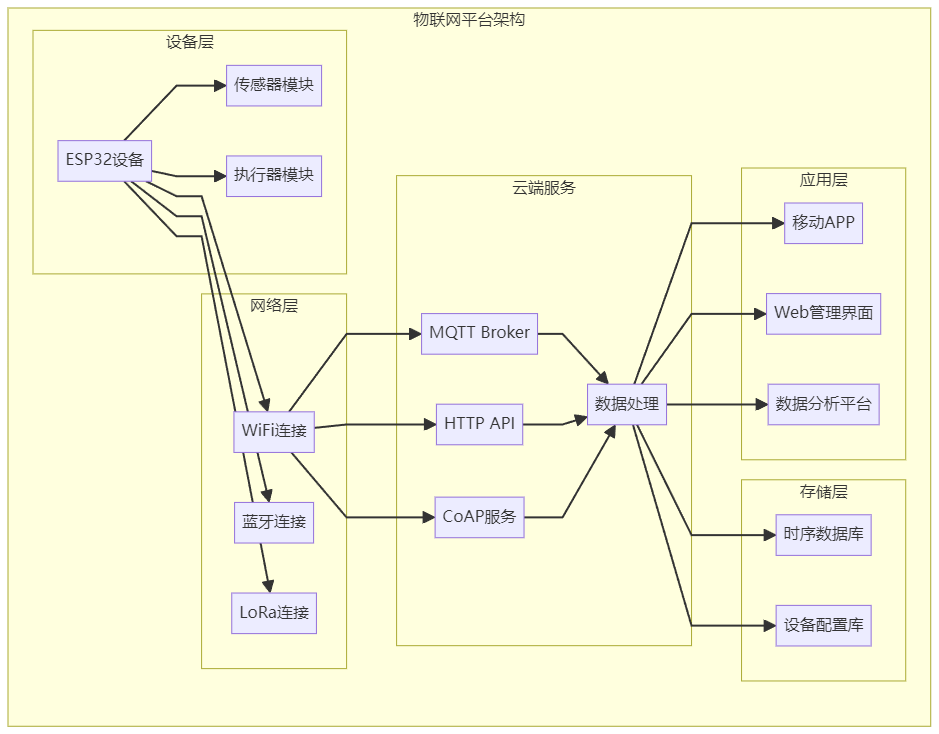
Platform Features:
// Complete IoT solution
Technology stack:
├── Hardware Platform: ESP32/ESP8266
├── Network Connections: WiFi, Bluetooth, LoRa
├── Cloud Services: MQTT, HTTP, CoAP
├── Mobile Applications: Android/iOS APP
├── Web Management: Device management interface
└── Data Analysis: Real-time data visualization
Typical Applications:
// Environmental monitoring station
typedef struct {
    float temperature;
    float humidity;
    uint16_t pm25;
    uint16_t co2;
    uint8_t light_level;
    uint32_t timestamp;
} env_data_t;

// Data collection task
void sensor_task(void *pvParameters) {
    env_data_t data;

    while(1) {
        // Read sensor data
        data.temperature = read_temperature();
        data.humidity = read_humidity();
        data.pm25 = read_pm25();
        data.co2 = read_co2();
        data.light_level = read_light();
        data.timestamp = get_timestamp();

        // Send to cloud
        mqtt_publish("sensor/env", &data, sizeof(data));

        vTaskDelay(pdMS_TO_TICKS(60000)); // Collect once a minute
    }
}
PowerManagement – Low Power Management
Project Address: https://github.com/espressif/esp-idf/tree/master/examples/system/deep_sleep
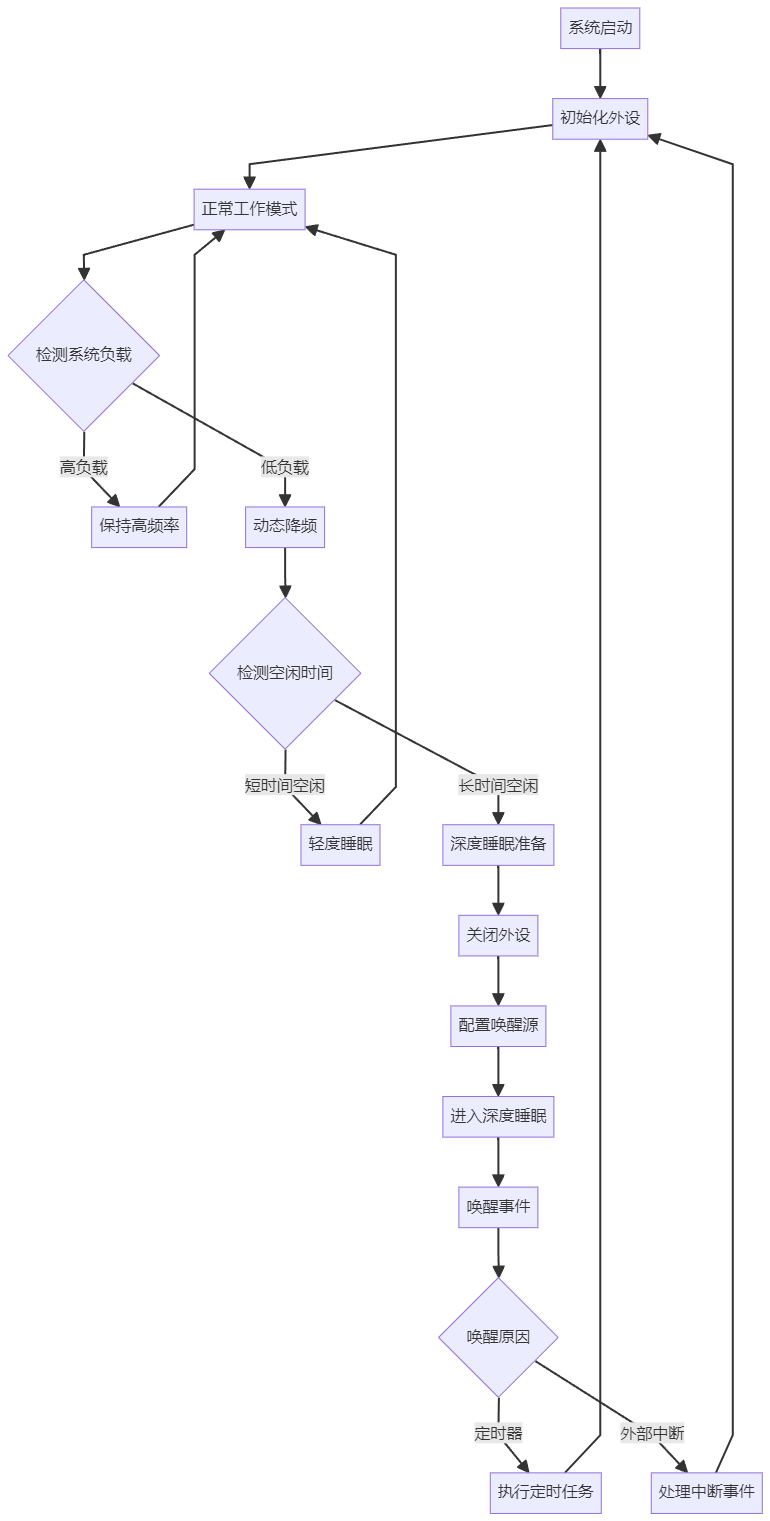
Power Optimization Techniques:
// Smart power management system
Power strategies:
├── Deep Sleep: Lowest power mode
├── Timed Wakeup: RTC timer wakeup
├── Event Wakeup: External interrupt wakeup
├── Dynamic Frequency Scaling: Adjust frequency based on load
├── Peripheral Management: Enable peripherals on demand
└── Power Monitoring: Real-time power measurement
Implementation Example:
#include "esp_sleep.h"
#include "esp_wifi.h"

// Enter low power mode
void enter_power_save_mode(uint32_t sleep_time_ms) {
    // Turn off WiFi
    esp_wifi_stop();

    // Turn off unnecessary peripherals
    disable_unused_peripherals();

    // Configure wakeup sources
    esp_sleep_enable_timer_wakeup(sleep_time_ms * 1000);
    esp_sleep_enable_ext1_wakeup(GPIO_SEL_0, ESP_EXT1_WAKEUP_ANY_HIGH);

    // Enter deep sleep
    esp_deep_sleep_start();
}

// Handle after wakeup
void handle_wakeup() {
    esp_sleep_wakeup_cause_t wakeup_reason = esp_sleep_get_wakeup_cause();

    switch(wakeup_reason) {
        case ESP_SLEEP_WAKEUP_TIMER:
            printf("Timed wakeup, executing data collection\n");
            collect_sensor_data();
            break;

        case ESP_SLEEP_WAKEUP_EXT1:
            printf("External interrupt wakeup, handling user input\n");
            handle_user_input();
            break;
    }
}
Creative Projects
MusicBox – Music Box Project
Project Address: https://github.com/TheRemote/PicoMusicBox
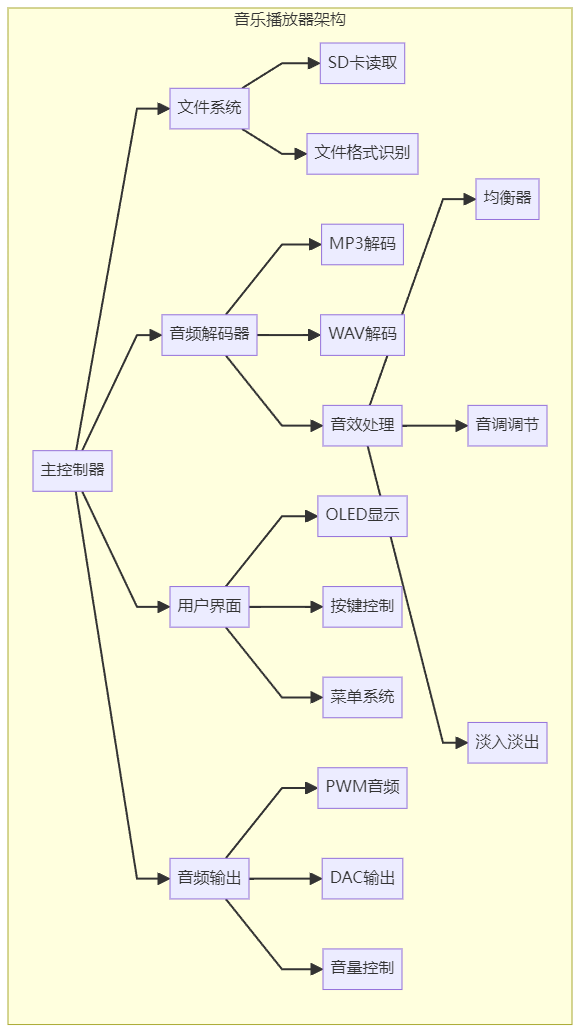
Project Functions:
// Microcontroller-based music player
Function features:
├── Music Playback: PWM audio output
├── File System: SD card music file reading
├── Sound Processing: Volume control, pitch adjustment
├── Display Interface: OLED display of song information
├── User Interaction: Key control for playback
└── Audio Output: High-quality audio via DAC
SmartClock – Smart Clock
Project Address: https://github.com/witnessmenow/ESP32-Trinity
Core Functions:
// Multifunctional smart clock
Function modules:
├── Time Display: NTP network time synchronization
├── Environmental Monitoring: Temperature and humidity display
├── Schedule Reminder: Event reminder function
├── Weather Forecast: Online weather retrieval
├── Music Alarm: Custom ringtone
├── Ambient Lighting: RGB light effect control
└── Mobile Control: APP remote settings
Debugging Tools
SerialPlotter – Serial Waveform Display
Project Address: https://github.com/devinaconley/arduino-plotter
Tool Features:
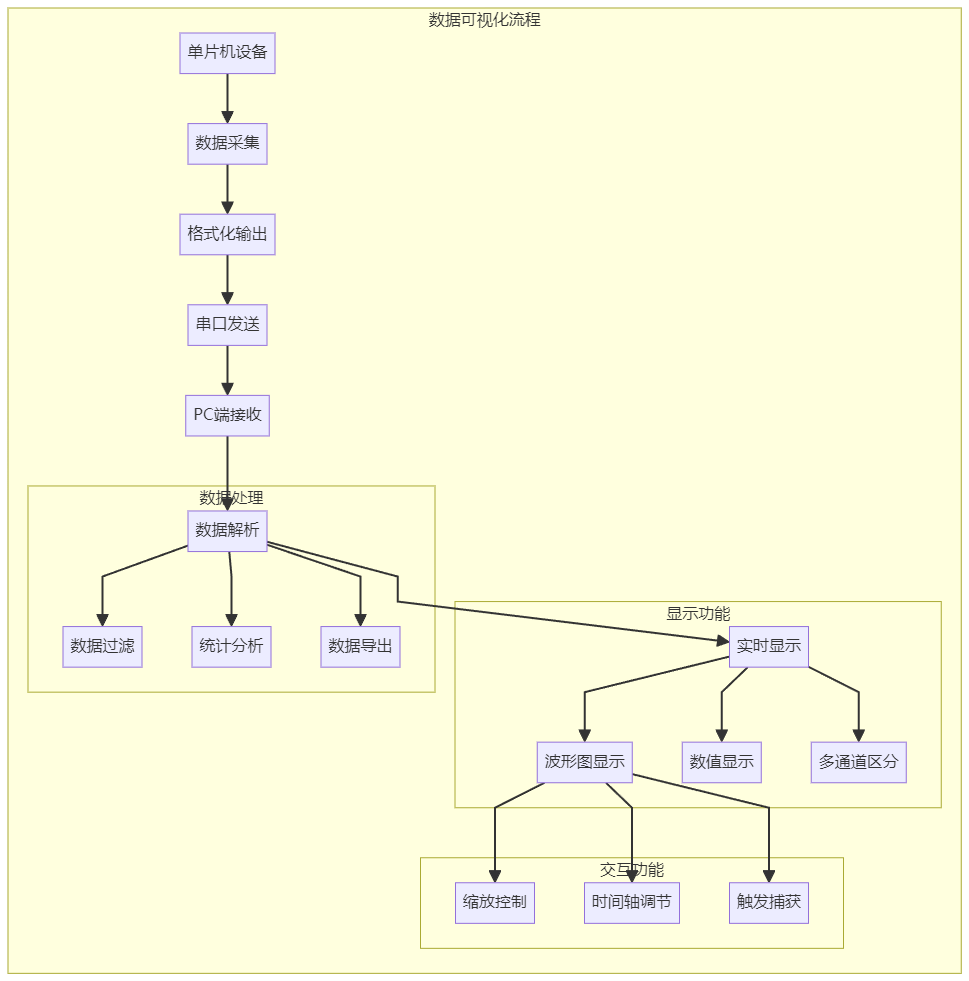
// Real-time data visualization tool
Display functions:
├── Waveform Display: Multi-channel data waveforms
├── Value Display: Real-time value monitoring
├── Color Differentiation: Different data sources in different colors
├── Zoom Function: Time axis zooming
├── Data Saving: Export waveform data
└── Trigger Function: Data trigger capture
Data Format:
// Serial data output format
void send_plot_data() {
    static uint32_t timestamp = 0;

    // Format: timestamp:channel1:channel2:channel3
    printf("%lu:%.2f:%.2f:%.2f\n",
           timestamp++,
           read_adc_channel(0) * 3.3f / 4095.0f,
           read_adc_channel(1) * 3.3f / 4095.0f,
           read_temperature());
}
———— END ————

Shenzhen Trip, Day One!
Differences Between CAN and CANFD Communication Protocols
I have run countless factory visits, and a few times I almost slept in the factory.