Click the blue text above to follow us
Resource ReleaseLinux Beginner to Advanced Practical Course↓ Scan to watch the video ↓
Introduction to the Linux last Command
The last command in Linux is used to display information about all recently logged in and logged out users. This command is very convenient and practical when we need to track login activities. It analyzes the /var/log/wtmp file, which contains all login and logout information.
Linux Versions Compatible with the last Command
The last command is available on all major Linux distributions, including Debian, Ubuntu, Alpine, Arch Linux, Kali Linux, RedHat/CentOS, Fedora, Raspbian, etc.
In most Linux distributions, the last command is pre-installed, so you do not need to install it separately. If you find that the last command is unavailable in some cases, you can install it using the package manager. Below are the installation commands for Debian and Ubuntu as well as RedHat/CentOS:
[[email protected] ~]$ sudo apt-get install util-linux  # For Debian/Ubuntu
[[email protected] ~]$ sudo yum install util-linux  # For RedHat/CentOS 7
[[email protected] ~]$ sudo dnf install util-linux  # For RedHat/CentOS 8
Basic Syntax of the Linux last Command
Syntax: last [options] [username...] [terminal...]Common Options or Parameters for the Linux last Command
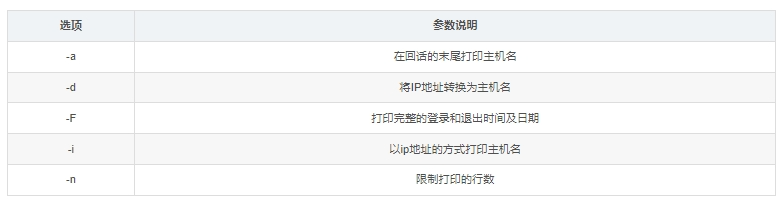
Detailed Examples of the Linux last Command
Example 1: Basic Usage of the last Command
In its simplest form, the last command can be run without any parameters (it will display all login sessions):
[[email protected] ~]$ lastExample 2: Display Login History for a Specific User
If you want to view the login history for a specific user, you can pass the username as a parameter to the last command:
[[email protected] ~]$ last usernameNotes:Special characters in the last command.These characters represent different types of system boot and shutdown events in the output:
-
crash — indicates a system crash. There is no record of a normal shutdown process, so the last running state of the system is considered a “crash”.
-
reboot — indicates a system reboot. The current kernel is fully loaded, and the previous system has been shut down.
-
shutdown — indicates a system shutdown. The current system is shutting down normally (not a crash), so all logins will end.
-
runlevel — indicates a change in runlevel. The system’s runlevel has changed, indicating the new runlevel and the previous runlevel.
Example 3: Limit the Output Lines of the last Command
If you want to limit the number of output lines from the last command, you can use the -n option followed by a number:
[[email protected] ~]$ last -n 5This command will only output the last 5 lines of login history.
Example 4: Display All System Reboot Records
If you want to view all system reboot records, you can use the last reboot command:
[[email protected] ~]$ last rebootExample 5: Display All System Shutdown Records
If you want to view all system shutdown records, you can use the last shutdown command:
[[email protected] ~]$ last shutdownNotes on the Linux last Command
Note that the last command parses the /var/log/wtmp file, which contains all login and logout information. If this file is deleted, the last command will not function correctly.

 For course inquiries, add: HCIE666CCIE↑ Or scan the QR code above ↑If you have any technical points or content you want to seeYou can leave a message below to let us know!