▲ Click☆to star me to prevent losing contact
In embedded development, the distribution and usage of RAM are key factors affecting code efficiency and performance. Nuvoton, as a leading manufacturer of the 8051 series products, has launched several series such as MS51, ML51, CM1003, etc. This article will take you deep into the distribution of Nuvoton’s 8051 RAM and its operational techniques.
Understand Nuvoton 8051 RAM Distribution in One Minute
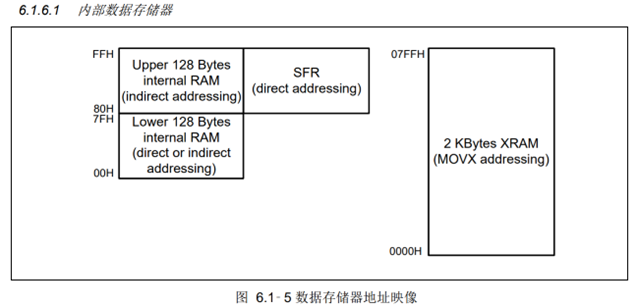
Nuvoton 8051’s RAM is divided into internal and external parts, with the internal further subdivided into direct addressing and indirect addressing. The specific classifications are as follows:
1. Internal RAM
data: Address range is 0x00-0x7F, totaling 128 bytes. It can be read and written directly through the accumulator (ACC), making it the fastest with the smallest generated code.
idata: Address range is 0x00-0xFF, totaling 256 bytes. The first 128 bytes are identical to data but accessed differently.
2. External RAM
xdata: Address range is 0x0000-0x7FF, with the specific size depending on the chip’s Flash capacity.
For detailed information, please refer to the specifications or the article “Understanding the Distribution and Usage of 8051 RAM in One Minute”: [Official Link](http://nuvoton-mcu.com/forum.php?mod=viewthread&tid=65929&extra=page%3D1).
How to Adjust RAM Size?
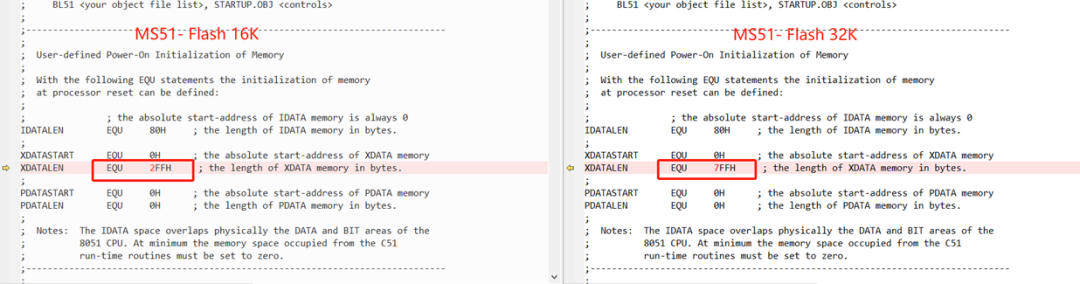
In the STARTUP.A51 file of Keil, you can adjust the RAM size according to different specifications of the chip. Here are the common settings:
MS51 Series
– Flash 16K: MS51FB9AE, MS51XB9AE, MS51XB9BE
Corresponding setting: `XDATALEN 2FFH`
– Flash 32K: MS51FC0AE, MS51XC0BE, MS51EB0AE, etc.
Corresponding setting: `XDATALEN 7FFH`
Note: If variables need to use the high 128 bytes of idata, please change `IDATALEN` from `80H` to `100H`.
ML51 Series
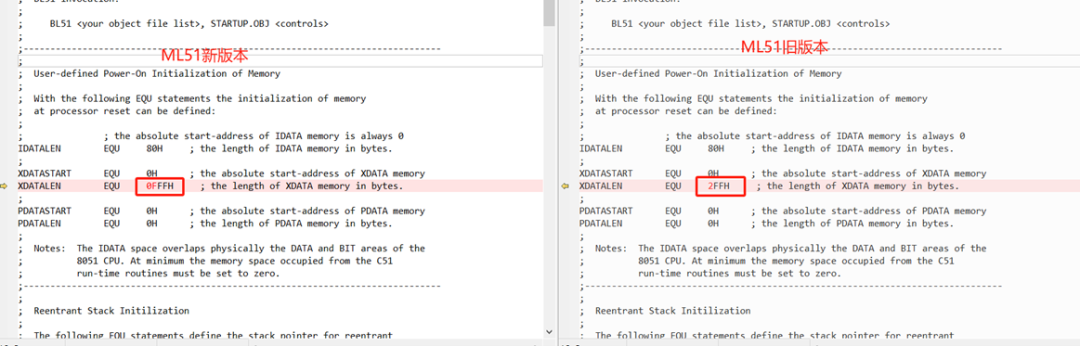
The ML51 series products include 16K, 32K, and 64K versions, with code compatibility across versions. It is recommended to uniformly set `XDATALEN` to `0FFFH` to accommodate the entire series of products.
Recommendations for RAM Variable Operations
Some developers have inquired: when operating on Nuvoton 8051 RAM variables, is it necessary to manually initialize them? The answer is: although the STARTUP.A51 file will automatically clear the variables, for code standardization, it is recommended to manually clear them.
How to Verify if RAM is Cleared?
The following are the specific steps to verify if RAM is cleared:
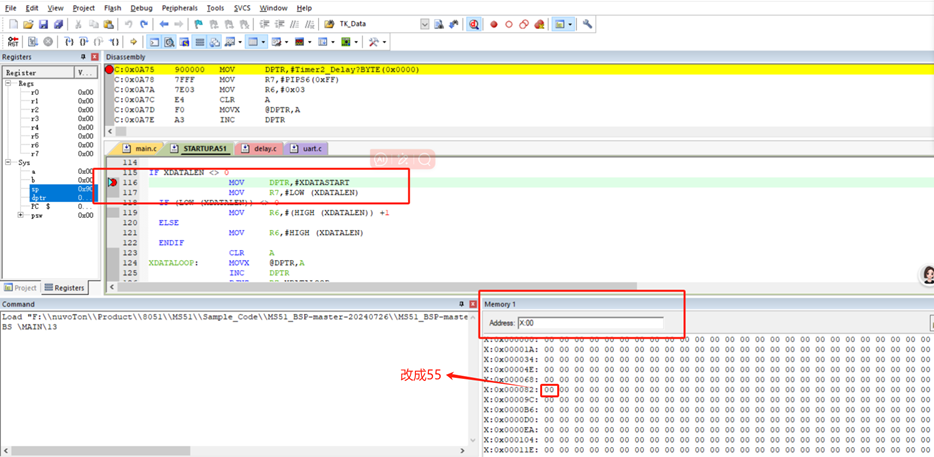
Step 1: Set Breakpoints
Set breakpoints at the locations where RAM needs to be tested, such as at an address within the `XDATALEN` range and at the first line of the `main()` program.
Step 2: Run the Code
Run at full speed to the breakpoint, modify the data within the RAM address range (e.g., change address 0x82 to 55). Then click `RST` to re-execute the code and run at full speed again.
Step 3: Check Memory
By viewing the Memory window, confirm whether the data at address 0x82 has been cleared. If cleared, it indicates that the RAM area has been correctly initialized.
Step 4: Test Range
Use the above method to test whether the RAM within the defined ranges of `DATALEN` and `IDATALEN` is cleared, ensuring that the test range does not exceed the defined size.
FAQ
Q1: How to choose the appropriate RAM type (data, idata, xdata)?
A1: If speed and code efficiency are a priority, use `data` first; choose `idata` or `xdata` when larger capacity is needed.
Q2: Why is it recommended to uniformly set `XDATALEN` to `0FFFH` for the ML51 series?
A2: The ML51 series products are code-compatible across versions, and uniformly setting `XDATALEN` to `0FFFH` can accommodate all versions, avoiding subsequent adjustments.
Q3: Can the STARTUP.A51 file be used with default settings directly?
A3: The default settings apply to some chips, but it is recommended to adjust `XDATALEN` and `IDATALEN` according to specific chip specifications to ensure reasonable RAM distribution.
Q4: Does clearing RAM affect code performance?
A4: Clearing RAM is an important step in initialization, affecting code standardization, but has a minimal impact on performance.
Q5: How to quickly locate RAM distribution issues?
A5: Using simulation tools to set breakpoints and checking RAM data changes in the Memory window is an effective method for quickly locating issues.
Welcome to follow the Dalian Dalian Engineer Community – Dada Tong
👇👇👇


ClickRead the original text for more details!

Like
Collect
Share