Detailed Explanation of FreeRTOS Tasks and Development Considerations for ESP32
1. Basics of FreeRTOS Tasks
1. What is a Task?
In FreeRTOS, a Task is the basic unit of system scheduling, similar to a thread. Each task is an infinite loop function managed by the FreeRTOS scheduler, which controls the execution order. Tasks are scheduled based on priority, time-slicing, or event-driven methods.
2. Task Lifecycle
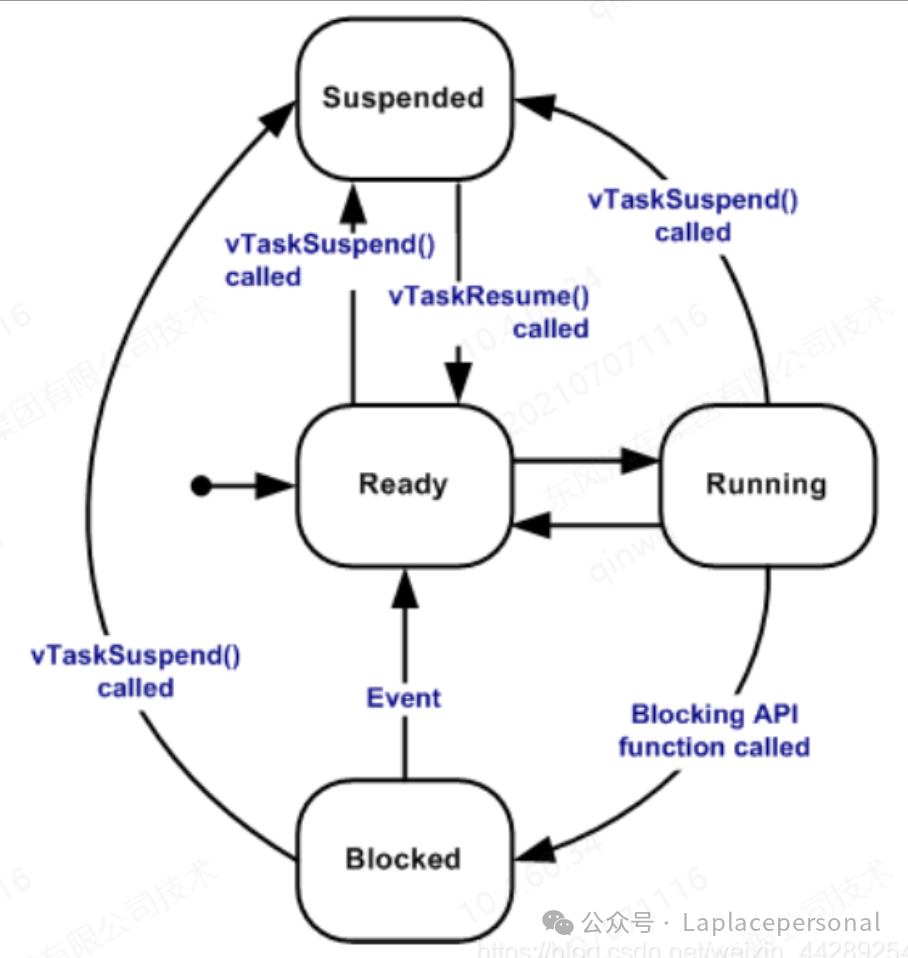
Tasks in FreeRTOS have the following four states:
- • Running: The task is currently executing on the CPU.
- • Ready: The task is ready to run but has not yet been scheduled.
- • Blocked: The task is waiting for an event (such as delay, semaphore, or queue data).
- • Suspended: The task is actively suspended and will not participate in scheduling.
3. Creating and Deleting Tasks
Creating a Task
Use the <span>xTaskCreate()</span> function to create a task, with the following typical code:
void vTaskFunction(void *pvParameters) {
    while (1) {
        // Task logic
        vTaskDelay(pdMS_TO_TICKS(1000)); // Delay
    }
}

// Create task
xTaskCreate(vTaskFunction, "MyTask", 1024, NULL, 1, NULL);
Parameter Explanation:
- •
<span>pvTaskCode</span>: Task function pointer. - •
<span>pcName</span>: Task name (for debugging). - •
<span>usStackDepth</span>: Task stack size (in words). - •
<span>pvParameters</span>: Parameters passed to the task. - •
<span>uxPriority</span>: Task priority (0 is the lowest). - •
<span>pxCreatedTask</span>: Task handle (optional).
Deleting a Task
- • Delete the current task:
<span>vTaskDelete(NULL)</span>. - • Delete another task: Call
<span>vTaskDelete(xTaskHandle)</span>using the task handle.
4. Task Scheduling Mechanism
The scheduling strategy of FreeRTOS is based on Priority + Time-Slicing:
- • Preemptive Scheduling: High-priority tasks can preempt low-priority tasks on the CPU.
- • Time-Slicing: Tasks of the same priority run alternately based on time slices (default time slice is one system clock cycle).
5. Inter-Task Communication
FreeRTOS provides various inter-task communication mechanisms:
- • Queue: For data transmission.
- • Semaphore: For mutual exclusion or synchronization.
- • Event Group: For multi-condition synchronization.
- • Task Notify: For lightweight communication.
2. FreeRTOS Features in ESP32 Development
The ESP32 supports a dual-core architecture (Core 0 and Core 1), allowing FreeRTOS to fully utilize this feature to enhance system concurrency.
1. Dual-Core Task Allocation
The dual-core architecture of the ESP32 allows tasks to be pinned to specific cores, reducing context-switching overhead. Use the <span>xTaskCreatePinnedToCore()</span> function to pin tasks:
xTaskCreatePinnedToCore(
    vTaskFunction,       // Task function
    "DualCoreTask",      // Task name
    2048,                // Stack size
    NULL,                // Parameters
    2,                   // Priority
    NULL,                // Task handle
    1                    // Pin to Core 1
);Recommendations:
- • Core 0: Reserved for Wi-Fi/BLE protocol stack.
- • Core 1: For high-priority user tasks (priority ≥ 2).
2. Memory Management
The ESP32 has limited memory resources, so task stack sizes must be allocated reasonably:
- • Stack Size Recommendations: The default task stack size is 2048 words (2KB), which can be monitored using
<span>uxTaskGetStackHighWaterMark()</span><span> to check actual usage.</span> - • PSRAM Support: Enable
<span>CONFIG_SPIRAM_USE_MALLOC</span><span> to extend memory, but be aware of DMA limitations.</span>
3. Interrupt Handling
Interrupt Service Routines (ISRs) on the ESP32 must follow these rules:
- • Only ISR-safe APIs are allowed: Such as
<span>xQueueSendFromISR()</span><span> and </span><code><span>xSemaphoreGiveFromISR()</span><span>.</span> - • Avoid time-consuming operations in ISRs: Such as complex calculations or direct hardware manipulation.
- • Wake tasks: Use
<span>xTaskNotifyFromISR()</span><span> or </span><code><span>xQueueSendFromISR()</span><span> to wake tasks.</span>
4. Low Power Optimization
The ESP32 supports Tickless Mode, which reduces clock interrupt overhead during idle times:
- • Enable configuration:
<span>CONFIG_FREERTOS_USE_TICKLESS_IDLE</span><span>.</span> - • Dynamically adjust CPU frequency: Call
<span>setCpuFrequencyMhz(80)</span><span> based on task load.</span>
3. Considerations in ESP-IDF Development
1. Task Priority Allocation
- • Avoid Priority Inversion: When a low-priority task holds resources, high-priority tasks cannot run. Use Priority Inheritance or Priority Ceiling Protocol to resolve this.
- • Recommended Priority Gradient: Set 3-4 priority levels to avoid excessive levels that can confuse scheduling.
2. Stack Overflow Detection
- • Enable Stack Watermark: Monitor remaining stack space using
<span>uxTaskGetStackHighWaterMark()</span><span>.</span> - • Configure
<span>CONFIG_FREERTOS_WATCHPOINT_END_OF_STACK</span>: To detect stack boundary violations.
3. Debugging and Monitoring
- • View Task Status: Enter
<span>tasks</span>in the IDF monitor to see the real-time task list. - • Visualization Tools: Use Segger SystemView to analyze task scheduling.
- • Memory Leak Detection: Enable
<span>CONFIG_HEAP_TRACING</span><span> and call </span><code><span>heap_trace_start()</span><span>.</span>
4. Common Issues and Solutions
| Issue | Solution |
| Task not executing | Ensure to call <span>vTaskStartScheduler()</span><span> to start the scheduler</span> |
| Task crash | Increase stack size (e.g., 4096 words) and check for stack overflow |
| Task hang | Use <span>vTaskDelay()</span><span> or </span><code><span>vTaskDelayUntil()</span><span> to avoid busy waiting</span> |
| Priority inversion | Enable priority inheritance mechanism |
4. Best Practices
1. Task Design Principles
- • Keep tasks lightweight: Each task should focus on a single function.
- • Avoid resource contention: Use mutexes to protect shared resources.
- • Use blocking operations judiciously: Reduce CPU usage through
<span>vTaskDelay()</span><span> or event waits.</span>
2. Example Code: Dual-Core Task Binding
#include <stdio.h>
#include "freertos/FreeRTOS.h"
#include "freertos/task.h"
#include "driver/gpio.h"

#define LED_PIN GPIO_NUM_2

void vTaskCore0(void *pvParam) {
    gpio_set_level(LED_PIN, 1);
    vTaskDelay(pdMS_TO_TICKS(500));
    gpio_set_level(LED_PIN, 0);
    vTaskDelete(NULL);
}

void vTaskCore1(void *pvParam) {
    while (1) {
        printf("Hello from Core 1!\n");
        vTaskDelay(pdMS_TO_TICKS(1000));
    }
}

void app_main() {
    gpio_reset_pin(LED_PIN);
    gpio_set_direction(LED_PIN, GPIO_MODE_OUTPUT);

    xTaskCreatePinnedToCore(vTaskCore0, "Core0_Task", 2048, NULL, 3, NULL, 0);
    xTaskCreatePinnedToCore(vTaskCore1, "Core1_Task", 4096, NULL, 2, NULL, 1);
}
5. Conclusion
FreeRTOS provides powerful multitasking management capabilities for the ESP32. Combined with the dual-core architecture and flexible scheduling strategies, it can significantly enhance the performance of embedded systems. During development, focus on task priority allocation, memory management, interrupt safety, and debugging methods to avoid common pitfalls. With a well-designed task structure and resource allocation, the ESP32 can easily handle 20+ tasks in parallel, meeting the demands of complex application scenarios.