Following the previous section, when we use global variables to implement synchronization and mutual exclusion, it is as follows: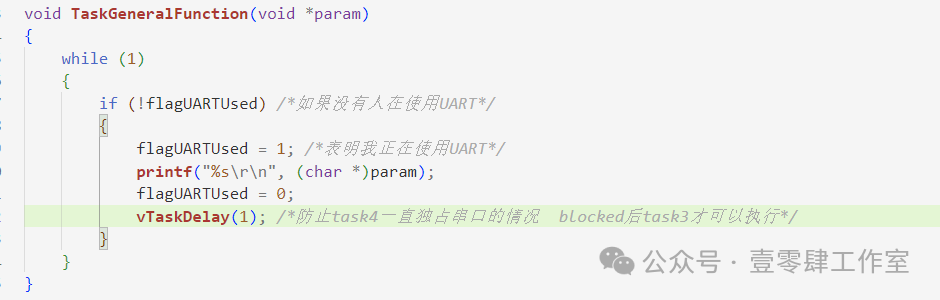 When the if condition is met, the task switches, and printf may not print completely, so we need to introduce a queue.First, let’s look at a few definitions.
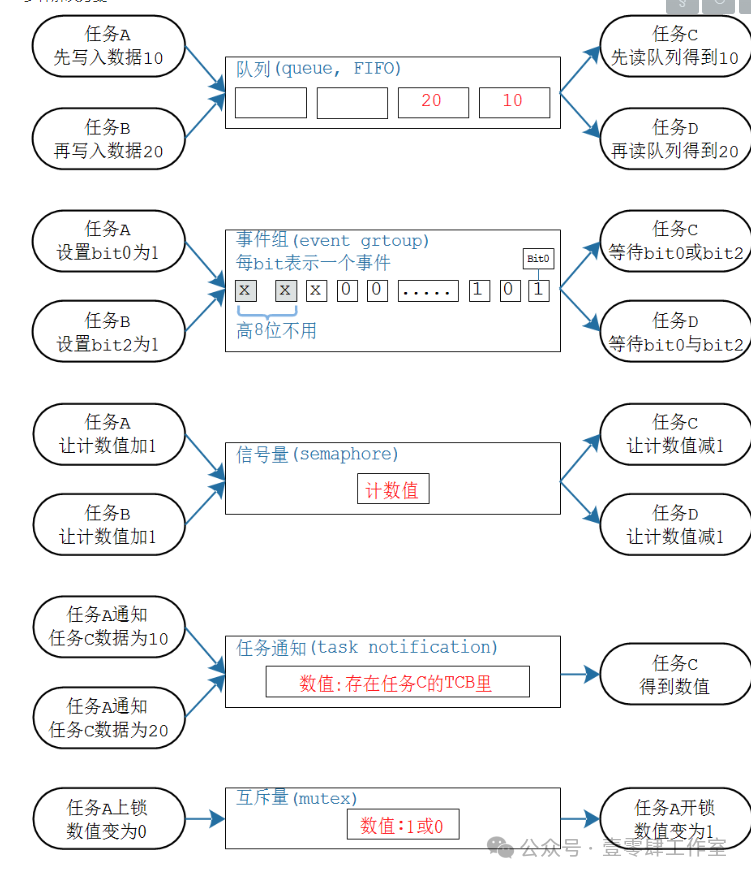
Queue (First In First Out)
Understanding a queue is like a production line or a conveyor belt.
Event Group (Combination of Events)
Each bit represents an event.
When the producer finishes a task, it sets a bit to 1.
The consumer can wait for a specific event or several events, establishing a many-to-many relationship.
Multiple producers and multiple consumers.
Semaphore
Data is passed in the queue.
Count values are passed in the semaphore.
When taskA (producer) completes, it increments the count value by 1.
When taskC (consumer) consumes, it decrements the count value by 1.
Mutex
The count value in the semaphore is set to either 1 or 0.
Mutex is used to protect certain critical resources.
Only one task can use the CPU resources at the same time.
Priority inversion may also occur (priority inheritance).
Task Notification
A many-to-one relationship.
The task on the left notifies taskC.
It can notify values, events, etc.
Queue
Basic Knowledge of Queues
- How to create, clear, and delete a queue.
- How messages are stored in the queue.
- How to send (write) data to the queue, how to read data from the queue, and how to overwrite data in the queue.
Queues are first-in-first-out.
A queue can be thought of as a conventional operation, like a production line.
Data is written at the tail and read from the head.
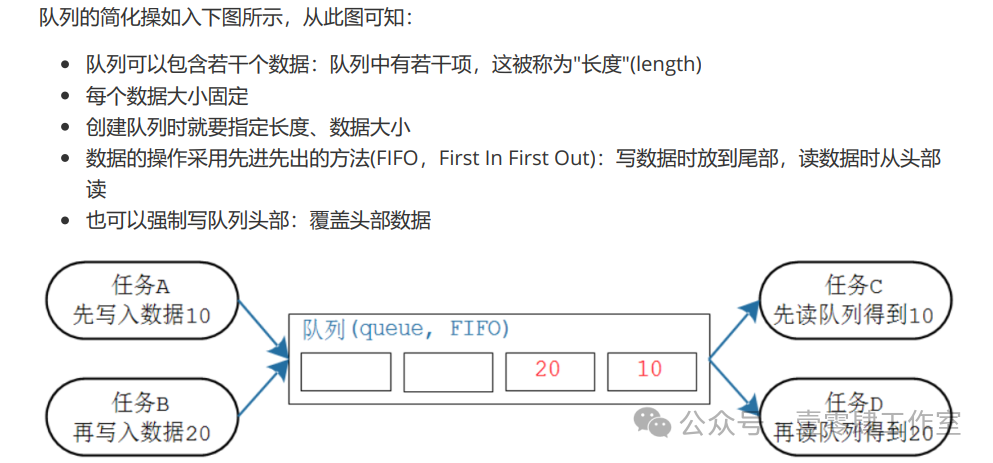
On the left are workers, and on the right are consumers.
After the workers produce goods, they place them on the conveyor belt.
When there is data in the queue, consumers can read data from the queue.
If there are multiple data in the queue, the data retrieved is the one that was first placed in the queue.
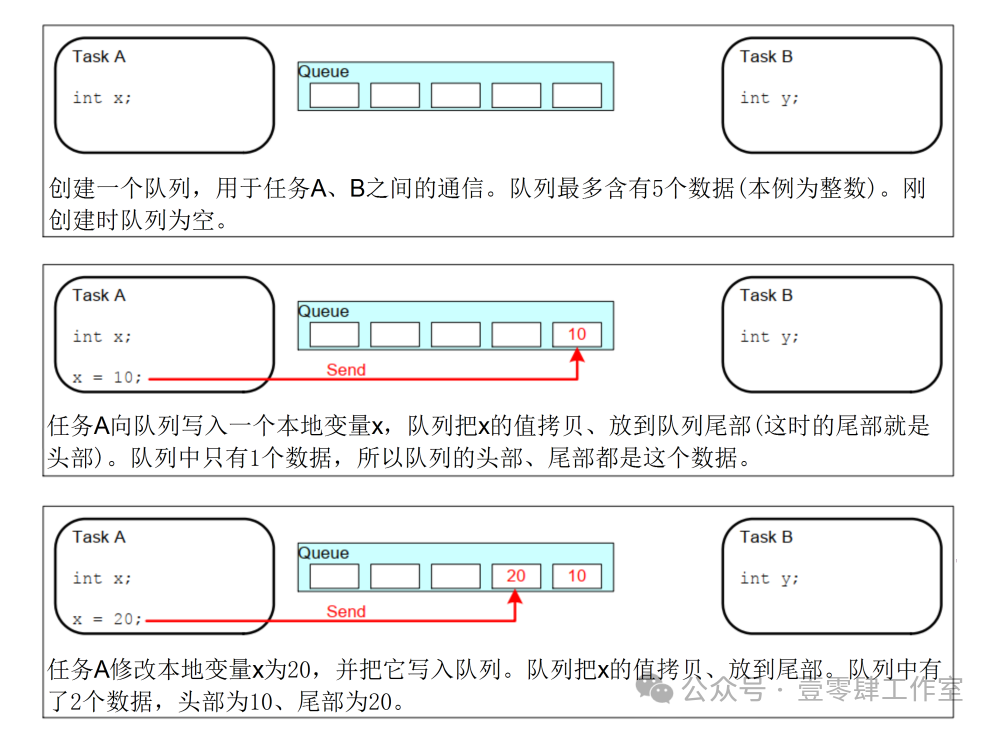
When storing data in the queue, it can be divided into head and tail.
The conventional approach is to place the produced data at the tail.
Consumers read data from the head.
If new data is placed at the head, the new data will not overwrite the original head data; instead, the original data will be shifted back, and the new data will be inserted. This data is managed using a circular buffer, so moving one data is not complex and is very efficient.
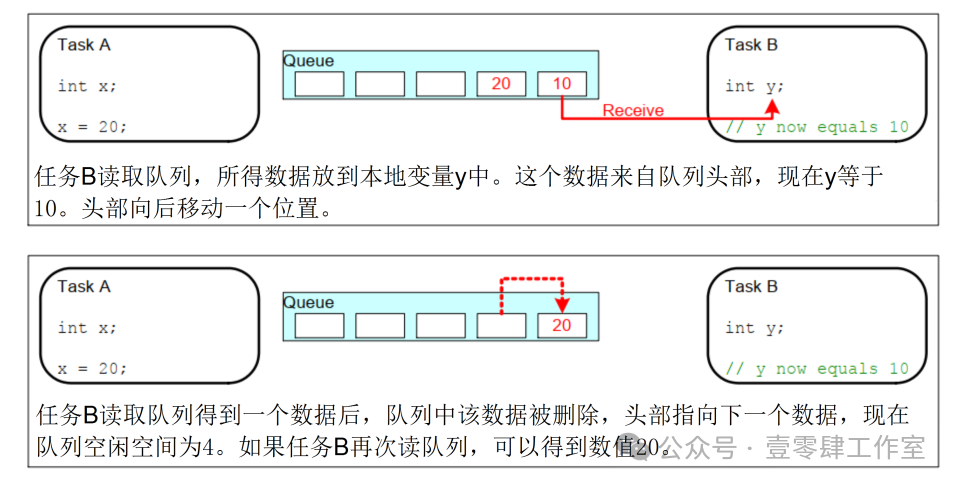
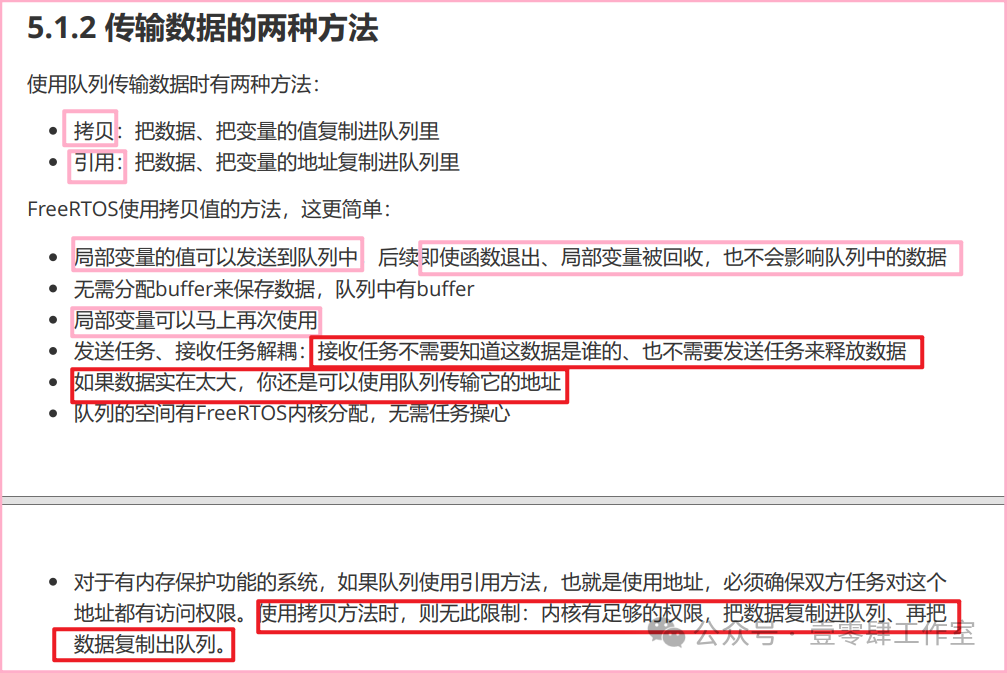
Blocking access to the queue.
Multiple tasks can read and write to the queue as long as they know the queue handle.
Tasks and ISRs can read and write to the queue.
1. When a task reads or writes to the queue, if the read or write is unsuccessful, it will enter the Blocked state, and a timeout can be specified.
If it can read or write, it enters the Ready state; otherwise, it remains blocked until the timeout.
2. If a task reads from the queue and there is no data, that task enters the Blocked state, and a blocking time can also be specified.
If there is data in the queue, that task immediately becomes Ready.
If there is still no data, after the timeout, it will also enter the Ready state.
3. There are no restrictions on the tasks reading from the queue; when multiple tasks read from an empty queue, all those tasks will enter the Blocked state.
When multiple tasks are waiting for data from the same queue, when data is available, the task that will enter the Ready state is the one with the highest priority; if all have the same priority, the task that has waited the longest will enter the Ready state.
Process of using a queue:
- Create a queue.
- Write to the queue.
- Read from the queue.
- Delete the queue.
Creating a Queue
There are two methods to create a queue.
- Dynamic memory allocation
- Static memory allocation
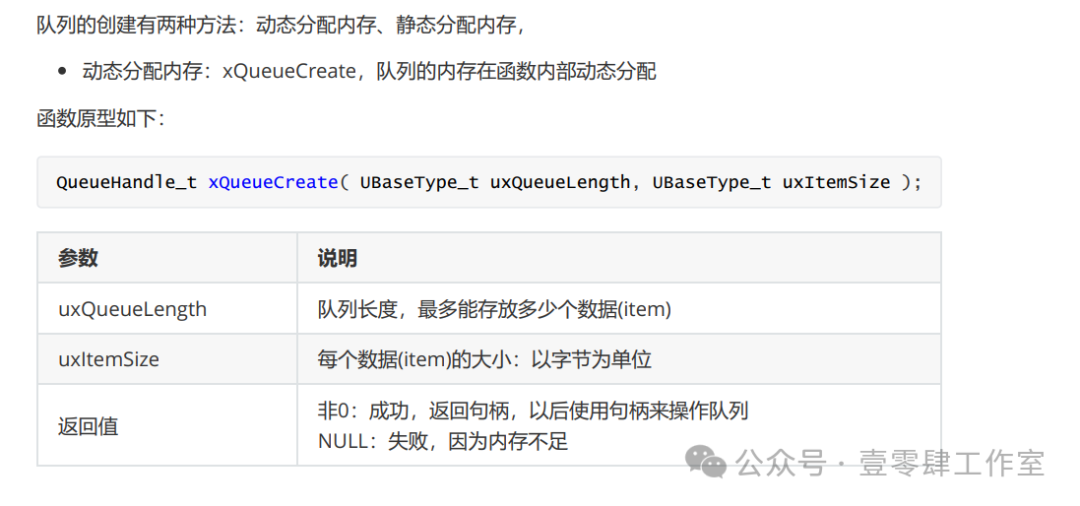
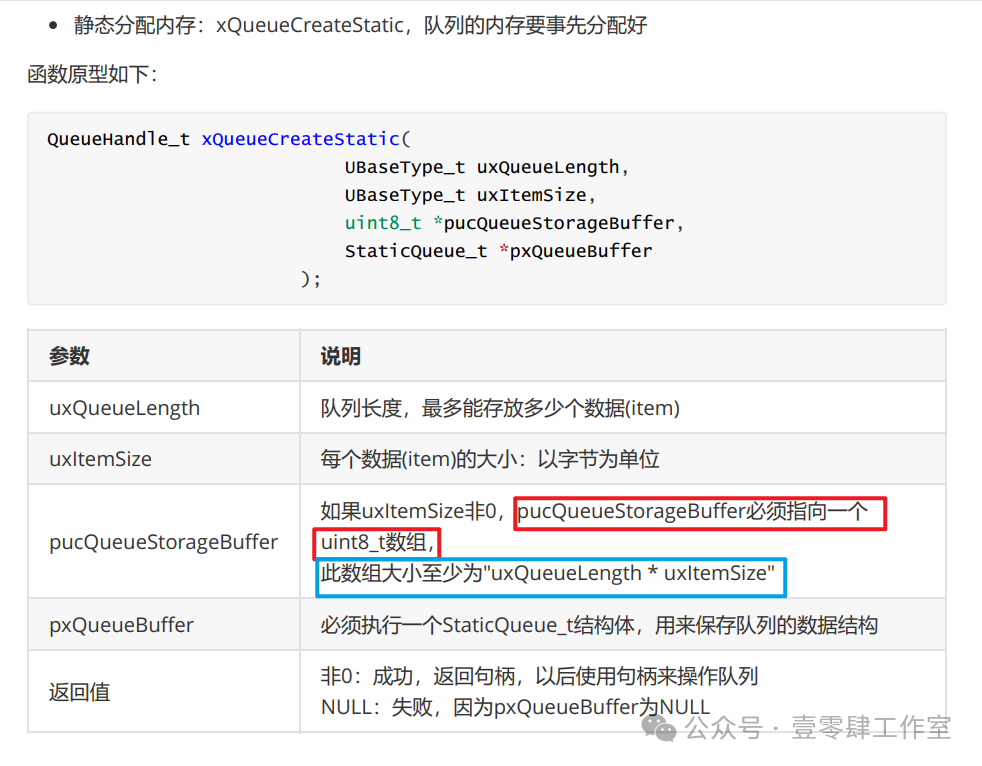
Methods to create a queue:
1. Dynamically create a queue.
First, define a Handle.
static QueueHandle_t xQueueCalcHandle;xQueueCalcHandle = xQueueCreate( 2, sizeof(int) );if (xQueueCalcHandle == NULL){ printf("can not create queue\r\n");}2. Statically create a queue.
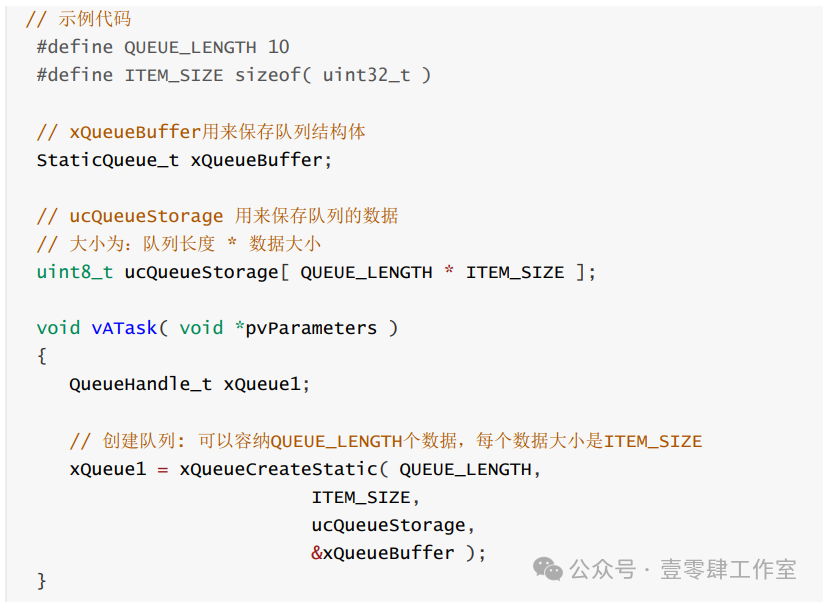
3. Reset the queue.
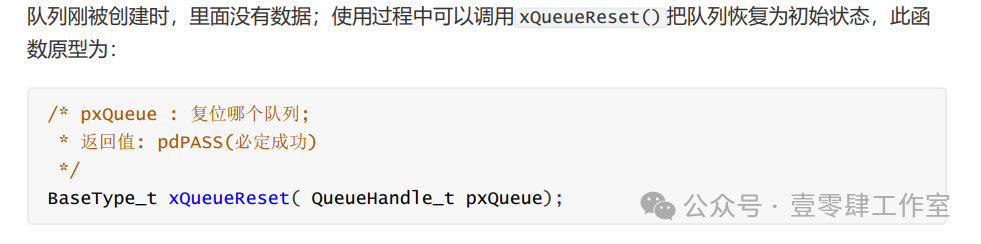
4. Delete the queue.

5. Write to the queue.
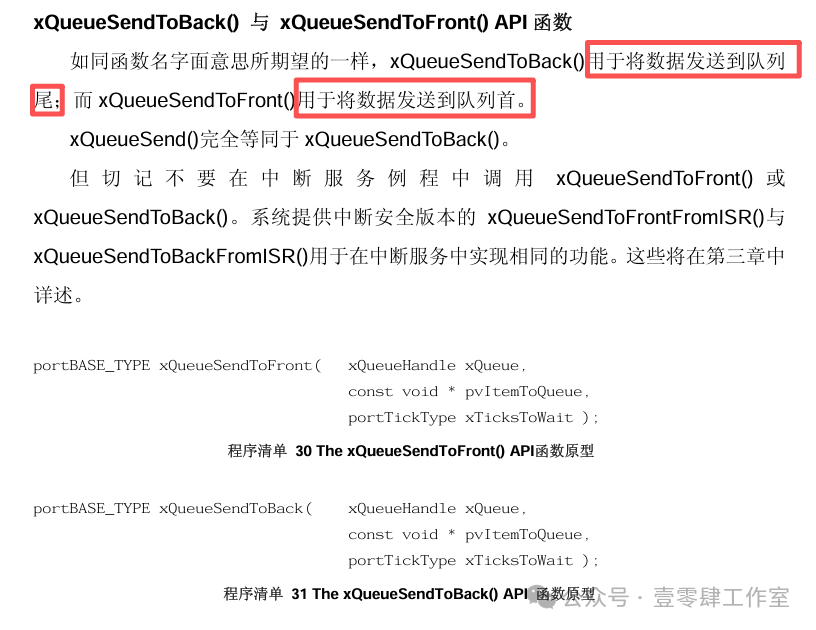
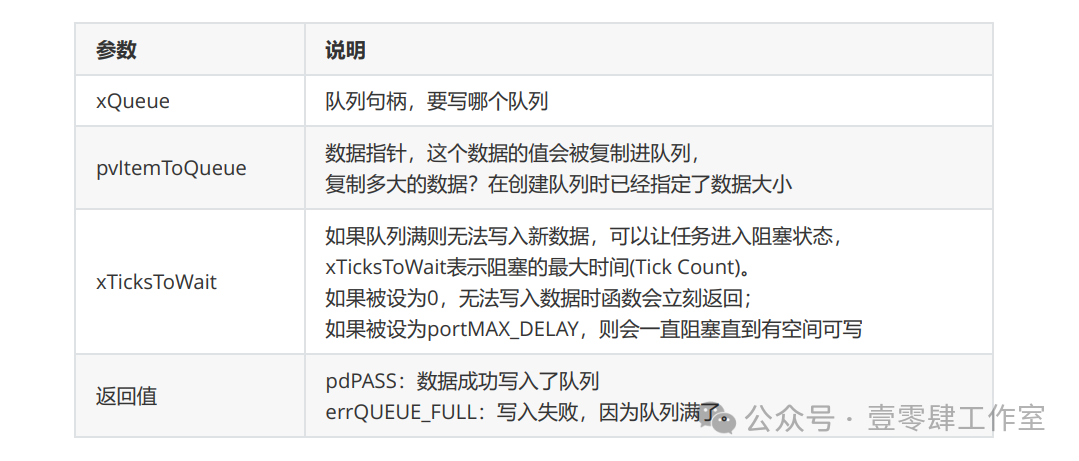
Note:
The length of the queue is
0 —— N-1
The pcWriteTo pointer points to the head of the buffer.
The data in the queue can be obtained through the pvItemToQueue pointer, with a size of ItemSize.
After copying is complete, it is written to the queue, and the pcWriteTo pointer points to the next data in the queue, pcWriteTo pointer += ItemSize;
If the queue is full, it should not write to the queue again, otherwise, it will overwrite the old data.
At this time, a waiting time xTicksToWait can be specified; if this waiting time is 0, it means no waiting, and if unable to write to the queue, it will return immediately.
If it is not 0, it will place the task calling this write queue function into the xTasksWaitingToSend list, entering the Blocked state.
Later, when there is space in the queue, it will be awakened.
When the write pointer writes the last data to the queue, the pointer jumps back to the head of the queue, from the tail to the head.
6. Read from the queue.

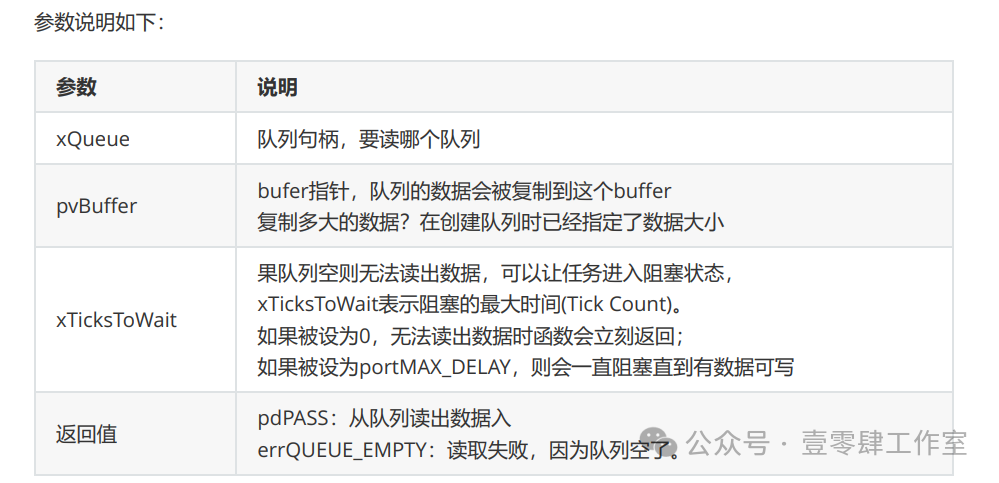
If data cannot be read, it will be placed in the xTasksWaitingToReceive list of the queue, entering the Blocked state, and will be awakened when another task writes to this queue.
Note: When writing data and reading data, if the data to be written is full or there is no data when reading, it enters the Blocked state, waiting for awakening.
The task with the highest priority is awakened.If the priorities are the same, the task that has waited the longest is awakened.
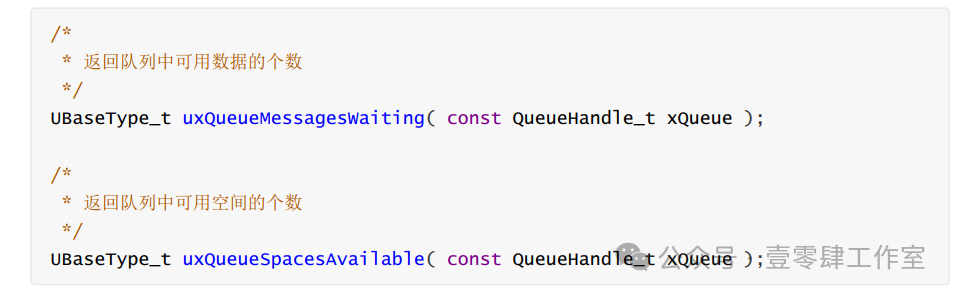
7. Query the queue.
Query how many data are in the queue and how much remaining space there is.
Next, we will demonstrate an example.
Let task1 calculate and write the accumulated value sum into the queue, while task2 reads from the queue. When there is data in the queue, it prints it out; if there is no data, it enters the Blocked state, so task2 will not participate in CPU scheduling during this waiting process. Once task1 writes the accumulated value into the queue, task2 will transition from the Blocked state to the Ready state, thus running and reading the data from the queue.
Steps:
-
Create a queue.
-
Specify the length of the queue (how many members are in the queue).
-
Specify the size of the data in the queue (the size of the data (members) in the queue).
-
Task1 writes data to the queue.
-
Task2 reads data from the queue.
The code is as follows:
#include "FreeRTOS.h"#include "task.h"#include "usart1.h"#include "queue.h"char Task1Flag = 0;char Task2Flag = 0;char Task3Flag = 0;char Taskidleflagrun = 0;static TaskHandle_t app_task1_handle = NULL;static TaskHandle_t app_task2_handle = NULL;static QueueHandle_t xQueueCalcHandle;TaskHandle_t app_task3_handle;BaseType_t xReturn;TaskHandle_t xReturn3;/* Task 1 */ static void app_task1(void* pvParameters); static void app_task2(void* pvParameters); static void Task3Function(void* pvParameters); static void Task4Function(void* pvParameters); void vApplicationIdleHook(void){ Task1Flag = 0; Task2Flag = 0; Task3Flag = 0; Taskidleflagrun = 1; printf("5");}int main(void){ uart1_init(9600); /* Create app_task1 task */ xQueueCalcHandle = xQueueCreate( 2, sizeof(int) ); if (xQueueCalcHandle == NULL) { printf("can not create queue\r\n"); } xTaskCreate((TaskFunction_t )app_task1, /* Task entry function */ (const char* )"app_task1", /* Task name */ (uint16_t )100, /* Task stack size */ (void* )NULL, /* Task entry function parameter */ (UBaseType_t )0, /* Task priority */ (TaskHandle_t* )&app_task1_handle); /* Task control block pointer */ xReturn = xTaskCreate((TaskFunction_t )app_task2, /* Task entry function */ (const char* )"app_task2", /* Task name */ (uint16_t )100, /* Task stack size */ (void* )NULL, /* Task entry function parameter */ (UBaseType_t )0, /* Task priority */ (TaskHandle_t* )&app_task2_handle); /* Task control block pointer */ /* Start task scheduling */ vTaskStartScheduler();}static volatile int flagCalcEnd=0;static int sum =0;static void app_task1(void* pvParameters){ int flag =0; volatile int i =0; for(;;) { for(i=0;i<100000000;i++){ sum++; // flagCalcEnd = 1; // vTaskDelete(NULL); xQueueSend(xQueueCalcHandle,&sum,portMAX_DELAY); sum =1; }}}static void app_task2(void* pvParameters){ int val; for(;;) { // if(flagCalcEnd){ // } flagCalcEnd=0; xQueueReceive(xQueueCalcHandle,&val,portMAX_DELAY); flagCalcEnd=1;}Thus, we have achieved synchronization using queues.
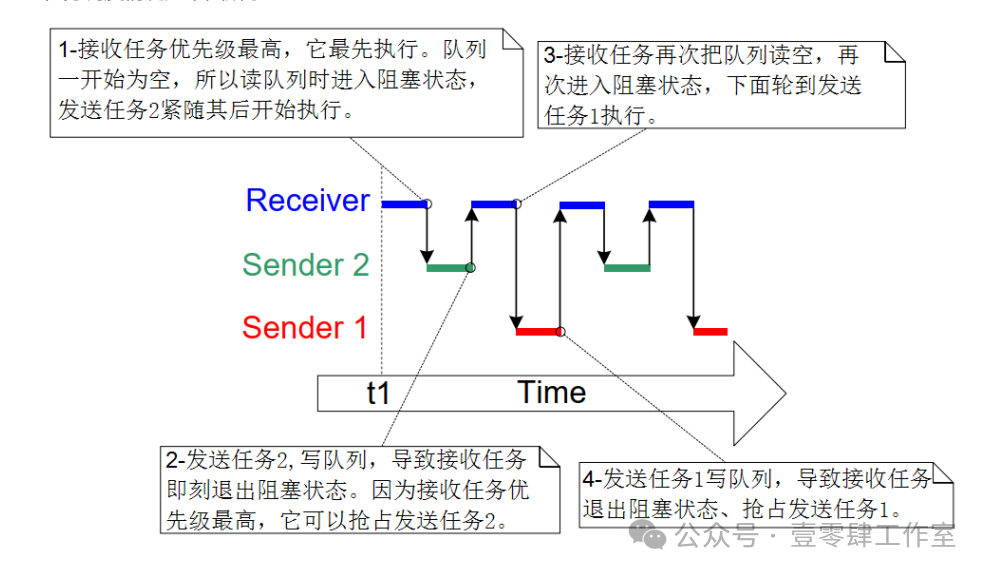
Next, we will use queues to implement mutual exclusion, which may be a bit difficult to understand; feel free to message or comment if you have questions.
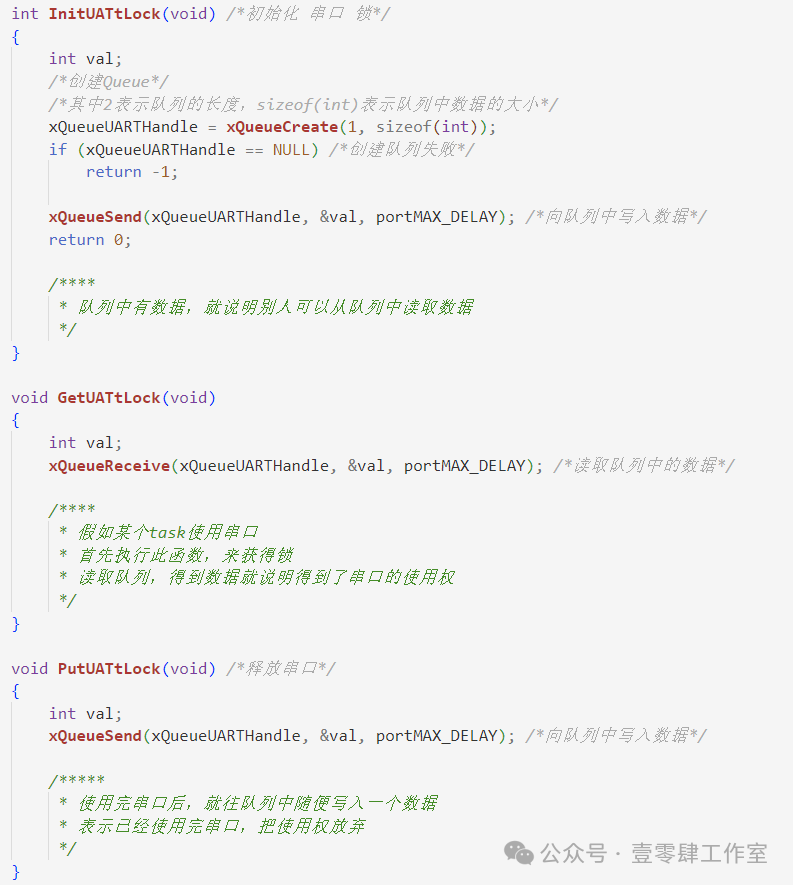
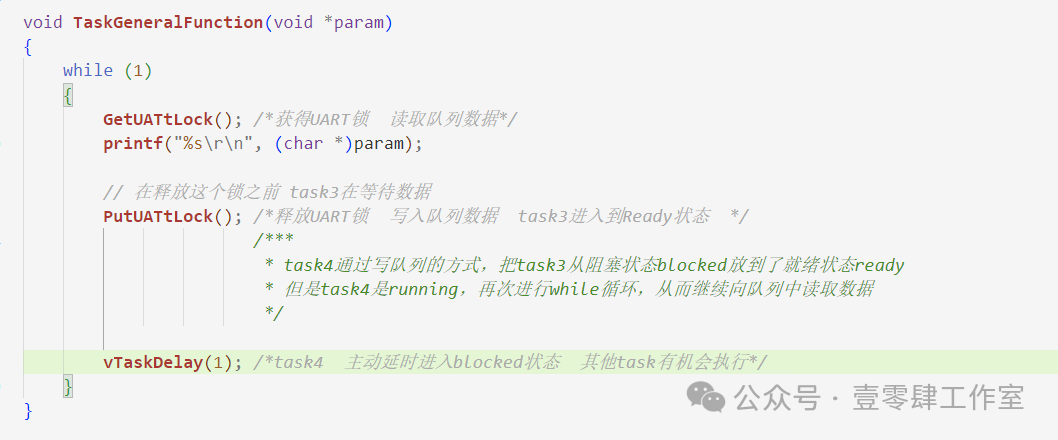
In summary, we have completed synchronization and mutual exclusion with queues. In the next section, we will implement queue sets.