Introduction
With the increasing popularity of Internet of Things (IoT) and real-time data monitoring applications, the MQTT protocol has become one of the preferred protocols for IoT communication due to its lightweight, low power consumption, and high efficiency. This article will guide you step-by-step on how to integrate the MQTT protocol in the RuoYi frontend-backend separation version, enabling real-time communication between devices and web applications.
What is MQTT?
MQTT (Message Queuing Telemetry Transport) is a lightweight messaging protocol based on the publish/subscribe model, designed for low bandwidth, high latency, or unstable network environments. It has the following characteristics:
-
Lightweight and efficient
-
Supports QoS (Quality of Service) levels
-
Topic-based message routing
-
Suitable for communication between IoT devices
Preparation
Before starting the integration, please ensure:
-
The RuoYi frontend-backend separation system is deployed
-
MQTT Broker service is prepared (e.g., EMQX, Mosquitto, etc.)
-
Basic knowledge of Java and Vue.js development
1. Add dependencies in the <span>common</span> module’s <span>pom.xml</span> file
<!–mqtt dependency–>
<dependency>
<groupId>org.springframework.boot</groupId>
<artifactId>spring-boot-starter-integration</artifactId>
</dependency>
<dependency>
<groupId>org.springframework.integration</groupId>
<artifactId>spring-integration-stream</artifactId>
</dependency>
<dependency>
<groupId>org.springframework.integration</groupId>
<artifactId>spring-integration-mqtt</artifactId>
</dependency>
2. Add relevant configurations in <span>application.yml</span>, under the <span>Spring</span> configuration#mqtt mqtt: username: admin # Username password: admin # Password hostUrl: tcp://ip:port clientId: clientId # Client ID defaultTopic: topic,topic1 # Subscribed topics timeout:100# Timeout (seconds) keepalive:60# Keepalive (seconds) enabled:true# Enable MQTT functionality3. Create a <span>mqtt</span> folder under <span>fanmukeji-common\src\main\java\com\fanmukeji\common\utils</span> and add the following three files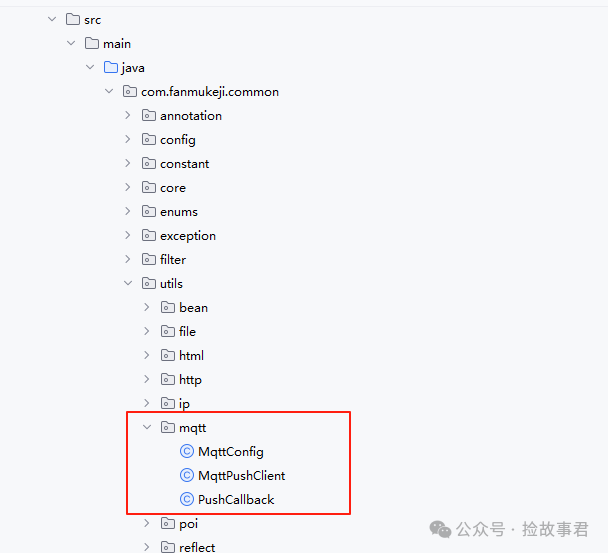 MqttConfig.java
package com.fanmukeji.common.utils.mqtt;
import com.fanmukeji.common.utils.StringUtils;
import org.springframework.beans.factory.annotation.Autowired;
import org.springframework.beans.factory.annotation.Value;
import org.springframework.boot.context.properties.ConfigurationProperties;
import org.springframework.context.annotation.Bean;
import org.springframework.context.annotation.Configuration;
import org.springframework.stereotype.Component;
@Component
@ConfigurationProperties("spring.mqtt")
public class MqttConfig {
@Autowired
private MqttPushClient mqttPushClient;
/**
     * Username
*/
private String username;
/**
     * Password
*/
private String password;
/**
     * Connection address
*/
private String hostUrl;
/**
     * Client ID
     */
private String clientId;
/**
     * Default connection topic
*/
private String defaultTopic;
/**
     * Timeout
*/
private int timeout;
/**
     * Keepalive
*/
private int keepalive;
/**
     * Enable MQTT functionality
*/
private boolean enabled;

public String getUsername() {
return username;
    }

public void setUsername(String username) {
this.username = username;
    }

public String getPassword() {
return password;
    }

public void setPassword(String password) {
this.password = password;
    }

public String getHostUrl() {
return hostUrl;
    }

public void setHostUrl(String hostUrl) {
this.hostUrl = hostUrl;
    }

public String getClientId() {
return clientId;
    }

public void setClientId(String clientId) {
this.clientId = clientId;
    }

public String getDefaultTopic() {
return defaultTopic;
    }

public void setDefaultTopic(String defaultTopic) {
this.defaultTopic = defaultTopic;
    }

public int getTimeout() {
return timeout;
    }

public void setTimeout(int timeout) {
this.timeout = timeout;
    }

public int getKeepalive() {
return keepalive;
    }

public void setKeepalive(int keepalive) {
this.keepalive = keepalive;
    }

public boolean isEnabled() {
return enabled;
    }

public void setEnabled(boolean enabled) {
this.enabled = enabled;
    }
@Bean
public MqttPushClient getMqttPushClient() {
if(enabled == true){
String mqtt_topic[] = StringUtils.split(defaultTopic, ",");
mqttPushClient.connect(hostUrl, clientId, username, password, timeout, keepalive);// Connect
for(int i=0; i < mqtt_topic.length; i++){
mqttPushClient.subscribe(mqtt_topic[i], 0);// Subscribe to topic
}
        }
return mqttPushClient;
    }
}MqttPushClient.javapackage com.fanmukeji.common.utils.mqtt;
import com.fanmukeji.common.core.domain.AjaxResult;
import org.eclipse.paho.client.mqttv3.*;
import org.eclipse.paho.client.mqttv3.persist.MemoryPersistence;
import org.slf4j.Logger;
import org.slf4j.LoggerFactory;
import org.springframework.beans.factory.annotation.Autowired;
import org.springframework.stereotype.Component;
import static com.fanmukeji.common.core.domain.AjaxResult.error;
import static com.fanmukeji.common.core.domain.AjaxResult.success;
@Component
public class MqttPushClient {
private static final Logger logger = LoggerFactory.getLogger(MqttPushClient.class);
@Autowired
private PushCallback pushCallback;
private static MqttClient client;
private static MqttClient getClient() {
return client;
}
private static void setClient(MqttClient client) {
MqttPushClient.client = client;
}
/**
* Client connection
*
* @param host ip+port
* @param clientID Client ID
* @param username Username
* @param password Password
* @param timeout Timeout
* @param keepalive Keepalive
*/
public void connect(String host, String clientID, String username, String password, int timeout, int keepalive) {
MqttClient client;
try {
client = new MqttClient(host, clientID, new MemoryPersistence());
MqttConnectOptions options = new MqttConnectOptions();
options.setCleanSession(true);
options.setUserName(username);
options.setPassword(password.toCharArray());
options.setConnectionTimeout(timeout);
options.setKeepAliveInterval(keepalive);
MqttPushClient.setClient(client);
try {
client.setCallback(pushCallback);
client.connect(options);
} catch (Exception e) {
e.printStackTrace();
}
} catch (Exception e) {
e.printStackTrace();
}
}
/**
* Publish
*
* @param qos Connection method
* @param retained Whether to retain
* @param topic Topic
* @param pushMessage Message body
*/
public AjaxResult publish(int qos, boolean retained, String topic, String pushMessage) {
MqttMessage message = new MqttMessage();
message.setQos(qos);
message.setRetained(retained);
message.setPayload(pushMessage.getBytes());
MqttTopic mTopic = MqttPushClient.getClient().getTopic(topic);
if (null == mTopic) {
logger.error("topic not exist");
}
MqttDeliveryToken token;
try {
token = mTopic.publish(message);
token.waitForCompletion();
return success();
} catch (MqttPersistenceException e) {
e.printStackTrace();
return error();
} catch (MqttException e) {
e.printStackTrace();
return error();
}
}
/**
* Subscribe to a topic
*
* @param topic Topic
* @param qos Connection method
*/
public void subscribe(String topic, int qos) {
logger.info("Starting to subscribe to topic " + topic);
try {
MqttPushClient.getClient().subscribe(topic, qos);
} catch (MqttException e) {
e.printStackTrace();
}
}
}PushCallback.javapackage com.fanmukeji.common.utils.mqtt;
import com.alibaba.fastjson2.JSONObject;
import org.eclipse.paho.client.mqttv3.IMqttDeliveryToken;
import org.eclipse.paho.client.mqttv3.MqttCallback;
import org.eclipse.paho.client.mqttv3.MqttClient;
import org.eclipse.paho.client.mqttv3.MqttMessage;
import org.slf4j.Logger;
import org.slf4j.LoggerFactory;
import org.springframework.beans.factory.annotation.Autowired;
import org.springframework.stereotype.Component;
@Component
public class PushCallback implements MqttCallback {
private static final Logger logger = LoggerFactory.getLogger(MqttPushClient.class);
@Autowired
private MqttConfig mqttConfig;
private static MqttClient client;
private static String _topic;
private static String _qos;
private static String _msg;
@Override
public void connectionLost(Throwable throwable) {
// After connection loss, generally reconnect here
logger.info("Connection lost, can reconnect");
if (client == null || !client.isConnected()) {
mqttConfig.getMqttPushClient();
}
}
@Override
public void messageArrived(String topic, MqttMessage mqttMessage) throws Exception {
// Messages received after subscribe will execute here
logger.info("Received message topic : " + topic);
logger.info("Received message Qos : " + mqttMessage.getQos());
logger.info("Received message content : " + new String(mqttMessage.getPayload()));
_topic = topic;
_qos = mqttMessage.getQos()+"";
_msg = new String(mqttMessage.getPayload());
}
@Override
public void deliveryComplete(IMqttDeliveryToken iMqttDeliveryToken) {
logger.info("deliveryComplete---------" + iMqttDeliveryToken.isComplete());
}
// Other Controller layers will call this method to get the received hardware data
public String receive() {
JSONObject jsonObject = new JSONObject();
jsonObject.put("topic", _topic);
jsonObject.put("qos", _qos);
jsonObject.put("msg", _msg);
return jsonObject.toString();
}
}4. Run the project, the backend can receive data sent from MQTTX
Security Considerations
-
Use TLS encryption: In production environments, use
<span>wss://</span>and<span>ssl://</span>protocols -
Authentication and authorization: Configure ACL rules for the MQTT Broker
-
Topic naming conventions: For example,
<span>{app_name}/{device_type}/{device_id}/{data_type}</span> -
Client ID management: Avoid using fixed client IDs
Troubleshooting Common Issues
-
Unstable connection: Adjust the keepalive interval and timeout settings
-
Message loss: Choose an appropriate QoS level based on requirements
-
Performance issues: Control message frequency to avoid high-frequency small messages
-
WebSocket support: Ensure the Broker is configured with a WebSocket port
Conclusion
With the guidance of this article, you should have successfully integrated the MQTT protocol into the RuoYi frontend-backend separation system. This integration can be widely applied in scenarios such as IoT monitoring, instant messaging, and real-time data display. Depending on actual needs, you can further optimize message processing logic and add retry mechanisms.
If you encounter any issues during implementation, feel free to leave a comment for discussion. Also, feel free to follow our public account for more technical insights!