(Thanks to everyone for your likes and appreciation. If this article resonates with you, please “like” and “recommend” it, thank you all!)
Task Introduction
In the production processes of enterprises, various intelligent production devices operate under the unified control and management of automated intelligent control units, forming an industrial-grade network working mode characterized by interconnection and collaboration. In general enterprises, multiple communication network modes coexist, among which the production mode utilizing PROFIBUS communication devices for network communication is also quite common.
01
—
Task Assignment
A certain intelligent production processing enterprise needs to utilize the PROFIBUS communication network in the main control room to control data transmission to remote PLC2, receiving and processing the data information feedback from PLC2.This task requires the design, installation, and debugging of control circuits for the two PLCs according to the task content.
02
—
Task Analysis
(1)Task Analysis
PLC1 control requirements:
1) Transmit a set of data information to PLC2;
2) Compare the content of the data information feedback from PLC2 and perform output control based on the comparison results.
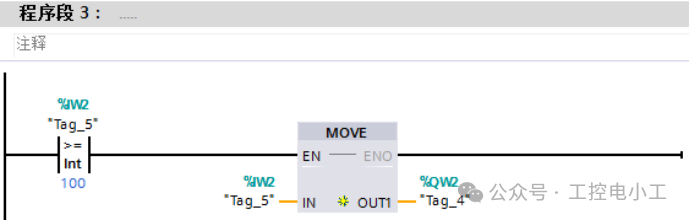
PLC2 control requirements:
1) Receive the data information sent by PLC1;
2) Perform calculations and other functions on the data information;
3) Feedback the processed data information to PLC1.
(2)I/O Address Allocation Table
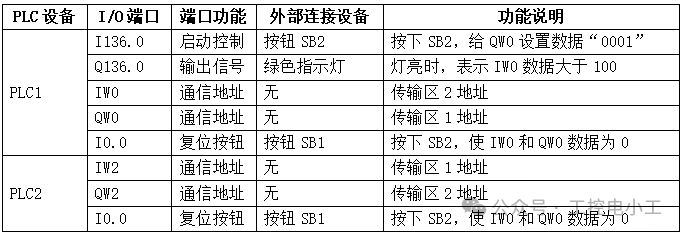
(3)Hardware Wiring Diagram
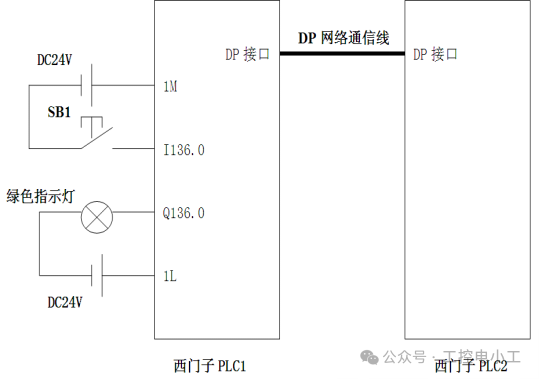
03
—
Task Implementation
1. Write Ladder Diagram Program
(1)Create a new project. Open Siemens V13 programming software, create a new project named “Communication Between S7-1200 and S7-300”, click “Create”, and the system will automatically generate a new project.
(2) Add two new PLC devices. Click to select “Open Project View” to enter the main project interface. In the left side of the interface, find “Add New Device” in the “Project Tree” and enter the “Add New Device” dialog box to find the CPU model of the PLC used for this task.
Select PLC1 as S7-314C-2PN/DP and PLC2 as S7-1214C, click “OK” to automatically generate the new PLC. At the same time, add a PROFIBUS communication module CM1242-5 (slave module) to PLC2.
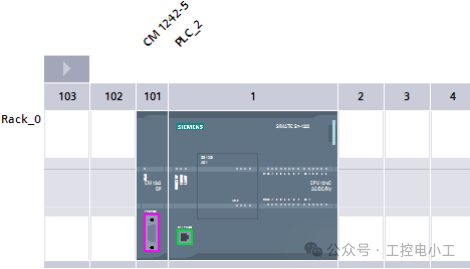
(3) Establish a configuration connection between the two PLC devices.
Connect PLC1 and PLC2 in the “Network View” interface. Use the mouse to select the DP interface of PLC1 and drag the mouse to the DP interface of PLC2’s CM1242-5 module. At this point, the system will automatically generate a communication link “PLC_1.DP-Mastersystem (1)” between the two PLCs.
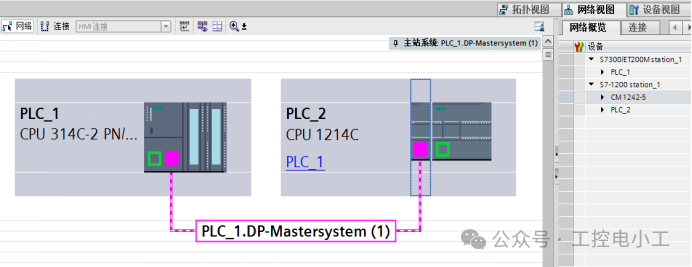
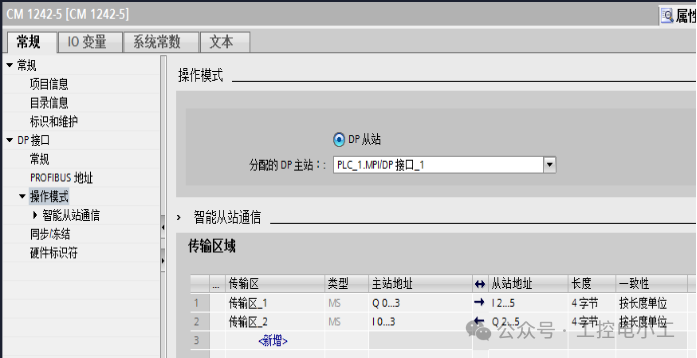
(4) Set the relevant parameters for the communication instructions. Select the CM1242-5 module of PLC2, and in the module’s “General Properties” section, set the transmission area for “Intelligent Slave Communication” under the “Operating Mode” column.
Set transmission area 1 with the master address as Q0…3, slave address as I2…5, length 4 bytes.
Set transmission area 2 with the master address as I0…3, slave address as Q2…5, length 4 bytes.
Notes:
(1) If you want to set the S7-1200 PLC as the master, you can add a CM1243-5 module to the PLC. The parameter setting method for the communication module is the same as that for the CM1242-2 module.
(2) The CPU module of the S7-300 PLC comes with a PROFIBUS communication interface, which can be used directly.
(5) Write PLC1 program
Add PLC1 initialization program block 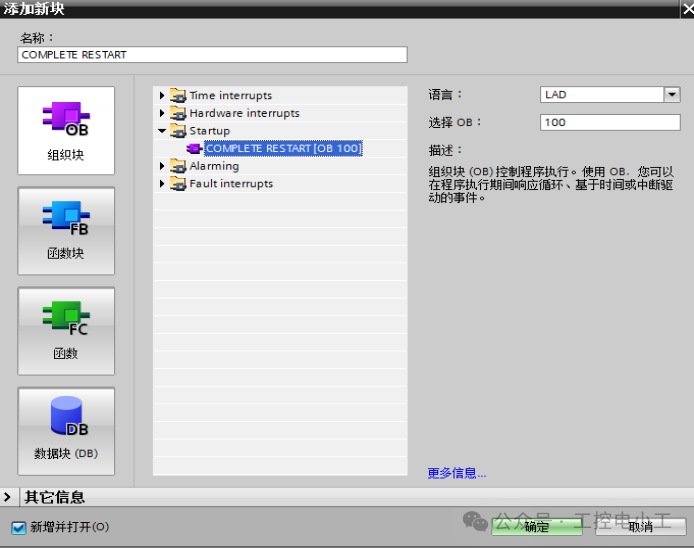 Write the initialization program in PLC1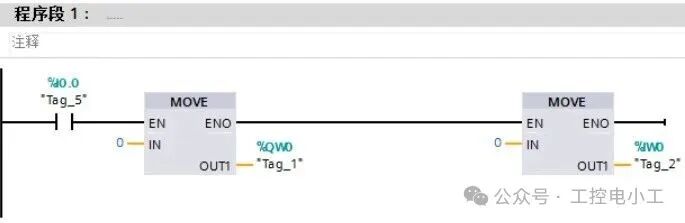
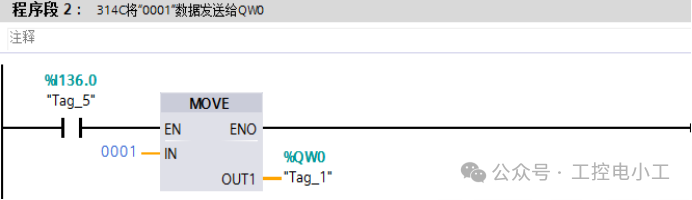
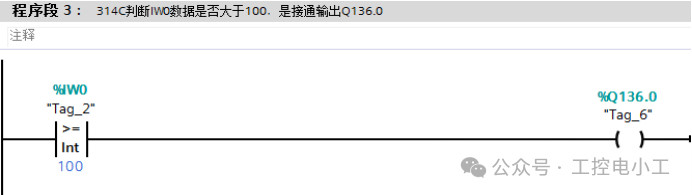
(6) Write PLC2 program
Add PLC2 initialization program block
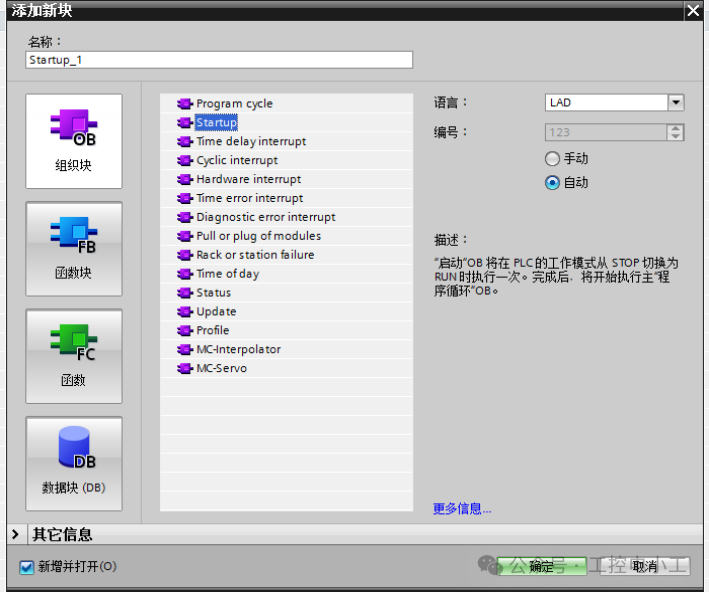
Write the initialization program for PLC2
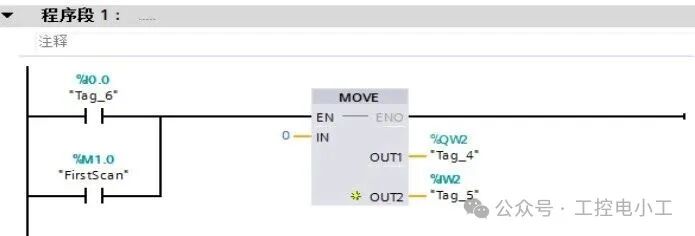
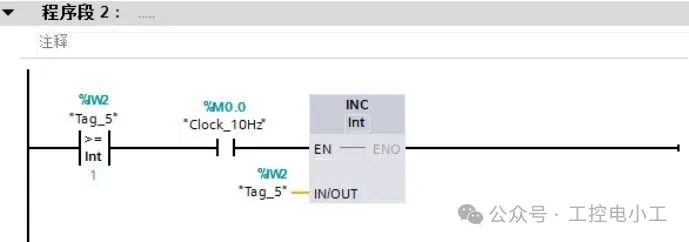
1
END
1
Previous Issues Review
Practical Case: Two S7-1200 PLCs Achieve PROFINET Communication, Detailed Steps Included, All Programs Provided for Easy ImplementationTypical Application Case of Time Interrupt Organization Block OB10 in Siemens S7-1200 PLCSiemens S7-1200 PLC Program Download Error, Firmware Version Incompatibility, Learn How to Solve ItTypical Application Case of Cycle Interrupt Organization Block in Siemens S7-1200 PLCPractical Case | S7-1200 Cycle Color Light Control, Complete Source Program Included, Follow the Steps to Replicate!Must-Know for Senior Electricians: Automatic Door Control with Siemens S7-1200 PLCMust-Know for Senior Electricians: Traffic Light Control at Intersections with Siemens S7-1200 PLCMust-Know for Senior Electricians: Automatic Assembly Line Control with Siemens S7-1200 PLCMust-Know for Senior Electricians: Automatic Mail Sorting Machine Control with Siemens S7-1200 PLC
If you like the articles from Industrial Control Electrician, please click on the business card to follow me! I will continue to share technical insights about PLCs and industrial robots!