1. Why Choose SVR for SOC Prediction?
SOC prediction is essentially a regression problem — predicting the remaining battery percentage based on features such as voltage, current, temperature, and time. Support Vector Regression (SVR) performs excellently in small sample, nonlinear problems, making it particularly suitable for batteries, which are influenced by multiple factors and have complex characteristics:
- Insensitivity to noisy data, suitable for actual collected battery data;
- Handles nonlinear relationships through kernel functions, capturing the implicit associations between voltage, current, and SOC;
- Strong generalization ability, avoiding overfitting issues.
2. MATLAB Model Training: From Data to Prediction Model
1. Data Preparation and Preprocessing
First, a labeled dataset needs to be prepared, using battery cycle data that includes features such as voltage, temperature, current, and corresponding SOC labels.
% Clear workspace
clear all;
clc;
% Read CSV file
data = readtable('xxxx.csv');
% Extract features and target variable
X = table2array(data(:, {'Voltage', 'Temperature', 'Current'})); % Feature matrix
y = table2array(data(:, 'SOC')); % Target variable (SOC)
% Data preprocessing: standardize features
[X_normalized, mu, sigma] = zscore(X); % Z-score standardization, saving mean and standard deviation
2. Dataset Splitting and Model Training
Split the data into training and testing sets in an 80:20 ratio, using grid search combined with 5-fold cross-validation to find the optimal hyperparameters.
% Sequentially split dataset
n = size(X, 1);
train_ratio = 0.8;
train_size = round(train_ratio * n);
X_train = X_normalized(1:train_size, :);
y_train = y(1:train_size);
X_test = X_normalized(train_size+1:end, :);
y_test = y(train_size+1:end);
% Define hyperparameter grid to search
C_values = [0.1, 1, 10, 100];
epsilon_values = [0.01, 0.1, 0.2];
param_combinations = combvec(C_values, epsilon_values)';
% 5-fold cross-validation to find best hyperparameters
k = 5;
cv = cvpartition(length(y_train), 'KFold', k);
best_mse = inf;
best_model = [];
best_params = [];
for i = 1:size(param_combinations, 1)
    C = param_combinations(i, 1);
    epsilon = param_combinations(i, 2);
    mse_cv = 0;
    fprintf('Testing hyperparameters: C = %.2f, epsilon = %.2f\n', C, epsilon);
    for fold = 1:k
        train_idx = cv.training(fold);
        val_idx = cv.test(fold);
        X_train_cv = X_train(train_idx, :);
        y_train_cv = y_train(train_idx);
        X_val_cv = X_train(val_idx, :);
        y_val_cv = y_train(val_idx);
        % Train SVR model
        mdl = fitrsvm(X_train_cv, y_train_cv, ...
            'KernelFunction', 'rbf', ...
            'BoxConstraint', C, ...
            'Epsilon', epsilon, ...
            'Standardize', false);
        % Calculate validation error
        y_pred_cv = predict(mdl, X_val_cv);
        mse_fold = mean((y_val_cv - y_pred_cv).^2);
        mse_cv = mse_cv + mse_fold / k;
    end
    % Update best model
    if mse_cv < best_mse
        best_mse = mse_cv;
        best_params = [C, epsilon];
        best_model = fitrsvm(X_train, y_train, ...
            'KernelFunction', 'rbf', ...
            'BoxConstraint', C, ...
            'Epsilon', epsilon, ...
            'Standardize', false);
    end
end
3. Model Evaluation and Saving
% Test set evaluation
y_pred = predict(best_model, X_test);
mse = mean((y_test - y_pred).^2);
rmse = sqrt(mse);
mae = mean(abs(y_test - y_pred));
fprintf('Best hyperparameters: C = %.2f, epsilon = %.2f\n', best_params(1), best_params(2));
fprintf('Root Mean Square Error (RMSE): %.4f\n', rmse);
fprintf('Mean Absolute Error (MAE): %.4f\n', mae);
% Visualization of results
figure('Position', [100, 100, 800, 400]);
plot(y_test, 'b-', 'LineWidth', 1.5, 'DisplayName', 'Actual SOC');
hold on;
plot(y_pred, 'r--', 'LineWidth', 1.5, 'DisplayName', 'Predicted SOC');
xlabel('Sample Index');
ylabel('SOC');
title('SVR Prediction SOC Results');
legend('show');
grid on;
% Save model and standardization parameters
save('SVRModel_cpu.mat', 'best_model');
save('scaler.mat', 'mu', 'sigma');
disp('Model and scaler have been saved');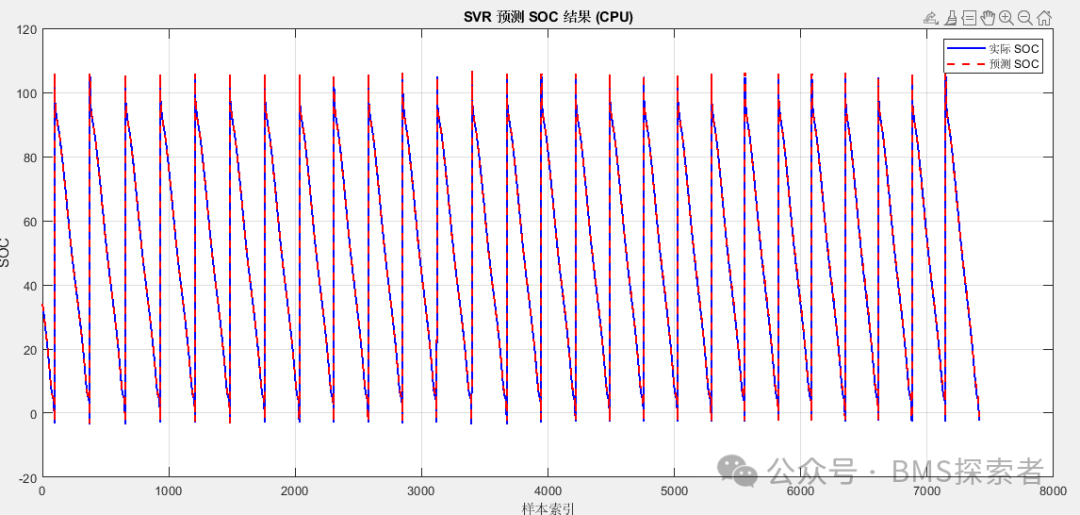
3. Importing the SVR Model into Simulink for Simulation
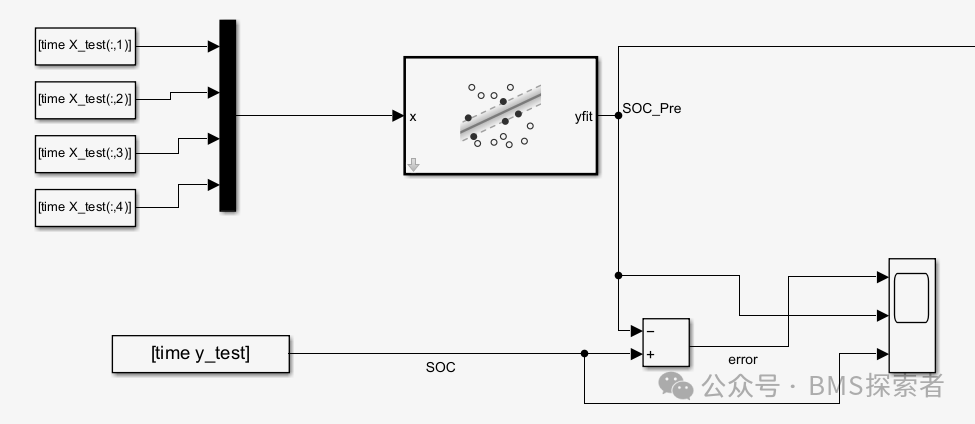
The trained model needs to be integrated into Simulink for use in actual battery management system simulations. Here are the detailed steps:
1. Preparations
Ensure the following are completed:
- The trained SVR model has been saved (
<span>SVRModel_cpu.mat</span>). - The standardization parameters have been saved (
<span>scaler.mat</span>). - Input data for Simulink simulation (voltage, temperature, current, etc.) is ready.
2. Building the Simulink Model
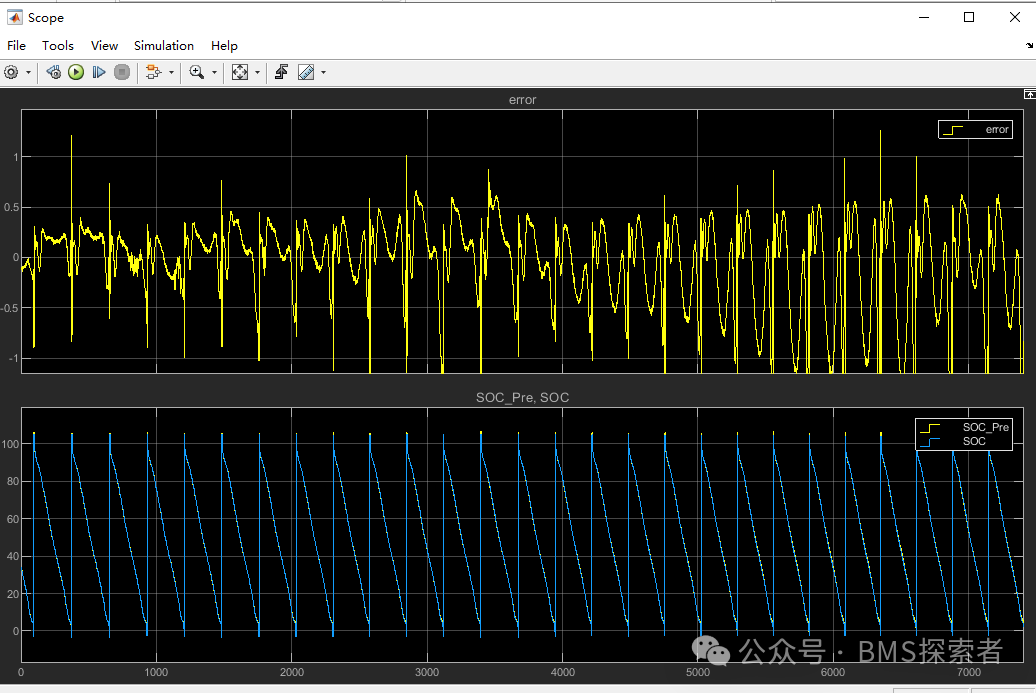
3. Running the Simulation and Analyzing Results