Click the blue text aboveto follow us
Resource ReleaseHuawei Certification Beginner to Advanced Practical Course↓ Scan to watch videos ↓ 1. Introduction to Hyper-Convergence1. What is FusionCube:FusionCube hyper-convergence represents another evolutionary direction for IT products. Based on virtualization technology, it vertically integrates computing, storage, and network resources, achieving rapid deployment and scalability, simplifying maintenance, and meeting the fast-changing information needs of enterprises.2. Advantages of FusionCube:As a virtualized hyper-converged infrastructure, FusionCube is an open and scalable system. It helps users quickly and easily deploy and manage various applications through features like unified resource management and operation management. Users can customize, develop, deploy, update, or manage business applications on FusionCube according to their business needs. FusionCube is suitable for deployments ranging from simple applications to complex clusters.3. Features of FusionCube:
- Minimal Management: Simple installation and deployment, quick delivery, and easy maintenance.
- Optimal Efficiency: Supports deduplication and compression technology with a compression ratio of up to 3:1, supports EC, and achieves a storage utilization rate of up to 90% (which FC cannot achieve).
- Rapid Performance: Provides high concurrency and high throughput storage services for applications like databases through built-in distributed storage. Offers the industry’s fastest switching network with 100Gbps bandwidth, enabling extremely fast data reconstruction.
- Extreme Reliability: Supports active-active configurations, asynchronous remote replication, and built-in backup software to ensure data security.
4. Functions of FusionCube① Compatible with Huawei virtualization platforms② FusionCube integrates computing, storage, and network resources③ FusionCube has built-in FusionStorage block storage, providing higher performance and data reliability④ FusionCube supports both virtualization and physical hybrid deployment within a single system, enhancing resource utilization through virtualization while improving performance by deploying database services on physical servers.⑤ FusionCube can simultaneously provide computing, storage, and network resources for both virtualization and databases, offering unified operation management services.5. Typical Application Scenarios of FusionCube① Server virtualization scenarios: Directly provides integrated FusionCube virtualization infrastructure without carrying any other software② Desktop Cloud: Runs VDI virtual desktops on FusionCube or provides desktop cloud services through application virtualization③ Enterprise OA: Users can directly run server applications like Microsoft Exchange and SharePoint on FusionCube2. Introduction to FusionCube Software1. Installation/Expansion Tool: FusionCube Builder (needs to run on a Windows PC, discovers servers and reads relevant information through management network SSDP or scanning IP. FusionCube Builder uses NFS to transfer related packages during OS and software installation)2. Management Tool: FusionCube Center (the system management center of FusionCube, providing system resource management, alarm monitoring, performance monitoring, and operation management, as well as initializing the system when the device is powered on for the first time)3. High-Performance Storage Software: FusionStorage (a distributed block storage software designed to meet the storage infrastructure needs of cloud computing data centers, which can organize local HDDs, SSDs, and other media of general x86 servers into a large-scale storage resource pool through distributed technology, providing industrial-standard SCSI and iSCSI interfaces to upper-layer applications and virtual machines, similar to a virtual distributed SAN storage.)3. Logical Architecture of FusionCube
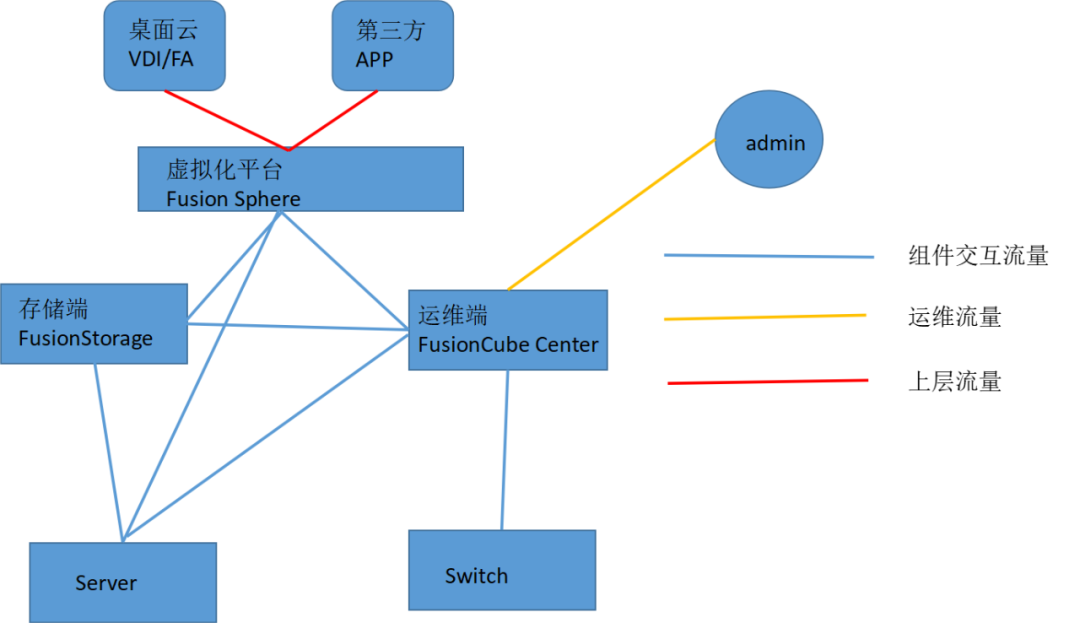
4. Network TopologyFusionCube supports two network deployment forms: management plane and BMC plane separation or combined deployment, and supports the following five types of nodes in the FusionSphere scenario:
- MCNA: Management Node
- SCNA: Storage Computing Node
- CNA: Computing Node
- SNA: Storage Node
- DBN: Database Node
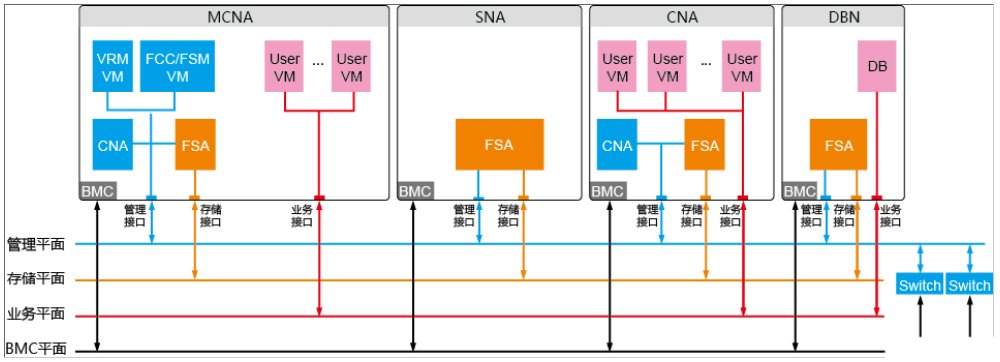
The network communication plane of FusionCube is divided into business plane, storage plane, and management plane:
- Business Plane
Provides users with a business channel, serving as the communication plane for virtual machine virtual network cards, offering business applications externally.
- Storage Plane
Provides a communication plane for virtual machines to access storage resources, but does not directly communicate with virtual machines, instead converting through the virtualization platform.
- Management Plane
Responsible for managing the entire system, daily maintenance, business configuration, system loading, and other functions of communication.5. Reliability1. Hardware Reliability:FusionCube selects highly reliable self-developed hardware, ensuring system reliability through redundant design, characterized by:
- Design with backup power for cache to ensure data safety during power outages.
- Uses hot-swappable SAS dedicated system disks, supporting RAID1 protection.
- Redundant power supply and fan design for the entire machine, ensuring system availability.
- Dual plane design for the network.
2. Software Reliability:① Management Node HAThe management node HA refers to the dual-machine mechanism of the management node, where the standby node becomes the primary state to provide business when the primary node fails, ensuring normal operation of the management node business.The primary and standby nodes monitor each other’s status through heartbeat detection on the management plane and autonomously select the primary node.
- Under normal circumstances, the primary node provides business externally, while the standby node remains idle, only running basic functions and periodically synchronizing data from the primary node.
- When the primary node fails, the dual-machine automatic switching occurs, and the original standby node becomes the primary state to provide business, while the original primary node becomes the standby idle state.
Failures of the primary node include: network interruption, abnormal status, and business process failure.② Management Data Backup and RecoveryThe system provides the capability to periodically back up configuration data and business data both locally and remotely. When the management node service fails and cannot be automatically repaired, local backup data can be immediately restored; when catastrophic failures cause simultaneous failure of both management nodes and cannot be restored through operations like rebooting, remote backup data can be immediately restored (completed within one hour), reducing failure recovery time.③ Black BoxFusionCube has a built-in black box that collects information about the current system. When a system fault occurs, the black box saves the fault scene information. Drawing on the black box, fault location can be conveniently conducted.The black box saves the following information:
- Storage kernel logs
- System snapshots
- Screen output information before abnormal exit
- Diagnostic information from diagnostic tools
6. Installation and Deployment1. Installation Deployment Process/Startup Process (with SNA/DBN)① Startup Preparation: Configure the server’s IBMC address, perform antivirus network card settings on the local PC, comply with Oracle VM VirtualBox and putty or other terminal connection software, and install other packages required for FusionCube installation.② Node Planning: (MCNA: must deploy two, mutually primary and standby; SCNA, CNA, DBN deployed as needed)③ BMC and Management Plane Planning: Plan the number of IPs = number of nodes x 2 + 6; each MCNA uses 1 management IP address and 1 BMC IP address, FusionCube Center uses 2 management IP addresses and 1 floating IP address, FusionCompute uses 2 management IP addresses and 1 floating IP address; other nodes can be disregarded if not involved. All nodes in combined deployment must have management IP addresses and BMC addresses on the same subnet.The default VLAN ID for FusionCube’s internal management plane is 1.④ Storage Plane Planning: Plan the number of IPs = number of nodes; each MCNA uses 1 storage IP address; other nodes can be disregarded if not involved.⑤ Business Plane Planning: Users can plan according to their own business situation.2. Installation DeploymentDeploy Installation Tools① Enable virtualization features on the local PC② Install VirtualBox③ Create and configure the FusionCube Builder virtual machine and its networkInstall System Software① Upload the corresponding software package② Select the installation scenario③ Discover servers (manual, automatic)④ Configure node information and network parameters⑤ Install softwareInitialize the System (Change Default Password on First Login)Configure the uplink network① Configure link aggregation② Release VLAN and map VLANConfigure FusionCube Center:① Time zone and clock synchronization② Configure backup server③ Configure alarm information④ Configure domain authentication informationConfigure FusionSphereLoad licenseConfigure database7. Common IssuesFusionCube Builder Portal Login Exception① The local PC is not connected to the FusionCube Builder Portal network② FusionCube Builder Portal server failure

For course inquiries, add: HCIE666CCIE
↑ Or scan the QR code above ↑

What technical points and content do you want to see?
You can leave a message below to let us know!