Introduction
Recently, while developing mobile H5 applications, the homepage requires loading many resources, and a Lottie animation needs to request over 70 images. However, we encountered limitations on the number of concurrent requests in Android WebView, resulting in some image requests failing. Of course, image resources can be loaded lazily and preloaded to alleviate issues with resources not being loaded during animation playback.

Similarly, business development may encounter scenarios requiring asynchronous requests to dozens of interfaces. If requests are made concurrently, the browser will limit the number of requests, which can also put pressure on the backend.
Scenario Description
Now, consider the following scenario:
Please implement a concurrent request function concurrencyRequest(urls, maxNum) with the following requirements:
- Maximum concurrency maxNum
- Each time a request returns, one slot is freed up for a new request
- Once all requests are completed, the results should be printed in the order of the urls array (the request function can directly use fetch)
Initial implementation:
const preloadManger = (urls, maxCount = 5) => {
  let count = 0; // Counter -- used to control concurrency
  const createTask = () => {
    if (count < maxCount) {
      const url = urls.pop(); // Get value from the request array
      if (url) {
        // Regardless of whether the request is successful, taskFinish must be executed
        loader(url).finally(taskFinish);
        // Add the next request
        count++;
        createTask();
      }
    }
  };

  const taskFinish = () => {
    count--;
    createTask();
  };

  createTask();
};

// Perform asynchronous requests
const loader = async (url) => {
  const res = await fetch(url).then(res => res.json());
  console.log("res", res);
  return res;
}

const urls = [];
for (let i = 1; i <= 20; i++) {
    urls.push(`https://jsonplaceholder.typicode.com/todos/${i}`);
}

preloadManger(urls, 5);
Request status:
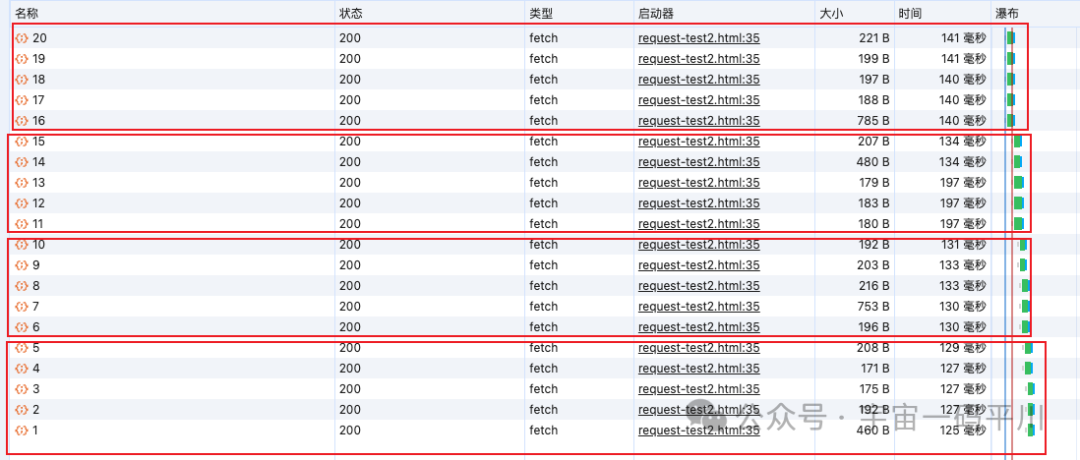
As seen above, requests are made in groups of five. When a request returns, whether successful or failed, a new request is taken from the request array to supplement it.
Design Approach
We can consider using a queue to request a large number of interfaces.
The approach is as follows:
Assuming the maximum concurrency is maxNum=5, the interfaces are defined with numbers. When a request returns from the queue pool, a new interface is added to the pool for requesting, continuing until the last request is completed.
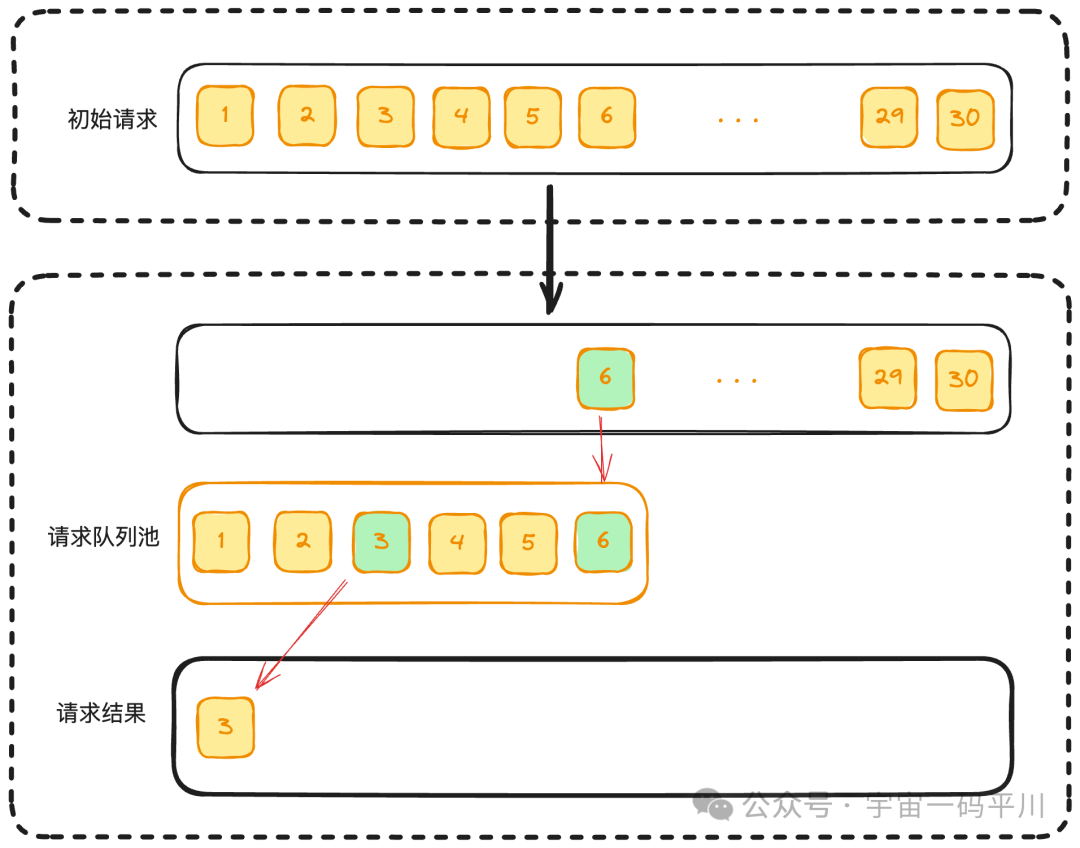
Of course, to ensure the robustness of the program, some edge cases need to be considered:
- When the initial request array urls has a length of 0, the result array results will be an empty array.
- If the maximum concurrency maxNums is greater than the length of urls, the number of requests will equal the length of urls.
- A counter count needs to be defined to determine if all requests are completed.
- Regardless of whether the request is successful or not, the result should be stored in the result array results.
- The order of the result array results should match that of the urls array for easy access.
Code Implementation
In the previous initial implementation, while it meets basic requirements, it does not consider some edge cases. Therefore, it needs to be re-implemented based on the design approach above:
// Concurrent request function
const concurrencyRequest = (urls, maxNum) => {
    return new Promise((resolve) => {
        if (urls.length === 0) {
            resolve([]);
            return;
        }
        const results = [];
        let index = 0; // Index of the next request
        let count = 0; // Number of current completed requests

        // Send requests
        async function request() {
            if (index === urls.length) return;
            const i = index; // Save index to ensure result matches urls
            const url = urls[index];
            index++;
            console.log(url);
            try {
                const resp = await fetch(url);
                // Add resp to results
                results[i] = resp;
            } catch (err) {
                // Add err to results
                results[i] = err;
            } finally {
                count++;
                // Check if all requests are completed
                if (count === urls.length) {
                    console.log('Completed');
                    resolve(results);
                }
                request();
            }
        }

        // Call with the minimum of maxNum and urls.length
        const times = Math.min(maxNum, urls.length);
        for (let i = 0; i < times; i++) {
            request();
        }
    });
};
Test code:
const urls = [];
for (let i = 1; i <= 20; i++) {
    urls.push(`https://jsonplaceholder.typicode.com/todos/${i}`);
}
concurrencyRequest(urls, 5).then(res => {
    console.log(res);
});
Request results:
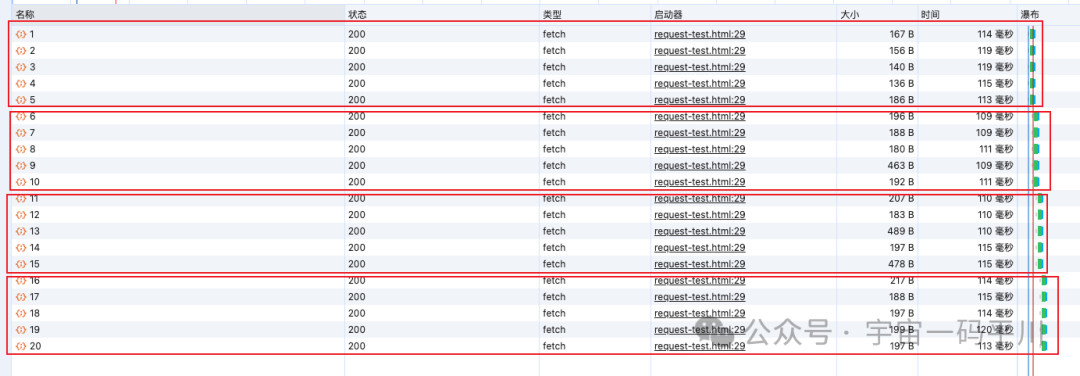
The above code basically meets the requirements for frontend concurrent requests. In production, there are many libraries that are already encapsulated and can be used directly, such as: p-limit【https://github.com/sindresorhus/p-limit】
Reading p-limit Source Code
import Queue from 'yocto-queue';
import {AsyncResource} from '#async_hooks';

export default function pLimit(concurrency) {
 // Check if this parameter is a positive integer greater than 0, if not, throw an error
 if (
  !((Number.isInteger(concurrency)
  || concurrency === Number.POSITIVE_INFINITY)
  && concurrency > 0)
 ) {
  throw new TypeError('Expected `concurrency` to be a number from 1 and up');
 }

 // Create a queue -- for storing requests
 const queue = new Queue();
 // Counter
 let activeCount = 0;

 // Function to handle concurrency
 const next = () => {
  activeCount--;

  if (queue.size > 0) {
   // queue.dequeue() can be understood as [].shift(), taking out the first task in the queue, since it is confirmed to be a function, it can be executed directly;
   queue.dequeue()();
  }
 };

 // The run function is used to execute asynchronous concurrent tasks
 const run = async (function_, resolve, arguments_) => {
  // activeCount increases by 1, indicating that the current concurrency increases by 1
  activeCount++;

  // Execute the passed asynchronous function, assigning the result to result, note: now result is a Promise in a pending state
  const result = (async () => function_(...arguments_))();

  // The resolve function is the resolve function of the Promise returned in the enqueue function
  resolve(result);

  // Wait for the result's state to change, using try...catch because the result may throw an exception, so it needs to be caught;
  try {
   await result;
  } catch {}

  next();
 };

 // Add the run function to the request queue
 const enqueue = (function_, resolve, arguments_) => {
  queue.enqueue(
   // Bind the run function to AsyncResource, not executed immediately, so a bind method is added
   AsyncResource.bind(run.bind(undefined, function_, resolve, arguments_)),
  );

  // Immediately execute an asynchronous function, waiting for the next microtask (note: because activeCount is updated asynchronously, it needs to wait for the next microtask to execute to get the new value)
  (async () => {
   // This function needs to wait until the next microtask before comparing
   // `activeCount` to `concurrency`, because `activeCount` is updated asynchronously
   // when the run function is dequeued and called. The comparison in the if-statement
   // needs to happen asynchronously as well to get an up-to-date value for `activeCount`.
   await Promise.resolve();

   // Check if activeCount is less than concurrency and there are tasks in the queue, if so, the tasks in the queue will be executed
   if (activeCount < concurrency && queue.size > 0) {
    // Note: queue.dequeue()() executes the run function
    queue.dequeue()();
   }
  })();
 };

 // Accept a function fn and parameters args, then return a Promise, executing the dequeue operation
 const generator = (function_, ...arguments_) => new Promise(resolve => {
  enqueue(function_, resolve, arguments_);
 });

 // Expose the current concurrency and the number of tasks in the queue, and manually clear the queue
 Object.defineProperties(generator, {
  // Current concurrency
  activeCount: {
   get: () => activeCount,
  },
  // Number of tasks in the queue
  pendingCount: {
   get: () => queue.size,
  },
  // Clear the queue
  clearQueue: {
   value() {
    queue.clear();
   },
  },
 });

 return generator;
}
The entire library consists of only 71 lines of code, and it imports the yocto-queue library, which is a micro queue data structure.
Handwritten Source Code
When writing the source code manually, a simple implementation can be done using arrays:
class PLimit {
    constructor(concurrency) {
        this.concurrency = concurrency;
        this.activeCount = 0;
        this.queue = [];

        return (fn, ...args) => {
            return new Promise(resolve => {
               this.enqueue(fn, resolve, args);
            });
        };
    }

    enqueue(fn, resolve, args) {
        this.queue.push(this.run.bind(this, fn, resolve, args));

        (async () => {
            await Promise.resolve();
            if (this.activeCount < this.concurrency && this.queue.length > 0) {
                this.queue.shift()();
            }
        })();
    }

    async run(fn, resolve, args) {
        this.activeCount++;

        const result = (async () => fn(...args))();

        resolve(result);

        try {
            await result;
        } catch {
        }

        this.next();
    }

    next() {
        this.activeCount--;

        if (this.queue.length > 0) {
            this.queue.shift()();
        }
    }
}
Conclusion
In this article, we briefly introduced why concurrent requests are necessary, explained the design approach for implementing concurrent requests using a request pool queue, and provided a brief implementation code.
Additionally, we analyzed the source code of p-limit and wrote a simple source code implementation using arrays to meet the requirements.
References
-
[Source Code Reading] How to Control Concurrency in High Concurrent Requests https://juejin.cn/post/7179220832575717435?searchId=20240430092814392DC2208C545E691A26
-
Frontend Implementation of Concurrent Control for Network Requests https://mp.weixin.qq.com/s/9uq2SqkcMSSWjks0x7RQJg
-
About Frontend: How to Implement Control of Concurrent Request Quantity? https://juejin.cn/post/7163522138698153997