👨🎓Author Introduction
🏅 High-quality creator in the cloud computing field 🏅 Expert blogger in Huawei Cloud Developer Community 🏅 Expert blogger in Alibaba Cloud Developer Community💊Community for Communication: Welcome to join the Operations and Maintenance Communication Community!🐋 Hope everyone supports us, and we can progress together! 😄🎉 If this article helps you, feel free to like 👍🏻, comment 💬, bookmark ⭐️, and follow +💗
1. Stop zabbix-server, zabbix-agent, httpd, rh-php72-php-fpm
systemctl stop zabbix-server zabbix-agent httpd rh-php72-php-fpm
2. Uninstall Zabbix Service
2.1. Find all Zabbix services
rpm -qa | grep -i zabbix
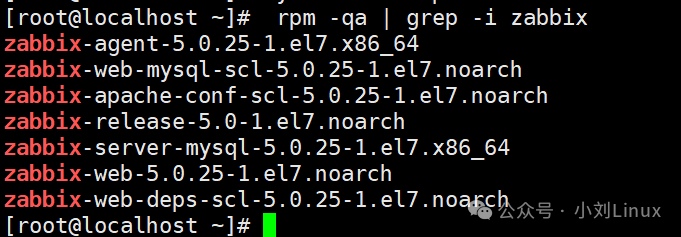
We can see several services, which can be uninstalled one by one;
2.2. Uninstall Zabbix services one by one
yum -y remove zabbix-agent-5.0.25-1.el7.x86_64
yum -y remove zabbix-web-mysql-scl-5.0.25-1.el7.noarch
yum -y remove zabbix-release-5.0-1.el7.noarch
yum -y remove zabbix-server-mysql-5.0.25-1.el7.x86_64
yum -y remove zabbix-web-5.0.25-1.el7.noarch
After uninstallation, check again;
rpm -qa | grep -i zabbix
 Now there are none left, which is good;
2.3. Delete all Zabbix configurations and related files
# Find Zabbix
[root@localhost ~]# find / -name zabbix

/etc/selinux/targeted/active/modules/100/zabbix
/etc/zabbix
/var/lib/yum/repos/x86_64/7/zabbix
/var/lib/mysql/zabbix
/var/log/zabbix
/var/cache/yum/x86_64/7/zabbix
/usr/lib/zabbix

# Delete all directly
rm -rf /etc/selinux/targeted/active/modules/100/zabbix
rm -rf /etc/zabbix
rm -rf /var/lib/yum/repos/x86_64/7/zabbix
rm -rf /var/lib/mysql/zabbix
rm -rf /var/log/zabbix
rm -rf /var/cache/yum/x86_64/7/zabbix
rm -rf /usr/lib/zabbix
Finally, check if everything is deleted cleanly;
find / -name zabbix

It can be seen that everything has been deleted cleanly;
If you want it even cleaner, you can use fuzzy search;
find / -name "*zabbix*"
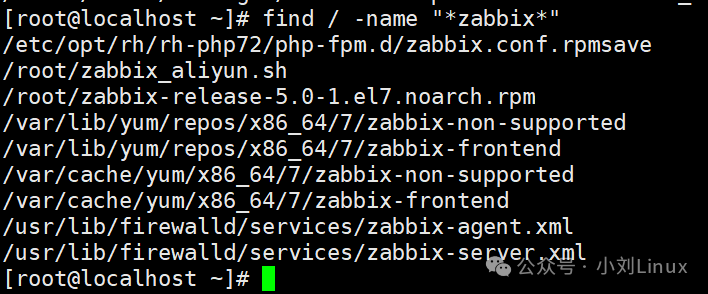 You can still find so many, just delete them all in the end;
 Finally, check again and you will have completely deleted everything.
3. Uninstall MySQL
3.1. Uninstall MariaDB
# Find MariaDB
rpm -qa mariadb

# Uninstall it
yum -y remove mariadb-5.5.68-1.el7.x86_64
3.2. Delete MySQL related configuration files
# Find MySQL related files
[root@localhost ~]# find / -name mysql

/etc/selinux/targeted/active/modules/100/mysql
/var/lib/mysql
/var/lib/mysql/mysql
/usr/lib64/mysql
/usr/lib64/perl5/vendor_perl/auto/DBD/mysql
/usr/lib64/perl5/vendor_perl/DBD/mysql
/usr/share/mysql

# Delete all directly
rm -rf /etc/selinux/targeted/active/modules/100/mysql
rm -rf /var/lib/mysql
rm -rf /var/lib/mysql/mysql
rm -rf /usr/lib64/mysql
rm -rf /usr/lib64/perl5/vendor_perl/auto/DBD/mysql
rm -rf /usr/lib64/perl5/vendor_perl/DBD/mysql
rm -rf /usr/share/mysql/
Finally, check if everything is deleted cleanly;
find / -name mysql
 It can be seen that everything has been deleted cleanly;
4. Uninstall HTTP Service
Find httpd service
rpm -qa httpd

# Uninstall httpd service
yum -y remove httpd-2.4.6-97.el7.centos.5.x86_64
5. Uninstall rh-php72-php-fpm Service
# Find rh-php72-php-fpm package
rpm -qa rh-php72-php-fpm

# Uninstall it
yum -y remove rh-php72-php-fpm-7.2.24-1.el7.x86_64
Now everything has been uninstalled cleanly.