
With the surge in the number of connected devices, cyber attacks leveraging AI technology are becoming increasingly rampant. In this context, the European Union has introduced various security legislations and standards, including the “Cybersecurity Resilience Act,” compelling companies to accelerate their security technology upgrades.
This article will introduce the TPM (Trusted Platform Module) and the steps for using the Infineon TPM evaluation board with Raspberry Pi to conduct functional tests. The Infineon OPTIGA™ TPM series includes various security controllers that protect the integrity and reliability of embedded devices and systems. With secure key storage and support for multiple cryptographic algorithms, the OPTIGA™ TPM provides robust protection for critical data and processes.

01
TPM Basics
TPM is a hardware device that can be integrated into a computer motherboard, communicating with the rest of the system via a hardware bus to provide hardware-level security functions. TPM can be used for the generation, storage, and management of encryption keys, ensuring the integrity of the computer platform during boot and operation. The following diagram (Figure 1) illustrates the architecture of the TPM 2.0 chip and the principles of key management:
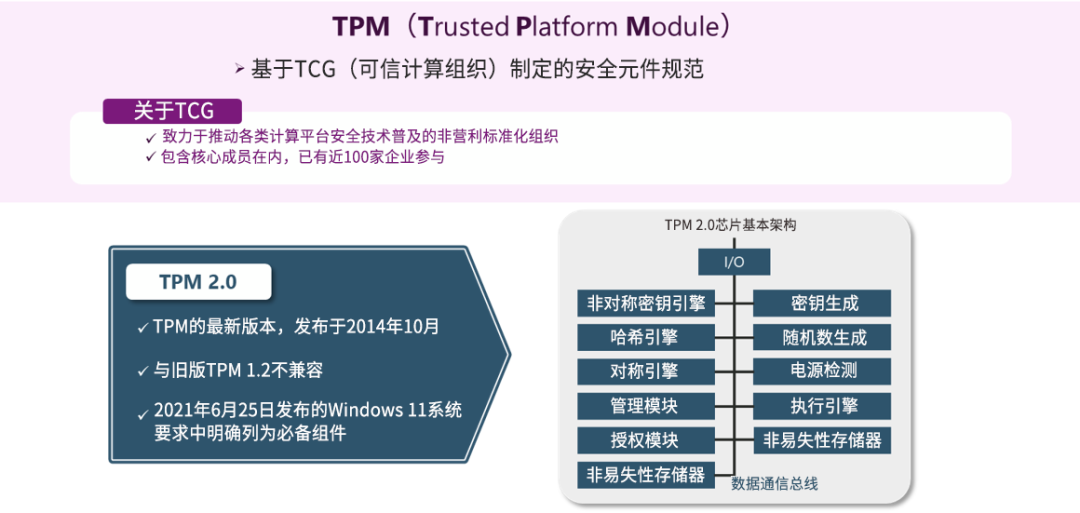
Figure 1 TPM 2.0 Chip Architecture and Key Management Principles
The design focus of TPM is to securely store encryption keys, protect data using encryption keys, and enhance the security of certificates. TPM gained attention when it became a mandatory requirement in Windows 11 system requirements, but due to the increasing prominence of security issues, many embedded devices are now considering adopting TPM. The following diagram (Figure 2) illustrates the role of TPM in device security architecture:
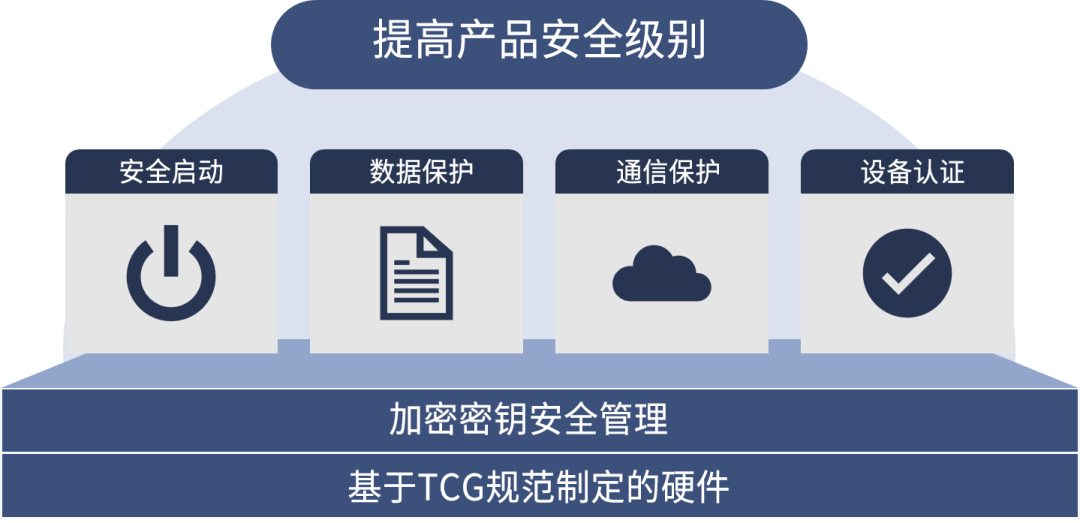
Figure 2 The Role of TPM in Device Security Architecture
02
Checking TPM Operation with Raspberry Pi
In this example, we used the OPTIGA™ TPM SLB9672 evaluation board provided by Infineon. To ensure the proper functioning of TPM, device drivers and middleware are required. In this operational test, we used the Embedded Linux TPM Toolbox 2 (ELTT2) as middleware.
ELTT2 is a single-file executable program for testing, diagnosing, and basic state modification of TPM 2.0 devices. This tool is available on GitHub and is suitable for environments running TPM 2.0 on Linux systems, and can be easily built and run using gcc.
System Requirements for the Evaluation Board

-
Hardware
-
Raspberry Pi 3 Model B V1.2: Raspberry Pi OS (64-bit)
-
OPTIGA TPM SLB9672 RPI EVAL
-
Software
-
ELTT2
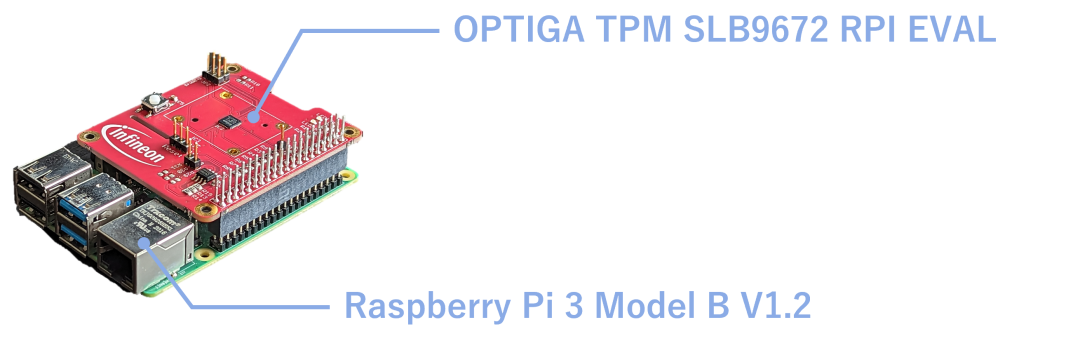
Figure 3 Schematic Diagram of Hardware Connection between Raspberry Pi 3 Model B V1.2 and OPTIGA TPM SLB9672 Evaluation Board
Preparing the Demonstration

01
Install Raspberry Pi OS
-
Use Raspberry Pi Imager to write “Raspberry Pi OS”
02
Check the TPM Device Driver, which is already integrated into the OS of Raspberry Pi OS
-
After starting Raspberry Pi, execute the following command to check if TPM is recognized
-
$ ls -l /dev/tpm*
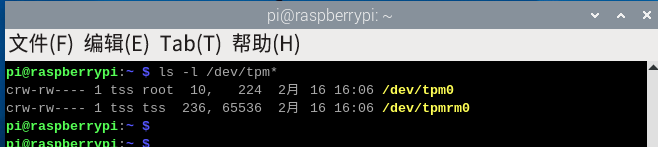
Figure 4 Terminal Interface for TPM Device Driver Recognition Verification
03
Preparation for ELTT2
-
Download the source code from GitHub (https://github.com/Infineon/eltt2)
-
Use the make command to compile the source code and generate eltt2

Figure 5 Terminal Interface for Compiling and Generating ELTT2 Tool Source Code
Testing Examples

Invoke commands as follows:
– $ sudo ./eltt2 < option(s)>
① sudo ./eltt2 -g: Read the fixed attributes of the TPM.
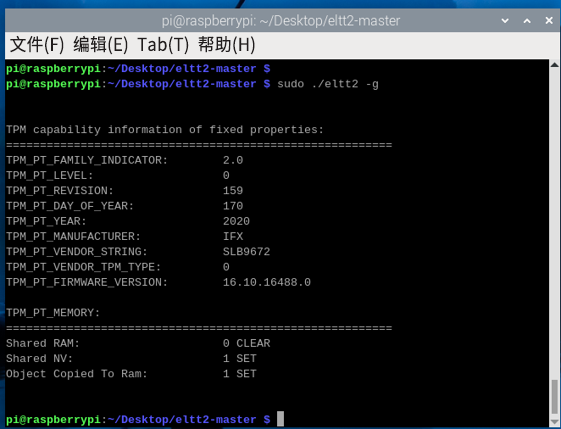
Figure 6 TPM Hardware Attribute Output
② sudo ./eltt2 -s [hash algorithm] <data bytes>: Hash specific data using SHA-1/256/384 hash algorithms. The following diagrams (Figure 7) and (Figure 8) show the hash calculation results for SHA-1 and SHA-384 respectively:
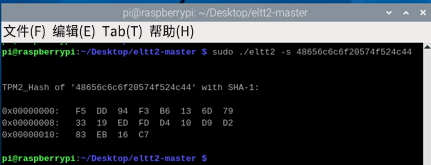
Figure 7 SHA-1 Hash Calculation Result
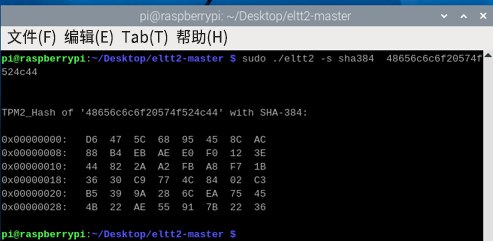
Figure 8 SHA-384 Hash Calculation Result
③ sudo ./eltt2 -G <data length>: Obtain a specified number of random bytes, with 08h and 14h specified for random bytes.
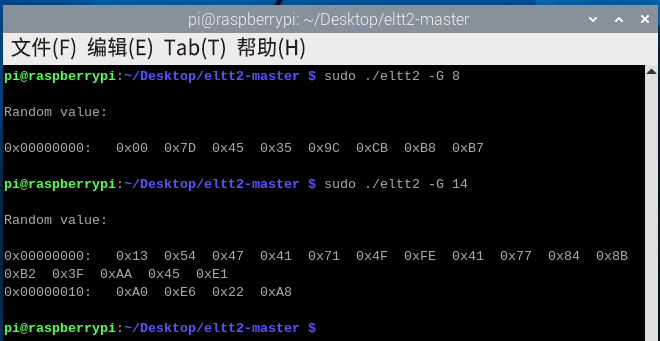
Figure 9 Hardware Random Number Generation Output
④ sudo ./eltt2 -e [hash algorithm] <PCR index> <PCR digest>: Extend (add) a new value to the specified PCR (Platform Configuration Register) and perform a hash calculation.
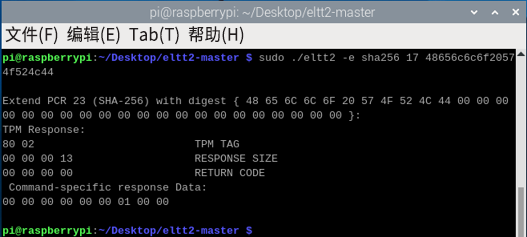
Figure 10 PCR Register Extension Operation
⑤ sudo ./eltt2 -r [hash algorithm] <PCR index>: Read the value of the specified PCR.
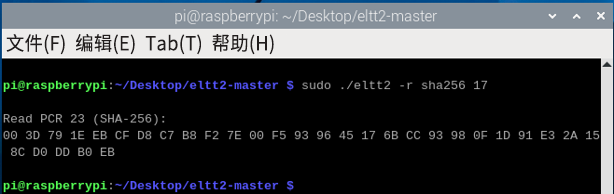
Figure 11 PCR Value Read Result
⑥ sudo ./eltt2 -z <PCR index>: Reset the specified PCR value to its initial state.
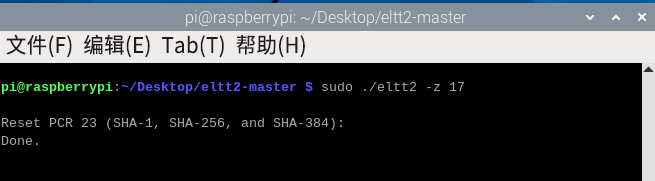
Figure 12 PCR Reset State Verification
03
Conclusion
In this article, we primarily used Raspberry Pi as an example, utilizing Infineon’s TPM evaluation board and ELTT2 to conduct basic functional tests on TPM 2.0, demonstrating how to enhance the attack resistance of IoT devices through hardware encryption modules. The key points can be summarized as follows:
-
With the increasing number of network-connected devices and the complexity of AI-based attacks, the importance of security measures is growing.
-
As regulations like the EU’s “Cybersecurity Resilience Act” continue to advance, relevant companies urgently need to establish compliance response mechanisms.
-
In the field of cybersecurity protection, relying solely on software solutions is insufficient; hardware-based security measures are equally crucial.
-
TPM has strong anti-tampering capabilities and can securely manage encryption keys.
For more information about Infineon’s products and solutions, please contact the local office of Junlong Technology or leave a message directly on WeChat, or email [email protected].