 01Example
Coincidentally, on this day, Zhang San also encountered this strange problem. According to his recollection: after compiling the project using cmake in the Ubuntu virtual machine, he used the scp command to transfer the program and project files from Ubuntu to the ARM development board. When he used the ll command to view the detailed file list, he found incomprehensible garbled file names on the development board:
# The file list on the development board shows such "heavenly books" -rw-r--r-- 1 root root 0 Aug 10 14:23 �˵�_����-rw-r--r-- 1 root root 2048 Aug 10 14:23 ʵ�鲿��.pdf-rw-r--r-- 1 root root 4096 Aug 10 14:23 项目�?.docxUpon investigation, these files clearly displayed normal Chinese file names on the Ubuntu virtual machine:
-
<span>程序_测试</span> -
<span>实验报告.pdf</span> -
<span>项目计划.docx</span>
It seems there might be an anomaly with the scp command?

(If you want to see the solution, scroll down directly)
02Character EncodingIn Linux systems, the occurrence of garbled file names is generally due to inconsistent or incorrect character encoding. So, is it really the scp command that is affecting this? Let’s first look at some knowledge about character encoding:
What is Character Encoding?
Conceptually, character encoding is the process of encoding characters from a character set into a specific object from a designated set (for example: bit patterns, sequences of natural numbers, etc.). Common character encodings include UTF-8, GBK, ISO-8859-1, etc.
In simple terms, character encoding is a set of rules for how computers store and display text, just like Morse code uses dots and dashes to represent letters, computers use numeric codes to represent text.
The default encoding for Linux file systems is usually UTF-8, but it may also use other encodings due to historical reasons or other factors. You can use the following commands to check or set your system encoding:
# Check current locale settingslocale
# Check current terminal and system character encoding settings
echo $LANG
# Temporarily set locale to UTF-8 (if you find character encoding is incorrect)
export LANG=en_US.UTF-8
export LC_ALL=en_US.UTF-8
From the perspective of character encoding, what could be the possible reasons for the garbled characters during scp transmission?
When using scp to transfer files between the virtual machine and the development board, encoding issues mainly arise in two stages:
-
The encoding of the file name itself: If the source file name uses a certain encoding (like UTF-8), while the target system expects another encoding (like GBK), garbled characters will occur.
-
Encoding handling during the transmission process: The scp command itself does not perform encoding conversion; it simply transmits the byte sequence as is.
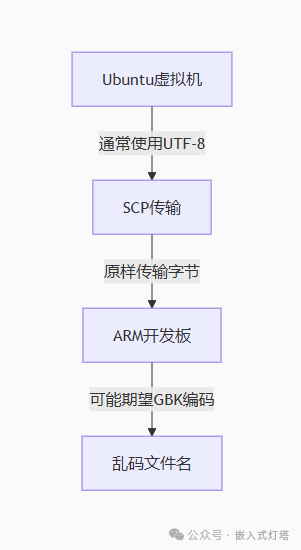 03Inode Concept
Before solving the problem, let’s briefly understand the concept of inode. We all know that everything in the Linux system is a file, and each file in Linux has a unique identifier, which is the inode. Files are stored on the hard disk, and the smallest storage unit on the hard disk is called a “sector”. Each sector stores 512 bytes (equivalent to 0.5KB).
When the operating system reads the hard disk, it does not read sector by sector, as this would be too inefficient. Instead, it reads multiple sectors at once, i.e., it reads a “block” at a time. This “block”, composed of multiple sectors, is the smallest unit for file access. The most common size for a “block” is 4KB, which consists of eight consecutive sectors.
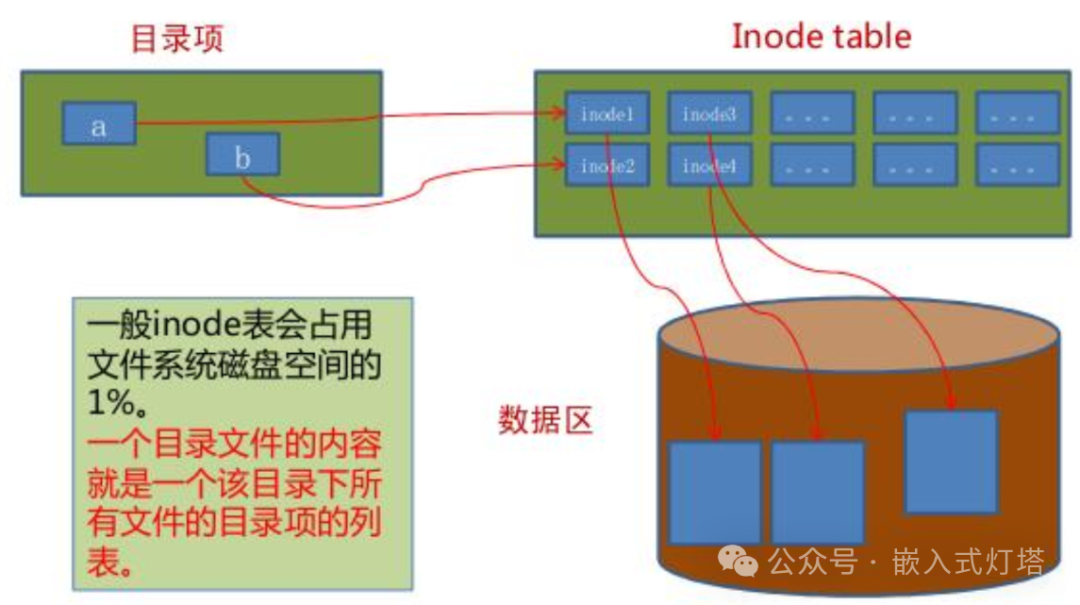
File data is stored in “blocks”, so we must also find a place to store the metadata of the file, such as the file’s creator, creation date, file size, etc. This area that stores the file’s metadata is called the inode, which is translated into Chinese as “index node”.
It can also be simply understood as: File = File Attributes + File Content, where file attributes and file content are stored separately, and to associate them, a specific method is required, which is the inode number..
# Each file has an inode number, which can be used to manage the file. First, you need to obtain the inode number of the file. # You can obtain it using the -i option of the ls command ls -i It is worth mentioning that Unix/Linux systems do not use file names internally, but rather use inode numbers to identify files. For the system, file names are merely aliases or nicknames for inode numbers, so it is said that file names have no meaning at the system level, as they are only for user use. The issue of garbled file names only affects our viewing and recognition, and can be corrected through some methods.04Solution
1. First, navigate to the directory where the garbled file or directory is located (you can see the garbled file names in the directory using the ll command), then use the ls -i command to find the inode of the file or directory:
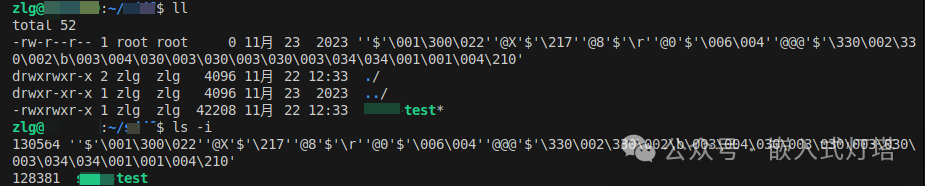
2. Use the find command to confirm whether it is the garbled file you are looking for:
# find command, (the numeric string in front of the file or directory is the inode number)find -inum inode_number
3. Use the find command in conjunction with other commands to copy/rename/delete:
# Copy: find . -inum 130564 -exec cp {} test1
# Rename: find . -inum 130564 -exec mv {} main_test
# Delete: find . -inum 130564 -exec rm {}

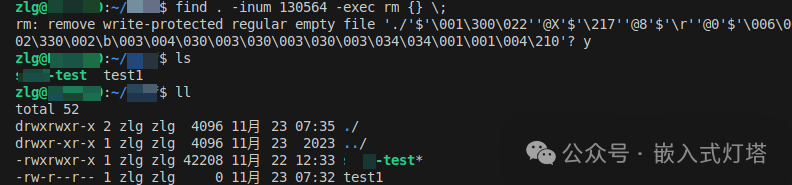 This method is suitable for cases with a single garbled file or directory. What if there are multiple garbled files in the directory? A direct method is to move other normal files to another directory, then use rm -rf to delete the directory containing the garbled files, and then rename the directory containing the other files back to its original name.
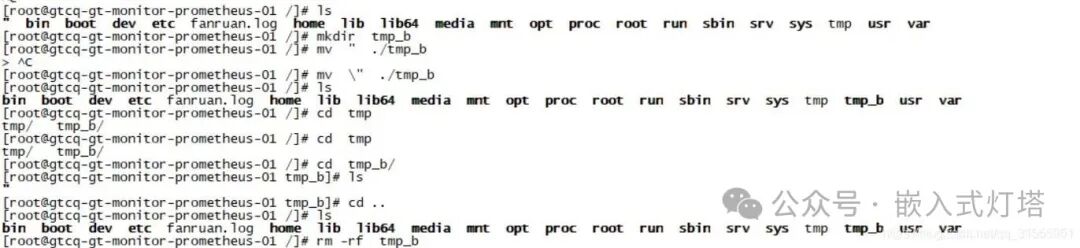
05Conclusion
Through the analysis and solutions provided in this article, in addition to solving the problem, prevention is also necessary:
-
Cause of Garbled Characters: Inconsistent encoding between the source system and the target system is a possible cause of garbled characters.
-
Best Practice: Using UTF-8 encoding uniformly can avoid most garbled character issues.
-
Solutions: There are multiple methods to fix and prevent garbled character issues.
-
Preventive Measures: Establishing standardized development processes and environmental standards is key.
Core Recommendation: In embedded development, try to use English file names and UTF-8 encoding, as this is the most effective way to avoid character encoding issues.
 Thank you for your attention and support. I will update various useful content from time to time. If you have any questions or different opinions, feel free to comment or leave a message for us to exchange and learn together~
 Feel free to follow the public account, and give a “Share“, “Like“, or “View“~Wishing you successful compilation and debugging without errors!