★
Embedded AI Series – Analysis of YOLOv3 Model Deployment Code – Overall Process
”
1. Introduction
In the previous article “Embedded AI Series – Deploying YOLOv3 Model on RV1126”, we provided the C++ source code project for deploying the YOLOv3 model in RKNN format on the RV1126 hardware platform and demonstrated the detection capabilities of YOLOv3.
This article will outline the details of each process step in the previous C++ source code to deepen the understanding of RKNN model deployment applications.
2. Overall Process
The flowchart of the YOLOv3 model deployment C++ source code from the previous article:
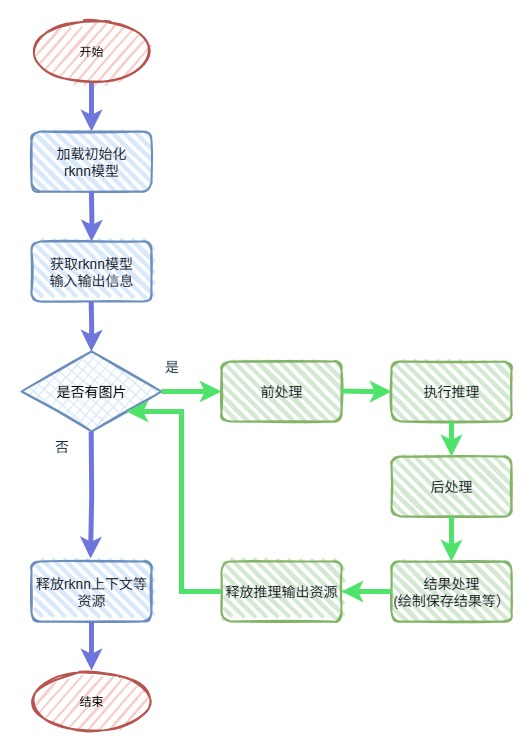
As shown in the flowchart:
- The blue section represents the overall initialization and de-initialization part, which is only executed once;
- The green section is the inference recognition process for each image. If there are multiple images or video input, the green section will be executed multiple times in a loop.
3. Main Process Overview
The main process refers to the blue section in the flowchart, which mainly consists of three parts: loading and initializing the RKNN model, obtaining the input and output information of the RKNN model, and releasing the resources such as the RKNN context.
3.1 Loading and Initializing the RKNN Model
The loading and initializing part of the RKNN model corresponds to the load_rknn_model function in the source code:
rknn_context load_rknn_model(const char* model_path){    rknn_context ctx = 0;
    // Load model file    FILE* fp = fopen(model_path, "rb");    if (!fp) {        std::cerr << "Failed to open RKNN model file" << std::endl;        return 0;    }
    fseek(fp, 0, SEEK_END);    size_t model_size = ftell(fp);    void* model_data = malloc(model_size);    fseek(fp, 0, SEEK_SET);
    if (fread(model_data, 1, model_size, fp) != model_size) {        std::cerr << "Failed to read RKNN model data" << std::endl;        free(model_data);        fclose(fp);        return 0;    }    fclose(fp);
    // Initialize RKNN model        std::cout << "to call rknn_init, model_size:" << model_size << std::endl;    int ret = rknn_init(&ctx, model_data, model_size, 0);    free(model_data);
    if (ret < 0) {        std::cerr << "rknn_init failed: " << ret << std::endl;        return 0;    }
    std::cout << "load_rknn_model ok" << std::endl;        return ctx;}
This function mainly does two things:
- Allocates memory space and reads the contents of the RKNN model file into memory;
- Calls the RK API rknn_init interface to initialize the function, which creates the rknn_context object, loads the RKNN model, and performs specific initialization actions based on the flag.
Points to note:
- The temporary memory occupied by the model is relatively large, and it should be released promptly after use to avoid insufficient system memory affecting other application layer functions.
- The third parameter of the rknn_init interface currently only supports enabling the performance collection debugging switch, which will increase the runtime of rknn_run, and is generally set to 0.
- If the executable program linked with librknn_api.so does not match the driver version of the running environment, an error will be printed during execution:

3.2 Obtaining RKNN Model Input and Output Information
The source code uses the interface function rknn_query to query the model information.
Different parameters can be used to query different information. For example, in the source code, the parameter RKNN_QUERY_SDK_VERSION is used to query the SDK version, RKNN_QUERY_IN_OUT_NUM is used to query the number of input and output tensors of the currently loaded YOLOv3 model, RKNN_QUERY_INPUT_ATTR is used to query the attributes of the input tensor, and RKNN_QUERY_OUTPUT_ATTR is used to query the attributes of the output tensor.
- Knowledge Supplement: What is a Tensor? A tensor, translated into Chinese as “张量”, is the data carrier unit in all deep learning frameworks (such as PyTorch/TensorFlow) and is the core data structure in AI models, which can be understood as a multi-dimensional array. For example, the content of the input tensor for the object detection model YOLOv3 is the pixel values of the image, which will be explained in detail later.
3.3 Releasing RKNN Context and Other Resources
Releasing the RKNN context and other resources means releasing the rknn_context object obtained from rknn_init, which is achieved by calling the rknn_destroy interface.