In Linux/UNIX systems, the <span>/dev</span> directory contains various device files, as shown in the figure below. These are not ordinary disk files, but rather special files that serve as communication interfaces between the kernel and hardware devices (or virtual devices).
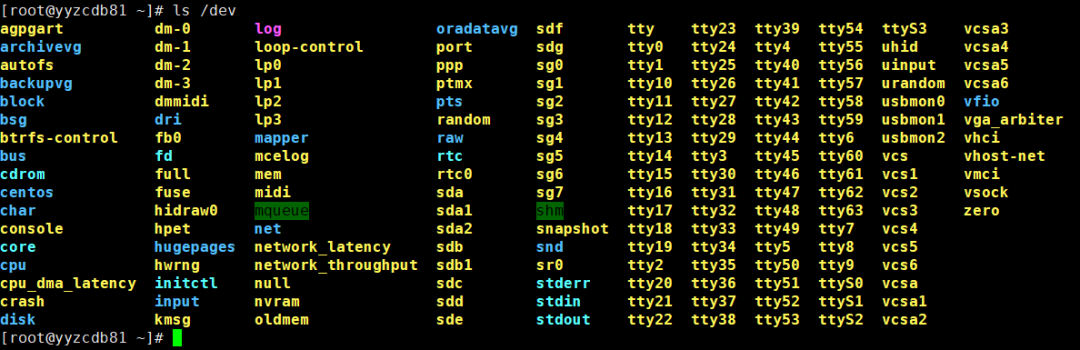
Among these device files, <span>/dev/console</span>, <span>/dev/tty</span>, and <span>/dev/tty0</span> are the most easily confused. Below, we will delve into the technical differences between them.
1. /dev/tty – “Current Control Terminal”
| Feature Category | Detailed Description |
|---|---|
| Professional Definition | <span>/dev/tty</span> is a character device file whose operations are redirected to the control terminal of the current process. It is a logically related symbolic link to <span>/proc/self/fd/0</span> (the standard input device of the current process). |
| Core Feature | Process-related. Each process with a control terminal has its <span>/dev/tty</span> pointing to its own terminal. |
| Design Purpose | To provide applications with a reliable channel for user interaction, regardless of whether the user logs in through a local virtual terminal, a remote SSH session, or a graphical terminal emulator. The program only needs to read and write to <span>/dev/tty</span>. |
| Technical Origin | “tty” is an abbreviation for Teletypewriter, originating from early physical terminal devices in computing. |
To check the control terminal of the current shell, you can enter:
[root@yyzcdb81 ~]# tty
/dev/pts/2
[root@yyzcdb81 ~]#
Or enter:
[root@yyzcdb81 ~]# who am i
root     pts/2        2025-11-27 14:59 (1*.1*9.3*.27)
[root@yyzcdb81 ~]#

Here, <span>/dev/pts/2 </span> indicates that the current terminal is a pseudo-terminal, which is the third pseudo-terminal session created (“pts” stands for Pseudo Terminal Slave).
To further verify with the who command, <span>/dev/pts/2 </span> is indeed the third pseudo-terminal session created:
[root@yyzcdb81 ~]# w
 16:11:52 up 1 day,  4:08,  3 users,  load average: 0.27, 0.15, 0.14
USER     TTY      FROM             LOGIN@   IDLE   JCPU   PCPU WHAT
root     pts/0    1*.1*9.3*.27     09:48    1:15m  0.26s  0.21s -bash     # First SSH login session
root     pts/1    1*.1*9.3*.27     10:14   41:04   0.36s  0.17s sqlplus   # Second SSH login session
root     pts/2    1*.1*9.3*.27     14:59    0.00s  0.20s  0.05s -bash     # Third SSH login session
[root@yyzcdb81 ~]#
2. /dev/tty0 and /dev/tty[1-63] – “Virtual Terminal System”
| Feature Category | Detailed Description |
|---|---|
| Professional Definition | <span>/dev/tty0</span> represents the current foreground virtual terminal. While <span>/dev/tty1</span> to <span>/dev/tty63</span> represent specific numbered virtual terminal instances. |
| Core Feature | System-wide, associated with physical display. These devices are directly bound to the system’s physical display and keyboard. <span>/dev/tty0</span> always points to the virtual terminal currently being viewed and operated by the user. |
| Design Purpose | To achieve multi-tasking and session isolation on a single physical console. Users can switch between these virtual terminals using <span>Ctrl+Alt+F1</span> to <span>Ctrl+Alt+F6</span> (in CentOS, F1 is usually the graphical interface). Each VT is an independent login session. |
| Permission Description | Ordinary users typically do not have permission to write directly to <span>/dev/tty0</span>, root permissions are required. |
To switch to a text virtual terminal (e.g., tty3), press: Ctrl + Alt + F3 on a physical or virtual machine, and then check all current login sessions:
[root@yyzcdb81 ~]# who
root     tty1         2025-11-27 16:31 (:0)            # Graphical session
root     pts/0        2025-11-27 09:48 (1*.1*9.3*.27)  # SSH session
root     pts/1        2025-11-27 10:14 (1*.1*9.3*.27)  # SSH session
root     pts/2        2025-11-27 14:59 (1*.1*9.3*.27)  # SSH session
oracle   pts/3        2025-11-27 16:28 (:1)            # SSH session, this is VNC
[root@yyzcdb81 ~]#
3. /dev/console – “System Console”
| Feature Category | Detailed Description |
|---|---|
| Professional Definition | <span>/dev/console</span> is the system console, which is the final destination for kernel log output and system-level management messages. |
| Core Feature | System-level, singleton, configurable. It is the highest priority communication channel between the kernel and the system administrator. A system has only one true console, but the specific device it points to can be configured. |
| Design Purpose | To receive and display kernel startup messages and kernel panic information. It provides an interactive single-user mode (runlevel 1) during the early stages of system startup. It serves as an interface for initialization systems like <span>systemd</span><span> to interact with the administrator during startup.</span> |
| Key Configuration | The specific device for the console is specified through kernel boot parameters <span>console=</span>. For example, <span>console=tty0 console=ttyS0,115200n8</span> indicates output to both the virtual terminal <span>tty0</span> and the first serial port <span>ttyS0</span>. |
Check the device attributes of /dev/console:
[root@yyzcdb81 ~]# ls -l /dev/console
crw------- 1 root root 5, 1 11月 27 16:35 /dev/console
[root@yyzcdb81 ~]#
The major device number 5 and minor device number 1 indicate that it is an alias or special instance of <span>/dev/tty1</span>.
Check the console configuration in the kernel boot parameters:
[root@yyzcdb81 ~]# cat /proc/cmdline
BOOT_IMAGE=/boot/vmlinuz-3.10.0-1160.el7.x86_64 root=UUID=dd891ec4-12dd-4eb6-8a94-c1ebc257640c ro crashkernel=auto rhgb quiet numa=off
[root@yyzcdb81 ~]#
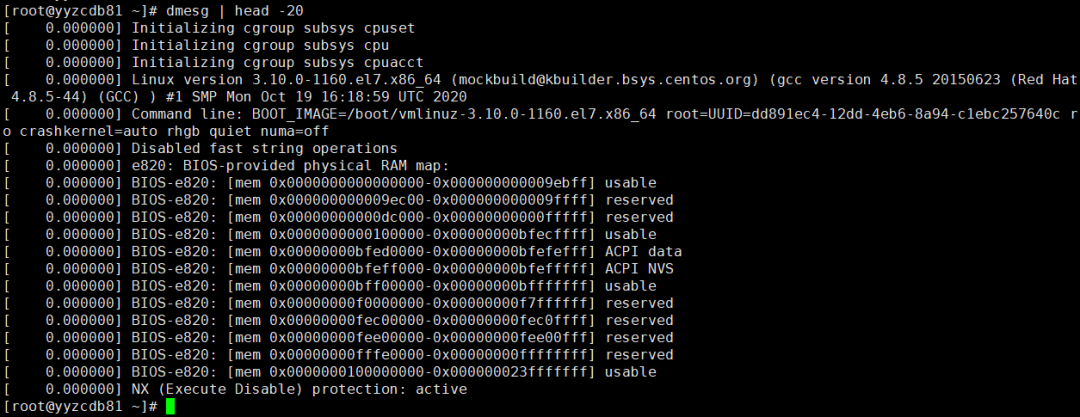
View the system startup log, these messages were initially output to /dev/console:
Finally, here is a comparison table:
| Feature | <span>/dev/tty</span> |
<span>/dev/tty0</span> |
<span>/dev/console</span> |
|---|---|---|---|
| Scope | Process-related | System-wide | System-wide |
| Target Pointing | Control terminal of the current process | Current foreground virtual terminal | System console (specified by kernel parameters) |
| Main Purpose | Ensure interaction with the current user | Manage multiple text sessions | Kernel messages, system startup, single-user mode |
| Typical Scenario | Forcing read/write to user terminal in scripts | Broadcasting system messages to the current screen | Kernel startup logs, serial port management |