Click to follow, so you won’t get lost on your learning journey!
On the stage of industrial automation, the MODBUS protocol acts like a diligent “communication messenger”. However, like any complex system, it sometimes encounters small “stumbling blocks”. Today, we will discuss common faults in MODBUS communication and how to step by step identify and resolve these issues like a detective.
1
Common Types of Faults
(1) Connection Faults
-
Hardware Connection Issues: This is one of the most common faults. It could be due to loose cables, damaged interfaces, or in serial communication, the A and B lines of RS-485 being reversed. It’s like building a bridge for devices, but if the bridge isn’t constructed properly, the devices can’t cross.
-
IP Address Conflict: In Ethernet communication, if two devices are assigned the same IP address, it’s like two couriers trying to deliver packages to the same address, resulting in a failure to deliver.
(2) Data Transmission Errors
-
Checksum Errors: In serial communication, data transmission involves checks, such as parity checks. If the checksum settings between devices are inconsistent, or if the data is interfered with during transmission, the checksum will fail, similar to a package being tampered with during transport.
-
Frame Format Errors: The data frame format of the MODBUS protocol is fixed. If the sent data frame format does not comply with the protocol, the receiver will reject it, just like receiving a letter with an incorrect format that cannot be processed.
(3) Timeout Faults
-
Network Delays: In Ethernet communication, if the network conditions are poor, data transmission will slow down, similar to a courier getting stuck in traffic. If data does not arrive within the specified time, a timeout fault occurs.
-
Slow Device Response: Some devices may respond slowly due to high load or faults, leading to timeouts.
2
Diagnostic Tools and Methods
(1) Hardware Testing Tools
-
Multimeter: For serial communication, a multimeter can be used to check if the voltage at the RS-485 interface is normal and to see if there are any short circuits or open circuits.
-
Network Tester: In Ethernet communication, a network tester can check if the cables are intact and if the network connection is normal.
(2) Software Diagnostic Tools
-
Network Packet Capture Tools: Tools like Wireshark can capture data packets in the network, allowing us to monitor the flow of packets and check if the data frames comply with the MODBUS protocol.
-
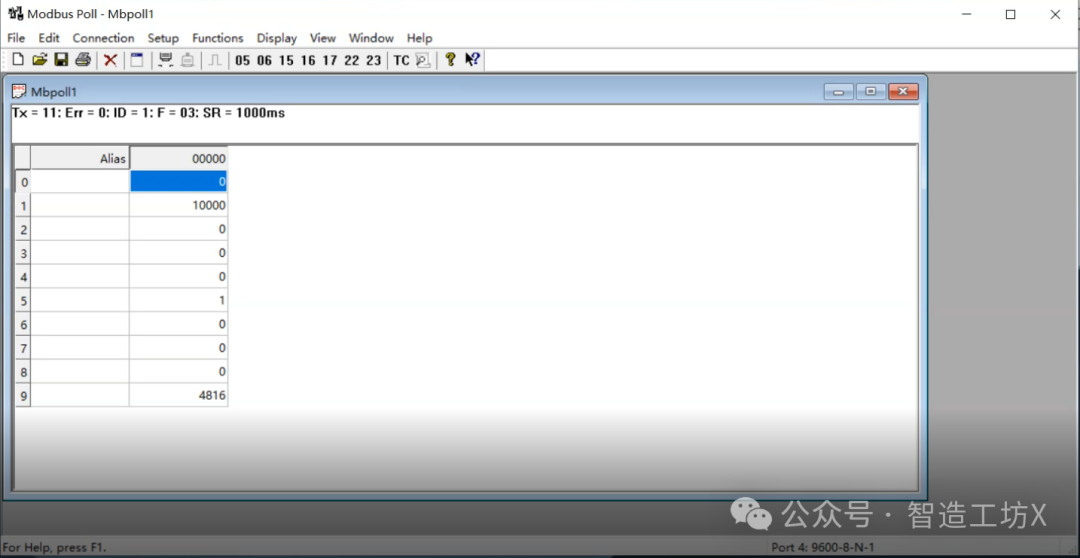
MODBUS Testing Software: There are many specialized MODBUS testing software available that can simulate master devices sending commands and test the responses of slave devices, helping us quickly locate issues.
☆ Recommended Software:Modbus Tools
☆ Download Link:https://pan.baidu.com/s/1Jhe3GKsWs4-YZhTa-NXIXg?pwd=9vh5 Extraction Code: 9vh5
3
Troubleshooting Steps
(1) Troubleshooting Connection Faults
-
Check Hardware Connections: First, check if the network cable and serial cable are properly connected and undamaged. If unsure, try replacing them; it might just solve the problem.
-
Check IP Address: In Ethernet communication, log into the device’s management interface and check the IP address settings to ensure there are no conflicts.
(2) Troubleshooting Data Transmission Errors
-
Check Checksum Settings: Confirm that the checksum settings between the master and slave devices are consistent. If not, make the necessary adjustments.
-
Check Data Frame Format: Use MODBUS testing software to send a correctly formatted data frame and see if the device responds correctly. If not, there may be an issue with the device that requires further inspection.
(3) Troubleshooting Timeout Faults
-
Optimize Network Environment: If the timeout is caused by network delays, consider replacing network devices or optimizing the network topology to reduce congestion.
-
Check Device Load: See if the device is overloaded; if so, consider upgrading the device or adjusting its operating parameters to reduce the load.
4
Case Study Analysis
(1) Connection Fault Case in Serial Communication
Once, in a small automation workshop, the MODBUS communication between a PLC and a sensor suddenly interrupted. Upon inspection, it was found that the A and B lines of RS-485 were reversed. After reconnecting the lines correctly, communication was restored. It was like a small accident where the ends of the bridge were connected incorrectly; once fixed, the devices could smoothly “cross the bridge” again.
(2) Data Transmission Error Case in Ethernet Communication
In a large factory’s energy management system, data errors occurred in the MODBUS TCP/IP communication between the main controller and the smart meter. By capturing packets with Wireshark, it was discovered that the data frame format did not comply with the protocol. Upon checking, it was found that the main controller’s software version was too low to support the new data format. After upgrading the software, the issue was resolved. It was like discovering that the format of a package was incorrect; updating the “packaging rules” resolved the problem.
Equip Your Toolbox with Troubleshooting Skills
Science & Technology
Through this in-depth discussion, we have reviewed common fault types, diagnostic tools, and troubleshooting steps in MODBUS protocol communication. These skills are like various tools in your toolbox, helping you quickly identify and resolve issues when communication faults occur.
If you can thoroughly understand today’s knowledge points, you will be more confident in the world of MODBUS protocol. However, understanding theory is not enough; you need to practice hands-on. You can look for devices that support the MODBUS protocol, set up a small communication network, and intentionally create some faults, such as unplugging cables or modifying IP addresses, then use the skills learned today to troubleshoot. Trust me, practice makes perfect; as long as you are willing to get hands-on, you will soon master troubleshooting techniques, adding a powerful boost to your future industrial projects.
If you encounter any issues during practice or have questions about today’s content, don’t hesitate to leave a comment. Let’s brainstorm together and solve the problems! See you next time, and remember to ponder the troubleshooting techniques of the MODBUS protocol!