The Series 30i/31i/32i C Language Executor allows machine builders to add custom screens to the 30i/31i/32i and customize the screen display and operation interface of the CNC software. Any CNC screen can be replaced with a C Language Executor application screen.
User applications regarding screen display and operation interface are developed using standard C language, similar to application development on a regular PC. The executable files developed by the machine tool manufacturer are built into the CNC unit. User programs compiled on a PC are stored in the flash ROM of the CNC unit and then loaded into the CNC’s memory by the CNC’s startup program, subsequently executed on the C Language Executor.In this manual, the C Language Executor application screen is described as a user screen.
The system components include the C Language Executor and user applications, as shown below.
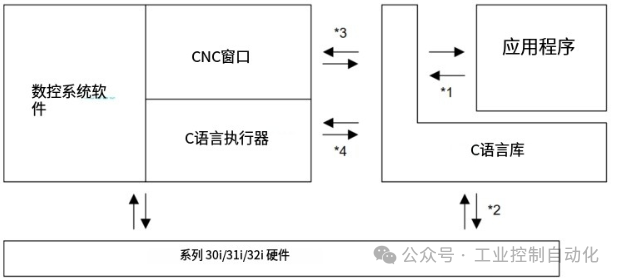
1 Application calls through library functions
2 Output to the screen, reading MDI keys or touch panels, etc.
3 Read/write CNC information
4 Task switching, screen switching, etc.
The C Language Executor provides the following functions
(1) Load and start applications The C Language Executor loads the application and C language library from flash ROM into DRAM during the startup process of the CNC unit and begins executing the application.(2) Switch between CNC screens and user screensThe C Language Executor monitors screen switching through the operator’s MDI operations.When any user screen is selected, the C Language Executor will execute the switch to the user application. When the CNC screen is selected again, the C Language Executor will return control to the CNC software.(3) Manage CNC tasks and user tasksThe C Language Executor manages background tasks of user applications through screen switching, as well as process switching through screen switching.
C Language Library
The C Language Library provides the following functions.
(1) Input/output between peripheral devices (LCD and MDI keys)
The C Language Library performs input/output operations called by the application, such as displaying characters on the screen using the printf function, reading MDI keys using the getch function, performing graphical displays using MS-C compatible functions, and input/output through reader/punch interfaces, etc.
(2) Input/output of CNC information (current position, parameters, tool offsets, etc.)
The C Language Library provides input/output functions for various CNC information through CNC window functions and provides PMC information through PMC windows.
(3) ANSI and MS-DOS compatible C language function libraryThe C Language Library provides an ANSI compatible C language standard library (with some exceptions) and an MS-C extended C language standard library that does not depend on specific hardware and operating systems.
(4) MS-DOS compatible file systemThe C Language Library provides an MS-DOS compatible file system. Applications can access non-volatile memory (SRAM) or SRAM disks on storage cards (PC cards) through this file system (up to 63KB (standard)/255KB (optional)). Functions such as fopen, fprintf, fgets, etc., can be used in applications to read or write files.
Applications
(1) Program structureThe application consists of six independent tasks.
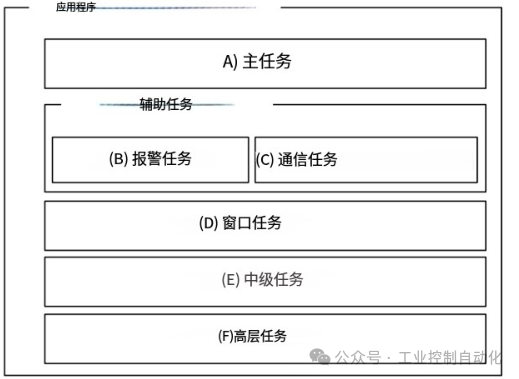
(A) Main taskAlmost all processes, such as screen display, key input, reading and writing CNC information, etc., are executed in this task.
(B) Alarm taskThis task is typically started periodically to monitor various conditions.
(C) Communication taskThis task is typically used to handle input/output independently of the main task through the reader/punch interface.
(D) Window taskThis task operates similarly to the alarm task or communication task, primarily used to display a window on any screen. This task allows for screen display operations almost identical to those of the main task.
(E) Intermediate taskThis task executes at specific starting periods, independently of the main task, alarm task, communication task, window task, and high-level task. The starting period can be selected through a parameter.This task is used to perform operations such as monitoring various conditions that need to be real-time.
(*) To use the intermediate task, the CNC option “C Language Executor Intermediate Task” is required.
(F) High-level taskThis task executes independently at certain starting time points, similar to the intermediate task. The starting time points are fixed. This task is used to perform operations such as real-time processing at the highest priority and high-speed data monitoring.Alarm tasks and communication tasks are referred to as auxiliary tasks. (Also known as background tasks because these tasks execute in the background of the main task.) Auxiliary tasks are functionally limited.
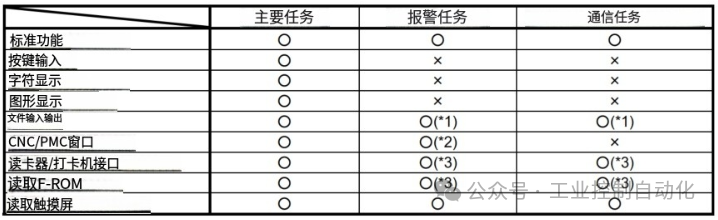
○ Indicates “available”, X indicates “unavailable”
(1) The same file cannot be accessed simultaneously by two or more tasks. Complete control must be implemented in the application.
(2) Simultaneous access to the MAIN TASK will result in a BUSY error.
(3) The application itself must exclusively control the communication port and F-ROM reading.Task switching between the main task and auxiliary tasks is achieved by calling task control library functions in the application.Periodic startup of auxiliary tasks can also be commanded in the application.
It is possible to write an application using only one task. In this case, only the MAIN TASK is used.Additionally, the window task can be used alongside the aforementioned tree tasks. The window task runs concurrently with the aforementioned tree tasks and is used to display a window on any screen. The following functions are provided in the window task.
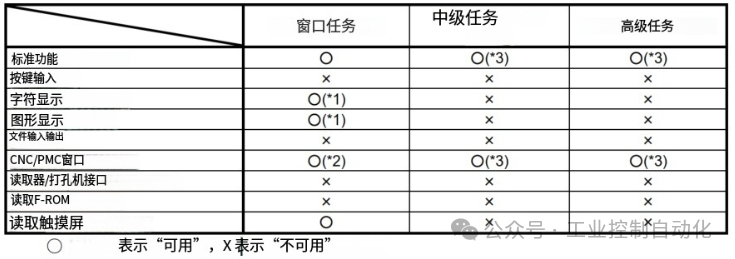
(1) The target for displaying output is no longer a normal window, but a VGA window.
(2) Exclusive control may be required with other tasks.
(3) There is a function that cannot be used.
(2) Executable program modelThe executable file format is different from the MS-DOS EXE format. Additionally, the execution environment is not compatible with MS-DOS. However, as long as the application does not depend on specific hardware, the same functions as those on MS-DOS PC can be used.
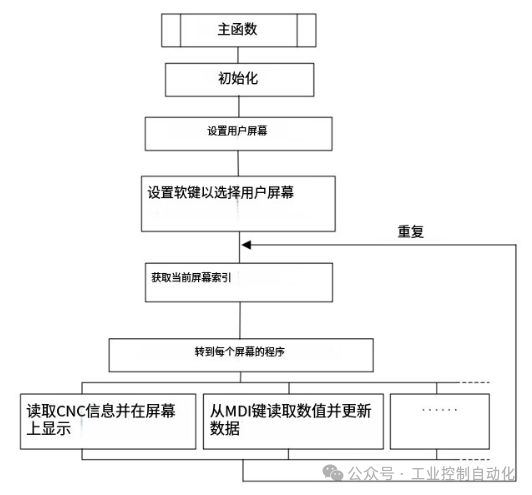
(3) Application exampleFor example, a program containing only the main task has the following structure.