Previously, we learned how to interact with the computer using scanf and printf, but we haven’t written a useful program yet. Today, we will discuss the various calculations that can be performed in a program and use these calculations to implement a simple interest calculator.First, let’s recall the operations we use in mathematics: +, -, *, /, and (). Since there are no multiplication and division symbols on the keyboard, we use * and / instead. These operators are also applicable in code and follow the same operational rules, such as performing multiplication before addition and subtraction, and calculating expressions within parentheses first. For example, 1 + 2 * 3 = 7 and (1 + 2) * 3 = 9.Note: As we discussed earlier, different data types require different variables for storage. Therefore, when we perform calculations with int values, the result is still an int value, and there is no rounding as in mathematics. For example, int a = 5 / 3; here, a equals 1, not 1.6666, and it will not equal 2. If you want a decimal result, you need to use the float type.
float a = 5;float b = 3;float c = a / b;In addition to the arithmetic operators mentioned above, the computer provides more operators for us to use in our programs. Below, we will explain them one by one.%: The modulus operator, which represents the remainder of a division operation. For example, 5 % 3 = 2, corresponding to division.= : The assignment operator. In C/C++ code, the equal sign no longer represents equality; it is used in programming to change the value of a variable. For example, int a = 10;== : Represents equality. Since = is used for assignment, we use two equal signs to express equality in the program. The two equal signs must be together without spaces or other characters in between.!=: Represents inequality. Due to keyboard input limitations, we use != to indicate that two values are not equal.>, <, >=, <=: Comparison operators, which are quite intuitive: greater than, less than, greater than or equal to, and less than or equal to. Note that = must be on the right side of > and <, with no other characters in between.++: Increment operator, which increases a number by its base unit. For example, int a = 10; a++; makes a equal to 11, which is the same as a = a + 1, just a more convenient way to write it.–: Decrement operator, which is the opposite of increment, equivalent to a = a – 1.! : Logical NOT operator, which reverses the truth value of an expression. For example, int a = 1; then a == 1 is true, and !(a == 1) is false.&&: Logical AND operator, which results in true only if all expressions are true. For example, if a is true and b is true, then a && b is true. If a is false and b is true, then a && b is false, and so on.|| : Logical OR operator, which results in true if at least one of the expressions is true. For example, if a is true and b is true, then a || b is true. If a is false and b is true, then a || b is true, and so on.These are some of the most commonly used operators, along with others like bitwise operators and the ternary operator, which we will explain as we use them later.With these operators, we can perform basic mathematical operations and write small tools, such as a deposit interest calculator. If we deposit a certain amount of money in the bank, how much will we have after one year? We know the formula is Total Amount = Principal + Principal * Interest Rate. In this formula, we need to input the principal and the interest rate to calculate the final result, and then output it. Since the interest rate is usually small and not an integer, we need to use float for the calculation.
#include <stdio.h> #include <stdlib.h> int main(int argc, char *argv[]) { // Define an int variable to store the principal amount, initialized to 0 int ben_jin = 0; // For better program aesthetics, we first output a prompt printf("Please enter the principal:"); // Get the ben_jin value from input scanf("%d", &ben_jin); // Define a float variable to store the interest rate float li_lv = 0; printf("Please enter the interest rate:"); // Note that we use %f to get decimal input scanf("%f", &li_lv); // Calculate the result and store it in a variable ben_xi. We usually express interest in decimal form. // For user-friendliness, we divide by 100 float ben_xi = ben_jin + ben_jin * li_lv / 100; printf("Total amount received: %f\n", ben_xi); return 0; }Let’s run a program.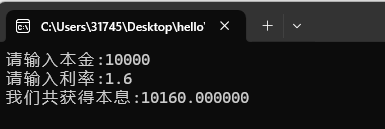 After studying this chapter, we can now write some small tools for calculations. Think about the tools you can use in your work and life, and try to implement them yourself. As always, practice is key to making knowledge your own 🙂I am zeroshen, a backend developer in a large company specializing in C/C++. Feel free to follow and connect. If you encounter any issues during your learning process, you can message me for answers.