Have you ever been overwhelmed by the environment setup for STM32? CubeMX, HAL, LL, CMSIS… it can be quite daunting. Today, I would like to recommend a powerful tool—Arduino_Core_STM32—that allows you to work with STM32 using the familiar Arduino IDE in no time.
What exactly is Arduino_Core_STM32? In simple terms, it is a plugin for the Arduino IDE that provides native support for the STM32 series microcontrollers:
- • Based on STM32Cube’s HAL and LL libraries
- • Integrated CMSIS device definitions
- • Comes with GNU Arm toolchain and OpenOCD debugging Once you have this “core” installed, you can upload programs to Nucleo, Blue Pill, and Discovery boards just like you would with UNO or Mega.
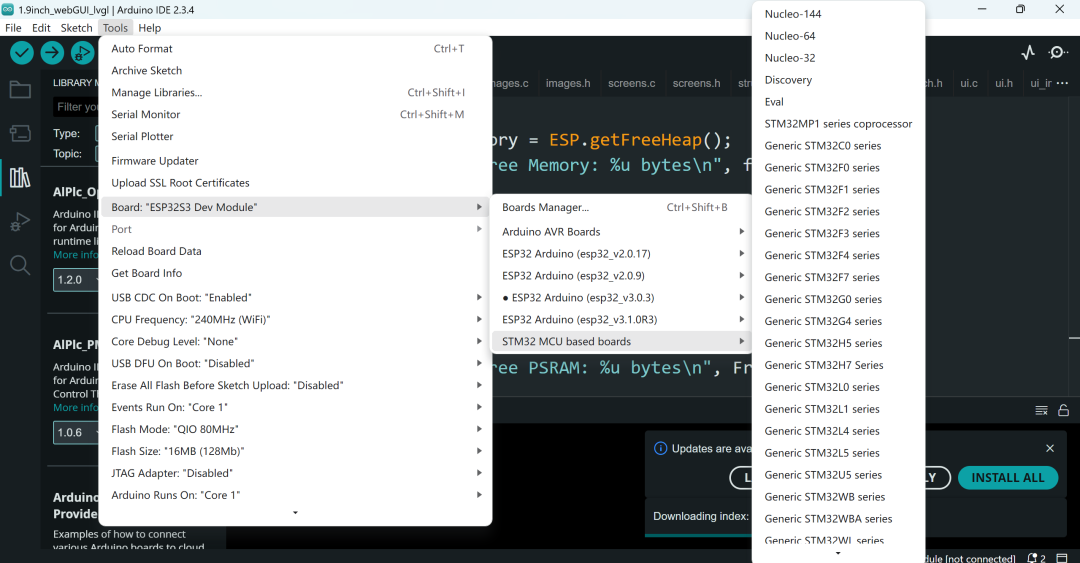
What pain points does it solve?
- 1. Complex environment: No need to install STM32CubeIDE, manually configure the compiler, or debugging scripts; one URL can solve it all.
- 2. Dispersed APIs: HAL, LL, and CMSIS are all available at once, with calls identical to Arduino.
- 3. Ecological gap: The rich libraries of Arduino can be directly utilized, reducing the learning curve.
- 4. Wide board support: From Nucleo 32/64/144 to various “clone” boards, 3D printing boards, and LoRa modules, all are included.
Quick Start: Get STM32 Up and Running in a Few Steps
- 1. Open Arduino IDE → “Preferences” → Fill in the “Additional Board Manager URLs” with:
<span>https://github.com/stm32duino/BoardManagerFiles/raw/main/package_stmicroelectronics_index.json</span> - 2. Open the “Board Manager”, search for STM32, and install the latest version.
- 3. Select your STM32 board, and configure the port and frequency using drag-and-drop.
- 4. Write your Arduino code and upload it with one click.
Example Code: Blink an LED
// STM32_LED_Blink.ino
void setup() {
  pinMode(LED_BUILTIN, OUTPUT);
}

void loop() {
  digitalWrite(LED_BUILTIN, HIGH);
  delay(500);
  digitalWrite(LED_BUILTIN, LOW);
  delay(500);
}
Did you see that? It’s exactly the same as with UNO! The only difference is that you can run it on the powerful M4/M7 cores.
Which mainstream STM32 boards are supported?
| Board Type | Example | Notes |
| Nucleo 64 | Nucleo F103RB | Release ≥ 0.2 |
| Nucleo 144 | Nucleo F767ZI | Release ≥ 1.4 |
| Bluetooth LoRa Board | RAK3172 Module | Release ≥ 2.6 |
| Standard F103 Board | Blue Pill | Release ≥ 1.5 |
Pros and Cons Overview
| Pros | Cons |
| Arduino ecosystem libraries are almost natively usable | Limited support for some advanced peripherals (e.g., dual-core STM32MP1) |
| User-friendly configuration interface, quick upload | Average compilation speed for very large projects |
| Rich board support, covering from F0 to H7 | Some new models require manual core updates |
| One-click debugging (with OpenOCD / ST-Link) | Poor support for older Arduino IDE 1.x |
Conclusion Overall, Arduino_Core_STM32 is truly tailored for those who want to quickly get started with STM32 and bring over Arduino libraries. If you want to avoid complicated configurations and directly use the Arduino IDE to “get things done”, it will definitely help you save a lot of time. Next time you work on IoT, robotics, or 3D printing projects, consider trying the combination of STM32 + Arduino_Core_STM32; it will be a delightful experience!
Project Address:https://github.com/stm32duino/Arduino_Core_STM32