What is Arduino Core STM32?If you have an STM32 board but are unsure how to use its CubeIDE, don’t worry! Arduino Core STM32 is here! It is a plugin that allows you to write STM32 code in Arduino IDE 2.x just like you would with UNO or Nano. It integrates HAL, LL, and CMSIS at the lower level, and the compilation chain is set up for you, saving you the hassle of configuring the environment.
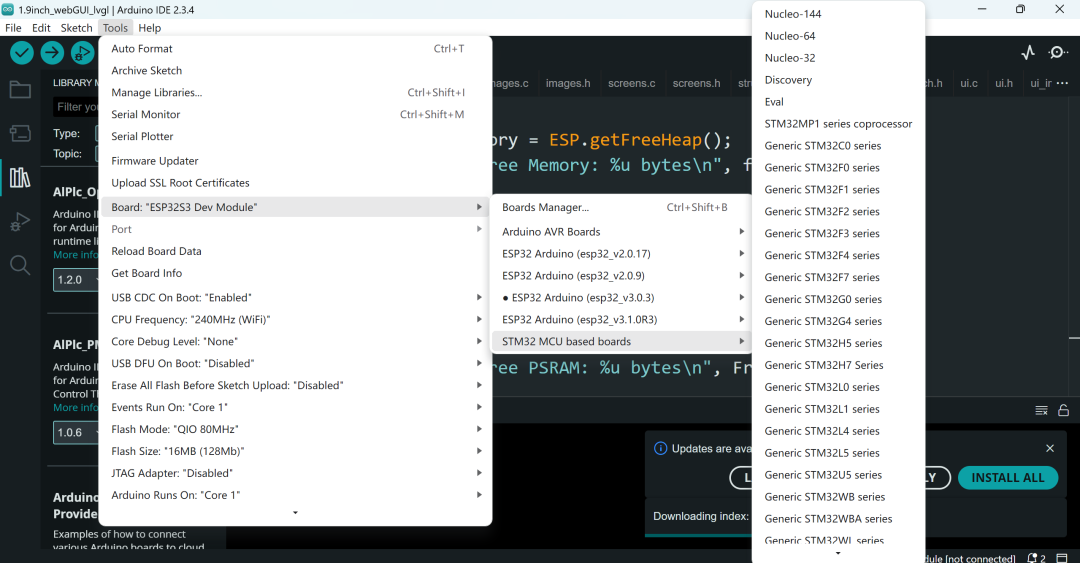
What Pain Points Does It Address?
- • Arduino users: Suddenly want to play with STM32, but the barrier is high, HAL API is cumbersome, and CubeMX is frustrating to use.
- • STM32 enthusiasts: Want to quickly validate algorithms without writing low-level registers, and can use Arduino’s rich libraries directly.
- • Educational scenarios: Standardize on Arduino IDE in courses without needing to install a bunch of STM32 toolchains.
Quick Start TipsJust three steps, hands-on:
- 1. Open Arduino IDE → Preferences → “Additional Board URLs”, paste:
<span>https://github.com/stm32duino/BoardManagerFiles/raw/main/package_stmicroelectronics_index.json</span> - 2. Search for “STM32” in the board manager → Install the latest Core (2.8.0+ only supports IDE2).
- 3. Select your STM32 board, such as “Nucleo F103RB (Blue Pill)” → Upload → OK.
Friendly reminder: If you want to try the latest features, you can also clone the source code directly and compile it yourself using
<span>CMake</span>and<span>git</span>.
Example: Blink an LEDThis code is almost universal across all boards, blinking the onboard LED once every second:
void setup() {
  pinMode(LED_BUILTIN, OUTPUT);
}
void loop() {
  digitalWrite(LED_BUILTIN, HIGH);
  delay(500);
  digitalWrite(LED_BUILTIN, LOW);
  delay(500);
}
Pros and Cons Comparison
| Pros | Cons |
| Arduino-style API, extremely quick to get started | Not flexible enough for low-level performance tuning |
| Built-in HAL/LL/CMSIS, one-click setup | Limited support for some high-end features (e.g., dual-core STM32H7) |
| Large community, rich libraries and examples | IDE2 features are relatively new, occasional bugs |
| Wide coverage of board types (F0~H7, LoRa, STM32MP1…) | Less depth for geeky customization compared to native CubeIDE |
ConclusionArduino Core STM32 is like giving STM32 wings, significantly lowering the learning curve, allowing you to spend your time on “writing code” and “doing projects”. Whether you are looking to quickly prototype a product or work on hardcore campus projects, this toolchain can bring you “Arduino-style joy”. Go ahead and try it out, using the most familiar IDE to master the most powerful ARM Cortex-M!
Project address: https://github.com/stm32duino/Arduino_Core_STM32