In this section, we will show you how to use the AMD Neural Processing Unit (NPU) and integrated GPU (iGPU) to accelerate our end-to-end micro proxy application. We enhance our end-to-end application by providing access to local files and creating an assistant to process sensitive information locally, ensuring maximum privacy.
To achieve this, we will use Lemonade Server[1], a tool for running models locally with NPU and iGPU acceleration.
Setup
Setting up Lemonade Server
You can install Lemonade Server on Windows and Linux. More documentation can be found at lemonade-server.ai[2].
Windows
To install Lemonade Server on Windows, simply download and run the latest installer here[3].
Lemonade Server supports CPU inference on all platforms and all engines on Windows x86/x64. GPU acceleration is enabled through the llamacpp engine using Vulkan, with a focus on supporting AMD Ryzen™ AI 7000/8000/300 series and AMD Radeon™ 7000/9000 series. For NPU acceleration, the ONNX Runtime GenAI (OGA) engine supports AMD Ryzen™ AI 300 series devices.
Once Lemonade Server is installed, you can start it by clicking the Lemonade icon added to your desktop.
Linux
To install Lemonade on Linux, first create and activate a virtual environment:
If you haven’t installed uv, please follow the instructions here to install it.
uv venv --python 3.11
source .venv/bin/activate
Then, install the lemonade-sdk package:
uv pip install lemonade-sdk==8.0.3Alternatively, you can install it by cloning the repository and building the package:
git clone https://github.com/lemonade-sdk/lemonade-sdk.git
cd lemonade-sdk
pip install -e .
After installation, you can start Lemonade by running the following command:
lemonade-server-dev serveLemonade Server supports CPU inference on all platforms and engines (for Windows x86/x64). GPU acceleration is supported through the llamacpp engine (Vulkan), focusing on AMD Ryzen™ AI 7000/8000/300 series and Radeon™ 7000/9000 series.
NPU acceleration is only available for AMD Ryzen™ AI 300 series on Windows.
Micro Proxy and NPX Setup
This part of the course assumes you have already installed <span><span>npx</span></span> and micro proxies. If you haven’t installed them, please refer to the micro proxy section[4]. Be sure to use <span><span>huggingface_hub[mcp]==0.33.2</span></span>.
Running Your Micro Proxy Application with AMD NPU and iGPU
To run your micro proxy application with AMD NPU and iGPU, simply point the MCP server we created in the previous section to Lemonade Server as follows:
Windows
{ "model": "Qwen3-8B-GGUF", "endpointUrl": "http://localhost:8000/api/", "servers": [ { "type": "stdio", "command": "C:\Program Files\nodejs\npx.cmd", "args": [ "mcp-remote", "http://localhost:7860/gradio_api/mcp/sse" ] } ]}Linux
{ "model": "Qwen3-8B-GGUF", "endpointUrl": "http://localhost:8000/api/", "servers": [ { "type": "stdio", "command": "npx", "args": [ "mcp-remote", "http://localhost:7860/gradio_api/mcp/sse" ] } ]}Then, you can choose various models to run on your local machine. For this example, we used the Qwen3-8B-GGUF model, which runs efficiently on AMD GPUs with Vulkan acceleration. You can find the list of supported models and even import your own models by navigating to http://localhost:8000/#model-management[5].
Creating an Assistant to Process Sensitive Information Locally
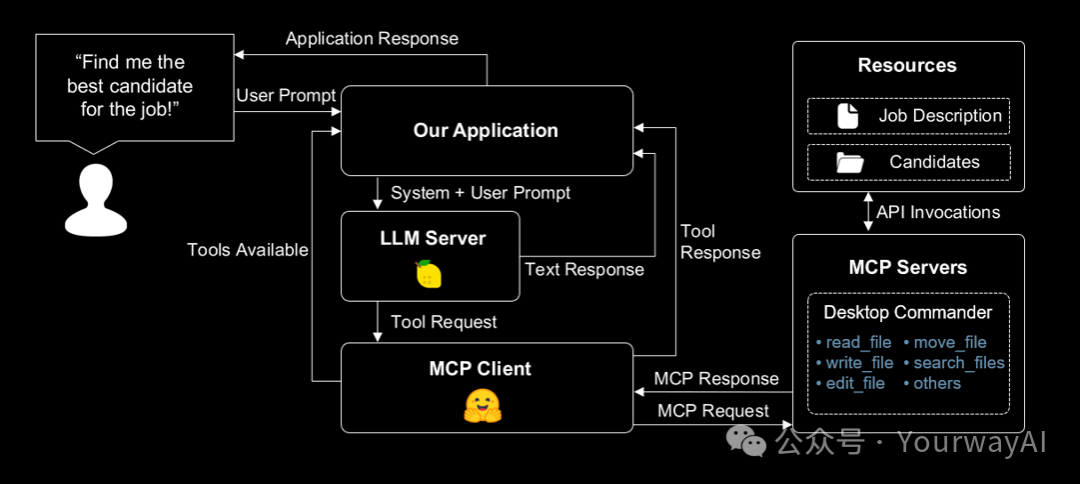
Now, let’s enhance our end-to-end application by enabling access to local files and introducing an assistant that processes sensitive information entirely on-device. Specifically, this assistant will help us evaluate candidate resumes and support decision-making during the hiring process—all while keeping the data private and secure.
To do this, we will use Desktop Commander MCP Server[6], which allows you to run commands on your local machine and provides full file system access, terminal control, and code editing capabilities.
Let’s set up a project that includes a basic micro proxy.
mkdir file-assistant
cd file-assistant
Then, let’s create a new <span><span>agent.json</span></span> file in the <span><span>file-assistant</span></span> folder.
Windows
{ "model": "user.jan-nano", "endpointUrl": "http://localhost:8000/api/", "servers": [ { "type": "stdio", "command": "C:\Program Files\nodejs\npx.cmd", "args": [ "-y", "@wonderwhy-er/desktop-commander" ] } ]}Linux
{ "model": "user.jan-nano", "endpointUrl": "http://localhost:8000/api/", "servers": [ { "type": "stdio", "command": "npx", "args": [ "-y", "@wonderwhy-er/desktop-commander" ] } ]}Finally, we need to download the Jan Nano model. You can do this by navigating to http://localhost:8000/#model-management[7], clicking “Add a Model” and providing the following information:
Model Name: user.jan-nano
Checkpoint: Menlo/Jan-nano-gguf:jan-nano-4b-Q4_0.gguf
Recipe: llamacpp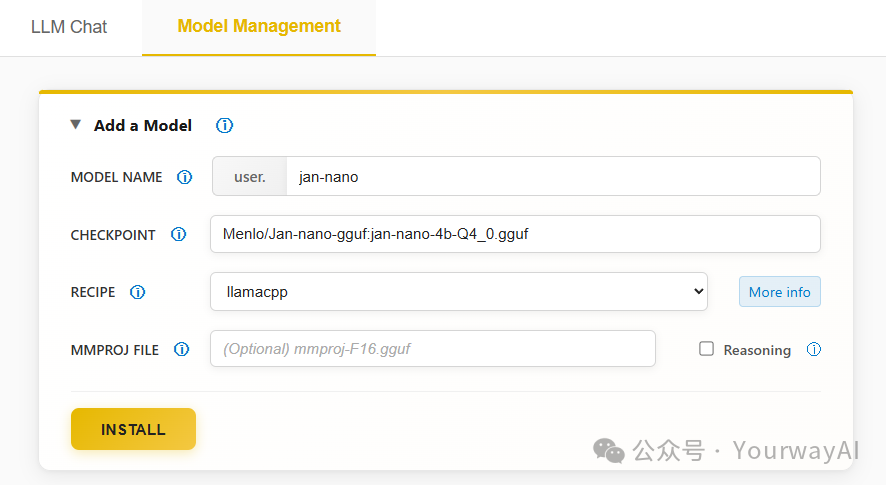
Great! Now let’s give it a try.
Practical Operations
Our goal is to create an assistant that can help us process sensitive information locally. To do this, we first create a job description file for the assistant.
In the <span><span>file-assistant</span></span> folder, create a file named <span><span>job_description.md</span></span>.
# Senior Food Technology Engineer
## About this position
We are looking for a culinary innovator who can translate cooking processes into precise algorithms and AI systems.
## What you will do
- Convert cooking instructions into measurable algorithms
- Develop AI-driven kitchen tools
- Create food quality assessment systems
- Build recipe-following AI models
## Requirements
- Master's degree in Computer Science (preferably with food-related thesis)
- Expertise in Python and PyTorch
- Proven experience combining food science with machine learning
- Strong communication skills using culinary metaphors
## Benefits
- Experiential kitchen access
- Ongoing tasting opportunities
- Collaborative technology-gourmet team environment
*Note: Must attend meetings and present research on algorithmic cooking optimization.*
Now, let’s create a <span><span>candidates</span></span> folder in the <span><span>file-assistant</span></span> folder and add a sample resume file for the assistant.
mkdir candidates
touch candidates/john_resume.md
Add the following sample resume or include your own resume.
# John Doe
**Contact Information**
- Email: [email protected]
- Phone: (+1) 123-456-7890
- Location: 1234 Abc Street, Example, EX 01234
- GitHub: github.com/example
- LinkedIn: linkedin.com/in/example
- Website: example.com
## Experience
**Machine Learning Engineer Intern** | Slow Feet Technology | July 2021 - Present
- Developed cross-ingredient cooking recipes without ingredient limitations
- Created a competitive cream mushroom soup recipe published in NeurIPS 2099
- Built a dedicated pan for dietary cooking research
**Research Intern** | Paddling University | August 2020 - Present
- Designed a method for efficiently estimating the quality of Mapo Tofu using thermometers
- Proposed a quick stir-frying algorithm for tofu cooking, published in CVPR 2077
- Surpassed SOTA methods with higher efficiency
**Research Assistant** | Huangdu Institute of Technology | March 2020 - June 2020
- Developed a novel framework for eating Mapo Tofu with spoons and chopsticks
- Designed a tofu filtering strategy inspired by bean grinding methods
- Created standards for assessing the novelty and diversity of meal plans
**Research Intern** | Paddling University | July 2018 - August 2018
- Designed a double-layer sandwich using traditional burger ingredients
- Improved cooking speed of shared ingredients using structural duality
- Surpassed baseline on QWE'15 and ASDF'14 datasets
## Education
**Master of Computer Science** | University of Charles River | September 2021 - January 2023
- Location: Boston, Massachusetts
**Bachelor of Software Engineering** | Huangdu Institute of Technology | September 2016 - July 2020
- Location: Shanghai, China
## Skills
**Programming Languages:** Python, JavaScript/TypeScript, HTML/CSS, Java
**Tools and Frameworks:** Git, PyTorch, Keras, scikit-learn, Linux, Vue, React, Django, LaTeX
**Languages:** English (fluent), Indonesian (native)
## Awards and Honors
- **Gold Medal**, International College Student Fishing Competition (ICCFC) | 2018
- **First Prize**, National Outstanding Culinary Skills Scholarship, China | 2017, 2018
## Publications
**Eating is All You Need** | NeurIPS 2099
- Authors: Haha Ha, San Zhang
**You Only Cook Once: Unified, Real-Time Mapo Tofu Recipe** | CVPR 2077 (Best Paper Honorary Award)
- Authors: Haha Ha, San Zhang, Si Li, Wu Wang
Then we can run the proxy using the following command:
tiny-agents run agent.jsonYou should see the following output:
Agent loaded with 18 tools: • get_config • set_config_value • read_file • read_multiple_files • write_file • create_directory • list_directory • move_file • search_files • search_code • get_file_info • edit_block • execute_command • read_output • force_terminate • list_sessions • list_processes • kill_process »Now let’s provide some information to the assistant to get started.
» Read the contents of C:\Users\your_username\file-assistant\job_description.mdYou should see output similar to the following:
<Tool iNtxGmOuXHqZVBWmKnfxsc61xsJbsoAM>read_file {"path":"C:\Users\your_username\file-assistant\job_description.md","length":23}
Tool iNtxGmOuXHqZVBWmKnfxsc61xsJbsoAM[Reading 23 lines from start]
(...)
The job description for the Senior Food Technology Engineer position emphasizes the candidate's ability to bridge the gap between food science and artificial intelligence (...). The candidate is also required to attend meetings and present research on algorithmic cooking optimization.
We are using the default system prompt, which may cause the assistant to call certain tools multiple times. To create a more confident assistant, you can provide a custom
<span><span>PROMPT.md</span></span>file in the same directory as<span><span>agent.json</span></span>.
Awesome! Now let’s read the candidate’s resume.
» In the same folder, you can find a candidates folder. Check john_resume.md and tell me if he is suitable for the job.You should see output similar to the following:
<Tool ll2oWo73YeGIft5VbOIpF9GNf0kevjEy>read_file {"path":"C:\Users\your_username\file-assistant\candidates\john_resume.md"}
Tool ll2oWo73YeGIft5VbOIpF9GNf0kevjEy[Reading 58 lines from start]
(...)
John Wayne **is a great fit** for the Senior Food Technology Engineer position. His technical expertise in AI and machine learning, combined with his experience in food-related research and publications, makes him an excellent candidate. He also possesses the soft skills and cultural fit needed to thrive in a collaborative innovation environment.
Great! Now we can proceed to invite the candidate for an interview.
» Create a file named "invitation.md" in the "file-assistant" folder and write a short interview invitation to John.You should see something similar written in the <span><span>invitation.md</span></span> file:
# Interview Invitation
Dear John,
We sincerely invite you to interview for the Senior Food Technology Engineer position. The interview will take place on [insert date and time] at [insert location or virtual meeting details].
Please confirm your availability and let us know if you need any additional information.
Best regards,
[Your Name]
[Your Contact Information]
Success! We have successfully created an assistant that can help us process sensitive information locally.
Exploring Other Models and Acceleration Options
In the example above, the Jan-Nano model utilizes Vulkan acceleration for efficient local LLM inference on AMD GPUs. You can also try other models and acceleration options by navigating to http://localhost:8000/#model-management[8] or checking the model documentation[9].
For Windows applications that require concise context and benefit from NPU + iGPU acceleration, you can try the hybrid models offered by Lemonade Server—optimized for AMD Ryzen AI 300 series PCs. Models like Llama-xLAM-2-8b-fc-r-Hybrid are specifically fine-tuned for tool invocation and provide fast, responsive performance!
Conclusion
In this unit, we demonstrated how to use AMD NPU and iGPU to accelerate our end-to-end micro proxy application. We also showed how to create an assistant to process sensitive information locally.
Now that you understand how to leverage Lemonade Server for local model acceleration and privacy-centric applications, you can explore more examples and features in the Lemonade GitHub repository[10]. This repository contains additional documentation, sample implementations, and is actively maintained by the community.
References
<span><span>[1]</span></span> Lemonade Server:https://lemonade-server.ai/<span><span>[2]</span></span>lemonade-server.ai:https://lemonade-server.ai/<span><span>[3]</span></span>here:https://github.com/Lemonade-AI/lemonade-server/releases/latest<span><span>[4]</span></span>micro proxy section:link_to_tiny_agents_section<span><span>[5]</span></span>:http://localhost:8000/#model-management<span><span>[6]</span></span>Desktop Commander MCP Server:https://github.com/WonderWhy-ER/desktop-commander<span><span>[7]</span></span>:http://localhost:8000/#model-management<span><span>[8]</span></span>:http://localhost:8000/#model-management<span><span>[9]</span></span>model documentation:https://lemonade-server.ai/docs/server/server_models/<span><span>[10]</span></span>Lemonade GitHub repository: https://github.com/Lemonade-AI/lemonade-server
from:from Hugging Face. All Rights Reserved.
Click to identify the account name card below and follow “YouywayAI” for more programming, AI development-related tools and practical resources!