When using Linux systems in daily tasks, we often need to handle various text files. When there is a lot of duplicate content in a file, processing it using conventional methods may be inefficient. Therefore, Linux provides a practical tool specifically for handling duplicate text lines: the uniq command.
Note:
uniqhas an important characteristic: it can only recognize and process adjacent duplicate lines. If duplicate lines are scattered throughout the file, the file needs to be sorted first.
1. Basic Syntax of the uniq Command
uniq has a simple and clear syntax structure, consistent with other Linux commands:
$ uniq [options] [input_file] [output_file]It is important to note that all options and parameters for this command are optional.
2. Creating a Sample Text File
To facilitate the following examples, let’s first create a text file containing duplicate content:
[root@myoracledb ~]# vim server-list.txt
[root@myoracledb ~]# cat server-list.txt
web-server-01
db-primary
cache-node
web-server-01
web-server-01
app-server-02
DB-PRIMARY
log-server
log-server
cache-node
WEB-SERVER-01
monitoring-server
[root@myoracledb ~]#
3. 8 Practical Examples
3.1 Basic Deduplication: Remove Adjacent Duplicate Lines
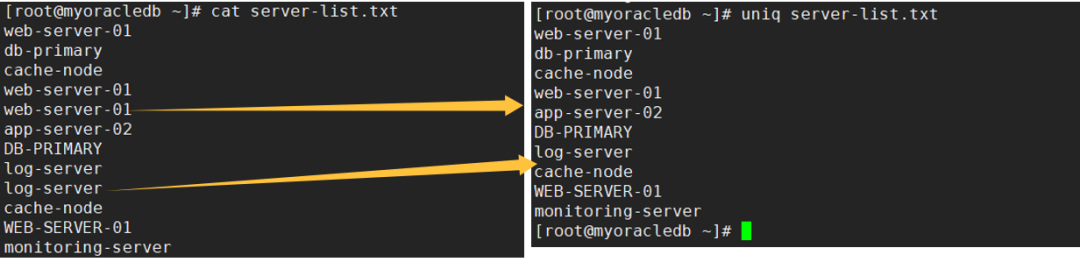
The most basic usage is to remove adjacent duplicate lines from a file:
[root@myoracledb ~]# uniq server-list.txt
web-server-01
db-primary
cache-node
web-server-01
app-server-02
DB-PRIMARY
log-server
cache-node
WEB-SERVER-01
monitoring-server
[root@myoracledb ~]#
After execution, adjacent duplicate lines will be merged, keeping only one unique line.
3.2 Count Duplicate Occurrences
Using the -c option allows you to display the number of times each line appears while deduplicating:
[root@myoracledb ~]# uniq -c server-list.txt
      1 web-server-01
      1 db-primary
      1 cache-node
      2 web-server-01
      1 app-server-02
      1 DB-PRIMARY
      2 log-server
      1 cache-node
      1 WEB-SERVER-01
      1 monitoring-server
[root@myoracledb ~]#
The first column of the output will show the number of times each line of text is repeated in the file.
3.3 Ignore Case for Deduplication
By default, the uniq command is case-sensitive. Using the -i option enables case-insensitive mode:
[root@myoracledb ~]# uniq -i server-list.txt
web-server-01
db-primary
cache-node
web-server-01
app-server-02
DB-PRIMARY
log-server
cache-node
WEB-SERVER-01
monitoring-server
[root@myoracledb ~]#
At this point, “web-server-01” and “WEB-SERVER-01” will be treated as the same text line.
3.4 Show Only Duplicate Lines
If you only need to see which lines in the file are duplicates, you can use the -d option:
[root@myoracledb ~]# uniq -d server-list.txt
web-server-01
log-server
[root@myoracledb ~]#
This command will display one representative from each group of duplicate lines.
3.5 Show All Duplicate Lines
Unlike the previous example, the -D option will show all duplicate lines, rather than just one from each group:
[root@myoracledb ~]# uniq -D server-list.txt
web-server-01
web-server-01
log-server
log-server
[root@myoracledb ~]#
3.6 Group Display of Duplicate Lines
To clearly display the grouping of duplicate lines, you can use the --all-repeated=separate option:
[root@myoracledb ~]# uniq --all-repeated=separate server-list.txt
web-server-01
web-server-01

log-server
log-server
[root@myoracledb ~]#
This way, the output will separate each group of duplicate lines with a blank line, improving readability.
3.7 Show Only Unique Lines
If you need to find lines in the file that are completely unique, you can use the -u option:
[root@myoracledb ~]#  uniq -u server-list.txt
web-server-01
db-primary
cache-node
app-server-02
DB-PRIMARY
cache-node
WEB-SERVER-01
monitoring-server
[root@myoracledb ~]#
This command will only output those lines that exist uniquely in the file.
3.8 Handle Non-Adjacent Duplicate Lines
Since uniq can only handle adjacent duplicate lines, for duplicates scattered throughout, you need to sort first:
[root@myoracledb ~]# sort server-list.txt | uniq
app-server-02
cache-node
db-primary
DB-PRIMARY
log-server
monitoring-server
web-server-01
WEB-SERVER-01
[root@myoracledb ~]# sort server-list.txt | uniq -i
app-server-02
cache-node
db-primary
log-server
monitoring-server
web-server-01
[root@myoracledb ~]#
This method first sorts all content, making duplicate lines adjacent, and then performs the deduplication operation.
4. Additional Practical Tips
In practical work, we often need to combine these options. For example, to ignore case and count duplicate occurrences:
[root@myoracledb ~]# uniq -ci server-list.txt
      1 web-server-01
      1 db-primary
      1 cache-node
      2 web-server-01
      1 app-server-02
      1 DB-PRIMARY
      2 log-server
      1 cache-node
      1 WEB-SERVER-01
      1 monitoring-server
[root@myoracledb ~]#
Or sort first, then count the occurrences of each content:
[root@myoracledb ~]# sort server-list.txt | uniq -ci
      1 app-server-02
      2 cache-node
      2 db-primary
      2 log-server
      1 monitoring-server
      4 web-server-01
[root@myoracledb ~]#
Another practical scenario is analyzing duplicate error messages in log files:
grep "ERROR" application.log | sort | uniq -c | sort -nrThis command can count the frequency of various error types and sort them in descending order of occurrence.
uniq is an indispensable part of the Linux text processing toolchain. Although its functionality is singular, it is very practical. It is particularly useful for analyzing log files, processing configuration files, and cleaning data.
It is important to note that handling non-adjacent duplicate lines in conjunction with the sort command is a crucial technique. Additionally, flexibly combining different options based on actual needs can solve more complex text processing problems.