What are the common Linux distributions?
Date: 2025/07/20
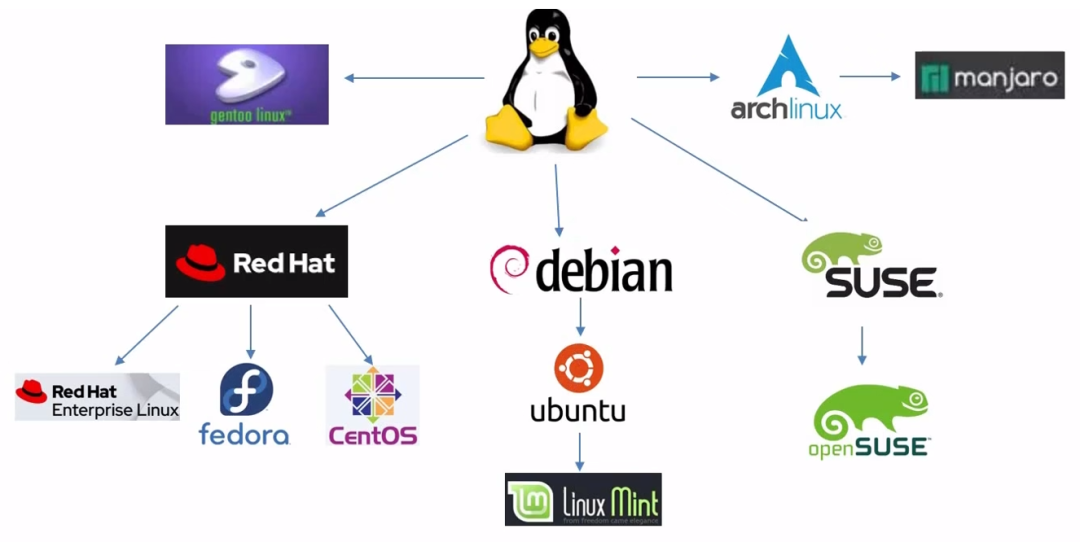
- Debian Series
- Debian: One of the oldest community distributions, known for its stability. Suitable for servers and advanced users, with a long update cycle (stable version released every 2 years).
- Ubuntu: Based on Debian, the most popular desktop distribution worldwide. Offers LTS (5 years support) and semi-annual updates, pre-installed with a user-friendly graphical interface.
- Linux Mint: Based on Ubuntu, optimized for desktop usability. Default support for multimedia codecs, suitable for users transitioning from Windows to Linux.
- Red Hat Series
- RHEL (Red Hat Enterprise Linux): A paid enterprise-level distribution, offering 10 years of support. Used for critical business servers (such as banking and telecommunications), requires a subscription license.
- Fedora: A community version sponsored by Red Hat, a testing ground for new technologies. New versions are released every 6 months, suitable for developers to experience the latest software.
- CentOS: Previously a free clone of RHEL, now transformed into CentOS Stream (the upstream development version of RHEL). Due to CentOS, maintenance updates have stopped, making it no longer suitable for production environments.
- SUSE Series
- openSUSE: Divided into stable (Leap) and rolling (Tumbleweed) versions. Desktop-friendly, defaults to the YaST configuration tool.
- SUSE Linux Enterprise (SLE): A paid enterprise-level distribution, similar to RHEL. Supports professional scenarios such as SAP and HPC, mainstream in the European market.
- Alpine Series
- Alpine Linux is a lightweight, security-oriented, and high-performance Linux distribution, especially suitable for scenarios such as containers (Docker), embedded systems, and edge computing.
- The base image is only 5MB, designed specifically for containers and embedded systems, with root access disabled by default and enforced security policies.
Different series of Linux operating systems have different package management tools
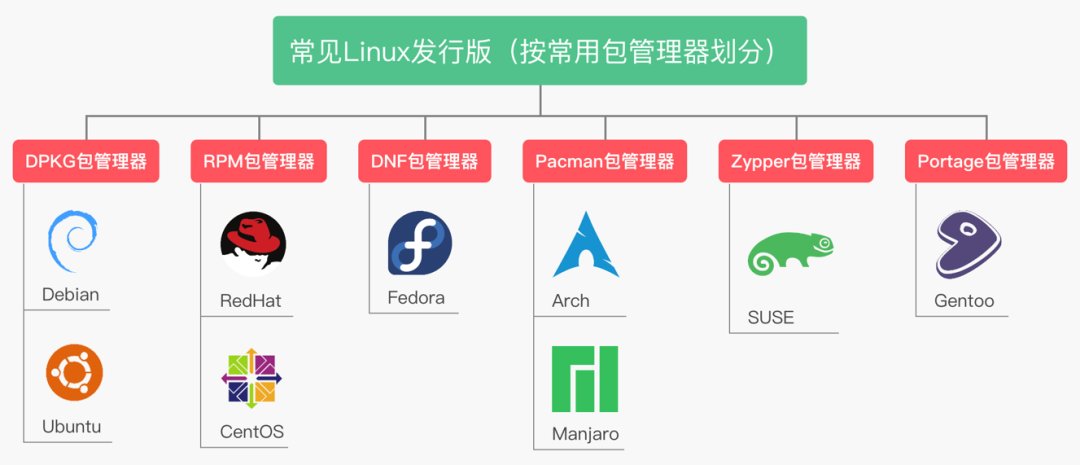
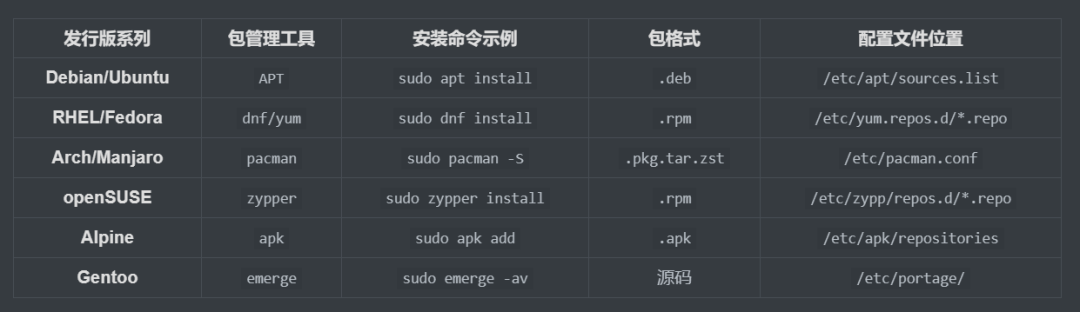
1) Package Management Tools
| Distribution Series | Package Management Tool | Installation Command Example | Package Format | Configuration File Location |
|---|---|---|---|---|
| Debian/Ubuntu | <span>APT</span> |
<span>sudo apt install</span> |
<span>.deb</span> |
<span>/etc/apt/sources.list</span> |
| RHEL/Fedora | <span>dnf/yum</span> |
<span>sudo dnf install</span> |
<span>.rpm</span> |
<span>/etc/yum.repos.d/*.repo</span> |
| Arch/Manjaro | <span>pacman</span> |
<span>sudo pacman -S</span> |
<span>.pkg.tar.zst</span> |
<span>/etc/pacman.conf</span> |
| openSUSE | <span>zypper</span> |
<span>sudo zypper install</span> |
<span>.rpm</span> |
<span>/etc/zypp/repos.d/*.repo</span> |
| Alpine | <span>apk</span> |
<span>sudo apk add</span> |
<span>.apk</span> |
<span>/etc/apk/repositories</span> |
| Gentoo | <span>emerge</span> |
<span>sudo emerge -av</span> |
Source | <span>/etc/portage/</span> |
2) Other Package Management Tools
| Tool | Purpose |
|---|---|
<span>dpkg</span> |
Directly operates <span>.deb</span> packages (Debian series low-level tool) |
<span>rpm</span> |
Directly operates <span>.rpm</span> packages (Red Hat series low-level tool) |
<span>snap</span>/<span>flatpak</span> |
Cross-distribution sandboxed software packages (e.g., <span>sudo snap install vscode</span><code><span>)</span> |

What is the difference between a Linux distribution and the Linux operating system?

An operating system is the underlying system software that manages computer hardware and software resources, responsible for core functions such as process scheduling, memory management, file systems, and device drivers.
Linux itself is an operating system kernel (Linux Kernel), released by Linus Torvalds in 1991, which is part of the core of the operating system, but the kernel alone cannot be used directly.
A Linux distribution is a complete operating system suite based on the Linux kernel, which includes, in addition to the kernel:
- GNU toolchain (e.g., Bash, Coreutils, GCC): Provides a basic command-line environment (strictly speaking, Linux + GNU = GNU/Linux).
- Package management system (e.g., APT, DNF, Pacman): Used for installing and managing software.
- Desktop environment (e.g., GNOME, KDE): Provides a graphical interface (optional).
- Pre-installed applications (e.g., browsers, office software).
- Configuration tools and scripts: Simplify system setup and maintenance.
For example:
- Ubuntu = Linux kernel + GNU tools + APT package management + GNOME desktop + pre-installed software (e.g., Firefox).
- Arch Linux = Linux kernel + GNU tools + Pacman package management + minimal design (requires user customization).
Analogy explanation
- The Linux kernel is like the engine of a car (core power).
- A Linux distribution is like a complete car (engine + body + steering wheel + seats, etc.).
- The Linux operating system can refer to a Linux distribution.
When we talk about “Linux”, we are actually referring to operating systems based on the Linux kernel. The Linux kernel is an open-source software core, responsible for managing hardware resources and providing basic services for applications on the computer. However, the kernel alone cannot constitute a complete working environment; therefore, it is necessary to combine the kernel with a series of tools, libraries, and applications to create a complete operating system.
A “Linux distribution” (Linux distribution or distro) is a collection that includes the Linux kernel and a set of pre-selected software packages and utilities, which are typically installed together on the user’s computer. Different Linux distributions may be designed for different purposes (such as servers, desktops, or embedded systems), user skill levels, or specific software preferences.
In other words, the “Linux operating system” can be seen as the result of a series of components chosen and packaged by an organization or community, with the most critical being the Linux kernel. The “Linux distribution” is a specific instantiation, the actual version of the operating system that can be installed and used. Therefore, all Linux distributions are Linux operating systems, but not all systems using the Linux kernel are considered independent distributions. Common Linux distributions include Ubuntu, Fedora, Debian, CentOS, and Arch Linux.
Linux Distribution = Linux Operating System.
END
Finally, yesterday I created a free community called “Operations and Development Field (Free)”. Welcome to visit and communicate.
The community will be more active than group chats, and will include valuable content and knowledge sharing.
Joining the community is free, and you can access my previously written paid column, “How to Manage a Blog, A Complete Practical Guide”: https://mp.weixin.qq.com/s/3AnbRTxcNQ1wZnkKjyvNug
Click to view, free column address: https://wx.zsxq.com/group/88882812844552/topic/2852411425851221

Personal Blog:Blog IntroductionWelcome everyone to join the group for communication (recommended for WeChat group chat):Operations communication/business cooperation, collectionPrevious Recommendations:
Aside from technology, what soft skills do companies value in employees?
Production environment changes: Switching PVC storage to object storage
How to smoothly switch the Containerd data directory
Windows system C drive is full, how to clean it up?
Reflections on work from a recent graduate
 One-finger Zen, poke poke poke!