In modern application development, interacting with Web APIs is a fundamental skill. This article will introduce how to use the HttpClient class in C# to send POST and GET requests to call external API services.
Introduction to HttpClient
HttpClient is a class in the .NET Framework and .NET Core used to send HTTP requests and receive HTTP responses. It supports asynchronous operations and can efficiently handle web requests, making it the preferred way for modern C# applications to interact with web services.

1. Preparation
1. Prepare an API request URL: https://api.qqsuu.cn/api/dm-caipuRequest method: Both GET and POST are acceptable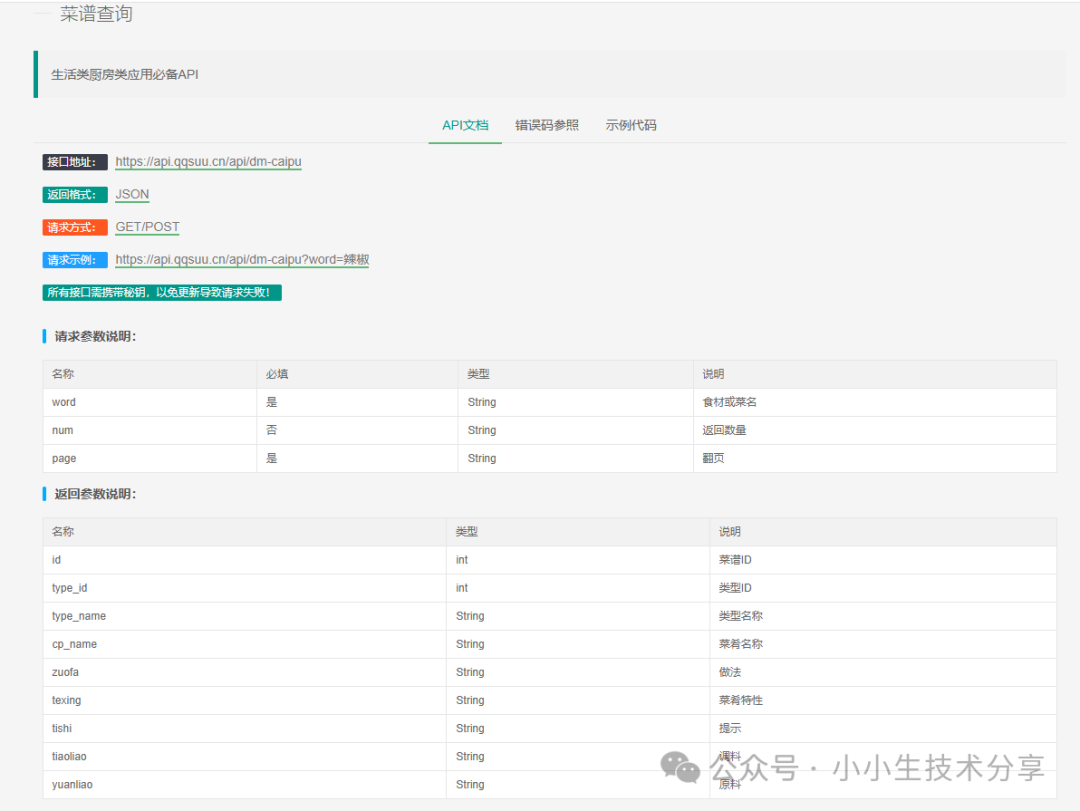 2. Create a Windows Forms application project. In Visual Studio 2019:
-
Create a new Windows Forms App (.NET Framework) project
-
Name it “WindowsFormsPOSTGET”
-
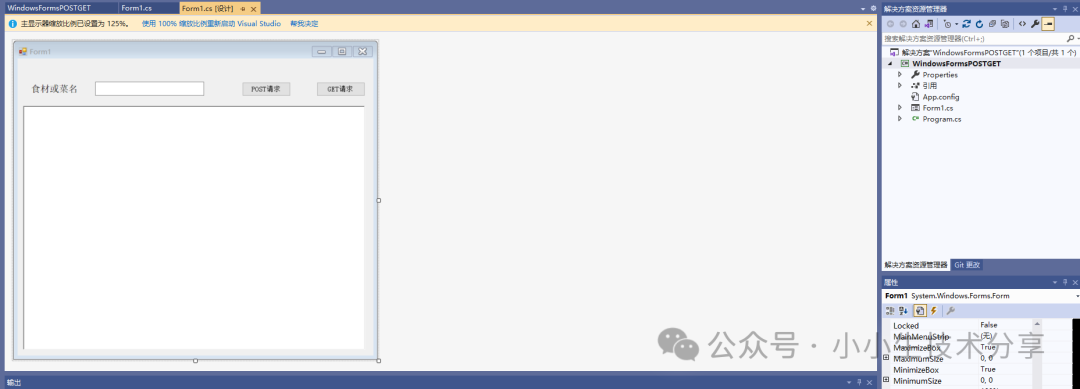
Design a simple interface that includes:
-
A text box (textBox1) for entering query parameters
-
Two buttons (button1 and button2) to trigger POST and GET requests respectively
-
A rich text box (richTextBox1) to display the API response results
2. Implementation of GET Request
GET is the most commonly used HTTP method for retrieving data from the server. In our example, the<span><span>Get</span></span> method implements the GET request:
public static string Get(string strUrl){ string str_Output = ""; try { HttpWebRequest request = (HttpWebRequest)WebRequest.Create(strUrl); request.Proxy = null; // Disable proxy request.Method = "GET"; request.ContentType = "application/json"; HttpWebResponse resp = (HttpWebResponse)request.GetResponse(); using (Stream stream = resp.GetResponseStream()) { using (StreamReader reader = new StreamReader(stream, Encoding.UTF8)) { str_Output = reader.ReadToEnd(); } } return str_Output; } catch (Exception ex) { return ex.Message.ToString(); }}-
Key Points:
-
<span><span>WebRequest.Create</span></span>creates the request object -
Set
<span><span>Method</span></span>to “GET” to specify the request type -
<span><span>ContentType</span></span>set to “application/json” indicates that JSON format data is expected -
Use
<span><span>GetResponse</span></span>to get the server response -
Read the response content using
<span><span>StreamReader</span></span>
Invocation Method:
private void button2_Click(object sender, EventArgs e){ string strUrl = "https://api.qqsuu.cn/api/dm-caipu?word=" + textBox1.Text.Trim(); string strReturn = Get(strUrl); richTextBox1.Text = strReturn;}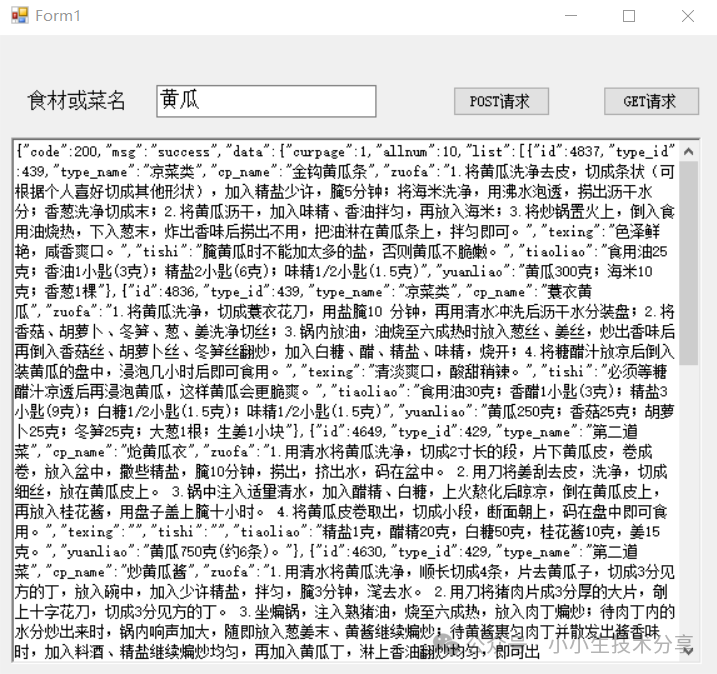
3. Implementation of POST Request
POST method is typically used to submit data to the server. In our example, the<span><span>Post</span></span> method implements the POST request:
public static string Post(string strUrl){ string str_Output = ""; try { HttpWebRequest request = (HttpWebRequest)WebRequest.Create(strUrl); request.Method = "POST"; request.ContentType = "application/json"; // For this specific API, the POST request does not require a request body using (Stream reqStream = request.GetRequestStream()) { reqStream.Flush(); reqStream.Close(); } // Get the response message HttpWebResponse resp = (HttpWebResponse)request.GetResponse(); Stream stream = resp.GetResponseStream(); // Get the response content using (StreamReader reader = new StreamReader(stream, Encoding.UTF8)) { str_Output = reader.ReadToEnd(); } return str_Output; } catch (Exception ex) { return ex.Message.ToString(); }}Key Points:
-
Set
<span><span>Method</span></span>to “POST” to specify the request type -
Even if no request body is needed, the request stream must be obtained and closed
-
The remaining handling is similar to the GET request
Invocation Method:
private void button1_Click(object sender, EventArgs e){ string strUrl = "https://api.qqsuu.cn/api/dm-caipu?word=" + textBox1.Text.Trim(); string strReturn = Post(strUrl); richTextBox1.Text = strReturn;}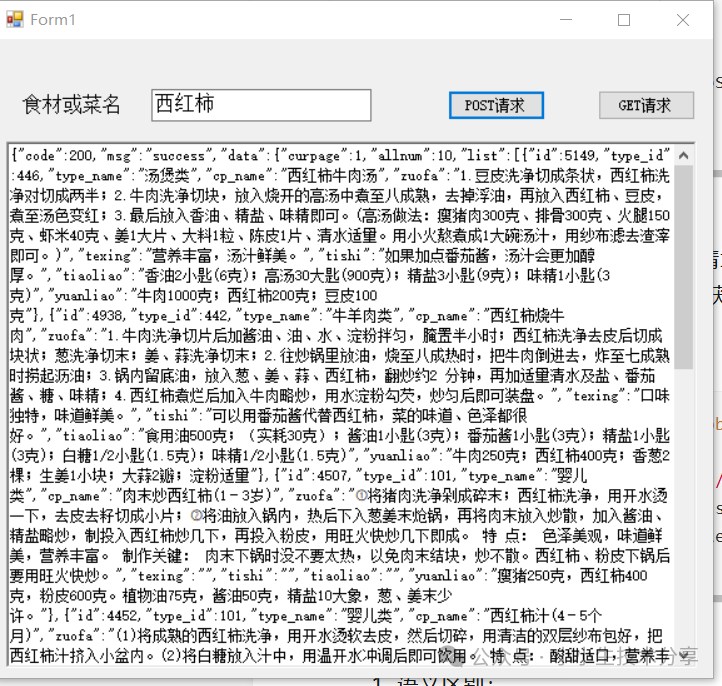
4. Differences Between GET and POST
-
Semantic Difference:
-
GET is used to retrieve data
-
POST is used to submit data
Parameter Passing:
-
GET parameters are passed via the URL
-
POST parameters are typically passed through the request body
Security:
-
GET parameters are visible in the URL and are not suitable for transmitting sensitive information
-
POST parameters are in the request body and are relatively more secure
Cache:
-
GET requests can be cached
-
POST requests are typically not cached
5. Extensions
1. Sending a POST request with parameters
public static string PostJson(string strUrl, string jsonInput) { string str_Output = ""; try { HttpWebRequest request = (HttpWebRequest)WebRequest.Create(strUrl); request.Method = "POST"; request.ContentType = "application/json"; byte[] xmlByte = Encoding.UTF8.GetBytes(jsonInput.ToString()); using (Stream reqStream = request.GetRequestStream()) { reqStream.Write(xmlByte, 0, xmlByte.Length); reqStream.Flush(); reqStream.Close(); } // Get the response message HttpWebResponse resp = (HttpWebResponse)request.GetResponse(); Stream stream = resp.GetResponseStream(); // Get the response content using (StreamReader reader = new StreamReader(stream, Encoding.UTF8)) { str_Output = reader.ReadToEnd(); } return str_Output; } catch (Exception ex) { return ex.Message.ToString(); } }2. Sending a DELETE request with parameters
public static string DeleteJson(string strUrl, string jsonInput) { string str_Output = ""; try { HttpWebRequest request = (HttpWebRequest)WebRequest.Create(strUrl); request.Method = "DELETE"; request.ContentType = "application/json"; byte[] xmlByte = Encoding.UTF8.GetBytes(jsonInput.ToString()); using (Stream reqStream = request.GetRequestStream()) { reqStream.Write(xmlByte, 0, xmlByte.Length); reqStream.Flush(); reqStream.Close(); } // Get the response message HttpWebResponse resp = (HttpWebResponse)request.GetResponse(); Stream stream = resp.GetResponseStream(); // Get the response content using (StreamReader reader = new StreamReader(stream, Encoding.UTF8)) { str_Output = reader.ReadToEnd(); } return str_Output; } catch (Exception ex) { return ""; } }6. Considerations in Practical Applications
-
Error Handling: As shown in the example, potential network exceptions should be handled properly
-
Asynchronous Calls: In practical applications, consider using asynchronous methods to avoid freezing the interface
-
Parameter Encoding: Parameters in the URL should be encoded, which can be done using
<span><span>System.Web.HttpUtility.UrlEncode</span></span> -
Request Timeout: The
<span><span>Timeout</span></span>property can be set to control the request timeout duration -
HTTPS Support: Most modern APIs use HTTPS, which is supported by .NET by default
Conclusion
Through this simple example, we have demonstrated the basic methods of calling APIs using POST and GET in C#. Although the example uses Windows Forms, the core code for these network requests is also applicable to other types of .NET applications such as WPF and console applications. With an understanding of these fundamentals, you can further explore more complex API interaction scenarios.
Previous Highlights:C# JSON Processing Solutions: A Deep Comparison of System.Text.Json vs Newtonsoft.JsonC# Using Third-Party Library Newtonsoft.Json to Manipulate JSONC# Efficiently Manipulating JSON Data Using System.Text.JsonC# Logging Framework Deep Comparison: Technical Selection Guide for Serilog, NLog, and log4netC# Implementing Efficient Logging with NLogC# Using Serilog for Structured Logging: A Practical GuideC# Logging with log4netC# Logging with NotepadC# Two Ways to Manipulate XML: A Comprehensive Comparison of XDocument and XmlDocumentC# Manipulating XML Data Using XDocumentC# Manipulating XMLC# Creating WebService InterfacesC# Exporting DataTable Data to Excel in Windows Forms ApplicationsC# Sending SMS Using Alibaba Cloud SMS Package
Follow our public account and enter 20250811 to get theC# Using HttpWebRequest to Send POST and GET Requests to Call APIs Demo