 Hello everyone, I am the information guy~Today I will share an article about MCU initialization:
1. What do we do during initialization?
In software development, there is generally an initialization process,and if there isn’t, I can’t imagine your program. Our hardware registers, module configurations, software data structures, and system initial states all need to be set up tocontrol the initial operating state of the system, so what tasks are typically performed during initialization?
1) Initialize with a delay
You may have seen a statement likeDelay_ms(XXX);in many project codes during the initialization phase. Some may not pay much attention to it, thinking it’s just a delay; others believe it’s to prevent the MCU from running away, etc. In fact, this statement needs to be written based on specific circumstances. For example, in a previous project that required quick startup, a delay during initialization was not acceptable.
 1// Pseudocode
 2#define SYS_INITIAL_DELY (200)
 3void SystemInitial(void)
 4{
 5    Delay_ms(SYS_INITIAL_DELY);  // System delay
 6    sLowInitial();               // Low-level initialization
 7    sFucInitial();               // Function initialization
 8    //......
 9}
10void main(void) {
11
12    SystemInitial(); // System initialization
13    //......
14}
Reasons for the delay:
-
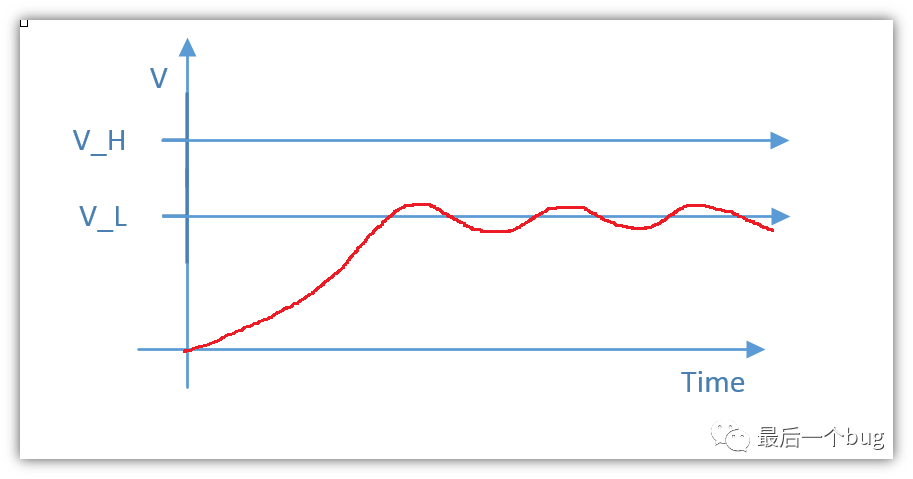
First, let’s talk aboutwaiting for the MCU power to stabilize to prevent runaway, this reason is a bit far-fetched because the Delay function is also a normal program operation. If the MCU runs away, the Delay function cannot alleviate that. If we change it to prevent peripheral initialization failures, it might make more sense, as sometimes the initialization of internal peripheral functions of the MCU requires a stable power supply; otherwise, it can easily lead to initialization failures and other anomalies..
-
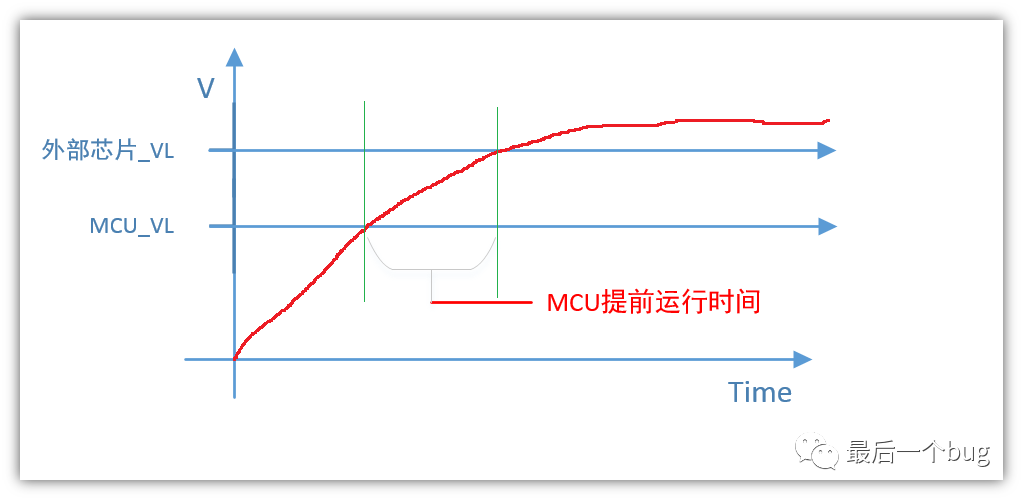
However, based on my previous MCU development experience,the main issue is the voltage threshold differences when the MCU interfaces with other modules. We all know that most chips have aminimum startup voltage; if the voltage is too low, the chip cannot start. If the voltage fluctuates near the minimum voltage, it can easily cause system instability. If the external chip shares the same power supply with the MCU, and the MCU’s operating voltage threshold is low while the external chip’s threshold is high, when the MCU starts configuring the external chip, the external chip may just be beginning its initialization, leading to unsuccessful configurations of the external chip by the MCU..
2) A traditional initialization structure diagram
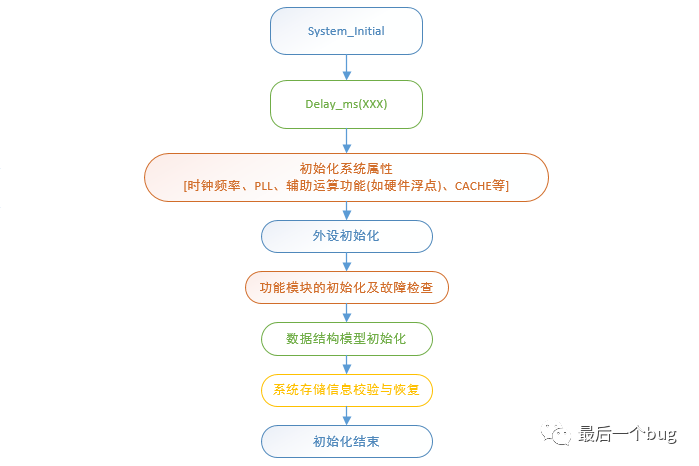
Don’t underestimate a simple initialization task; a clearly structured and well-layered initialization function can save you a lot of time in future large projects. Remember when you first started coding? The variable initialization was a mess, often being assigned a value only to be reset immediately. Below is a simple traditional MCU initialization hierarchy diagram that you can design based on your own project:
Explanation:
-
The above structure diagram adoptsa bottom-up initialization hierarchy, first configuring the basic system clock and bus clock, as well as some low-level initializations related to the CPU; for the MCU, the next level is the initialization of various peripherals such as UART, USB, SDIO, etc.; then the initialization of data structures and models can be divided according to specific functional modules, and finally, reading information from EEPROM, FLASH, etc., to restore the system’s previous default parameters and states.
-
You can design the above according to your project’s specific situation. For example, if it includes RTOS, GUI, etc., the initialization also needs to be categorized and classified; here, the author only provides ideas.
2. Let the MCU tell you more
Most people are not particularly familiar with the MCUs they are developing software for, and indeed many MCUs are now very well packaged,for example, how the MCU performs calculations, where it retrieves data, where it sends data, how long a piece of code takes to execute, etc.,which makes it difficult for some to resolve bugs. Therefore, if we can understand an MCU more clearly, we will have more control over bugs. We must play with the MCU, not be played by it.
Alright, to better control the MCU, we need to do something in today’s initializationmaintopic.
1) Directly initialize and output the sizes of basic types
 1void PrintTypeSize(void)
 2{
 3    printf("Type Size:\n");
 4    printf("char      : %u\n", sizeof(char));
 5    printf("short     : %u\n", sizeof(short));
 6    printf("int       : %u\n", sizeof(int));
 7    printf("long      : %u\n", sizeof(long));
 8    printf("long long : %u\n", sizeof(long long));
 9    printf("void*     : %u\n", sizeof(void *));
10    printf("float     : %u\n", sizeof(float));
11    printf("double    : %u\n", sizeof(double));
12    //......Add your printf of your think
13}
Explanation:
This piece of code seems simple, but many may not have actually printed it on their platform. During your learning of C language, you should know that some data types are platform-dependent. If we do not controlthe lengths of these basic types well, bugs will likely come looking for you.
At the same time, you must also pay attention to the range of data types during your programming, as the consequences can vary greatly. For a deeper understanding of data types, you can refer to previous articles.
2) Byte alignment and order
This part is a topic I have discussed in several articles and is very important. I won’t elaborate too much here; the relevant detection algorithms are also demonstrated, which are quite simple. Therefore, I suggest that during the early stages of development, you print relevant content.
Some may encounter minor issues and search for information everywhere, but some answers can be obtained by programming the MCU to tell us, which is also the basis for developing a new MCU.
3) Control of operation time
This is actually thekey point of this article and a method I highly recommend for evaluating and familiarizing yourself with MCU performance. Below is a classic macro definition that I simulated on Windows; you can adapt it to run on your MCU:
1#include <stdio.h>
2#include <stdlib.h>
3#include <windows.h>
4#include <math.h>
5/***************************************************
6 * Function: 10 times run Operation
7 * Author :(WeChat: Last Bug)
8 ***************************************************/
9#define TEN_OPERATE_TIMES(x) do { x; x; x; x; x; x; x; x; x; x; } while (0)
10/***************************************************
11 * Function: 50 times run Operation
12 * Author :(WeChat: Last Bug)
13 ***************************************************/
14#define FIFTY_OPERATE_TIMES(x) do {\
15 TEN_OPERATE_TIMES(x); \
16 TEN_OPERATE_TIMES(x); \
17 TEN_OPERATE_TIMES(x); \
18 TEN_OPERATE_TIMES(x); \
19 TEN_OPERATE_TIMES(x); \
20 } while (0)
21/***************************************************
22 * Function: Print the time required for the corresponding operation op
23 * Author :(WeChat: Last Bug)
24 ***************************************************/
25#define PRINT_TIME(name, operate, count) do { \
26 unsigned char i = 0;\
27 LARGE_INTEGER StartTime;\
28 LARGE_INTEGER EndTime;\
29 LARGE_INTEGER Freq;\
30 QueryPerformanceFrequency (&Freq);\
31 QueryPerformanceCounter(&StartTime);\
32 for (i = 0; i < count; i++) { \
33 FIFTY_OPERATE_TIMES(operate); \
34 } \
35 QueryPerformanceCounter(&EndTime);\
36 printf("%-8s %7.8f ms\n", name, (EndTime.QuadPart -StartTime.QuadPart )*1000.0f*1000.0f/Freq.QuadPart/ (double)(count * 50.0));\
37 } while (0)
38
39
40/***************************************************
41 * Function: Variable definition area
42 * Author :(WeChat: Last Bug)
43 ***************************************************/
44volatile float fv = 1.0;
45volatile float fv_out = 0.8;
46/***************************************************
47 * Function: Test main function
48 * Author :(WeChat: Last Bug)
49 ***************************************************/
50int main(int argc, char *argv[]) {
51
52 PRINT_TIME("Mul :", fv_out *= fv, 200);
53 PRINT_TIME("Div :", fv_out /= fv, 200);
54 PRINT_TIME("sin(x):", fv_out = sinf(fv), 100);
55 PRINT_TIME("cos(x):", fv_out = cosf(fv), 100);
56 printf("\nWelcome to follow WeChat: Last Bug\n");
57 return 0;
58}Let’s take a look at the results:
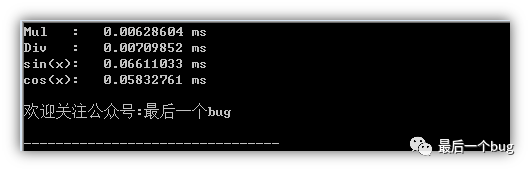
Analysis:
-
First, this is mainly a case of combining macro definitions with do{}while(0); everyone can learn this definition method.
-
Design highlights: You may wonder why the two macro definitions do not directly accumulate time in the for loop and calculate the time for each operation at the end? You need to note thatthe for loop is also composed of several assembly instructions, and if the operation time being tested is very short, the minimum test time will not be less than the time of the for operation, leading to significant measurement errors. Therefore, multiple operations are constructed to ensure that the operation time is not in the same running time level as the for statement, thus improving accuracy. Many may find this confusing; alright, here’s the image!!!!
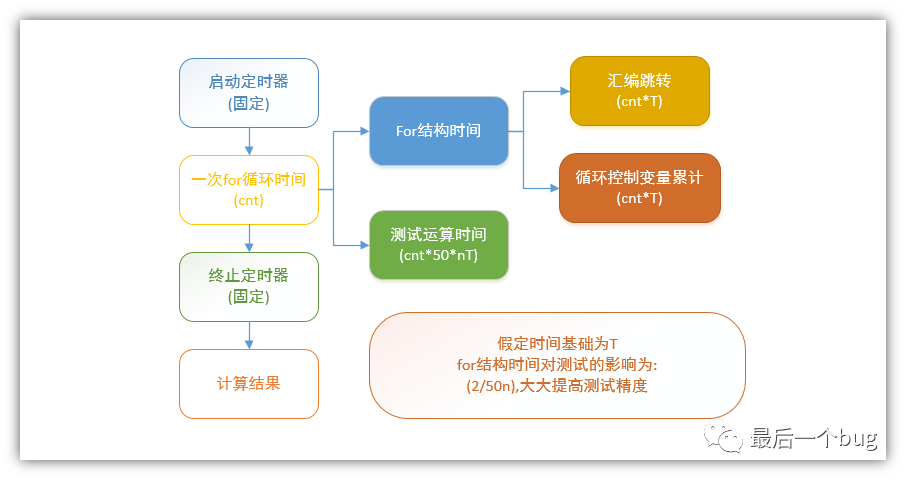
Finally
I have collected some embedded learning materials; reply【1024】 in the public account to find the download link!
Recommended good articles  Click the blue text to jump
☞ Collection | Comprehensive Programming of Linux Applications
☞ Collection | Learn Some Networking Knowledge
☞ Collection | Handwritten C Language

☞ Collection | Handwritten C++ Language
☞ Collection | Experience Sharing
☞ Collection | From Microcontroller to Linux
☞ Collection | Power Control Technology
☞ Collection | Essential Mathematics for Embedded Systems
☞  MCU Advanced Collection