(Click the blue text above to quickly follow us)
Source: WhyWin (@郑_灿锐)
www.cnblogs.com/0201zcr/p/4694945.html
If you have good articles to submit, please click → here for details
1. The Relationship Between HTTP Protocol and TCP/IP Protocol
The long and short connections of HTTP are essentially the long and short connections of TCP. HTTP is an application layer protocol that uses TCP at the transport layer and IP at the network layer. The IP protocol mainly addresses network routing and addressing issues, while the TCP protocol primarily ensures the reliable transmission of data packets over the IP layer, ensuring that all packets sent from the sender are received in the same order at the other end of the network. TCP is characterized by reliability and connection-oriented communication.
2. Understanding the Stateless Nature of HTTP Protocol
The HTTP protocol is stateless, meaning that the protocol has no memory of transaction processing, and the server does not know the state of the client. In other words, there is no connection between opening a webpage on a server and previously opening another webpage on the same server. HTTP is a stateless, connection-oriented protocol; being stateless does not mean that HTTP cannot maintain a TCP connection, nor does it imply that HTTP uses the UDP protocol (which is connectionless).
3. What are Long Connections and Short Connections?
In HTTP/1.0, short connections are used by default. This means that for each HTTP operation between the browser and the server, a connection is established, but the connection is terminated once the task is completed. If a certain HTML or other type of web page accessed by the client browser contains other web resources, such as JavaScript files, image files, CSS files, etc., the browser will establish an HTTP session for each of these web resources.
However, starting from HTTP/1.1, long connections are used by default to maintain connection characteristics. The HTTP protocol using long connections will include the following line in the response header:
Connection: keep-alive
When using long connections, after a webpage is fully loaded, the TCP connection used for transmitting HTTP data between the client and server will not close. If the client accesses another webpage on the same server, it will continue to use the already established connection. Keep-Alive does not maintain the connection permanently; it has a keep-alive time that can be set in different server software (such as Apache). For long connections to be implemented, both the client and server must support long connections.
The long and short connections of the HTTP protocol are essentially the long and short connections of the TCP protocol.
3.1 TCP Connection
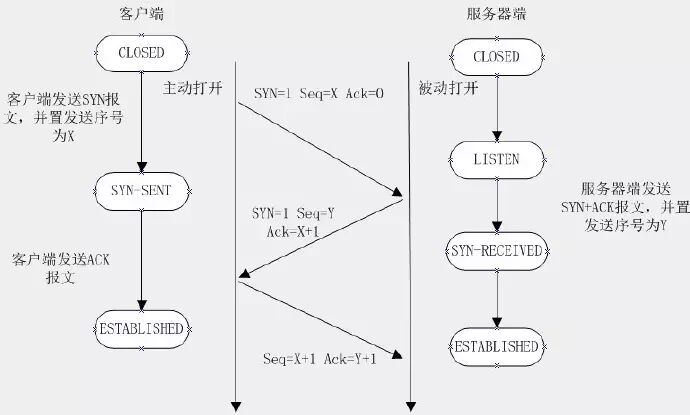
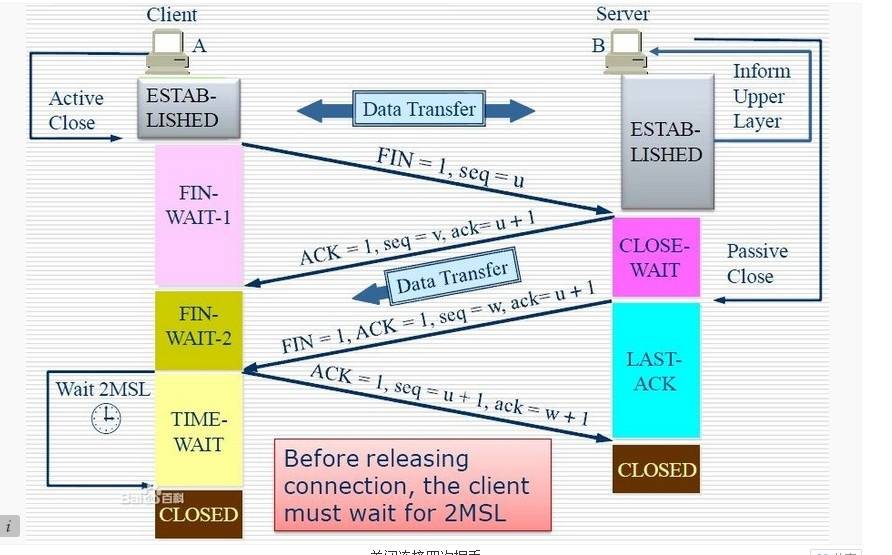
When network communication uses the TCP protocol, a connection must be established between the server and client before any actual read/write operations can occur. Once the read/write operations are completed, either party can release the connection if it is no longer needed. Establishing a connection requires a three-way handshake, while releasing it requires a four-way handshake. Therefore, establishing each connection consumes resources and time.
Classic three-way handshake diagram:
Classic four-way handshake close diagram:
3.2 TCP Short Connection
Let’s simulate a TCP short connection scenario: the client initiates a connection request to the server, the server receives the request, and then both parties establish a connection. The client sends a message to the server, and the server responds to the client, completing one read/write operation. At this point, either party can initiate a close operation, but generally, the client initiates the close operation first. This is because a typical server does not immediately close the connection after responding to the client, although there may be special cases. From the above description, short connections generally only involve one read/write operation between the client and server.
The advantages of short connections are: they are simpler to manage, and all existing connections are useful connections, requiring no additional control measures.
3.3 TCP Long Connection
Next, let’s simulate a long connection scenario: the client initiates a connection to the server, the server accepts the client connection, and both parties establish a connection. After the client and server complete one read/write operation, the connection between them does not actively close, and subsequent read/write operations will continue to use this connection.
First, let’s discuss the TCP keep-alive feature mentioned in TCP/IP detailed explanations. The keep-alive feature is mainly provided for server applications that want to know if the client host has crashed, allowing the server to reclaim resources on behalf of the client. If the client has disappeared, leaving a half-open connection on the server while waiting for data from the client, the keep-alive feature attempts to detect such half-open connections on the server side.
If a given connection has had no activity for two hours, the server will send a probe segment to the client host, which must be in one of the following four states:
-
The client host is still running normally and reachable from the server. The client’s TCP response is normal, and the server knows that the other party is functioning correctly, resetting the keep-alive timer after two hours.
-
The client host has crashed and is either shut down or rebooting. In either case, the client’s TCP does not respond. The server will not receive a response to the probe and will time out after 75 seconds. The server sends a total of 10 such probes, each spaced 75 seconds apart. If the server does not receive a response, it assumes the client host has shut down and terminates the connection.
-
The client host has crashed and has rebooted. The server will receive a response to its keep-alive probe, which is a reset, causing the server to terminate the connection.
-
The client is running normally, but the server is unreachable. This situation is similar to 2, where TCP can detect that no response to the probe was received.
3.4 Long Connection and Short Connection Operation Process
The operation steps for short connections are:
Establish connection — Data transmission — Close connection… Establish connection — Data transmission — Close connection
The operation steps for long connections are:
Establish connection — Data transmission… (Keep connection) … Data transmission — Close connection
4. Advantages and Disadvantages of Long Connections and Short Connections
As can be seen, long connections can save a significant amount of TCP establishment and closure operations and reduce waste, saving time. For clients that frequently request resources, long connections are more suitable. However, there is a problem: the keep-alive probe cycle is too long, and it only detects the liveliness of the TCP connection, which is a relatively gentle approach. In the case of malicious connections, the keep-alive feature may not be sufficient. In scenarios where long connections are used, the client side generally does not actively close the connection, which can lead to a problem: as the number of client connections increases, the server will eventually be overwhelmed. In this case, the server needs to adopt strategies such as closing connections that have not had read/write events for a long time to avoid damage to server services caused by malicious connections. If conditions permit, the server can also limit the maximum number of long connections per client machine to completely avoid a troublesome client affecting backend services.
Short connections are simpler for server management, as all existing connections are useful and require no additional control measures. However, if the client requests frequently, it will waste time and bandwidth on TCP establishment and closure operations.
The emergence of long and short connections depends on the closing strategies adopted by the client and server. Specific application scenarios require specific strategies; there is no perfect choice, only suitable choices.
5. When to Use Long Connections and Short Connections?
Long connections are often used for frequent operations and point-to-point communication, provided that the number of connections is not too high. Each TCP connection requires a three-way handshake, which takes time. If each operation involves connecting and then operating, the processing speed will be significantly reduced. Therefore, after each operation, the connection is not closed, and subsequent processing can directly send data packets without establishing a TCP connection. For example, database connections use long connections; using short connections for frequent communication can lead to socket errors, and frequent socket creation wastes resources.
In contrast, web services generally use short connections because long connections consume certain resources on the server side. For web services with potentially thousands or even millions of client connections, short connections are more resource-efficient. If long connections were used and there were thousands of users, each occupying a connection, the resource consumption would be significant. Therefore, in scenarios with high concurrency but where each user does not require frequent operations, short connections are preferable.
If you find this article helpful, please share it with more people
Follow “Programmer’s Matters” to see technical insights
↓↓↓