“Class” is likely the first advanced usage that many encounter when learning Python, and its peculiar format and statements can easily confuse beginners.
I also kept my distance from “classes” for a long time, but later used them in a project. I found them very convenient after using just a few simple features. This article introduces the “class” I created in this project, both as a record for my own reference and to share my rudimentary understanding of “classes,” hoping to help and inspire Python beginners.
How to Understand Classes?
A class can be understood as a kind of template, similar to a function.
What is a function? Quoting Magnus Lie Hetland’s “Python Basics” from Chapter 6 “Abstraction”:
…Organizing statements into functions allows you to tell the computer how to do things, and you only need to tell it once. With functions, you don’t have to repeatedly pass the same specific instructions to the computer…
A function rewrites instructions that will be used repeatedly into a template, which can be called once wherever those instructions are needed.
Classes are similar; they rewrite repeated “things” into a template that can be called when needed, avoiding the need to repeat statements over and over.
In “Python Basics,” the content about functions is in Chapter 6 “Abstraction,” while the content about classes is in Chapter 7 “More Abstraction,” indicating that there are indeed similarities between the two. Using functions to aid in understanding classes can help beginners grasp the concept of classes better.
Using Classes from Specific Code Examples
In a project, I needed to read waveform data from a text file generated by an oscilloscope. For each set of data, I had to execute the following statements:
with open('data1.txt','r') as file:                             # Read data from txt file
    data1_y = file.readlines()
data1_y = np.array([float(i.strip('\n')) for i in data1_y]) # Organize data into array
data1_x = np.linspace(0,len(data1_y)/Fs,len(data1_y))       # Create time array based on sampling frequency

p1.plot(data1_x,data1_y)                                    # Plot using pyqtgraph
pg.exec()
If I have three sets of data, I would need to repeat these statements three times:
with open('data1.txt','r') as file: # Data 1
    data1_y = file.readlines()
data1_y = np.array([float(i.strip('\n')) for i in data1_y])
data1_x = np.linspace(0,len(data1_y)/Fs,len(data1_y))

with open('data2.txt','r') as file: # Data 2
    data2_y = file.readlines()
data2_y = np.array([float(i.strip('\n')) for i in data2_y])
data2_x = np.linspace(0,len(data2_y)/Fs,len(data2_y))

with open('data3.txt','r') as file: # Data 3
    data3_y = file.readlines()
data3_y = np.array([float(i.strip('\n')) for i in data3_y])
data3_x = np.linspace(0,len(data3_y)/Fs,len(data3_y))

# Plot using pyqtgraph
p1.plot(data1_x,data1_y)
p2.plot(data2_x,data2_y)
p3.plot(data3_x,data3_y)

pg.exec()
This is clearly inconvenient. Therefore, I created a class:
class data(object):

    def __init__(self,filePath,Fs):

        with open(filePath,'r') as file:                         # Read data from txt file
            self.y = file.readlines()

        self.y = np.array([float(i.strip('\n')) for i in self.y])  # Organize data into array
        self.x = np.linspace(0,len(self.y)/Fs,len(self.y)) # Create time array based on sampling frequency
This class executes the statements I mentioned above for reading and processing data.
A class serves as a template, while the specific instances created from this template are called “instances.” The following statement creates an instance of this class, also known as instantiation:
data1 = data(filePath='data1.txt',Fs=Fs)Creating an instance of the class is equivalent to executing all the instructions in the class for the instance data1:
with open('data1.txt','r') as file:                           # Read data from txt file
    data1.y = file.readlines()

data1.y = np.array([float(i.strip('\n')) for i in data1.y])  # Organize data into array
data1.x = np.linspace(0,len(self.y)/Fs,len(data1.y))         # Create time array based on sampling frequency
Thus, I no longer need to repeatedly write these statements; I just need to create an instance of the class.
Now, in the subsequent code, I only need to use this class to create instances, and the created instances automatically complete the above reading and processing statements. I can easily extract data and plot without repeating those statements:
# Instantiation
data1 = data(filePath='data1.txt',Fs=Fs)
data2 = data(filePath='data2.txt',Fs=Fs)
data3 = data(filePath='data3.txt',Fs=Fs)

# Plotting
p1.plot(data1.x,data1.y)
p2.plot(data2.x,data2.y)
p3.plot(data3.x,data3.y)

pg.exec()
This example demonstrates the functionality of classes as templates.
In fact, the class I created in the project is more complex; I also included a fast Fourier transform (FFT) function within the class:
class data(object):

    def __init__(self,filePath,Fs):

        with open(filePath,'r') as file:                             # Read data from txt file
            self.y = file.readlines()
        self.y = np.array([float(i.strip('\n')) for i in self.y])    # Organize data into array
        self.x = np.linspace(0,len(self.y)/Fs,len(self.y))           # Create time array based on sampling frequency

        self.freq, self.fft_y_amp, self.fft_y_phase = FFT.FFT(Fs,self.y) # Fast Fourier Transform
For the Python code on fast Fourier transform, you can refer to my other article:
Python and Matlab Fast Fourier Transform FFT Program
Thus, every time I create an instance of this class, I complete data reading, organizing, and FFT calculation. I can directly plot the data waveform and the spectrum after the Fourier transform.
# Instantiation
data1 = data(filePath='data1.txt',Fs=Fs)
data2 = data(filePath='data2.txt',Fs=Fs)
data3 = data(filePath='data3.txt',Fs=Fs)

# Plotting waveform and spectrum
p1.plot(data1.x,data1.y,pen=pg.mkPen('b'))
p2.plot(data1.freq,10*np.log10(data1.fft_y_amp),pen=pg.mkPen('b'))

p3.plot(data2.x,data2.y,pen=pg.mkPen('r'))
p4.plot(data2.freq,10*np.log10(data2.fft_y_amp),pen=pg.mkPen('r'))

p5.plot(data3.x,data3.y,pen=pg.mkPen('k'))
p6.plot(data3.freq,10*np.log10(data3.fft_y_amp),pen=pg.mkPen('k'))
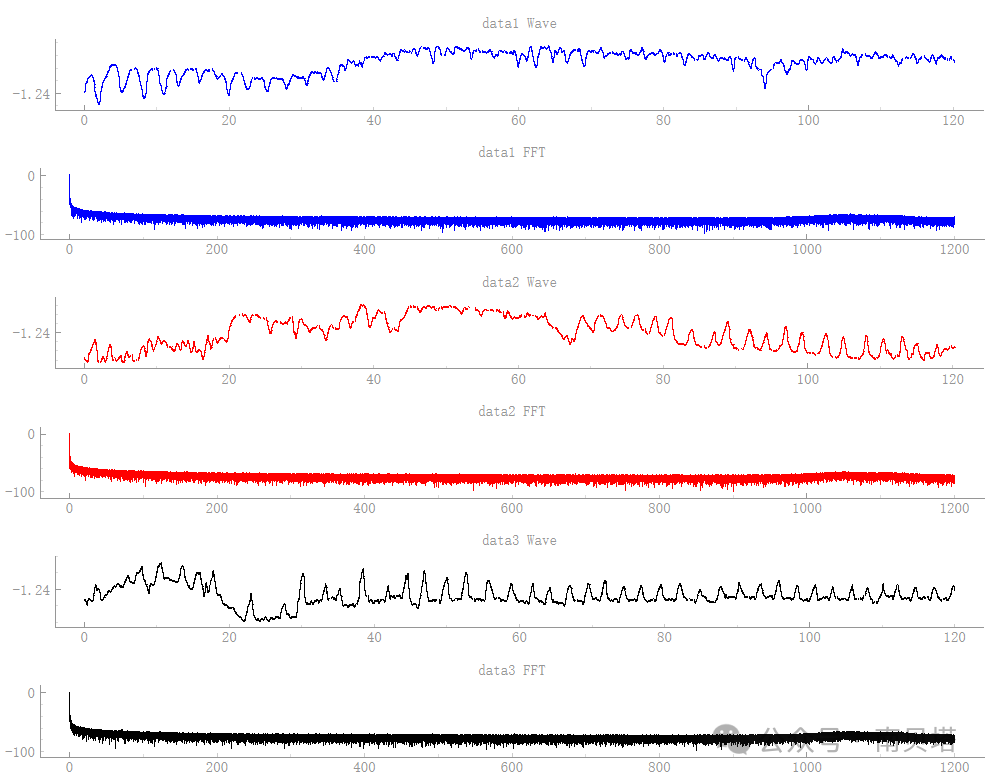
Here is the complete code:
import numpy as np
import pyqtgraph as pg
import pyqtgraph.examples
from   pyqtgraph.Qt import QtCore
import FFT # Custom FFT function

win = pg.GraphicsLayoutWidget(show=True,title="plt")
win.resize(1000,600)
win.setBackground('w')
win.setWindowTitle('plt')

class data(object):

    def __init__(self,filePath,Fs):

        with open(filePath,'r') as file:                             # Read data from txt file
            self.y = file.readlines()
        self.y = np.array([float(i.strip('\n')) for i in self.y])    # Organize data into array
        self.x = np.linspace(0,len(self.y)/Fs,len(self.y))           # Create time array based on sampling frequency

        self.freq, self.fft_y_amp, self.fft_y_phase = FFT.FFT(Fs,self.y) # Fast Fourier Transform

if __name__ == '__main__':

    # pg plotting window layout
    p1 = win.addPlot()
    win.nextRow()
    p2 = win.addPlot()
    win.nextRow()

    p3 = win.addPlot()
    win.nextRow()
    p4 = win.addPlot()
    win.nextRow()

    p5 = win.addPlot()
    win.nextRow()
    p6 = win.addPlot()
    win.nextRow()

    Fs = 2400 # sampling frequency, Hz

    # Instantiation
    data1 = data(filePath='data1.txt',Fs=Fs)
data2 = data(filePath='data2.txt',Fs=Fs)
data3 = data(filePath='data3.txt',Fs=Fs)

    # Plotting waveform and spectrum
    p1.plot(data1.x,data1.y,pen=pg.mkPen('b'))
p2.plot(data1.freq,10*np.log10(data1.fft_y_amp),pen=pg.mkPen('b'))

    p3.plot(data2.x,data2.y,pen=pg.mkPen('r'))
p4.plot(data2.freq,10*np.log10(data2.fft_y_amp),pen=pg.mkPen('r'))

    p5.plot(data3.x,data3.y,pen=pg.mkPen('k'))
p6.plot(data3.freq,10*np.log10(data3.fft_y_amp),pen=pg.mkPen('k'))

    p1.setTitle('data1 Wave')
p2.setTitle('data1 FFT')
p3.setTitle('data2 Wave')
p4.setTitle('data2 FFT')
p5.setTitle('data3 Wave')
p6.setTitle('data3 FFT')

    pg.exec()
Conclusion
Classes are an important aspect of Python, and there are naturally many deeper concepts and usages, such as subclasses, superclasses, inheritance, method overriding, etc. However, for beginners, it is helpful to first understand the functionality and usage of classes as templates from a familiar perspective, without getting bogged down by obscure terminology.