C language is an essential knowledge in embedded learning, and most operations revolve around C language. Among them, there are three “hard bones” that are almost universally recognized as difficult to tackle.
01
Pointers
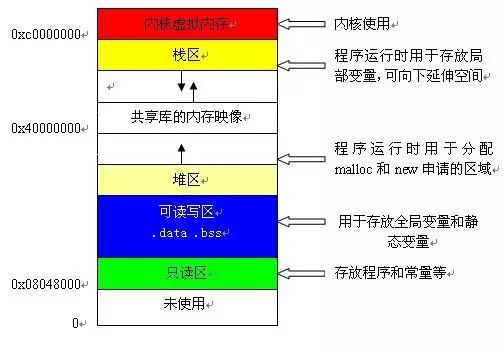
Pointers are recognized as the most difficult concept to understand, and they are a direct reason many beginners choose to give up.
The difficulty in understanding pointers arises because a pointer itself is a variable, a very special variable that specifically stores addresses. This address needs to allocate space to hold data, and since it is a variable, it can be reassigned, which confuses many people and leads to complications. The reason why many experts favor C language is due to the charm of pointers, which allow for flexible switching and high execution efficiency, making it a challenging point for beginners.
Pointers are an unavoidable knowledge point in learning, and after mastering C language, the next step is to switch to data structures and algorithms, where pointers are crucial. If one cannot grasp pointers, it becomes very difficult to proceed, which discourages many from continuing their studies.
Pointers directly interface with memory structures, and common issues like pointer misdirection and array out-of-bounds are fundamentally memory problems. There is endless potential for exploration with pointers, and many programming techniques converge here.
Pointers also involve how to allocate and free memory. If memory is not released in time, memory leaks can occur. Pointers are efficient and useful, but not fully understanding them can be a nightmare for some.
For conceptual issues, refer to the previous article titled “The Most Detailed Explanation of C Language Pointers“. For pointers, consider the experiences of experts:
▎Complex Type Explanation
To understand pointers, one will inevitably encounter some complex types. Therefore, let’s first introduce how to fully understand a complex type.
Understanding complex types is actually quite simple. A type can contain many operators, which have precedence just like ordinary expressions.
Thus, the author summarizes the principle:Start from the variable name, analyze step by step according to operator precedence.
Let’s start analyzing from simple types.
-
int p;
This is a normal integer variable.
-
int p;
Starting from P, we first combine with the operator, indicating that P is a pointer. Then we combine with int, indicating that the type of data pointed to by the pointer is int, so P is a pointer that returns integer data.
-
int p[3];
Starting from P, we first combine with [], indicating that P is an array. Then we combine with int, indicating that the elements in the array are of integer type, so P is an array composed of integer data.
-
int *p[3];
Starting from P, we first combine with [], indicating that P is an array. Then we combine with *, indicating that the elements in the array are of pointer type. Finally, we combine with int, indicating that the type of data pointed to by the pointers is integer, so P is an array composed of pointers that return integer data.
-
int (*p)[3];
Starting from P, we first combine with *, indicating that P is a pointer. Then we combine with [], indicating that the pointer points to an array. Finally, we combine with int, indicating that the elements in the array are of integer type. So P is a pointer to an array consisting of three integers.
-
int **p;
Starting from P, we first combine with *, indicating that P is a pointer. Then we combine with *, indicating that the pointer points to another pointer. Finally, we combine with int, indicating that the data pointed to by this pointer is of integer type. Since double pointers and higher-level pointers are rarely used in complex types, we will not consider multi-level pointers further, only single-level pointers.
-
int p(int);
Starting from P, we first combine with (), indicating that P is a function. Then we analyze the parameters inside (), indicating that this function has one integer parameter, and finally combine with the outer int, indicating that the return value of the function is of integer type.
-
Int (*p)(int);
Starting from P, we first combine with *, indicating that P is a pointer. Then we combine with (), indicating that the pointer points to a function. Finally, we combine with the int inside (), indicating that the function has an int parameter, and combine with the outer int, indicating that the return type of the function is integer. So P is a pointer to a function that takes an integer parameter and returns an integer type.
-
int (p(int))[3];
This type is too complex to analyze. Starting from P, we first combine with (), indicating that P is a function. Then we analyze the int parameter inside (), indicating that the function has one integer parameter. Then we combine with the outer type, indicating that the function returns a pointer. Finally, we combine with [], indicating that the returned pointer points to an array. Then we combine with *, indicating that the elements in the array are pointers, and finally combine with int, indicating that the pointers point to integer data. So P is a function that takes an integer parameter and returns a pointer to an array of integer pointer variables.
At this point, we have covered the main points. Understanding these types makes other types seem trivial. However, generally, overly complex types should be avoided as they greatly reduce program readability. The above types are sufficient for our needs.
▎Detailed Discussion on Pointers
A pointer is a special variable that stores a value interpreted as an address in memory.
To understand a pointer, one must grasp four aspects: the type of the pointer, the type pointed to by the pointer, the value of the pointer (or the memory area pointed to), and the memory area occupied by the pointer itself. Let’s explain each aspect.
First, let’s declare a few pointers for examples:
(1) int*ptr;
(2) char*ptr;
(3) int**ptr;
(4) int(*ptr)[3];
(5) int*(*ptr)[4];
▎Pointer Type
From a syntactical perspective, friends can simply remove the pointer name from the pointer declaration statement, and the remaining part is the type of the pointer. This is the type that the pointer possesses.
Let’s look at the types of each pointer in the examples above:
(1) intptr; // Pointer type is int
(2) charptr; // Pointer type is char
(3) intptr; // Pointer type is int
(4) int(ptr)[3]; // Pointer type is int()[3]
(5) int*(ptr)[4]; // Pointer type is int(*)[4]
How about that? Finding the type of a pointer is quite simple, right?
▎Type Pointed to by the Pointer
When accessing the memory area pointed to by a pointer, the type pointed to by the pointer determines how the compiler interprets the contents of that memory area.
From a syntactical perspective, friends just need to remove the pointer name and the * from the pointer declaration statement, and the remaining part is the type pointed to by the pointer.
The types pointed to by each pointer in the examples above are:
(1) intptr; // Type pointed to is int
(2) char*ptr; // Type pointed to is char*
(3) int*ptr; // Type pointed to is int*
(4) int(*ptr)[3]; // Type pointed to is int(*)[3]
(5) int*(*ptr)[4]; // Type pointed to is int*(*)[4]
In pointer arithmetic, the type pointed to by the pointer plays a significant role.
The type of the pointer (i.e., the type of the pointer itself) and the type pointed to by the pointer are two distinct concepts. As friends become more familiar with C, they will find that separating the concept of “type” associated with pointers into “pointer type” and “type pointed to by the pointer” is one of the key points to mastering pointers.
The author has read many books and found that some poorly written books mix these two concepts together, leading to contradictions and confusion.
▎Pointer Value
This refers to the memory area or address pointed to by the pointer.
The value of a pointer is the value stored by the pointer itself, which the compiler interprets as an address, not a general value.
In a 32-bit program, the values of all types of pointers are 32-bit integers, as memory addresses in a 32-bit program are all 32 bits long. The memory area pointed to by the pointer starts from the address represented by the pointer’s value and has a length of sizeof(type pointed to by the pointer).
In the future, when we say a pointer’s value is XX, it is equivalent to saying that the pointer points to a memory area starting at address XX; when we say a pointer points to a certain memory area, it is equivalent to saying that the pointer’s value is the starting address of that memory area.
The memory area pointed to by the pointer and the type pointed to by the pointer are two completely different concepts. In example one, the type pointed to is already defined, but since the pointer has not been initialized, the memory area it points to does not exist or is meaningless.
In the future, whenever encountering a pointer, one should ask: What is the type of this pointer? What type does the pointer point to? Where does this pointer point?
▎Memory Area Occupied by the Pointer Itself
How much memory does a pointer occupy? You can find out by using the sizeof function on the pointer type. In a 32-bit platform, a pointer occupies 4 bytes. The concept of memory occupied by the pointer itself is useful when determining whether a pointer expression is an lvalue.
02
Function Concept
The basic unit of object modules in procedural programming, along with various combinations, function pointers, and pointer functions.
A function is a block of business logic, the smallest unit of procedural programming. During the execution of a function, how parameters are exchanged, how data is passed out, and how to design a reasonable function are not only about solving a feature but also about whether it can be reused to avoid reinventing the wheel.
Function pointers and pointer functions may seem interchangeable, but they have completely different meanings. Pointer functions are easier to understand; they are functions that return pointers. Function pointers are mainly used in callback functions. Many people find it confusing to understand functions, and callback functions are even more perplexing. In simple terms, a function pointer is a pointer variable that points to a function, which brings us back to the pointer level. Not fully understanding pointers makes it particularly difficult to advance.
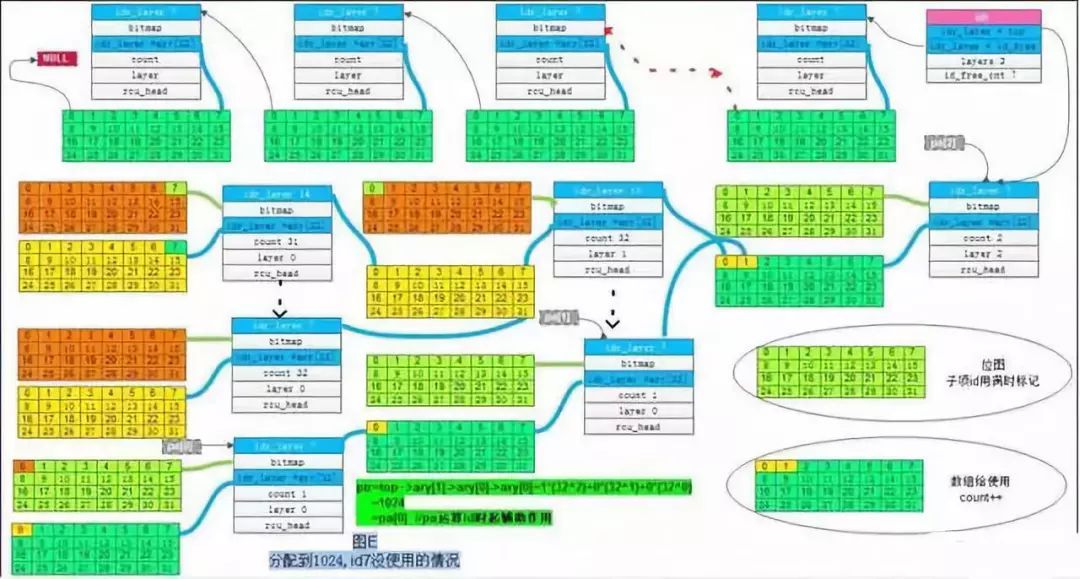
C language developers have done some work for future developers by writing a lot of code that completes common basic functions, allowing others to use them directly. However, with so much code, how can one find what they need? Clearly, it is unrealistic to take all the code.However, this code has already been categorized by early developers into different files, and each piece of code has a unique name. Therefore, learning C language is not that difficult, especially when hands-on practice is involved. When using code, simply add () after the corresponding name. This piece of code is a function that can independently complete a certain function and can be reused multiple times after being written once.Many beginners may confuse functions in C language with the concept of functions in mathematics. In reality, it is not that complicated; functions in C language follow a pattern, and once the concept is clear, it can be quite interesting.The English name for function is Function, which also translates to “functionality” in Chinese. Functions in C language are closely related to functionality.Let’s look at a small piece of C code:
#include<stdio.h>int main(){puts("Hello World");return 0;}Focusing on the fourth line of code, this line will output “Hello World” on the display. As mentioned earlier, puts must be followed by (), and the string must be enclosed in ().In C language, some statements cannot have parentheses when used, while others must have parentheses. Those with parentheses are functions (Function).C language provides many functionalities that can be accessed with a simple line of code. However, the underlying complexity of these functionalities often involves a combination of software and hardware, requiring consideration of many details and boundaries. If all these functionalities were left to programmers to complete, it would significantly increase the learning cost and reduce programming efficiency.With functions, programming efficiency in C language feels like having a magical tool; developers can call them whenever needed, such as process functions, operation functions, date and time functions, etc., which can help us directly implement the functionalities of C language itself.C language functions are reusable.One obvious feature of functions is that they must be called with parentheses (), and if necessary, the parentheses can also contain data to be processed. For example, puts(“尚观科技”) uses a piece of code with output functionality, where puts is the name of the code, and “尚观科技” is the data to be processed by this code. The act of using functions in programming is professionally referred to as a function call.If a function needs to process multiple data, they are separated by commas, for example:pow(10, 2);This function is used to calculate 10 raised to the power of 2.Now, do you find that C language functions are quite interesting and not as complex as they seem? In the future, when you encounter beginners, just mentioning C language functions might earn you countless admiring glances.
03
Structures and Recursion
Many students studying C language in university do not complete many courses, and structures are often not covered because they are placed in the latter half of textbooks, leading many students to feel that structures are unimportant. If one is only aiming to pass exams or obtain a diploma, learning them may not be very meaningful.
However, if one wants to pursue a career in programming, not understanding this concept makes it nearly impossible to construct data models. No business entity can be fully completed using only primitive data types. Many experts organize structure data from header files when designing data models. Then they design the parameter names and functions before actually starting to write C source code.
From a space-saving perspective, the order of data in structures can affect the space they occupy in memory. When assigning values between structures, if a structure contains pointers, special attention must be paid to perform deep assignments.
Recursion is generally used to count or list some data from start to finish. Many beginners find it awkward to use, wondering how a function can call itself. Moreover, when using recursion, it is essential to set a proper exit condition; otherwise, it can lead to an infinite loop.
For knowledge about structures, refer to the previous article titled “The Most Comprehensive Explanation of C Language Structures (Ten Thousand Words of Content)”. Specific experiences can also be referenced from experts:Everyone is familiar with structures. Here, I will share my research and learning summary on C language structures. If you find something in this summary that you have not mastered before, then this article has some value. Of course, my level is limited, so if you find any shortcomings, please point them out. The code file test.c is provided below.In this article, I will analyze and apply C language structures around the following two questions:1. What is the role of structures in C language?2. What are the considerations for memory alignment of structure member variables? (Key Point)For some conceptual explanations, I will not simply copy definitions from C language textbooks. Let’s sit down and chat slowly.1. What is the role of structures?Three months ago, a senior in the research office encountered this question during an interview at Huawei’s Nanjing Research Institute. Of course, this was just a basic question in the interview. How would you answer it?My understanding is that structures in C language have at least the following three roles:(1) Organizes the attributes of objects organically.For example, in STM32 RTC development, we need data to represent date and time, which typically includes year, month, day, hour, minute, and second. If we do not use structures, we would need to define six variables to represent them. This would make the program’s data structure loose. It is better for our data structure to be “high cohesion, low coupling”. Therefore, using a structure to represent this is better in terms of program readability, portability, and maintainability:
typedef struct // Gregorian date and time structure{vu16 year;vu8 month;vu8 date;vu8 hour;vu8 min;vu8 sec;}_calendar_obj;_calendar_obj calendar; // Define structure variable(2) Replaces the redefinition of function (entry parameters) with methods to modify structure member variables.If structures organize the attributes of objects well, representing the structure as “visually appealing”, then replacing the redefinition of function (entry parameters) with methods to modify structure member variables represents the structure as “functionally useful”. Continuing with the above structure as an example, let’s analyze. Suppose I have the following function to display date and time:
void DsipDateTime( _calendar_obj DateTimeVal)Then we can simply call DsipDateTime() with a variable of type _calendar_obj as an argument, and DsipDateTime() can display the content through the member variables of DateTimeVal. If we do not use structures, we would likely need to write a function like this:
void DsipDateTime( vu16 year, vu8 month, vu8 date, vu8 hour, vu8 min, vu8 sec)Clearly, such parameter declarations are not visually appealing, and managing the data structure becomes cumbersome. If a function’s return value is a representation of date and time data, it becomes even more complex. This is just one aspect.On the other hand, if a user needs to include the week (day) in the date and time data, then without using structures, we would need to add a parameter vu8 week to the DsipDateTime() function:
void DsipDateTime( vu16 year, vu8 month, vu8 date, vu8 week, vu8 hour, vu8 min, vu8 sec)It is evident that this method of passing parameters is very cumbersome. Therefore, one of the benefits of using structures as function entry parameters is that the function declaration void DsipDateTime( _calendar_obj DateTimeVal) does not need to change; we only need to add member variables to the structure and handle calendar.week accordingly in the function’s internal implementation. This significantly aids in program modification and maintenance.
typedef struct // Gregorian date and time structure{vu16 year;vu8 month;vu8 date;vu8 week;vu8 hour;vu8 min;vu8 sec;}_calendar_obj;_calendar_obj calendar; // Define structure variable(3) The memory alignment principle of structures can improve CPU access speed to memory (exchanging space for time).Moreover, the addresses of structure member variables can be calculated based on the base address (using offset). Let’s first look at a simple program, and the analysis of this program will be detailed in the second part on memory alignment of structure member variables.
#include<stdio.h>int main(){    struct    // Declare structurechar_short_long    {        char  c;        short s;        long  l;    }char_short_long;    struct    // Declare structurelong_short_char    {        long  l;        short s;        char  c;    }long_short_char;    struct    // Declare structurechar_long_short    {        char  c;        long  l;        short s;    }char_long_short;printf("
");printf(" Size of char   = %d bytes
",sizeof(char));printf(" Size of shrot  = %d bytes
",sizeof(short));printf(" Size of long   = %d bytes
",sizeof(long));printf("
");  //char_short_longprintf(" Size of char_short_long       = %d bytes
",sizeof(char_short_long));printf("     Addr of char_short_long.c = 0x%p (10进制:%d)
",&char_short_long.c,&char_short_long.c);printf("     Addr of char_short_long.s = 0x%p (10进制:%d)
",&char_short_long.s,&char_short_long.s);printf("     Addr of char_short_long.l = 0x%p (10进制:%d)
",&char_short_long.l,&char_short_long.l);printf("
");printf("
");  //long_short_charprintf(" Size of long_short_char       = %d bytes
",sizeof(long_short_char));printf("     Addr of long_short_char.l = 0x%p (10进制:%d)
",&long_short_char.l,&long_short_char.l);printf("     Addr of long_short_char.s = 0x%p (10进制:%d)
",&long_short_char.s,&long_short_char.s);printf("     Addr of long_short_char.c = 0x%p (10进制:%d)
",&long_short_char.c,&long_short_char.c);printf("
");printf("
");  //char_long_shortprintf(" Size of char_long_short       = %d bytes
",sizeof(char_long_short));printf("     Addr of char_long_short.c = 0x%p (10进制:%d)
",&char_long_short.c,&char_long_short.c);printf("     Addr of char_long_short.l = 0x%p (10进制:%d)
",&char_long_short.l,&char_long_short.l);printf("     Addr of char_long_short.s = 0x%p (10进制:%d)
",&char_long_short.s,&char_long_short.s);printf("
");return 0;}
The program’s output results are as follows (note: the data in parentheses are the decimal forms of the addresses of member variables):
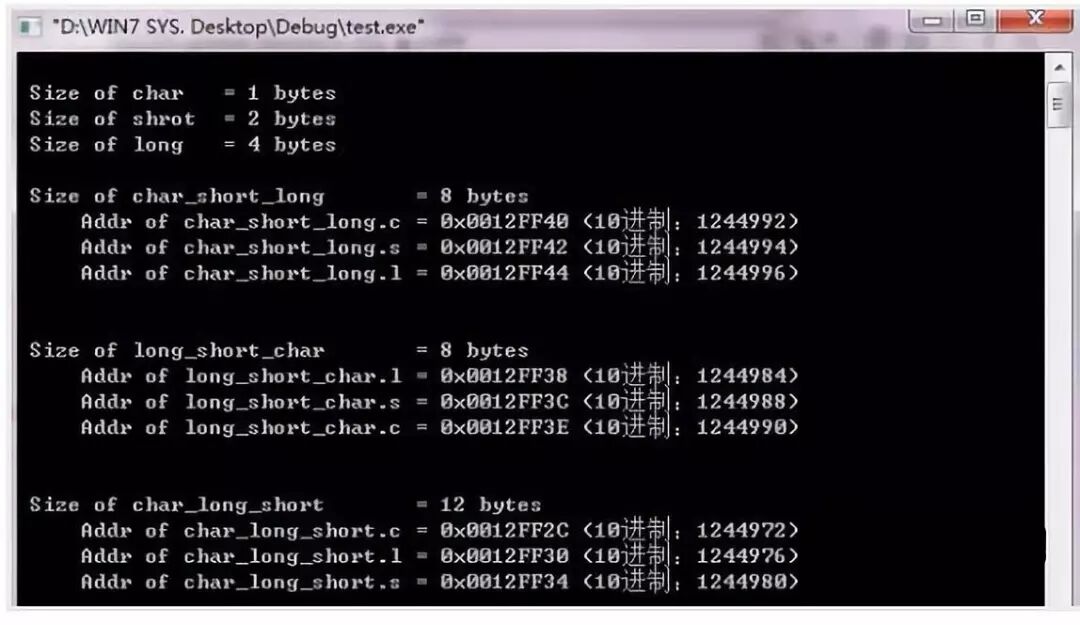
2. Memory Alignment of Structure Member VariablesFirst, let’s analyze the output of the above program. The first three lines indicate that in my program, char occupies 1 byte, short occupies 2 bytes, and long occupies 4 bytes. char_short_long, long_short_char, and char_long_short are three structures with the same members but different arrangements of member variables. From the program’s output, we can see that
Size of char_short_long = 8 bytesSize of long_short_char = 8 bytesSize of char_long_short = 12 bytes // 4 bytes larger than the first two!Moreover, it should be noted that 1 byte (char) + 2 bytes (short) + 4 bytes (long) = 7 bytes, not 8 bytes.Thus, the order of member variables in a structure affects the size of memory occupied by the structure. The size of memory occupied by a structure variable is not necessarily equal to the sum of the space occupied by its member variables. If a user program or operating system (like uC/OS-II) contains a large number of structure variables, this memory usage must be optimized, meaning the order of member variables in the structure is significant.How are structure member variables actually stored? Here, I will not keep you in suspense; I will directly provide the following conclusions without #pragma pack macros:Principle 1 The data members of a structure (struct or union) are stored starting at offset 0 for the first data member, and each subsequent data member must start at an address that is a multiple of the size of that member (for example, int on a 32-bit machine is 4 bytes, so it must start at an address that is a multiple of 4).Principle 2 The total size of the structure, i.e., the result of sizeof, must be a multiple of the size of its largest member; if not, it must be padded.*Principle 3 When a structure is a member, the members of the structure must start at an address that is a multiple of the size of its largest element (for example, if struct a contains struct b, which has char, int, double, etc., then b should start at an address that is a multiple of 8, since sizeof(double) = 8 bytes).Now, let’s analyze the above program (temporarily not discussing Principle 3).First, let’s look at char_short_long and long_short_char. The addresses of their member variables indicate that these two structures comply with Principles 1 and 2. Note that in the address of char_short_long’s member variables, char_short_long.s’s address is 1244994, meaning that 1244993 is “empty” and just “occupied”!Now let’s look at the char_long_short structure. The address distribution of char_long_short is as follows:
| Member Variable | Hex Address of Member Variable | Decimal Address of Member Variable |
| char_long_short.c | 0x0012FF2C | 1244972 |
| char_long_short.l | 0x0012FF30 | 1244976 |
| char_long_short.s | 0x0012FF34 | 1244980 |
It can be seen that the memory distribution is as follows, totaling 12 bytes:
| Address | 1244972 | 1244973 | 1244974 | 1244975 | 1244976 | 1244977 | 1244978 | 1244979 | 1244980 | 1244981 | 1244982 | 1244983 |
| Member | .c | .l | .s |
First, 1244972 can be divided by 1, so char_long_short.c can be placed at 1244972 without issue (in fact, for char type member variables, it can be placed at any address unit). According to Principle 1, in the address of char_long_short’s member variables, there are no addresses that can be divided by 4 (since sizeof(long) = 4 bytes) in 1244973~1244975, so 1244976 can be divided by 4, meaning char_long_short.l should be placed at 1244976. Similarly, the last member .s (sizeof(short) = 2 bytes) should be placed at 1244980.Is that the end? No, there’s also Principle 2. According to Principle 2, the size of the char_long_short structure should be a multiple of the size of its largest member variable. If we stop here, the size of char_long_short would be 1244972~1244981, totaling 10 bytes, which does not comply with Principle 2. Therefore, we must pad 2 bytes (1244982~1244983) at the end.Thus, the memory layout of a structure is complete.Now, let’s verify whether this analysis is correct by defining a structure like this, which should occupy 12 bytes:
struct // Declare structurechar_long_short_new{char c;char add1; // Padding spacechar add2; // Padding spacechar add3; // Padding spacelong l;short s;char add4; // Padding spacechar add5; // Padding space}char_long_short_new;The running result is as follows:

It can be seen that our analysis is correct. As for Principle 3, you can verify it by programming; we will not discuss it further here.Therefore, whether you are in VC6.0, Keil C51, or Keil MDK, when you need to define a structure, just pay a little attention to the phenomenon of memory alignment of structure member variables, and you can save a significant amount of MCU RAM. This is not only applicable in practical programming but is also common in written tests and interviews at many large companies, such as IBM, Microsoft, Baidu, and Huawei.
These three hard bones are stumbling blocks in learning C language. By putting in the effort to overcome them, the main arteries of C language will be opened, making it relatively easier to learn other content. The more painful the learning process, the more one learns; overcoming past difficulties will enhance one’s skills, and giving up will nullify the time spent. The more difficult a language is to learn, the more enjoyable it becomes after mastering the basics. Have you become addicted to it, or have you given up?

👉The Universal “Three Axes” of C Language👉The 20 Common Analog Circuits👉How to Write Unmaintainable Code👉CAN Communication Signal Waveform, How to Measure with an Oscilloscope