Click the blue text above to follow us



Host Configuration Planning

Pod Container Lifecycle
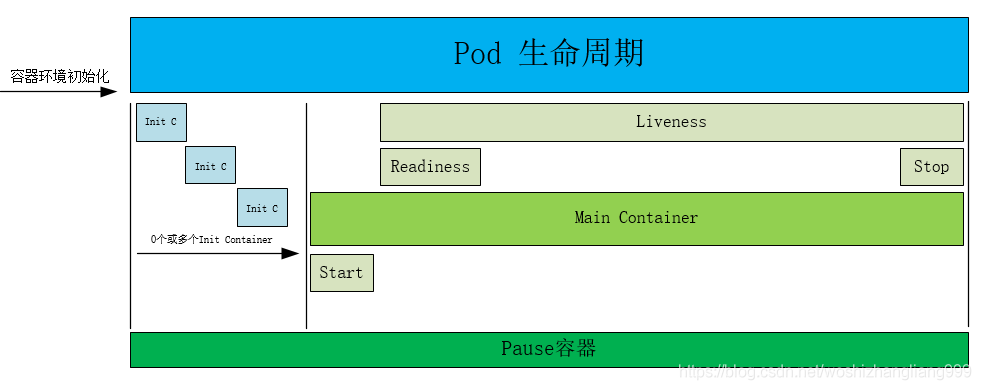
Pause Container Description
Each Pod runs a special container called the Pause container, while other containers are business containers. These business containers share the network stack and Volume mounts of the Pause container, allowing for more efficient communication and data exchange between them.
This feature can be fully utilized in design by placing a group of closely related service processes in the same Pod; containers within the same Pod can communicate with each other via localhost.
The Pause container in Kubernetes primarily provides the following functions for each business container:
① PID Namespace: Different applications in the Pod can see the process IDs of other applications.
② Network Namespace: Multiple containers in the Pod can access the same IP and port range.
③ IPC Namespace: Multiple containers in the Pod can communicate using System V IPC or POSIX message queues.
④ UTS Namespace: Multiple containers in the Pod share a hostname; Volumes (shared storage volumes).
Containers in the Pod can access Volumes defined at the Pod level.
Init Container
A Pod can contain multiple containers where applications run, and it can also have one or more Init containers that start before the application containers.
If multiple Init containers are specified for a Pod, they will run sequentially. Each Init container must run successfully before the next one can run. Only after all Init containers have completed successfully will Kubernetes initialize the application containers in the Pod and run them as usual.
Init containers are very similar to regular containers, except for the following two points:
① Init containers always run until they successfully complete and exit normally.
② The next Init container can only run after the previous Init container has successfully completed and exited normally.
If an Init container of the Pod fails, Kubernetes will continuously restart the Pod until the Init container succeeds. However, if the Pod’s restartPolicy is set to Never, it will not restart.
The Pod will not become Ready until all Init containers have successfully completed. The ports of Init containers will not be aggregated in the Service. A Pod that is initializing is in a Pending state but will set the condition Initializing to true.
If the Pod restarts, all Init containers must execute again.
The names of each application container and Init container in the Pod must be unique; sharing the same name with any other container will throw an error during validation.
What Can Init Containers Do?
Because Init containers are separate images from application containers, their startup-related code has the following advantages:
① Init containers can include utilities or personalized code that are not present in the application containers during installation.
For example, if tools like sed, awk, python, or dig are needed during installation, they can be included in the Init container; similarly, if the application container requires necessary directories or configuration files, or even sensitive information, they can be executed in the Init container instead of the main container.
② Init containers can run these tools safely, avoiding any security degradation of the application image.
③ The creators and deployers of the application image can work independently without needing to jointly build a separate application image.
④ Init containers can run with a different filesystem view than the application containers in the Pod. Therefore, Init containers can have access to Secrets that application containers cannot.
⑤ Since Init containers must complete before the application containers start, Init containers provide a mechanism to block or delay the startup of application containers until a set of prerequisites are met. Once the prerequisites are satisfied, all application containers in the Pod will start in parallel.
Init Container Example
The following example defines a simple Pod with 2 Init containers. The first waits for myservice to start, and the second waits for mydb to start. Once both Init containers have completed, the Pod will start the application containers in the spec section.
Pod YAML File
[root@k8s-master lifecycle]# pwd
/root/k8s_practice/lifecycle
[root@k8s-master lifecycle]# cat init_C_pod.yaml
apiVersion: v1
kind: Pod
metadata:
  name: myapp-busybox-pod
  labels:
    app: myapp
spec:
  containers:
  - name: myapp-container
    image: registry.cn-beijing.aliyuncs.com/google_registry/busybox:1.24
    command: ['sh', '-c', 'echo The app is running! && sleep 3600']
  initContainers:
  - name: init-myservice
    image: registry.cn-beijing.aliyuncs.com/google_registry/busybox:1.24
    command: ['sh', '-c', "until nslookup myservice; do echo waiting for myservice; sleep 60; done"]
  - name: init-mydb
    image: registry.cn-beijing.aliyuncs.com/google_registry/busybox:1.24
    command: ['sh', '-c', "until nslookup mydb; do echo waiting for mydb; sleep 60; done"]
To start this Pod and check its status, you can execute the following commands:
[root@k8s-master lifecycle]# kubectl apply -f init_C_pod.yaml
pod/myapp-busybox-pod created
[root@k8s-master lifecycle]# kubectl get -f init_C_pod.yaml -o wide  # or kubectl get pod myapp-busybox-pod -o wide
NAME                READY   STATUS     RESTARTS   AGE   IP            NODE         NOMINATED NODE   READINESS GATES
myapp-busybox-pod   0/1     Init:0/2   0          55s   10.244.4.16   k8s-node01   <none>           <none>
For more detailed information:
[root@k8s-master lifecycle]# kubectl describe pod myapp-busybox-pod
Name:         myapp-busybox-pod
Namespace:    default
Priority:     0
…………
Node-Selectors:  <none>
Tolerations:     node.kubernetes.io/not-ready:NoExecute for 300s
                 node.kubernetes.io/unreachable:NoExecute for 300s
Events:  Type    Reason     Age    From                 Message
  ----    ------     ----   ----                 -------
  Normal  Scheduled  2m18s  default-scheduler    Successfully assigned default/myapp-busybox-pod to k8s-node01
  Normal  Pulled     2m17s  kubelet, k8s-node01  Container image "registry.cn-beijing.aliyuncs.com/google_registry/busybox:1.24" already present on machine
  Normal  Created    2m17s  kubelet, k8s-node01  Created container init-myservice
  Normal  Started    2m17s  kubelet, k8s-node01  Started container init-myservice
To view the logs of the Init container in the Pod, execute:
[root@k8s-master lifecycle]# kubectl logs -f --tail 500 myapp-busybox-pod -c init-myservice   # Details of the first init container
Server:    10.96.0.10
Address 1: 10.96.0.10 kube-dns.kube-system.svc.cluster.local
waiting for myservice
nslookup: can't resolve 'myservice'
Server:    10.96.0.10
Address 1: 10.96.0.10 kube-dns.kube-system.svc.cluster.local
………………
[root@k8s-master lifecycle]# kubectl logs myapp-busybox-pod -c init-mydb   # Details of the second init container
Error from server (BadRequest): container "init-mydb" in pod "myapp-busybox-pod" is waiting to start: PodInitializing
At this point, the Init containers will wait until they discover the Services named mydb and myservice.
Service YAML File
[root@k8s-master lifecycle]# pwd
/root/k8s_practice/lifecycle
[root@k8s-master lifecycle]# cat init_C_service.yaml
---
kind: Service
apiVersion: v1
metadata:
  name: myservice
spec:
  ports:
    - protocol: TCP
      port: 80
      targetPort: 9376
---
kind: Service
apiVersion: v1
metadata:
  name: mydb
spec:
  ports:
    - protocol: TCP
      port: 80
      targetPort: 9377
Commands to create the services for mydb and myservice:
[root@k8s-master lifecycle]# kubectl create -f init_C_service.yaml
service/myservice created
service/mydb created
After checking the status of the pod and services, you will see that once the Init containers have completed, the myapp-busybox-pod transitions into the Running state:
[root@k8s-master lifecycle]# kubectl get svc -o wide mydb myservice
NAME        TYPE        CLUSTER-IP       EXTERNAL-IP   PORT(S)   AGE   SELECTOR
mydb        ClusterIP   10.108.24.84     <none>        80/TCP    72s   <none>
myservice   ClusterIP   10.105.252.196   <none>        80/TCP    72s   <none>
[root@k8s-master lifecycle]#
[root@k8s-master lifecycle]# kubectl get pod myapp-busybox-pod -o wide
NAME                READY   STATUS    RESTARTS   AGE     IP            NODE         NOMINATED NODE   READINESS GATES
myapp-busybox-pod   1/1     Running   0          7m33s   10.244.4.17   k8s-node01   <none>           <none>
As we can see: once we start the two Services mydb and myservice, we can see the Init containers complete, and the myapp-busybox-pod is created.
Enter the myapp-busybox-pod container and use nslookup to check the DNS records of these two Services.
[root@k8s-master lifecycle]# kubectl exec -it myapp-busybox-pod sh
/# nslookup mydb
Server:    10.96.0.10
Address 1: 10.96.0.10 kube-dns.kube-system.svc.cluster.local
Name:      mydb
Address 1: 10.108.24.84 mydb.default.svc.cluster.local
/# nslookup myservice
Server:    10.96.0.10
Address 1: 10.96.0.10 kube-dns.kube-system.svc.cluster.local
Name:      myservice
Address 1: 10.105.252.196 myservice.default.svc.cluster.local
Done!
Claim Your Benefits

Plant a TreeThe best time was 10 years agoNext best time is nowLearning is the same
Source: Internet, please delete if infringing