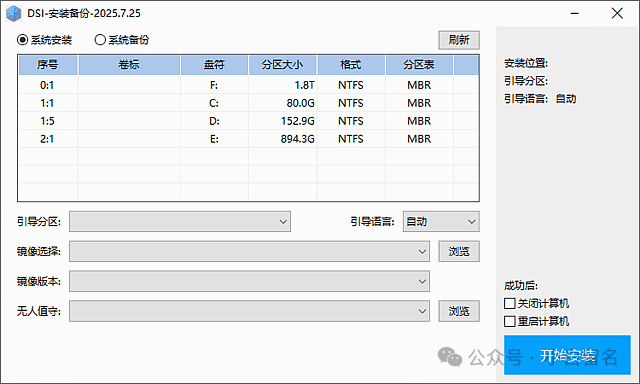
DSI Installation and Backup is developed by deepseek, utilizing wimgapi-cmd.exe to call wimgapi.dll for system installation and backup functionalities, hence the name DSI. The program consists of two core components: wimgapi-cmd.exe, which is primarily used for system installation, and wimlib-imagex.exe, which is used entirely for system backup.
Software Features
System Installation: Automatically selects core tools for system installation, prioritizing wimgapi-cmd, followed by wimlib-imagex, supporting the installation of various formats of system images.System Backup: Utilizes wimlib-imagex.exe to back up the system as an image file, facilitating recovery in case of system issues.Boot Configuration: The built-in bcdboot.exe can set up system boot, while bcdedit.exe can update BIOS boot (effective for EFI), ensuring the system can boot normally after installation.Image Operations: Both wimgapi-cmd.exe and wimlib-imagex.exe can be used to list image information, helping users understand image-related parameters. Additionally, it supports the installation of gho images via Ghost64.exe.
Software Characteristics
High Configurability: Supports modifying the paths of Ghost64.exe and wimlib-imagex.exe through the config.ini file, allowing the software to automatically search and call them, reducing unnecessary tool duplication in PE.Open Source and Free: According to relevant posts on the Wuyou Boot Forum, this software provides source code and is free for users, making it convenient for technicians to modify and customize according to their needs.High Functionality Integration: Integrates system installation, backup, and boot configuration functions, and includes multiple related tools, providing users with a one-stop solution for system installation and backup.
Update Log
2025.07.25 UpdateThis update adds some details and operations to prevent issues. All operations are based on disk numbers and partition physical numbers.1. Partition sizes exceeding 1024G will be displayed as T, with one decimal place shown.2. After clicking install or backup, the drive letters will be re-obtained and automatically updated in the table (some users may open the program and then rearrange drive letters, delete drive letters, or change drive letters without refreshing or reopening the program).3. After clicking install or backup, it will check if the partition starting position, partition bytes, and partition table are consistent with the data before refreshing (to prevent some users from opening the program and then partitioning; it cannot be completely prevented, but some issues can be mitigated).4. The boot partition dropdown now includes ESP and active partition displays.5. If the boot disk has no drive letter, a drive letter will be automatically assigned during installation, and cleaned up afterward (if there is a drive letter, it will be re-obtained but not automatically cleaned).
Download Links
Quark Cloud: https://pan.quark.cn/s/bb83d55a7527Thunder Cloud: https://pan.xunlei.com/s/VOW92EjNPFMCBZAQg7iI7jhQA1?pwd=2c7i#123 Cloud: https://www.123912.com/s/Rg5A-tsRj